A Program Is Instructions
The smallest idea in programming, and the most important: a program is a list of instructions the computer follows in order, doing exactly what each one says.
This course teaches the ideas every programming language is built from — not a language yet. You’ll meet each idea twice: once in pseudocode (the idea, written in plain words no computer ever reads), and once in a real language, running on a real machine (the idea, made to happen). That real language is Sinclair BASIC — the one built into the ZX Spectrum, and one of the gentlest first languages ever made. We’ll write “BASIC” from here on and mean that.
The ideas are what you keep for life; the language is just the clothes they’re wearing today. Now and then a rule will be Sinclair BASIC’s own quirk and not a universal truth — and where it is, we’ll say so. Everywhere else, trust that the idea travels.
A program is a list of instructions
A program is a list of instructions. The computer reads them in order, from the top, and does exactly what each one says — no more, no less, and no guessing at what you meant.
Here is the smallest program there is: one instruction that shows a word. In pseudocode — the idea, with no language in the way:
SHOW "Hello"And the same idea in BASIC, which you can type into a Spectrum (or any Spectrum emulator) and run:
10 PRINT "Hello"
Type it in and run it (type RUN and press Enter). The screen shows Hello, then a
short report along the bottom:
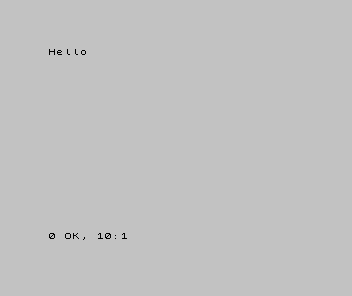
That is the whole of it: you told the computer to show a word, and it did. That relationship — you write the instruction, the machine carries it out — is what programming is. Everything else in this course is more instructions, and cleverer ones.
Every language has a way to show something. BASIC says PRINT. Python says print.
C says printf. The word changes; the idea — output — does not. That is why we
write the pseudocode first: SHOW is true everywhere, and PRINT is only the
Spectrum’s spelling of it.
“Exactly what you say” — not “perfectly”
You will hear it said that a computer never makes mistakes. That is a useful half-truth. The machine does exactly what you told it — but “exactly” is not “perfectly”. The computer itself was built by people, and people make mistakes, so a handful of genuine bugs are baked into the silicon and the ROMs of these old machines. They are real — but they are rare, and they are well documented.
In your first months of programming, a program that misbehaves is almost never one of them. It is the instruction you wrote. So build this habit from your first day: the moment something goes wrong, suspect your own code first — not because the machine is flawless (it isn’t), but because real machine bugs are rare and known, while your own slips are neither. The computer did what you said; the work is finding where what you said and what you meant came apart. That is a craft of its own, and the last unit of this primer is about it.
When it’s wrong, see why
This first program goes wrong in small, recognisable ways:
Nonsense in BASIC, or the line won’t take. A typo, or a missing quotation mark —PRINT "Hello"needs the quote at both ends. The machine is not being difficult; it honestly cannot read what you meant.- Nothing happens. You typed the line but never ran it. A program sits and waits until you tell it to go.
- The report says something other than
0 OK. Read it. The report line is the machine telling you what it did and where it stopped — the first and most honest debugging tool you have.
Reading what the machine did — its output, and that report line — is how you will find every bug from here on. Not by guessing: by looking.
What you’ve learnt
- A program is a list of instructions, followed in order, exactly as written.
- Output is how a program shows you something —
SHOWin pseudocode,PRINTin BASIC, a different word in every language, the same idea underneath. - The machine does exactly what you say, which is not the same as perfectly — but your own code is the first place to look when something is wrong.
- The report line is the machine telling you what it did: your first window into a program that has run.
What’s next
One instruction is a program. So is a thousand. In Unit 2 we give the computer more than one thing to do — and find that the order you put the instructions in is the program, every bit as much as the instructions themselves.