A Place to Remember
The keystone idea: a variable — a named box that holds a value, so the program can keep it, use it, and change it. Everything else builds on this.
So far, the moment the computer shows a value, it forgets it. To do anything interesting, a program needs to remember — to keep a value and come back to it. The tool for that is a variable, and it is the most important idea in this whole course. Almost everything from here on is built on it.
A named box
A variable is a named box that holds a value. You give the box a name, you put a value in it, and afterwards you can look in the box by using its name. In pseudocode:
SET score TO 0
SHOW "Score: ", score
In BASIC:
  10 LET score = 0
  20 PRINT "Score: "; score
Run it:
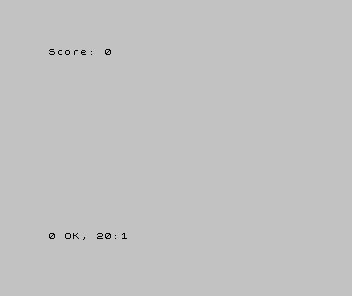
Two things are happening, and they are worth separating. Line 10 — LET score = 0 —
puts the value 0 into a box called score. Line 20 then uses that box: where
you write score, the computer reads whatever value is currently inside it. The name
score is yours to choose — points or s would do as well — so long as you use the
same name every time you mean that box.
Every language has its own rules about what names it allows, worth knowing for the one
you’re using. BASIC lets a number box have a name as long as you like — score,
lives, highscore. Others are stricter: the Commodore 64’s BASIC reads only the
first two letters of a name, so to it score and scones are the same box. And
BASIC has a tighter rule for text boxes in particular — which matters in a moment.
One thing to unlearn straight away: that = does not mean “equals” the way it does
in maths. LET score = 0 is an instruction — “put 0 into the box score” — not a
statement that two things are equal. That distinction looks pedantic now; in two units
it stops a real headache.
Change the box, keep the name
A box you can put a value into is a box you can put a different value into. The name stays; the contents change:
| 1 | 1 | 10 LET score = 0 | |
| 2 | 2 | 20 PRINT "Score: "; score | |
| 3 | + | 30 LET score = 100 | |
| 4 | + | 40 PRINT "Score: "; score | |
| 3 | 5 | |
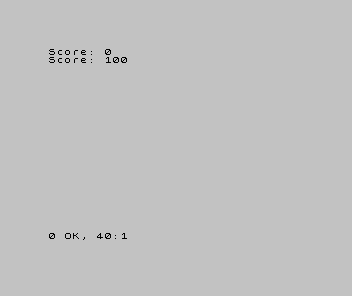
That is the whole power of a variable: a name you can read whenever you want the value, and write whenever you want to change it. A score that climbs, a life count that falls, a player’s position that moves — all of them are a box with a name, holding a value that changes as the program runs.
(A box can hold text as well as numbers. In BASIC a text box is marked with a $ on
the end of its name — and it must be a single letter, like n$ or a$; a longer
name such as name$ isn’t allowed. The $ is a common BASIC habit — many dialects
share it, though most allow longer names; the single-letter rule is Sinclair BASIC’s
own. Other languages don’t mark text boxes at all. The idea — a box that holds text —
is everywhere; the rules for naming it are local. You’ll fill an n$ in the next unit.)
When it’s wrong, see why
- The value is always what you first put in. You never changed the box — or you
changed a different box by misspelling the name.
scoreandscorare two different boxes to the computer. Check the names match exactly. - You get
0(or nothing) where you expected a value. You used the box before you put anything in it. Put a value in first, then use it — order, from Unit 2. Variable not found, or a strange error. The name you used to read the box isn’t the name you used to fill it. The computer only knows the boxes you named; ask for one it’s never seen and it can’t help you.
What you’ve learnt
- A variable is a named box that holds a value — the program’s memory.
- You put a value in (
LET name = value) and use it by writing its name; the name stands for whatever is currently inside. - The box’s contents can change; the name stays the same. That’s how a score climbs or a life count falls.
=inLETmeans “put this in the box”, not “equals”. Hold onto that.
What’s next
Right now you decide what goes in the box, when you write the program. In Unit 5, the program asks the player — it reads what someone types and puts it in a variable. That is the moment a program stops doing the same thing every time and starts responding to whoever is using it.