The Magic Program
Type in a complete game with rainbow colours, block-pixel text, and sound — your very first Spectrum program.
Your first Spectrum program isn’t 10 PRINT "Hello". It’s a game. A complete, visually impressive game with a rainbow title screen, block-pixel letters, a temperature bar, big digits, sound effects, and a victory celebration. You’re going to type the whole thing in — line by line — before you understand any of it.
This is how millions of children first encountered programming in the 1980s. Magazines published complete program listings. You typed them in, ran them, and marvelled at the result. Understanding came later. The magic came first.
The program is roughly 100 lines. That sounds like a lot, but you’ll type it in four stages. After each stage, you run the program and see what you’ve built so far. Four checkpoints, four rewards.
We recommend typing the program in by hand — that’s how you build a feel for the language. But if you’d rather skip ahead, or if you get stuck and want to compare, the .bas files for each checkpoint are available in the code-samples repository. You can load them directly into any Spectrum emulator that supports .bas files.
The Spectrum Keyboard
Before you type anything, you need to know how the Spectrum keyboard works. It’s different from a modern computer.
When you switch on (or type NEW), the Spectrum starts in K mode — keyword mode. The K cursor flashes in the bottom-left corner. In K mode, pressing a letter key doesn’t type a single letter. It types a whole command. Press P and the Spectrum types PRINT for you. Press R and it types RUN.
After you type a command, the cursor changes to L — letter mode. Now keys type individual letters, the way you’d expect. The Spectrum switches between modes automatically as you type.
Numbers always type normally in either mode. Symbol Shift combined with a key types symbols like ", +, =, and so on.
The cursor letter tells you which mode you’re in. Watch it as you type — it’ll make sense quickly.
What Is a Program?
A program is a list of instructions that the computer follows in order. On the Spectrum, each instruction has a line number — a number at the start that tells the computer what order to run things in.
The Spectrum runs line 1 before line 5. Line 5 before line 10. The numbers don’t have to be consecutive — gaps are fine. Most Spectrum programmers use gaps of 10, leaving room to insert lines later.
Type a line and press ENTER to store it. The Spectrum remembers every line you type. When you type RUN, it executes them all in order.
Checkpoint 1: The Rainbow
Type these lines exactly. For each line, type the number first (numbers work in any mode), then a space, then the instruction. Press ENTER after each line.
Some tips before you start:
- In K mode, B types
BORDER, P typesPRINT, F typesFOR, N typesNEXT, and so on. The Spectrum prints the full keyword — you don’t need to spell it out. - After the keyword, the cursor switches to L mode automatically. Now you can type letters and numbers normally.
- Symbol Shift + P types a double-quote character
". - Symbol Shift + O types a semicolon
;. - If you make a mistake, retype the whole line with the same number. The new version replaces the old one.
   1 REM Lucky Number v3
   5 BORDER 0: PAPER 0: INK 7: CLS
  10 REM === Rainbow cascade ===
  20 FOR i=0 TO 7
  30 FOR j=0 TO 31
  40 PRINT AT i,j; PAPER i;" "
  50 NEXT j
  55 BEEP 0.01,i*4+20
  60 NEXT i
Now type RUN and press ENTER.
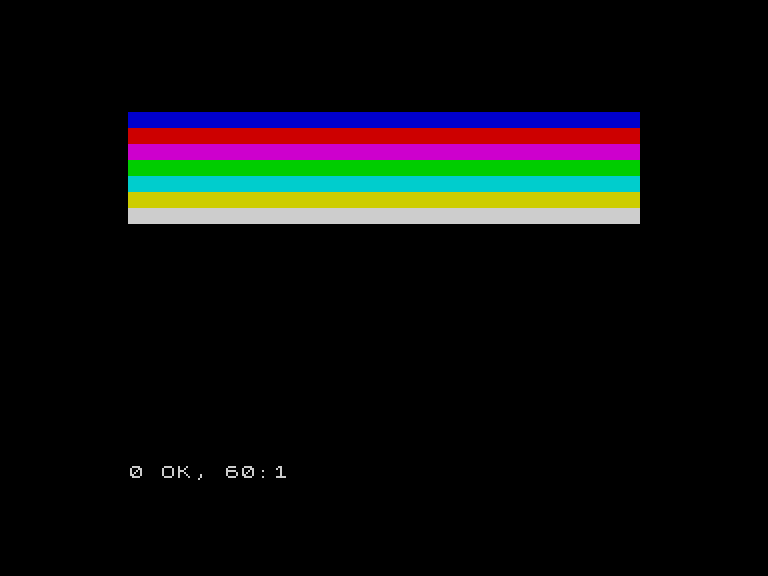
The screen goes black, then eight bands of colour sweep across the top of the screen — one row at a time, each with a rising tone. Black, blue, red, magenta, green, cyan, yellow, white. That’s every colour the Spectrum can display, filling the screen left to right.
You just made that happen. If something looks wrong — if the colours don’t appear, or you see an error message — check your lines against the listing above. The most common mistakes are missing semicolons, wrong quotation marks, or mistyped line numbers. Fix the line by retyping it with the same number, then RUN again.
Checkpoint 2: The Title Screen
This checkpoint draws the block-pixel title and waits for a keypress. First, the code that reads the letter shapes and draws them on screen:
  70 REM === Big LUCKY ===
  80 RESTORE 5000
  90 FOR r=0 TO 4
 100 READ a$
 110 FOR q=1 TO LEN a$
 120 IF a$(q)="1" THEN PRINT AT 9+r,q; PAPER 6;" "
 130 NEXT q
 140 NEXT r
 150 REM === Big NUMBER ===
 160 RESTORE 5010
 170 FOR r=0 TO 4
 180 READ a$
 190 FOR q=1 TO LEN a$
 200 IF a$(q)="1" THEN PRINT AT 15+r,q; PAPER 5;" "
 210 NEXT q
 220 NEXT r
 230 PRINT AT 21,6; INK 7; FLASH 1;" Press any key "; FLASH 0
 240 IF INKEY$="" THEN GO TO 240
Now the DATA that defines the letter shapes. Each 1 becomes a coloured square; each . stays black. Type these carefully — every dot matters.
5000 REM === LUCKY (5 wide, 1 gap) ===
5001 DATA "1.....1...1.11111.1...1.1...1"
5002 DATA "1.....1...1.1.....1..1...1.1."
5003 DATA "1.....1...1.1.....111.....1.."
5004 DATA "1.....1...1.1.....1..1....1.."
5005 DATA "11111.11111.11111.1...1...1.."
5010 REM === NUMBER (4 wide, 1 gap) ===
5011 DATA "1..1.1..1.1..1.111..1111.111."
5012 DATA "11.1.1..1.1111.1..1.1....1..1"
5013 DATA "1.11.1..1.1111.111..111..111."
5014 DATA "1..1.1..1.1..1.1..1.1....1.1."
5015 DATA "1..1.1111.1..1.111..1111.1..1"
Type RUN.
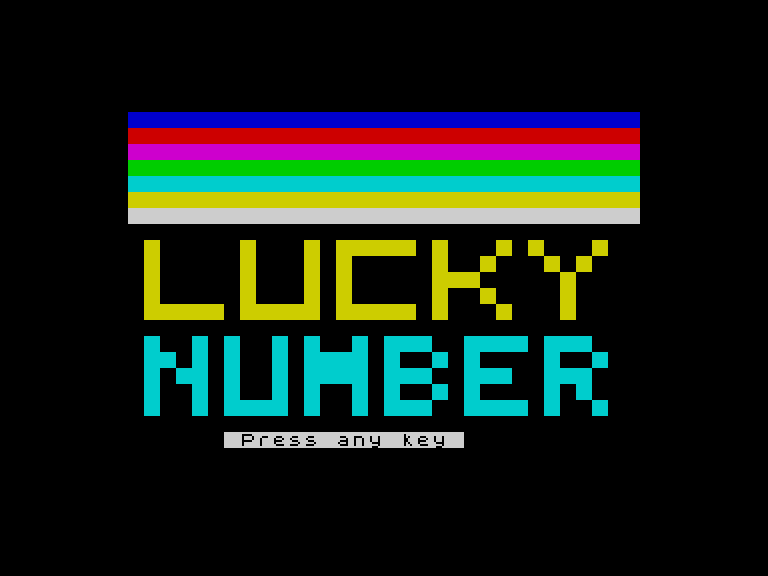
The rainbow cascade appears again, and then — block-pixel letters materialise below it. “LUCKY” in yellow. “NUMBER” in cyan. Each letter is built from coloured squares, five rows tall. A flashing “Press any key” prompt appears at the bottom.
This is a title screen. Your program made a title screen. Don’t worry about understanding the DATA lines or the loops — that’s magic for now.
Checkpoint 3: The Game
This is the largest checkpoint — four blocks of typing. Take your time with each one.
First, the game screen setup. This clears the title screen and draws the header bar, guess counter, and temperature label:
 250 REM === NEW GAME ===
 280 LET n=INT (RND*100)+1
 290 LET c=0
 300 CLS
 310 FOR i=0 TO 31
 320 PRINT AT 0,i; PAPER 1;" "
 330 NEXT i
 340 PRINT AT 0,9; PAPER 1; INK 6; BRIGHT 1;" LUCKY NUMBER "
 350 PRINT AT 2,1; INK 5;"Guesses: 0"
 360 PRINT AT 10,3; INK 7;"Temperature:"
Next, the guess loop. This is the heart of the game — it asks for a guess, displays it as big digits, calculates the temperature bar, shifts the border colour, and prints feedback:
 370 REM === Guess loop ===
 380 LET c=c+1
 390 PRINT AT 2,10; INK 5;c;"  "
 400 INPUT "Your guess (1-100): ";g
 410 IF g<1 OR g>100 THEN GO TO 400
 420 REM === Show guess big ===
 430 LET pc=6: LET v=g: LET dr=4: GO SUB 8200
 440 IF g=n THEN GO TO 700
 450 LET d=ABS (g-n)
 460 REM === Heat bar ===
 470 LET h=INT ((100-d)/3.4)+1
 480 IF h>30 THEN LET h=30
 490 IF h<1 THEN LET h=1
 500 FOR i=1 TO 30
 510 IF i<=h AND i<=10 THEN PRINT AT 11,1+i; PAPER 1;" "
 520 IF i<=h AND i>10 AND i<=20 THEN PRINT AT 11,1+i; PAPER 6;" "
 530 IF i<=h AND i>20 AND i<=26 THEN PRINT AT 11,1+i; PAPER 2;" "
 540 IF i<=h AND i>26 THEN PRINT AT 11,1+i; PAPER 7;" "
 550 IF i>h THEN PRINT AT 11,1+i; PAPER 0;" "
 560 NEXT i
 570 BEEP 0.05,h/2-8
 580 REM === Border ===
 590 IF d<=5 THEN BORDER 2
 600 IF d>5 AND d<=15 THEN BORDER 6
 610 IF d>15 AND d<=30 THEN BORDER 1
 620 IF d>30 THEN BORDER 0
 630 REM === Feedback ===
 640 PRINT AT 13,2;"                            "
 650 PRINT AT 14,2;"                            "
 660 IF g<n THEN PRINT AT 13,2; INK 6; BRIGHT 1;"Too low!": PRINT AT 14,2; INK 5; BRIGHT 0;"Guess higher."
 670 IF g>n THEN PRINT AT 13,2; INK 3; BRIGHT 1;"Too high!": PRINT AT 14,2; INK 5; BRIGHT 0;"Guess lower."
 680 GO TO 370
Now the digit patterns. Each digit (0-9) is defined as five rows of four characters — 1 for a coloured square, . for empty. This is the most tedious block to type, but it’s just data:
5100 REM === Digit 0 ===
5101 DATA "1111"
5102 DATA "1..1"
5103 DATA "1..1"
5104 DATA "1..1"
5105 DATA "1111"
5110 REM === Digit 1 ===
5111 DATA ".11."
5112 DATA "..1."
5113 DATA "..1."
5114 DATA "..1."
5115 DATA ".11."
5120 REM === Digit 2 ===
5121 DATA "1111"
5122 DATA "...1"
5123 DATA "1111"
5124 DATA "1..."
5125 DATA "1111"
5130 REM === Digit 3 ===
5131 DATA "1111"
5132 DATA "...1"
5133 DATA ".111"
5134 DATA "...1"
5135 DATA "1111"
5140 REM === Digit 4 ===
5141 DATA "1..1"
5142 DATA "1..1"
5143 DATA "1111"
5144 DATA "...1"
5145 DATA "...1"
5150 REM === Digit 5 ===
5151 DATA "1111"
5152 DATA "1..."
5153 DATA "1111"
5154 DATA "...1"
5155 DATA "1111"
5160 REM === Digit 6 ===
5161 DATA "1111"
5162 DATA "1..."
5163 DATA "1111"
5164 DATA "1..1"
5165 DATA "1111"
5170 REM === Digit 7 ===
5171 DATA "1111"
5172 DATA "...1"
5173 DATA "..1."
5174 DATA ".1.."
5175 DATA ".1.."
5180 REM === Digit 8 ===
5181 DATA "1111"
5182 DATA "1..1"
5183 DATA "1111"
5184 DATA "1..1"
5185 DATA "1111"
5190 REM === Digit 9 ===
5191 DATA "1111"
5192 DATA "1..1"
5193 DATA "1111"
5194 DATA "...1"
5195 DATA "1111"
Finally, the subroutines that draw digits on screen. You don’t need to understand these — just type them in:
8000 REM === Draw digit f at dr,dc ===
8010 RESTORE 5100+f*10
8020 FOR r=0 TO 4
8030 READ a$
8040 FOR q=1 TO LEN a$
8050 IF a$(q)="1" THEN PRINT AT dr+r,dc+q-1; PAPER pc;" "
8060 NEXT q
8070 NEXT r
8080 RETURN
8200 REM === Draw number v centred ===
8210 FOR r=dr TO dr+4
8220 PRINT AT r,5; PAPER 0;"                      "
8230 NEXT r
8240 IF v>=100 THEN GO TO 8400
8250 IF v>=10 THEN GO TO 8350
8260 LET dc=14: LET f=v: GO SUB 8000
8270 RETURN
8350 REM Two digits
8360 LET dc=12: LET f=INT (v/10): GO SUB 8000
8370 LET dc=17: LET f=v-INT (v/10)*10: GO SUB 8000
8380 RETURN
8400 REM Three digits (100)
8410 LET dc=9: LET f=1: GO SUB 8000
8420 LET dc=14: LET f=0: GO SUB 8000
8430 LET dc=19: LET f=0: GO SUB 8000
8440 RETURN
Type RUN. Press any key to get past the title screen. The game begins.
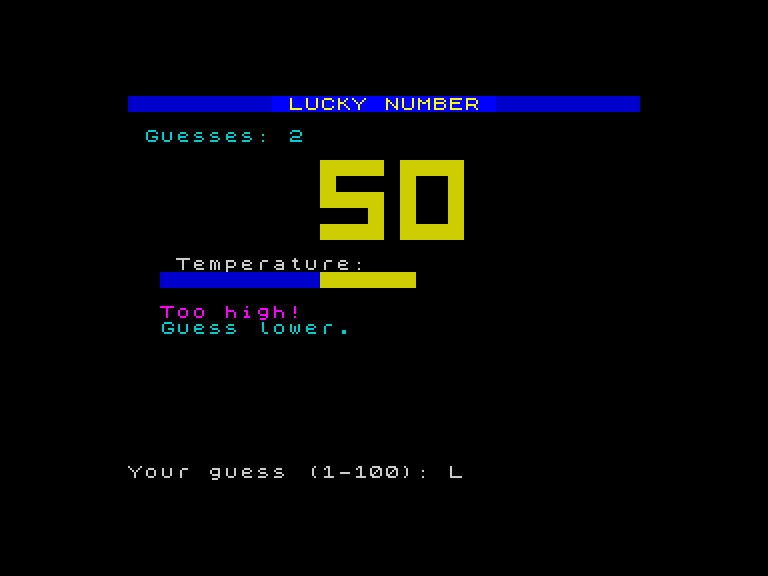
A blue header bar says “LUCKY NUMBER”. A guess counter tracks your attempts. Type a number and press ENTER. Your guess appears as big yellow block-pixel digits. A temperature bar fills with colour — blue when you’re cold, yellow when you’re warmer, red when you’re close, white when you’re nearly there. The border changes colour. Feedback text tells you “Too high!” or “Too low!”.
The game works. You typed it in and it works.
Checkpoint 4: The Win
The final checkpoint adds the victory celebration. First, the border strobe and green colour flood:
 700 REM === WIN! ===
 710 FOR i=1 TO 20
 720 BORDER INT (RND*8)
 730 BEEP 0.03,10+i
 740 NEXT i
 750 BORDER 0
 760 REM === Green digits ===
 770 LET pc=4: LET v=g: LET dr=4: GO SUB 8200
 780 REM === Green heat bar ===
 790 FOR i=1 TO 30
 800 PRINT AT 11,1+i; PAPER 4;" "
 810 BEEP 0.01,i
 820 NEXT i
Then the results and play-again prompt:
 830 PRINT AT 13,2;"                            "
 840 PRINT AT 14,2;"                            "
 850 PRINT AT 13,7; INK 4; BRIGHT 1; FLASH 1;"  YOU GOT IT!  "; FLASH 0
 860 PRINT AT 15,7; INK 5;"The number was ";n
 870 PRINT AT 16,7; INK 7;"Found in ";c;" guesses"
 880 IF c<=5 THEN PRINT AT 18,7; INK 2; BRIGHT 1;"Incredible!"
 890 IF c>5 AND c<=8 THEN PRINT AT 18,7; INK 6;"Impressive!"
 895 IF c>8 AND c<=12 THEN PRINT AT 18,7; INK 5;"Well done!"
 896 IF c>12 THEN PRINT AT 18,7; INK 4;"Keep practising!"
 897 BRIGHT 0
 898 PRINT AT 20,7; INK 7;"Play again? (y/n)"
 899 LET k$=INKEY$
 900 IF k$="" THEN GO TO 899
 910 IF k$="y" THEN GO TO 280
 920 BORDER 7: PAPER 7: INK 0: CLS
 930 PRINT "Thanks for playing!": STOP
Type RUN. Play through to a win.
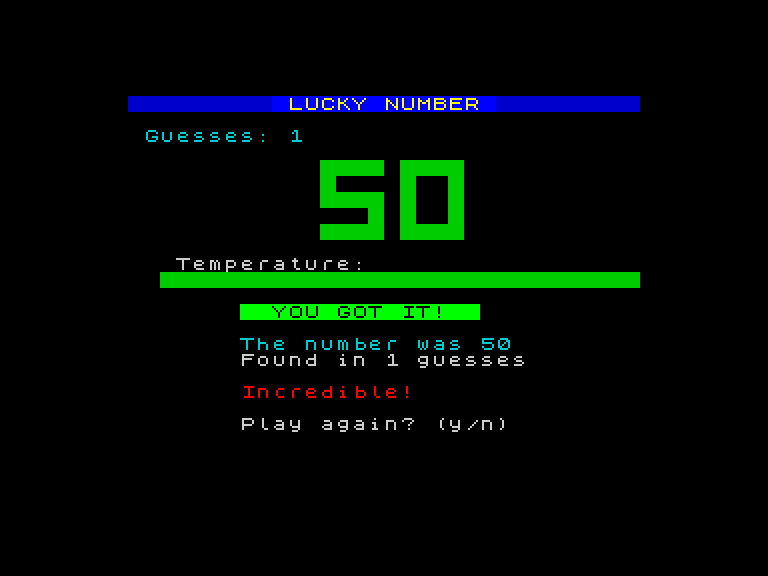
When you guess correctly, the border strobes random colours with ascending tones. The big digits turn green. The temperature bar floods green from left to right, each square accompanied by a rising tone. “YOU GOT IT!” flashes on screen. The game tells you the secret number, how many guesses you took, and rates your performance — “Incredible!” for five or fewer, “Keep practising!” for thirteen or more.
Press y to play again. Press n to quit.
The Complete Listing
Here’s the full program. If you’ve typed everything correctly, this is what you have:
   1 REM Lucky Number v3
   5 BORDER 0: PAPER 0: INK 7: CLS
  10 REM === Rainbow cascade ===
  20 FOR i=0 TO 7
  30 FOR j=0 TO 31
  40 PRINT AT i,j; PAPER i;" "
  50 NEXT j
  55 BEEP 0.01,i*4+20
  60 NEXT i
  70 REM === Big LUCKY ===
  80 RESTORE 5000
  90 FOR r=0 TO 4
 100 READ a$
 110 FOR q=1 TO LEN a$
 120 IF a$(q)="1" THEN PRINT AT 9+r,q; PAPER 6;" "
 130 NEXT q
 140 NEXT r
 150 REM === Big NUMBER ===
 160 RESTORE 5010
 170 FOR r=0 TO 4
 180 READ a$
 190 FOR q=1 TO LEN a$
 200 IF a$(q)="1" THEN PRINT AT 15+r,q; PAPER 5;" "
 210 NEXT q
 220 NEXT r
 230 PRINT AT 21,6; INK 7; FLASH 1;" Press any key "; FLASH 0
 240 IF INKEY$="" THEN GO TO 240
 250 REM === NEW GAME ===
 280 LET n=INT (RND*100)+1
 290 LET c=0
 300 CLS
 310 FOR i=0 TO 31
 320 PRINT AT 0,i; PAPER 1;" "
 330 NEXT i
 340 PRINT AT 0,9; PAPER 1; INK 6; BRIGHT 1;" LUCKY NUMBER "
 350 PRINT AT 2,1; INK 5;"Guesses: 0"
 360 PRINT AT 10,3; INK 7;"Temperature:"
 370 REM === Guess loop ===
 380 LET c=c+1
 390 PRINT AT 2,10; INK 5;c;"  "
 400 INPUT "Your guess (1-100): ";g
 410 IF g<1 OR g>100 THEN GO TO 400
 420 REM === Show guess big ===
 430 LET pc=6: LET v=g: LET dr=4: GO SUB 8200
 440 IF g=n THEN GO TO 700
 450 LET d=ABS (g-n)
 460 REM === Heat bar ===
 470 LET h=INT ((100-d)/3.4)+1
 480 IF h>30 THEN LET h=30
 490 IF h<1 THEN LET h=1
 500 FOR i=1 TO 30
 510 IF i<=h AND i<=10 THEN PRINT AT 11,1+i; PAPER 1;" "
 520 IF i<=h AND i>10 AND i<=20 THEN PRINT AT 11,1+i; PAPER 6;" "
 530 IF i<=h AND i>20 AND i<=26 THEN PRINT AT 11,1+i; PAPER 2;" "
 540 IF i<=h AND i>26 THEN PRINT AT 11,1+i; PAPER 7;" "
 550 IF i>h THEN PRINT AT 11,1+i; PAPER 0;" "
 560 NEXT i
 570 BEEP 0.05,h/2-8
 580 REM === Border ===
 590 IF d<=5 THEN BORDER 2
 600 IF d>5 AND d<=15 THEN BORDER 6
 610 IF d>15 AND d<=30 THEN BORDER 1
 620 IF d>30 THEN BORDER 0
 630 REM === Feedback ===
 640 PRINT AT 13,2;"                            "
 650 PRINT AT 14,2;"                            "
 660 IF g<n THEN PRINT AT 13,2; INK 6; BRIGHT 1;"Too low!": PRINT AT 14,2; INK 5; BRIGHT 0;"Guess higher."
 670 IF g>n THEN PRINT AT 13,2; INK 3; BRIGHT 1;"Too high!": PRINT AT 14,2; INK 5; BRIGHT 0;"Guess lower."
 680 GO TO 370
 700 REM === WIN! ===
 710 FOR i=1 TO 20
 720 BORDER INT (RND*8)
 730 BEEP 0.03,10+i
 740 NEXT i
 750 BORDER 0
 760 REM === Green digits ===
 770 LET pc=4: LET v=g: LET dr=4: GO SUB 8200
 780 REM === Green heat bar ===
 790 FOR i=1 TO 30
 800 PRINT AT 11,1+i; PAPER 4;" "
 810 BEEP 0.01,i
 820 NEXT i
 830 PRINT AT 13,2;"                            "
 840 PRINT AT 14,2;"                            "
 850 PRINT AT 13,7; INK 4; BRIGHT 1; FLASH 1;"  YOU GOT IT!  "; FLASH 0
 860 PRINT AT 15,7; INK 5;"The number was ";n
 870 PRINT AT 16,7; INK 7;"Found in ";c;" guesses"
 880 IF c<=5 THEN PRINT AT 18,7; INK 2; BRIGHT 1;"Incredible!"
 890 IF c>5 AND c<=8 THEN PRINT AT 18,7; INK 6;"Impressive!"
 895 IF c>8 AND c<=12 THEN PRINT AT 18,7; INK 5;"Well done!"
 896 IF c>12 THEN PRINT AT 18,7; INK 4;"Keep practising!"
 897 BRIGHT 0
 898 PRINT AT 20,7; INK 7;"Play again? (y/n)"
 899 LET k$=INKEY$
 900 IF k$="" THEN GO TO 899
 910 IF k$="y" THEN GO TO 280
 920 BORDER 7: PAPER 7: INK 0: CLS
 930 PRINT "Thanks for playing!": STOP
5000 REM === LUCKY (5 wide, 1 gap) ===
5001 DATA "1.....1...1.11111.1...1.1...1"
5002 DATA "1.....1...1.1.....1..1...1.1."
5003 DATA "1.....1...1.1.....111.....1.."
5004 DATA "1.....1...1.1.....1..1....1.."
5005 DATA "11111.11111.11111.1...1...1.."
5010 REM === NUMBER (4 wide, 1 gap) ===
5011 DATA "1..1.1..1.1..1.111..1111.111."
5012 DATA "11.1.1..1.1111.1..1.1....1..1"
5013 DATA "1.11.1..1.1111.111..111..111."
5014 DATA "1..1.1..1.1..1.1..1.1....1.1."
5015 DATA "1..1.1111.1..1.111..1111.1..1"
5100 REM === Digit 0 ===
5101 DATA "1111"
5102 DATA "1..1"
5103 DATA "1..1"
5104 DATA "1..1"
5105 DATA "1111"
5110 REM === Digit 1 ===
5111 DATA ".11."
5112 DATA "..1."
5113 DATA "..1."
5114 DATA "..1."
5115 DATA ".11."
5120 REM === Digit 2 ===
5121 DATA "1111"
5122 DATA "...1"
5123 DATA "1111"
5124 DATA "1..."
5125 DATA "1111"
5130 REM === Digit 3 ===
5131 DATA "1111"
5132 DATA "...1"
5133 DATA ".111"
5134 DATA "...1"
5135 DATA "1111"
5140 REM === Digit 4 ===
5141 DATA "1..1"
5142 DATA "1..1"
5143 DATA "1111"
5144 DATA "...1"
5145 DATA "...1"
5150 REM === Digit 5 ===
5151 DATA "1111"
5152 DATA "1..."
5153 DATA "1111"
5154 DATA "...1"
5155 DATA "1111"
5160 REM === Digit 6 ===
5161 DATA "1111"
5162 DATA "1..."
5163 DATA "1111"
5164 DATA "1..1"
5165 DATA "1111"
5170 REM === Digit 7 ===
5171 DATA "1111"
5172 DATA "...1"
5173 DATA "..1."
5174 DATA ".1.."
5175 DATA ".1.."
5180 REM === Digit 8 ===
5181 DATA "1111"
5182 DATA "1..1"
5183 DATA "1111"
5184 DATA "1..1"
5185 DATA "1111"
5190 REM === Digit 9 ===
5191 DATA "1111"
5192 DATA "1..1"
5193 DATA "1111"
5194 DATA "...1"
5195 DATA "1111"
8000 REM === Draw digit f at dr,dc ===
8010 RESTORE 5100+f*10
8020 FOR r=0 TO 4
8030 READ a$
8040 FOR q=1 TO LEN a$
8050 IF a$(q)="1" THEN PRINT AT dr+r,dc+q-1; PAPER pc;" "
8060 NEXT q
8070 NEXT r
8080 RETURN
8200 REM === Draw number v centred ===
8210 FOR r=dr TO dr+4
8220 PRINT AT r,5; PAPER 0;"                      "
8230 NEXT r
8240 IF v>=100 THEN GO TO 8400
8250 IF v>=10 THEN GO TO 8350
8260 LET dc=14: LET f=v: GO SUB 8000
8270 RETURN
8350 REM Two digits
8360 LET dc=12: LET f=INT (v/10): GO SUB 8000
8370 LET dc=17: LET f=v-INT (v/10)*10: GO SUB 8000
8380 RETURN
8400 REM Three digits (100)
8410 LET dc=9: LET f=1: GO SUB 8000
8420 LET dc=14: LET f=0: GO SUB 8000
8430 LET dc=19: LET f=0: GO SUB 8000
8440 RETURN
If something isn’t working, compare your program against this listing line by line. Type LIST to see your program in memory. Press ENTER to scroll through it.
What Just Happened
You typed roughly 100 lines of code and made a game. A game with colour, sound, animation, and interactivity. You don’t understand most of it yet — and that’s fine. You’re not supposed to.
Over the next seven units, you’ll take this program apart. Not by studying it in isolation, but by changing it. You’ll change what it says, what it knows, what it asks, how it decides, and how it looks. Every change will produce a visible result. And slowly, the magic will become understanding.
For now, play your game. Show it to someone. You built this.
What You’ve Learnt
- Line numbers — every instruction has a number; the Spectrum runs them in order
- RUN — executes the program from the beginning
- K mode and L mode — the Spectrum keyboard switches between keywords and individual letters
- Type-in programs — you can type a complete program from a listing without understanding every line
- Checkpoints — running a program partway through lets you catch mistakes early
- The Spectrum’s colours — eight colours (0-7: black, blue, red, magenta, green, cyan, yellow, white)