Your Version
Change the range, colours, sounds, scoring, and title — make the game yours.
You now understand the game logic: INPUT asks, LET stores, IF/THEN decides, GO TO loops, RND randomises. You’ve changed messages, colours, thresholds, and the range across the previous six units. This unit pushes further — the goal is a version that looks, sounds, and feels like your own game.
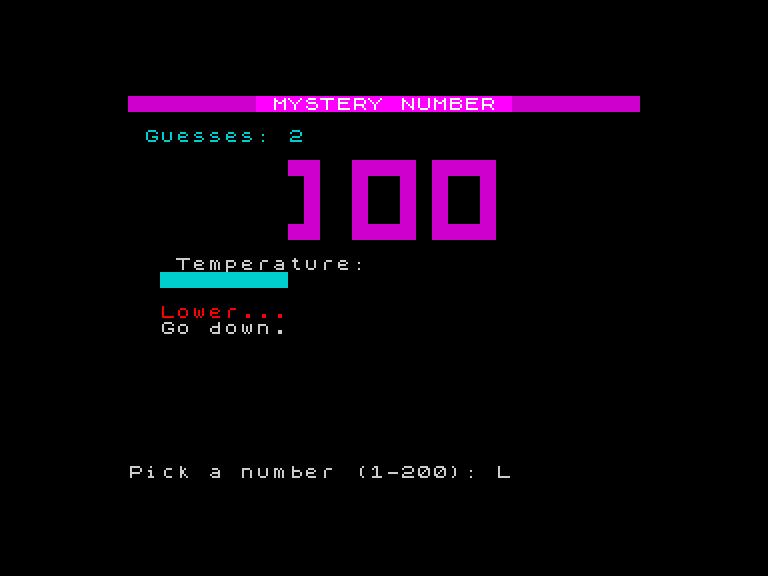
There’s no single right answer. Work through the checklist below and make every choice yourself.
Change the Range
The original is 1-100. Try 1-200 for a harder game or 1-50 for a faster one. Three lines need updating:
- Line 280 — the formula:
LET n=INT(RND*200)+1 - Line 400 — the prompt:
INPUT "Pick a number (1-200): ";g - Line 410 — the validation:
IF g<1 OR g>200 THEN GO TO 400
With a 1-200 range, the big digits show three-digit numbers. The temperature bar spreads across a wider distance — guesses feel colder because the gap is larger. The game’s character changes without touching the display code.
You’ll also want to adjust the temperature bar formula on line 470. For a 1-200 range, try LET h=INT((200-d)/6.8)+1.
Design a Colour Scheme
Pick every colour in the game. Here’s your palette:
| What | Lines | Variable or keyword |
|---|---|---|
| Big digit colour | 430 | LET pc= |
| Win digit colour | 770 | LET pc= |
| Border (very close) | 590 | BORDER |
| Border (close) | 600 | BORDER |
| Border (medium) | 610 | BORDER |
| Border (far) | 620 | BORDER |
| Temperature bar band 1 | 510 | PAPER |
| Temperature bar band 2 | 520 | PAPER |
| Temperature bar band 3 | 530 | PAPER |
| Temperature bar band 4 | 540 | PAPER |
| ”Too low” text | 660 | INK |
| ”Too high” text | 670 | INK |
| Header bar | 320, 340 | PAPER |
Every number is a colour from 0-7. Choose a scheme that looks deliberate, not random. Cool colours (blue, cyan) for cold? Warm colours (red, yellow) for hot? All magenta? Your call.
Change the Sounds
Three sound effects to customise:
- Line 570 — the guess tone:
BEEP 0.05,h/2-8. The first number is duration (seconds), the second is pitch. TryBEEP 0.03,h/3for shorter, higher tones. - Line 730 — the win celebration:
BEEP 0.03,10+i. Change10+ito15+i*2for a steeper rising scale. Change0.03to0.01for rapid-fire tones. - Line 810 — the green bar flood:
BEEP 0.01,i. Changeitoi+10to shift the whole sequence up in pitch.
The Spectrum’s BEEP range is -60 to 69 (semitones from middle C). Negative numbers go lower, positive numbers go higher. Experiment.
Rewrite the Scoring
Design five or six tiers instead of four. Each tier is one IF/THEN line. Remember: lower line numbers run first, so put the hardest tier on the lowest line and use GO TO 897 to skip the rest.
 877 IF c=1 THEN PRINT AT 18,7; INK 7; BRIGHT 1;"IMPOSSIBLE!": GO TO 897
 878 IF c<=3 THEN PRINT AT 18,7; INK 7; BRIGHT 1;"LEGENDARY!": GO TO 897
 880 IF c<=6 THEN PRINT AT 18,7; INK 2; BRIGHT 1;"Superb!"
 890 IF c>6 AND c<=10 THEN PRINT AT 18,7; INK 6;"Solid!"
 895 IF c>10 AND c<=15 THEN PRINT AT 18,7; INK 5;"Decent!"
 896 IF c>15 THEN PRINT AT 18,7; INK 3;"Room to grow!"
Pick your own words, your own thresholds, your own colours.
Change the Title
Line 340 sets the header bar text. Change it to anything:
340 PRINT AT 0,8; PAPER 3; INK 7; BRIGHT 1;" MYSTERY NUMBER "The block-pixel title on the title screen (lines 5000-5015) is DATA-driven and harder to change — but you can change the colour of the words. Line 120 uses PAPER 6 for “LUCKY” and line 200 uses PAPER 5 for “NUMBER”. Change those numbers to change the title colours.
Add Encouragement
Add a line that prints a message when the guess count gets high:
385 IF c>10 THEN PRINT AT 2,20; INK 2;"Keep trying!"The game now talks more as the count climbs. You could add more:
 386 IF c>15 THEN PRINT AT 2,20; INK 3;"Getting warm? "
 387 IF c>20 THEN PRINT AT 2,20; INK 6;"Nearly there! "
What You’ve Built
You’ve changed roughly 20 lines of a 100-line program and made it feel entirely different. The visual subroutines are still black boxes — the rainbow cascade, the digit renderer, the number centring — and that’s fine. You don’t need to understand the rainbow to change the border colours. You don’t need to understand the digit renderer to change what colour the digits appear in.
The program is yours. You typed it in, you understood it by changing it, and now it looks and sounds like something only you could have made. Show it to someone.
Over the next seven games, you’ll learn FOR/NEXT, PRINT AT, BEEP, INKEY$, CLS, DATA/READ, and GO SUB/RETURN — the concepts that power the visual subroutines you’ve been treating as magic. By Game 6 you’ll understand GO SUB well enough to write your own reusable drawing routines. By Game 14 you’ll be designing custom character sets and writing machine code. The black boxes open one by one. Each game builds on what you know. Each game looks and feels like a real game from the very first unit.
What You’ve Learnt
- PRINT with expressions — combining text and variables with semicolons:
"Found in ";c;" guesses" - Customisation — every visible and audible feature of the game is controlled by numbers you can change
- BEEP —
BEEP duration,pitchplays a tone; duration in seconds, pitch in semitones from middle C - Ownership — programming isn’t just following instructions; it’s making something that’s yours