A Different Number Every Time
Restore randomness, explore how RND works, and change the game's range.
Since Unit 3, you’ve been playing with LET n=50 — a fixed answer. Time to bring the surprise back.
Restore Randomness
If you still have LET n=50 on line 280, replace it with the original formula:
280 LET n=INT (RND*100)+1
Type RUN. You don’t know the answer any more. The temperature bar starts cold and climbs unpredictably. The border shifts at different points. Each game is different. Randomness makes the game replayable.
How RND Works
To understand the formula, type NEW and enter this program:
  10 PRINT RND
  20 PRINT RND
  30 PRINT RND
  40 PRINT INT (RND*100)+1
  50 PRINT INT (RND*100)+1
  60 PRINT INT (RND*100)+1
Type RUN.
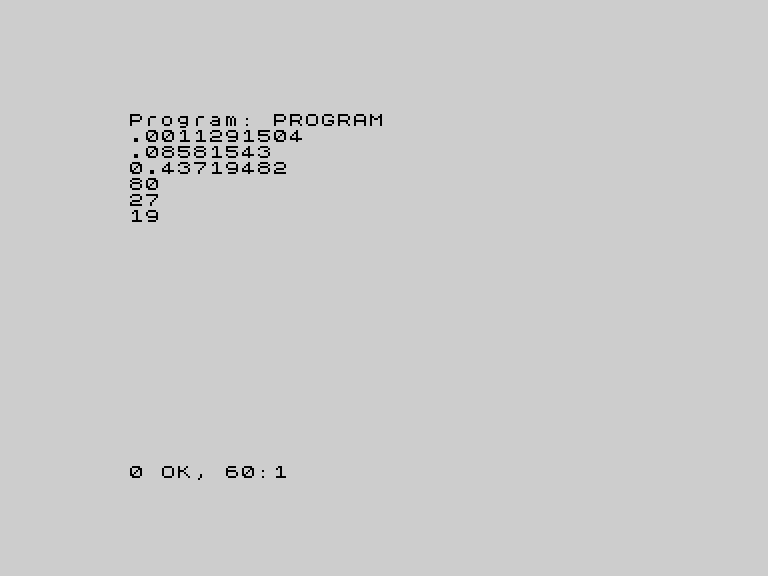
The first three lines print raw RND values — decimals between 0 and 1. Something like 0.0011, 0.0858, 0.4371. Different every time you run the program.
The last three lines apply the formula. Here’s how it builds up:
| Expression | Result |
|---|---|
RND | A decimal between 0 and 0.999… |
RND*100 | A decimal between 0 and 99.999… |
INT(RND*100) | A whole number between 0 and 99 |
INT(RND*100)+1 | A whole number between 1 and 100 |
INT strips the decimal part — INT(3.7) gives 3. The +1 shifts the range so it starts at 1 instead of 0. That’s the formula on line 280.
Run the program a few times. The numbers are different every time. The Spectrum is generating unpredictable values — and that unpredictability is what makes the game work.
RND in the Win Celebration
Look at line 720 in the original game:
720 BORDER INT (RND*8)The same idea, smaller scale. RND*8 gives a number between 0 and 7.999…, INT strips the decimal, and you get a random colour number 0-7. That’s why the border strobe during the win celebration looks different every time — twenty random colours, chosen fresh each game.
Change the Range
Change the game from 1-100 to 1-50:
 280 LET n=INT (RND*50)+1
 400 INPUT "Your guess (1-50): ";g
 410 IF g<1 OR g>50 THEN GO TO 400
Three lines to change: the random formula, the prompt text, and the validation. Type RUN and play.
The game feels different. The temperature bar reacts more sharply to each guess because the distances are smaller — a guess 10 away from the target is much further in a 1-50 range than a 1-100 range. The border shifts sooner. The visual feedback changes character even though you didn’t touch the display code.
Try RND*10 for a tiny range. Try RND*1000 for a huge one (you’ll need to change the validation and prompt to match). The formula scales — change the multiplier, change the game.
Try This
- Run the RND explorer program five times. Are the numbers ever the same? (Extremely unlikely — but theoretically possible.)
- Change the win celebration from
RND*8toRND*3. Now it only strobes between black, blue, and red. TryRND*2— just black and blue. The celebration gets more restrained. - What happens if you use
LET n=INT(RND*100)without the+1? (The range becomes 0-99 instead of 1-100. Zero is a valid secret number, but the validation on line 410 won’t let you guess 0.) - Change the range to 1-10 and play. How many guesses does it take? Is binary search still the fastest strategy?
What You’ve Learnt
- RND — generates a random decimal between 0 and 0.999…
- INT — strips the decimal part;
INT(3.7)gives3 - The formula —
INT(RND*n)+1gives a random whole number between 1 and n - Scaling — change the multiplier to change the range; the rest of the game adapts automatically
- RND in visuals — the win celebration’s border strobe uses the same
INT(RND*8)pattern