The Loop That Makes It Live
Break the game loop and watch it freeze, then restore it — your first look at GO TO.
Delete one line and the game dies. Put it back and the game breathes again. That line is 680 GO TO 370, and it’s the heartbeat of Lucky Number.
Break the Game
Delete line 680. On the Spectrum, you do this by typing just the line number and pressing ENTER:
680That’s it — line 680 is gone. Type RUN and make a guess.
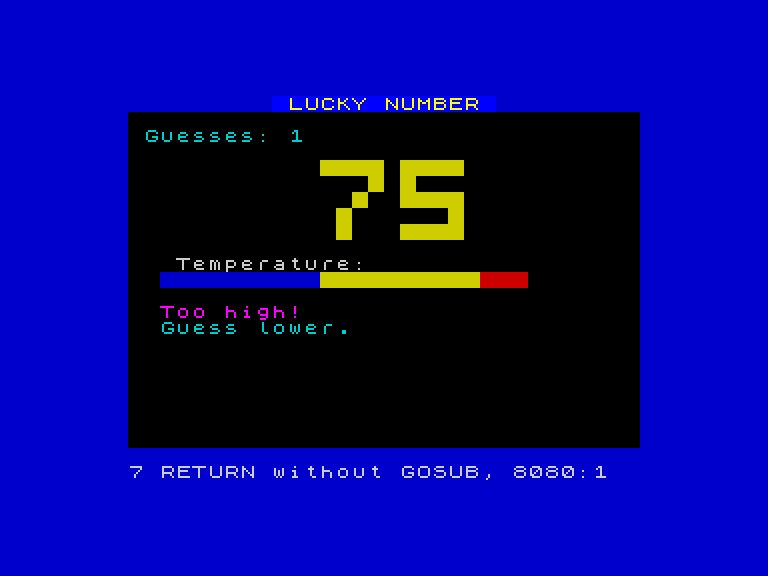
The game shows your guess. The temperature bar fills. The border shifts. The feedback appears — “Too high!” or “Too low!” But there’s no second guess. The program ran off the end of the game logic, crashed into the DATA lines, and stopped with an error. One guess, then silence.
Without the loop, the game is a single frame. Every visual element appears once and freezes.
Restore the Loop
Put line 680 back:
680 GO TO 370
Type RUN. Guess wrong. The game asks again. Guess wrong again. It asks again. The temperature bar updates, the digits redraw, the border shifts, the feedback changes. The game is alive because GO TO 370 sends the program back to the start of the guess loop.
That’s what GO TO does. It tells the Spectrum: “Don’t go to the next line. Go to line 370 instead.” The program jumps backwards, and the loop runs again.
Where You Jump Matters
Change line 680 to jump to 380 instead of 370:
680 GO TO 380
Type RUN and play. The game loops normally — line 370 is a REM comment and line 380 increments the counter, both of which still run when you jump to 380. The real difference comes when you skip further ahead. Try:
680 GO TO 390Now the counter never changes. The game loops, but it always says “Guesses: 1” because line 380 (LET c=c+1) is skipped every time. GO TO controls exactly where the program resumes. One line number makes the difference.
Fix it back to 680 GO TO 370 before moving on.
The Shape of the Program
Now that you understand the loop, look at the REM comments already in the program. Type LIST and scroll through:
250 REM === NEW GAME ===— setup: pick a number, clear the screen, draw the header370 REM === Guess loop ===— the loop: ask, display, check, feedback, repeat630 REM === Feedback ===— the hint messages700 REM === WIN! ===— the victory celebration
REM lines do nothing when the program runs — the Spectrum ignores them. They’re notes for the programmer. They mark the sections so you can see the program’s shape: setup → loop → feedback → win.
How GO TO Works
To see the simplest possible loop, type NEW then:
  10 PRINT "Hello"
  20 GO TO 10
Type RUN. The Spectrum prints “Hello” forever — filling the screen, scrolling upwards, never stopping. Line 20 sends the program back to line 10, which prints “Hello”, which reaches line 20, which sends it back to line 10…
Press BREAK (Caps Shift + Space) to stop it.
A loop without an exit runs forever. In Lucky Number, the loop has an exit: line 440 (IF g=n THEN GO TO 700). When the guess equals the secret number, the program jumps to the win screen instead of continuing through the loop. Without that exit, you’d be guessing forever.
Try This
- Delete line 680 again and
RUN. Count how many lines execute before the error. (The answer is: all of them from 250 to 670, then it falls into the DATA lines and crashes.) - Change
GO TO 370toGO TO 250. What happens? (The game restarts completely — new secret number, counter reset to 0, screen redrawn. Every guess starts a fresh game.) - Change
GO TO 370toGO TO 400. What happens? (The counter never updates and the guess display doesn’t redraw — the loop skips lines 380-430.) - Look at line 910:
IF k$="y" THEN GO TO 280. That’s another GO TO — the play-again loop. How is it different from line 680?
What You’ve Learnt
- GO TO — jumps to a specific line number instead of continuing to the next line
- Loops — GO TO jumping backwards creates a loop; the program repeats a section
- Breaking a loop — deleting the GO TO line stops the loop; the program runs once and stops (or crashes)
- Loop exits —
IF g=n THEN GO TO 700escapes the loop when the condition is met - REM — comments that the Spectrum ignores; used to mark sections and explain the program’s structure
- BREAK — Caps Shift + Space stops a running program