How It Decides
Change border colours, scoring tiers, and the temperature bar — your first look at IF/THEN.
Three lines are the heart of Lucky Number: IF g=n, IF g<n, IF g>n. But IF/THEN controls far more than the game logic. The border colour, the temperature bar bands, the scoring tiers, the feedback colours — every visual decision in the program passes through an IF/THEN gate.
Redesign the Border
Lines 590-620 decide the border colour based on how far the guess is from the answer. The original uses red when close, yellow for medium, blue for far, black for very far. Replace all four:
 590 IF d<=5 THEN BORDER 4
 600 IF d>5 AND d<=15 THEN BORDER 3
 610 IF d>15 AND d<=30 THEN BORDER 5
 620 IF d>30 THEN BORDER 0
Now the border turns green when you’re within 5, magenta for medium distance, cyan for far, and black for very far. Each line is a gate: if the condition is true, the instruction runs. If not, the program skips it and checks the next one.
Invert the Temperature Bar
Lines 510-540 draw the temperature bar in colour bands. The original goes blue→yellow→red→white (cold to hot). Swap them:
 510 IF i<=h AND i<=10 THEN PRINT AT 11,1+i; PAPER 2;" "
 520 IF i<=h AND i>10 AND i<=20 THEN PRINT AT 11,1+i; PAPER 6;" "
 530 IF i<=h AND i>20 AND i<=26 THEN PRINT AT 11,1+i; PAPER 5;" "
 540 IF i<=h AND i>26 THEN PRINT AT 11,1+i; PAPER 1;" "
Type RUN and make a guess.
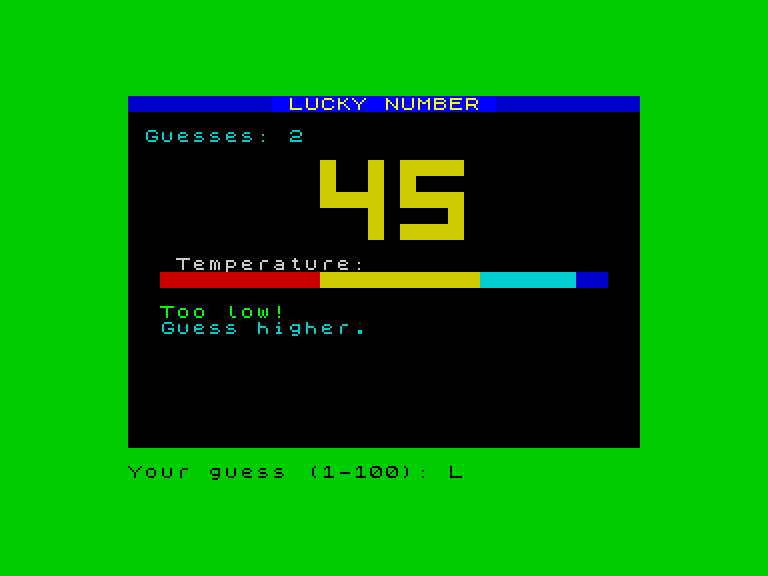
The bar now starts red-hot and ends cold blue. The border is green because the guess was close. The game feels completely different — same mechanics, different visual language — and all you changed were the numbers after PAPER and BORDER.
Add a LEGENDARY Tier
The scoring tiers on lines 880-896 check the guess count. Add a new line between 870 and 880:
878 IF c<=2 THEN PRINT AT 18,7; INK 7; BRIGHT 1;"LEGENDARY!": GO TO 897
This line checks IF c<=2 — two guesses or fewer. If true, it prints “LEGENDARY!” in bright white and then jumps to line 897 with GO TO, skipping all the other tiers. The GO TO 897 is important — without it, the program would keep checking and might print a second tier message on top.
Win in two guesses to see it:
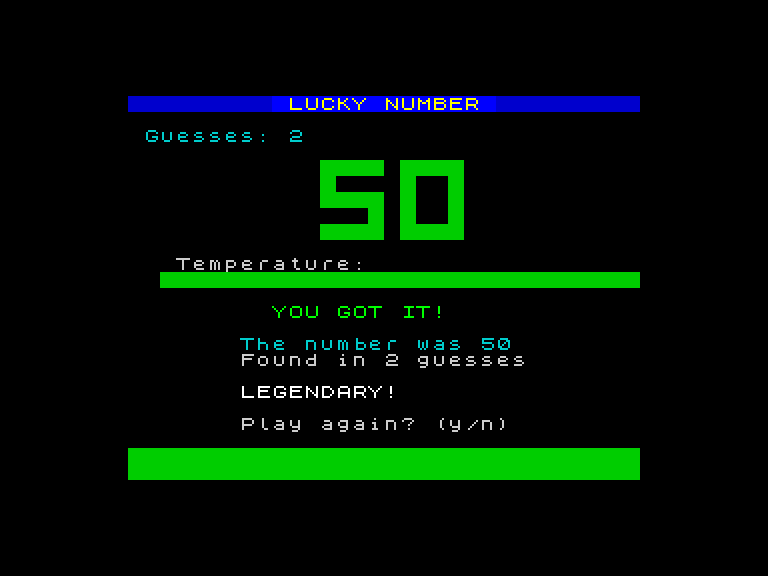
Line 878 runs before line 880. Because c<=2 is also c<=5, both conditions are true — but 878 gets there first and jumps past 880. Line numbers control the order. First match wins.
Swap the Feedback Colours
Lines 660 and 670 print the “Too low!” and “Too high!” messages. The original uses INK 6 (yellow) for low and INK 3 (magenta) for high. Swap them:
 660 IF g<n THEN PRINT AT 13,2; INK 4; BRIGHT 1;"Too low!": PRINT AT 14,2; INK 5; BRIGHT 0;"Guess higher."
 670 IF g>n THEN PRINT AT 13,2; INK 2; BRIGHT 1;"Too high!": PRINT AT 14,2; INK 5; BRIGHT 0;"Guess lower."
Now “Too low!” appears in green and “Too high!” in red. The colour meaning is reversed — a small change, but it shows that every visual detail is controlled by an IF/THEN with a number you can change.
How IF/THEN Works
IF/THEN is a gate. The program checks a condition. If it’s true, the instruction after THEN runs. If it’s false, the whole line is skipped.
To see this at its simplest, type NEW then:
  10 INPUT "Pick a number: ";x
  20 IF x>50 THEN PRINT "Big number!"
  30 IF x<=50 THEN PRINT "Small number!"
Type RUN and enter 75. The Spectrum prints “Big number!” — line 20 ran because 75>50 is true. Line 30 was skipped because 75<=50 is false.
Run it again with 30. This time line 20 is skipped and line 30 runs.
The comparison operators:
| Symbol | Meaning |
|---|---|
= | Equal to |
< | Less than |
> | Greater than |
<= | Less than or equal to |
>= | Greater than or equal to |
<> | Not equal to |
On the Spectrum keyboard, < is Symbol Shift + R, > is Symbol Shift + T, and <= is typed as two characters.
In Lucky Number, every visual decision uses these comparisons. IF d<=5 checks distance. IF g<n checks the guess. IF c<=2 checks the count. The condition decides. The instruction after THEN acts.
Try This
- Design your own border colour scheme. Pick four colours from the table in Unit 3 and assign them to the four distance bands.
- Change the temperature bar to use only two colours instead of four. Delete lines 530 and 540, then change line 520’s condition from
i>10 AND i<=20to justi>10. - Add a sixth scoring tier:
877 IF c=1 THEN PRINT AT 18,7; INK 7; BRIGHT 1;"IMPOSSIBLE!": GO TO 897. Can you actually win in one guess? - Read through lines 440, 660, and 670. These are the three IF/THEN lines that make the game work. What does each one decide?
What You’ve Learnt
- IF/THEN — checks a condition; if true, runs the instruction after THEN; if false, skips the whole line
- Comparisons —
=,<,>,<=,>=,<>compare two values - Gates — every visual decision in the game passes through an IF/THEN; change the condition or the instruction to change the result
- Line number order — when multiple IF/THEN lines could match, the one with the lowest line number runs first
- GO TO in IF/THEN —
GO TO 897after the LEGENDARY tier skips the remaining checks