The Countdown
A FOR loop counts down from 9 to 0, drawing a big block digit each second using GO SUB and PAUSE.
The screen has a header bar and four coloured wires. The space between them is empty — that’s where the countdown goes. A big block digit, five rows tall, counting down from 9 to 0. One number per second. The digit renderer from Lucky Number does the drawing. You supply the loop.
Timing With PAUSE
Before the countdown, a quick look at PAUSE. Type NEW, then:
  10 PRINT "Wait one second..."
  20 PAUSE 50
  30 PRINT "Wait half a second..."
  40 PAUSE 25
  50 PRINT "Wait two seconds..."
  60 PAUSE 100
  70 PRINT "Done!"
Type RUN. The messages appear with gaps between them — one second, half a second, two seconds, then “Done!” immediately.
PAUSE n stops the program for n frames. The Spectrum runs at 50 frames per second (PAL), so PAUSE 50 is one second, PAUSE 25 is half a second. PAUSE 100 is two seconds. The number is frames, not seconds — that’s important. PAUSE 0 waits forever until a key is pressed.
PAUSE is how games control speed. Without it, the Spectrum runs code as fast as it can. A countdown that ticks every 25 frames feels tense. Every 50 frames feels deliberate. The number you choose sets the rhythm.
The Countdown
Type NEW, then type this program. The digit renderer and DATA at the bottom are the same subroutines from Lucky Number — type them exactly as shown:
   5 BORDER 0: PAPER 0: INK 7: CLS
  10 LET t=9
  12 LET pc=7
  14 FOR c=t TO 0 STEP -1
  16 LET dr=3: LET v=c: GO SUB 8200
  18 PAUSE 25
  20 NEXT c
  22 STOP
8200 REM === Draw single digit centred ===
8210 FOR r=dr TO dr+4
8220 PRINT AT r,12;"        "
8230 NEXT r
8240 LET dc=14: LET f=v: GO SUB 8000
8250 RETURN
8000 REM === Draw digit f at dr,dc ===
8010 RESTORE 5100+f*10
8020 FOR r=0 TO 4
8030 READ a$
8040 FOR q=1 TO LEN a$
8050 IF a$(q TO q)="1" THEN PRINT AT dr+r,dc+q-1; PAPER pc;" "
8060 NEXT q
8070 NEXT r
8080 RETURN
5100 DATA "1111","1..1","1..1","1..1","1111"
5110 DATA ".11.","..1.","..1.","..1.",".11."
5120 DATA "1111","...1","1111","1...","1111"
5130 DATA "1111","...1",".111","...1","1111"
5140 DATA "1..1","1..1","1111","...1","...1"
5150 DATA "1111","1...","1111","...1","1111"
5160 DATA "1111","1...","1111","1..1","1111"
5170 DATA "1111","...1","..1.",".1..",".1.."
5180 DATA "1111","1..1","1111","1..1","1111"
5190 DATA "1111","1..1","1111","...1","1111"
Type RUN.
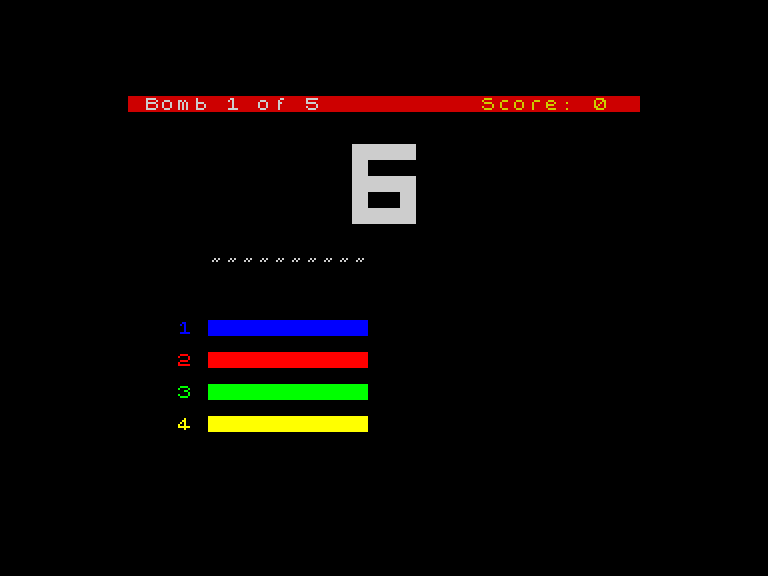
A big white digit appears in the centre of the screen. 9. A pause. 8. A pause. 7, 6, 5, 4, 3, 2, 1, 0. Each digit replaces the last, five rows tall, built from coloured blocks. The countdown takes about five seconds.
How It Works
Line 14 is the engine: FOR c=t TO 0 STEP -1. It counts backwards from t (which is 9) down to 0. Each pass through the loop draws one digit.
Line 16 calls the digit renderer: GO SUB 8200. This is the same subroutine from Lucky Number. It reads a pattern from DATA and prints coloured spaces to draw a big block digit. Three variables control it:
dr— the row to draw at (3, so the digit sits near the top)v— the number to draw (set toc, the current countdown value)pc— the PAPER colour for the blocks (7 = white)
The subroutine at line 8200 clears the old digit first (line 8220 prints spaces over it), then calls line 8000 which reads the pattern for digit v from DATA and draws it. You don’t need to understand every line of the renderer — just know that you set dr, v, and pc, then GO SUB 8200, and a big digit appears.
Line 18 pauses for 25 frames (half a second) between digits. Then NEXT c on line 20 decreases c by 1 and loops back.
GO SUB — Calling a Subroutine
GO SUB 8200 means “jump to line 8200, run the code there, and come back when you hit RETURN.” It’s like a function call. The digit renderer is reusable code — you call it whenever you need a big digit, with different values for dr, v, and pc.
The RESTORE 5100+f*10 on line 8010 is the clever part. Each digit’s pattern starts at a different DATA line: digit 0 at 5100, digit 1 at 5110, digit 2 at 5120, and so on. The formula jumps to the right pattern. You don’t need to memorise this — just know that it works.
Try This
- Change
LET t=9toLET t=20. The countdown starts higher. The digits go past 9 — but the renderer only handles single digits (0-9). What happens at 10? - Change
PAUSE 25toPAUSE 5. The countdown races. Change it toPAUSE 50— it crawls. Feel the difference. - Change
LET pc=7toLET pc=2. The digits turn red. TryLET pc=4for green.
What You’ve Learnt
- PAUSE n — pauses for
nframes (50 frames = 1 second on a PAL Spectrum) - FOR/NEXT with STEP -1 — counts backwards;
FOR c=9 TO 0 STEP -1runs 10 times, from 9 down to 0 - GO SUB and RETURN — jumps to a subroutine and comes back; reusable code you can call from anywhere
- The digit renderer — set
dr,v,pc, thenGO SUB 8200to draw a big block digit