Found It!
Detect when the cursor reaches the treasure and reward the player with a star, sound, and message.
The game works — the border guides the player toward the treasure, cooling and warming with every step. But the moment of discovery — landing on the exact right cell — produces a single beep and a plain message. After all that searching, all that tension as the border warmed from blue to red to yellow, finding the treasure should feel like an event. It should feel like winning.
The Victory Sequence
 100 REM === Found! ===
 102 PRINT AT r,c; INK 4; BRIGHT 1; FLASH 1;"*"; FLASH 0
 104 BORDER 7
 106 BEEP 0.1,10: BEEP 0.1,15: BEEP 0.1,20: BEEP 0.2,25
 108 PRINT AT 21,0; INK 4; BRIGHT 1;"Found! ";m;" moves!             "
 110 STOP
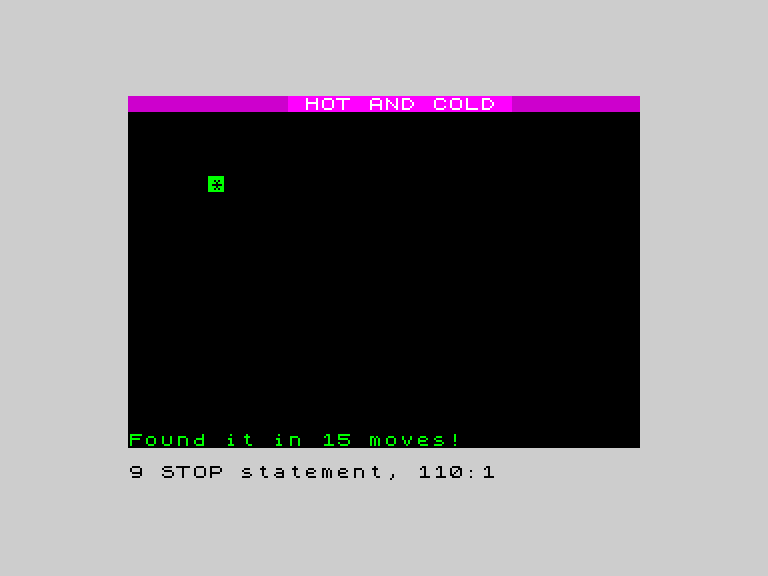
The cursor hits the right cell and everything changes. A green flashing star replaces the ”+”. The border turns white — the warmest possible colour, brighter than yellow. Four ascending tones play in rapid succession, climbing like a fanfare. “Found! 15 moves!” appears at the bottom in bright green. The whole mood shifts from searching to celebrating.
When the cursor lands on the treasure (d = 0), the program jumps to line 100 and runs the victory sequence:
Line 102 replaces the cursor with a green flashing star. INK 4 makes it green, BRIGHT 1 makes it vivid, and FLASH 1 makes it blink — the Spectrum alternates between the ink and paper colours every half second. FLASH 0 resets so the next text doesn’t flash too.
Line 104 sets the border to white (7) — the warmest possible colour, confirming the treasure is right here.
Line 106 plays four ascending BEEPs. Each note is higher than the last: pitch 10, 15, 20, 25. The rising melody creates a sense of discovery and reward. Short notes (0.1 seconds each, with 0.2 for the final one) keep it snappy.
Line 108 shows the move count in bright green at the bottom of the screen. The player can see how efficiently they searched.
FLASH — Blinking Text
FLASH 1 before a PRINT makes that text blink. The Spectrum swaps the ink and paper colours roughly twice per second. It draws attention to the star without any code in a loop — the hardware handles the blinking automatically.
Use FLASH 0 after the flashing text to stop the effect from applying to everything printed afterwards. Like BRIGHT, FLASH is sticky — it stays on until you turn it off.
Sound as Reward
A single BEEP is functional. Four ascending notes feel celebratory. The rising pitch creates an emotional arc — each note builds on the last, like climbing stairs to a fanfare. Game designers call this “juice” — small touches that make interactions feel satisfying.
Try This
Longer tune. Add more notes to the sequence. Try a falling pattern after the rise: BEEP 0.1, 25: BEEP 0.1, 20: BEEP 0.3, 25 for a rise-dip-resolve.
Different star. Replace ”*” with ”#” or “O”. The star is traditional, but any character works.
No flash. Remove FLASH 1 and use just INK 4; BRIGHT 1 instead. Compare the two — flash is eye-catching but can feel noisy. Which do you prefer?
What You’ve Learnt
- FLASH 1 / FLASH 0 — makes text blink by alternating ink and paper colours
- Ascending BEEPs — rising pitch creates a sense of reward
- Victory sequence — replace cursor, change border, play sound, show message
- Juice — small visual and audio touches that make the game feel satisfying