Press a Key
Replace INPUT with INKEY$ for instant single-key responses, using AND to validate.
INPUT works but it feels slow — the player types a letter, then presses ENTER. A real quiz show doesn’t wait for you to confirm. INKEY$ reads the keyboard instantly: press a key and the game reacts.
AND — Combining Conditions
  10 PRINT "Press A, B, C or D"
  20 LET k$=INKEY$
  30 IF k$<>"a" AND k$<>"b" AND k$<>"c" AND k$<>"d" THEN GO TO 20
  40 PRINT "You pressed: ";k$
Line 30 uses AND to combine four conditions: the key is not “a” AND not “b” AND not “c” AND not “d”. All four must be true for the loop to continue. The moment any one is false — meaning the player pressed a valid key — execution falls through.
AND means “both must be true.” IF x > 0 AND x < 10 only passes when x is between 1 and 9. You’ve seen IF with single conditions since Game 1. AND lets you check several at once.
The INKEY$ Quiz
   5 BORDER 0: PAPER 0: INK 7: CLS
  10 FOR i=0 TO 31
  12 PRINT AT 0,i; PAPER 2;" "
  14 NEXT i
  16 LET sc=0
  20 FOR n=1 TO 4
  22 READ q$,a$,b$,c$,d$,r$
  24 CLS
  26 FOR i=0 TO 31
  28 PRINT AT 0,i; PAPER 2;" "
  30 NEXT i
  32 PRINT AT 0,1; PAPER 2; INK 7;"Q";n;" of 4"
  34 PRINT AT 0,22; PAPER 2; INK 6;"Score: ";sc
  36 PRINT AT 4,4; INK 7;q$
  38 PRINT AT 8,6; INK 7;"A: ";a$
  40 PRINT AT 10,6; INK 7;"B: ";b$
  42 PRINT AT 12,6; INK 7;"C: ";c$
  44 PRINT AT 14,6; INK 7;"D: ";d$
  46 PRINT AT 18,4; INK 5;"Press A, B, C or D"
  48 LET k$=INKEY$
  50 IF k$<>"a" AND k$<>"b" AND k$<>"c" AND k$<>"d" THEN GO TO 48
  52 IF k$=r$ THEN PRINT AT 18,4; INK 4; BRIGHT 1;"Correct!        ": LET sc=sc+1: GO TO 56
  54 PRINT AT 18,4; INK 2; BRIGHT 1;"Wrong! It was ";r$;"    "
  56 PAUSE 50
  58 NEXT n
  60 CLS
  62 PRINT AT 4,10; INK 5;"Score: ";sc;" out of 4"
 500 DATA "Closest planet to the Sun?","Mercury","Venus","Earth","Mars","a"
 510 DATA "Who built the pyramids?","Romans","Egyptians","Vikings","Greeks","b"
 520 DATA "Capital of France?","London","Berlin","Madrid","Paris","d"
 530 DATA "Instrument with 88 keys?","Guitar","Drums","Violin","Piano","d"
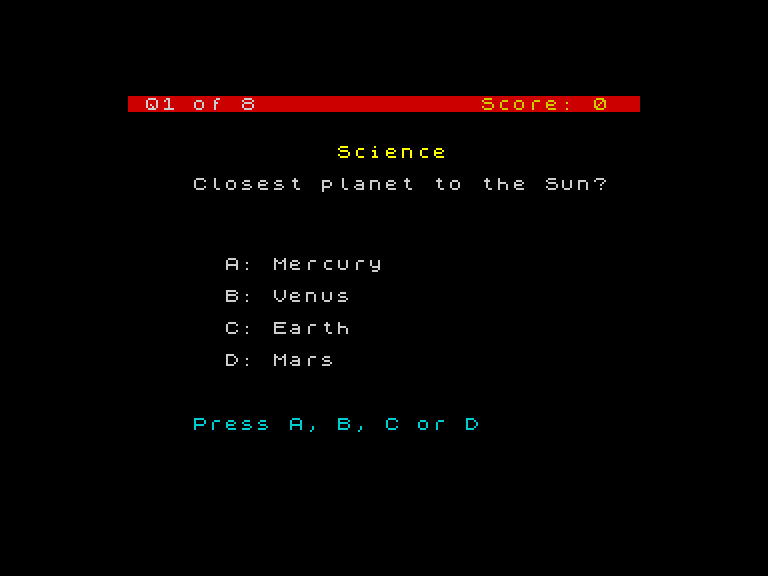
The INPUT prompt is gone. Instead, “Press A, B, C or D” appears in cyan at row 18. The INKEY$ loop on lines 48-50 watches the keyboard and only proceeds when a valid key is pressed. The response feels instant — no ENTER needed.
The feedback messages on lines 52-54 overwrite the prompt line with spaces after the text, clearing any leftover characters from a longer previous message.
Why INKEY$ Instead of INPUT?
INPUT pauses the program and shows a cursor. The player types, edits, and presses ENTER. INKEY$ returns whatever key is currently pressed — or an empty string if nothing is pressed. It’s faster, feels more like a game, and gives you control over the display.
The trade-off: INPUT handles the cursor and editing for you. INKEY$ reads one key at a time, so you need to validate it yourself. That’s what the AND line does.
Try This
Reject with a sound. Add a BEEP inside the validation loop for invalid keys: put BEEP 0.02, -5 before GO TO 48. Every wrong key makes a short buzz.
Accept uppercase too. The Spectrum sends lowercase by default, but holding CAPS SHIFT sends uppercase. Add OR k$ = "A" etc. to accept both.
What You’ve Learnt
- AND — combines conditions: all must be true for the line to execute
- INKEY$ — reads the keyboard instantly without waiting for ENTER
- Input validation loop —
IF k$ <> "a" AND ... THEN GO TOrejects invalid keys - Instant response — INKEY$ makes the game feel faster than INPUT