Right and Wrong
Add green and red arrow markers, border flash, and sound effects for correct and wrong answers.
The quiz accepts answers instantly. Now it needs to react — differently for right and wrong. A correct answer should feel like a win. A wrong answer should show what was right so the player learns.
Two Feedback Paths
   5 BORDER 0: PAPER 0: INK 7: CLS
  10 FOR i=0 TO 31
  12 PRINT AT 0,i; PAPER 2;" "
  14 NEXT i
  16 LET sc=0
  20 FOR n=1 TO 4
  22 READ q$,a$,b$,c$,d$,r$
  24 CLS
  26 FOR i=0 TO 31
  28 PRINT AT 0,i; PAPER 2;" "
  30 NEXT i
  32 PRINT AT 0,1; PAPER 2; INK 7;"Q";n;" of 4"
  34 PRINT AT 0,22; PAPER 2; INK 6;"Score: ";sc
  36 PRINT AT 4,4; INK 7;q$
  38 PRINT AT 8,6; INK 7;"A: ";a$
  40 PRINT AT 10,6; INK 7;"B: ";b$
  42 PRINT AT 12,6; INK 7;"C: ";c$
  44 PRINT AT 14,6; INK 7;"D: ";d$
  46 PRINT AT 18,4; INK 5;"Press A, B, C or D"
  48 LET k$=INKEY$
  50 IF k$<>"a" AND k$<>"b" AND k$<>"c" AND k$<>"d" THEN GO TO 48
  52 IF k$=r$ THEN GO TO 80
  54 REM === Wrong ===
  56 BORDER 2
  58 LET y=0
  60 IF k$="a" THEN LET y=8
  62 IF k$="b" THEN LET y=10
  64 IF k$="c" THEN LET y=12
  66 IF k$="d" THEN LET y=14
  68 PRINT AT y,4; INK 2; BRIGHT 1;">"
  70 LET y=0
  72 IF r$="a" THEN LET y=8
  74 IF r$="b" THEN LET y=10
  76 IF r$="c" THEN LET y=12
  78 IF r$="d" THEN LET y=14
  79 PRINT AT y,4; INK 4; BRIGHT 1;">"
  77 BEEP 0.3,-5
  78 BORDER 0
  79 PAUSE 75
  GO TO 100
  80 REM === Correct ===
  82 LET sc=sc+1
  84 BORDER 4
  86 LET y=0
  88 IF k$="a" THEN LET y=8
  90 IF k$="b" THEN LET y=10
  92 IF k$="c" THEN LET y=12
  94 IF k$="d" THEN LET y=14
  96 PRINT AT y,4; INK 4; BRIGHT 1;">"
  97 BEEP 0.1,12: BEEP 0.1,16: BEEP 0.15,19
  98 BORDER 0
  99 PAUSE 50
 100 NEXT n
 110 CLS
 120 PRINT AT 4,10; INK 5;"Score: ";sc;" out of 4"
 500 DATA "Closest planet to the Sun?","Mercury","Venus","Earth","Mars","a"
 510 DATA "Who built the pyramids?","Romans","Egyptians","Vikings","Greeks","b"
 520 DATA "Capital of France?","London","Berlin","Madrid","Paris","d"
 530 DATA "Instrument with 88 keys?","Guitar","Drums","Violin","Piano","d"
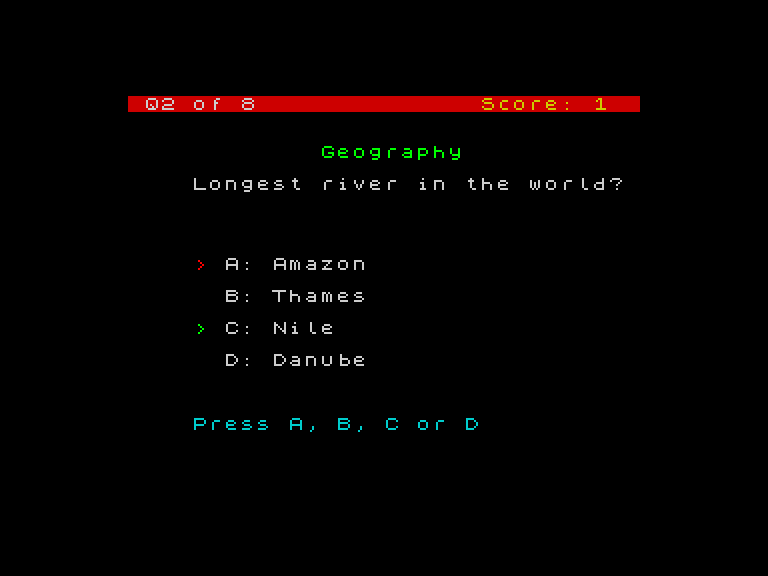
When correct (lines 80-99):
- The score increments
- The border flashes green (
BORDER 4) - A green
>appears next to the chosen option - An ascending three-note jingle plays
When wrong (lines 54-79):
- The border flashes red (
BORDER 2) - A red
>appears next to the chosen option — showing what the player picked - A green
>appears next to the correct option — showing what was right - A low buzz plays
Both paths use the same key-to-row mapping: “a” maps to row 8, “b” to row 10, “c” to row 12, “d” to row 14. The wrong path runs this mapping twice — once for the player’s key, once for the correct answer.
Border as Feedback
The border flash is brief — BORDER 4 followed by the sound effect, then BORDER 0 resets it. The player sees a flash of green or red around the entire screen. Combined with the > markers, the feedback is visible at a glance.
Try This
Longer jingle. Add more notes to the correct jingle. Try BEEP 0.1, 7: BEEP 0.1, 12: BEEP 0.1, 16: BEEP 0.2, 19 for a four-note ascending phrase.
Flash the option text. Instead of just a > marker, reprint the entire option text in green or red: PRINT AT y, 6; INK 4; BRIGHT 1; "A: Mercury". The whole line lights up.
What You’ve Learnt
- Arrow markers —
>in green or red shows which option was chosen/correct - Key-to-row mapping —
IF k$ = "a" THEN LET y = 8converts a letter to a screen position - Border flash —
BORDER 4(green) orBORDER 2(red) for instant colour feedback - Two-path feedback — correct and wrong look and sound completely different