Visual Design
Switch to a black background and use colour to make the game look professional.
The game works, but it looks like a program listing — black text on a white background. A few colour changes transform it into something that looks like a real game.
The Program
10 CLS
20 BORDER 0
30 PAPER 0
40 INK 7
50 CLS
60 PRINT AT 0, 8; INK 6; "Treasure Hunt"
70 REM draw play area border
80 INK 3
90 FOR i = 0 TO 31
100 PRINT AT 1, i; "="
110 PRINT AT 21, i; "="
120 NEXT i
130 FOR i = 1 TO 21
140 PRINT AT i, 0; "|"
150 PRINT AT i, 31; "|"
160 NEXT i
170 INK 7
180 REM place coins
190 FOR i = 1 TO 8
200 LET y = INT (RND * 18) + 2
210 LET x = INT (RND * 29) + 1
220 INK 6: PRINT AT y, x; "*": INK 7
230 NEXT i
240 REM place hazards
250 FOR i = 1 TO 3
260 LET y = INT (RND * 18) + 2
270 LET x = INT (RND * 29) + 1
280 INK 2: PRINT AT y, x; "#": INK 7
290 NEXT i
300 REM place player
310 INK 4: BRIGHT 1: PRINT AT 10, 15; "O": BRIGHT 0: INK 7
320 REM HUD
330 PRINT AT 0, 0; "L:1 C:8  V:3"
340 PRINT AT 0, 24; "T:500"
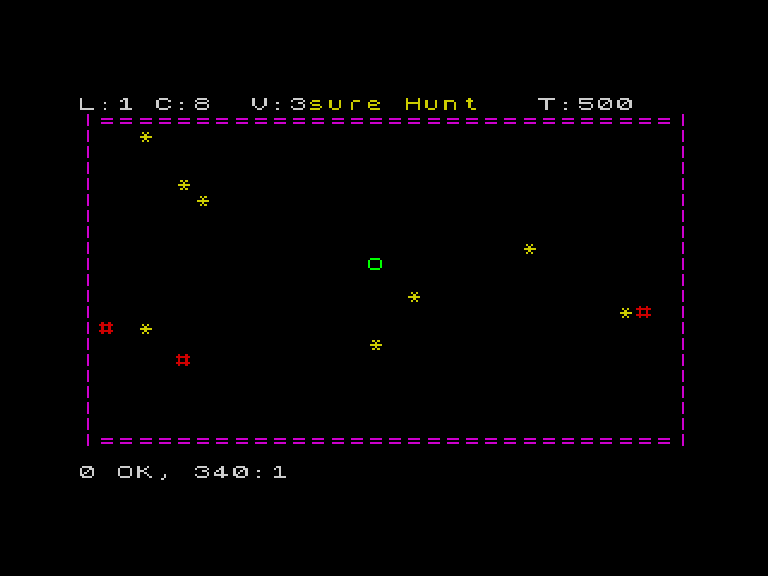
What Changed
Lines 20-50. BORDER 0: PAPER 0: INK 7: CLS sets a black background with white text. The CLS after changing paper fills the whole screen with the new colour.
Line 60. The title in yellow (INK 6) — a splash of colour at the top.
Line 80. Walls in cyan (INK 3) — bright against the black background.
Line 220. Coins in yellow (INK 6) — gold on black.
Line 280. Hazards in red (INK 2) — danger colour.
Line 310. Player in green (INK 4) with BRIGHT 1 — stands out from everything else.
ATTR Values Change
With PAPER 0 instead of PAPER 7, the ATTR formula gives different values:
ATTR = INK + 8 * PAPER + 64 * BRIGHT| Object | INK | PAPER | ATTR |
|---|---|---|---|
| Empty cell | 7 | 0 | 7 |
| Wall (cyan) | 3 | 0 | 3 → but with PAPER: 5 |
| Coin (yellow) | 6 | 0 | 6 |
| Hazard (red) | 2 | 0 | 2 |
| Player (green bright) | 4 | 0 | 4 + 64 = 68 |
The collision code in the final game will use these new values. Simpler numbers, actually — no more adding 56 for white paper.
The Colour Palette
Black backgrounds make colours pop. The Spectrum’s 8 colours are designed to look good on both black and white — but games almost always use black. It’s what gives Spectrum games their distinctive look.
| INK | Colour | Use in game |
|---|---|---|
| 0 | Black | Background |
| 1 | Blue | — |
| 2 | Red | Hazards, danger |
| 3 | Magenta/Cyan | Walls, borders |
| 4 | Green | Player |
| 5 | Cyan | Controls, highlights |
| 6 | Yellow | Coins, gold, titles |
| 7 | White | Text, instructions |
Try This
Different colour scheme. Try BORDER 1: PAPER 1 for a blue background. Or PAPER 2 for red. Each creates a different mood.
BRIGHT everywhere. Add BRIGHT 1 before drawing game elements. The colours become vivid.
What You’ve Learnt
- BORDER, PAPER, INK — control background and text colours
- CLS after PAPER — fills the screen with the new colour
- Colour meaning — consistent colours for game objects
- Black backgrounds — the classic Spectrum game look