You Type the Whole Word
Type your first line of Commodore BASIC, run it, and read what the C64 prints back. Meet the keyboard where you spell each word out — and the type-run loop you'll use all primer.
New to programming entirely? Start with General Programming — it teaches the ideas this primer writes in Commodore BASIC. If you’ve met variables, loops and decisions before, in any language, you’re in the right place.
You already know what it means to tell a computer to show something — in General
Programming you wrote SHOW "Hello". Now you’ll say it to a real Commodore 64, in its own
language, and watch it answer. The C64 greets you with a screen it is famous for —
**** COMMODORE 64 BASIC V2 ****, 38911 BASIC BYTES FREE, and then READY. — the
machine telling you it is waiting for a line.
Milestone 1 — your first line
10 PRINT "HELLO"
Type the 10, a space, then the word PRINT — letter by letter, P-R-I-N-T. (If
you’ve used a Spectrum, this is the first difference: there, one key stamped the whole
word PRINT; the C64 has no keyword keys, so you spell every word out.) Finish the line —
a space, "HELLO" in quotes — and press RETURN. Then type RUN and press RETURN
again.
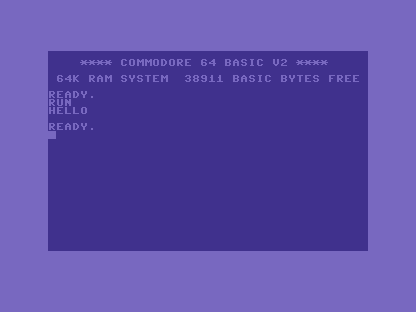
Two things happened. The screen printed HELLO — you told the machine what to say, and it
said it. And below it the C64 printed READY. again. Unlike some machines, the C64 gives
you no report number when a program finishes cleanly — it just returns to READY.. That
word is the whole status: no error, your turn. When something does go wrong, the C64
speaks up — you’ll see that at the end of this unit.
Milestone 2 — a second line, and the loop
A program is rarely one line. Add a second, with a higher number, and run it again:
| 1 | 1 | 10 PRINT "HELLO" | |
| 2 | + | 20 PRINT "FROM THE C64" | |
| 2 | 3 | |
Type line 20 — PRINT "FROM THE C64" — and RETURN, then RUN. Both lines print, in
number order.
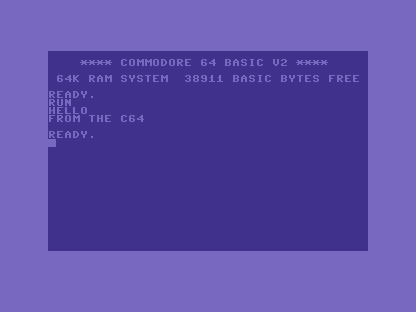
You’ve just done the whole rhythm of writing BASIC: type a line, RUN, read the result,
type the next. Every program in this primer grows that way, one line and one run at a
time.
When it doesn’t work
The first line fails in small, recognisable ways — and the C64 names each one:
?SYNTAX ERROR. Usually a missing quotation mark or a mistyped word.PRINTneeds both quotes around its text —PRINT "HELLO", notPRINT "HELLO. TypeLISTto see your program, find the line, and retype it.- Nothing printed. You pressed RETURN to store the line but never typed
RUN. Storing a line and running the program are two separate steps —LISTshows the line is there, waiting. ?OUT OF DATAor some other?…ERROR. The C64 always starts the message with a?and ends it withERROR. It is the machine talking back; reading it — not guessing — is the habit this whole primer is built on. You’ll meet it in earnest in the last unit.
Before and after
You started at a cold machine showing READY. and finished with a two-line program you
typed, ran, and grew. The lesson underneath: you spell every BASIC word out yourself,
and the C64 returns to READY. when a program finishes cleanly. Everything from here is
more lines, typed the same way.
Try this
- Change the message. Type line
10again with different words in the quotes, thenRUN. The new line 10 replaces the old one — the first hint of how editing works (Unit 2’s subject). - A third line. Add line
30with another message and run it. Predict the order before you press RETURN. - Break it on purpose. Leave off the closing quote and run it. Read the
?SYNTAX ERROR, then put the quote back. Seeing the failure once is how you’ll recognise it later.
What you’ve learnt
- The C64 has no keyword keys — you spell out
PRINTand every other word yourself. PRINTshows text; text goes in quotes.- You write a program by typing a numbered line, then
RUN— and repeating. - The C64 returns to
READY.when a program finishes cleanly, and answers a mistake with a?…ERRORmessage.
What’s next
Both your lines have numbers — 10 and 20 — and they ran in that order. Those numbers
are more than labels: each one is an address you can write to, replace, and slip
between. In Unit 2 we use them — and LIST — to edit a program.