The Line Number Is an Address
Edit a program by its line numbers — replace a line by reusing its number, slip a new line into a gap, delete one, and LIST them in order. Then meet the C64's full-screen editor, where you change a line in place.
In Unit 1 your two lines were numbered 10 and 20, and they ran in that order. The
number isn’t only a label for where a line sits in the running order — it’s the line’s
address. Once you can write to an address, you can edit: replace what’s there, slip
something new in beside it, or take it away.
Milestone 1 — a numbered program
10 PRINT "ONE"
20 PRINT "TWO"
30 PRINT "THREE"
Three lines, numbered in tens. Type them in and RUN: they print ONE, TWO, THREE,
in number order, then the C64 returns to READY..
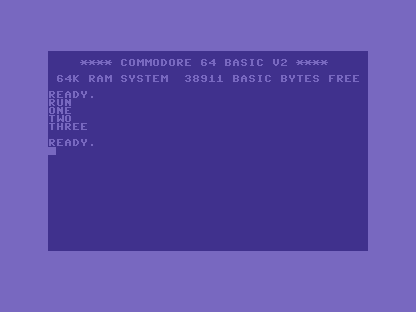
Notice the numbering jumps in tens. Nothing forces that — 1, 2, 3 would run the
same. The tens leave room between the lines, and the next milestone shows why.
Milestone 2 — slip a line into the gap
You want a line between TWO and THREE, without retyping anything. Give it a number
that falls in the gap — 25, sitting between 20 and 30:
| 1 | 1 | 10 PRINT "ONE" | |
| 2 | 2 | 20 PRINT "TWO" | |
| 3 | + | 25 PRINT "AND A HALF" | |
| 3 | 4 | 30 PRINT "THREE" | |
| 4 | 5 | |
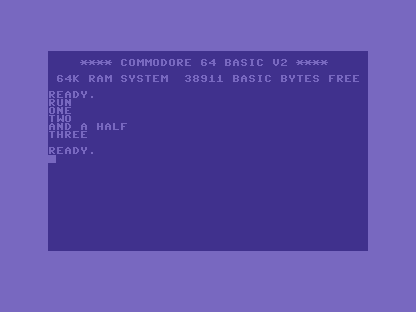
Type line 25 and press RETURN — on its own, with the other lines already in place. You
don’t move anything; the C64 files it by number. RUN, and the new line lands exactly
where its number puts it: after 20, before 30.
Milestone 3 — write to an address that’s taken
Use the same idea to replace a line. Type line 20 again, with new text. The number is
already taken, so the new line takes the old one’s place:
| 1 | 1 | 10 PRINT "ONE" | |
| 2 | - | 20 PRINT "TWO" | |
| 2 | + | 20 PRINT "TWO, REPLACED" | |
| 3 | 3 | 25 PRINT "AND A HALF" | |
| 4 | 4 | 30 PRINT "THREE" | |
| 5 | 5 | |
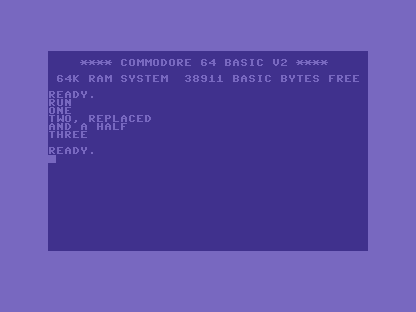
That’s the whole rule, two ways: pick a free number to add a line; reuse a number to replace one. To remove a line, type its number alone and press RETURN — line gone.
LIST, and the full-screen editor
To see the program in its true order at any time, type LIST. The C64 shows every line
from lowest number to highest — the order it will run, whatever order you typed them in.
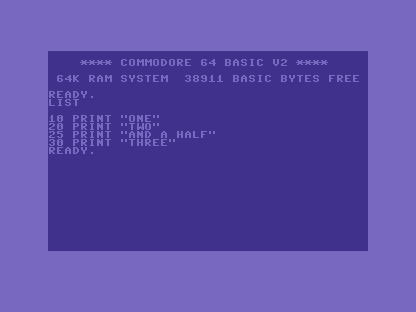
Here the C64 does something the listing makes possible. Those LISTed lines are not a
frozen printout — they are live text on the screen. Move the cursor up with the
CRSR keys onto line 20, type over part of it, and press RETURN while the cursor is on
that line: the C64 reads the whole line back in and stores the change. This is the
full-screen editor, and it is one of the C64’s nicest touches — you fix a line by
editing it where it sits, not by retyping it whole.
When it doesn’t work
- A new line overwrote one you wanted to keep. You reused a number that was already
taken.
LISTfirst, find a free number in a gap (like25), and add there instead. - The line ran in the wrong place. The number decides the order, not where you typed it. Whatever should come first needs the lowest number.
- You edited a
LISTed line but the change didn’t stick. You must press RETURN while the cursor is on that line — that’s what feeds it back to BASIC. Scrolling past it changes nothing.
Before and after
You started with three lines and ended having inserted one into a gap, replaced another, and edited a line in place — without ever retyping the whole program. The idea underneath: a line number is an address. Write to a free one to add; write to a taken one to replace. Numbering in tens keeps gaps open for the lines a later step will add — a habit every program here leans on.
Try this
- Fill another gap. Add line
15, between10and20. Predict where it prints before you run it. - Edit in place.
LIST, cursor up onto line30, changeTHREEtoTHE END, press RETURN on the line, thenRUN. The full-screen editor in action. - Delete and confirm. Remove line
25(type25, RETURN),LISTto confirm it’s gone, thenRUN.
What you’ve learnt
- A line number is the line’s address.
- Reuse a number to replace a line; pick a free number to add one; type a number alone to delete it.
LISTshows the program in number order — the order it runs.- The C64’s full-screen editor lets you change a
LISTed line in place: edit it and press RETURN on the line. - Number in tens so there’s always a gap to slip a line into later.
What’s next
You can write, run, and edit a program now. Time to make it say more than a fixed word.
In Unit 3 we give PRINT its punctuation — the comma and semicolon that join and
space text and numbers across the line.