PRINT, and Its Punctuation
Give PRINT its punctuation — join with a semicolon, line things up in 10-column zones with a comma — then clear the screen the C64 way, with PRINT CHR$(147), and start the title card you'll grow all primer.
You met PRINT in Unit 1. On its own it shows a word. With punctuation, it lays text
and numbers out — joined or spaced into columns. Two marks do most of the work on the
C64: the semicolon and the comma. (If you’ve used a Spectrum, note one thing missing: the
C64 has no apostrophe for a new line, and no CLS — we’ll handle both below.)
Milestone 1 — join with a semicolon
A semicolon joins two things with no gap between them:
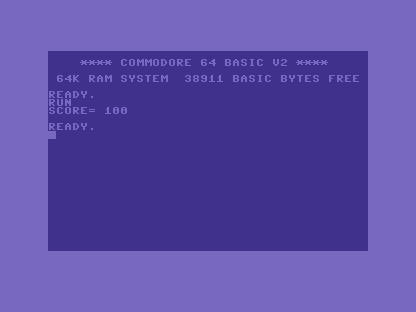
10 PRINT "SCORE=";100
RUN it: SCORE= 100. The text "SCORE=" and the number 100 print as one run, the
semicolon butting them together. The space you see before 100 isn’t from the
semicolon — the C64 prints every positive number with a leading space, where a minus
sign would go for a negative one. Knowing that space is there spares you the “why is my
layout off by one?” puzzle later.
Milestone 2 — columns, and a line each
The comma lays things out in columns. Each separate PRINT takes its own line. Add three
lines:
| 1 | 1 | 10 PRINT "SCORE=";100 | |
| 2 | + | 20 PRINT "LEFT","RIGHT" | |
| 3 | + | 30 PRINT "TOP" | |
| 4 | + | 40 PRINT "BOTTOM" | |
| 2 | 5 | |
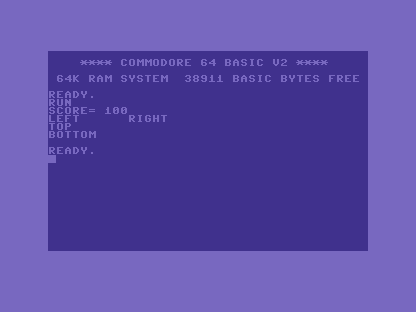
The comma jumps to the next print zone — the C64’s 40-column screen is divided
into zones every ten columns — so LEFT and RIGHT line up, RIGHT starting at column
10. And because each PRINT ends its own line, TOP and BOTTOM stack one above the
other. There’s no apostrophe-for-newline here as on some machines: a new line means a new
PRINT. (To stay on the line instead, end a PRINT with a ; — the next one carries
on where it left off.)
Milestone 3 — clear the screen, start the title card
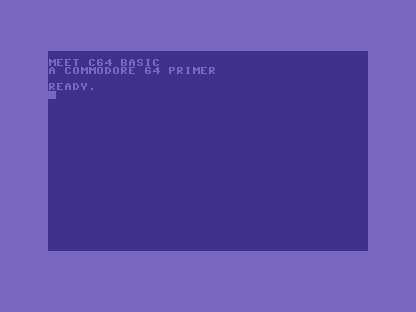
The C64 has no CLS keyword. Clearing the screen is itself a PRINT: PRINT CHR$(147),
where CHR$(147) is the clear-screen control code. (You can also type the reverse
heart that SHIFT+CLR/HOME puts inside a quoted string, but CHR$(147) is clearer to
read.) We’ll use it to open a title card — a small splash screen we grow across the
primer until it has colour, sound and motion. Here’s its first, plain version:
10 PRINT CHR$(147)
20 PRINT "MEET C64 BASIC"
30 PRINT "A COMMODORE 64 PRIMER"
When it doesn’t work
SCORE=100ran together with no space. That’s correct for two strings joined by;. The space you saw earlier came from the number, not the semicolon — print a number to get it.- Old text is still on screen under the new. No clear. Unlike some machines the C64
has no
CLS; putPRINT CHR$(147)as your first line to wipe the screen each run. ?SYNTAX ERROR. A missing quote, orCHR(147)without the$.CHR$needs its dollar sign — it returns a character (a string).
Before and after
You started with PRINT showing one word and finished laying text and numbers into
columns, then clearing the screen and beginning the title card. The ideas underneath:
; joins, , tabs to the next 10-column zone, a new PRINT is a new line — and on the
C64 you clear the screen by printing CHR$(147), because the language has no CLS.
Try this
- Build a line. Print a label and a number together:
PRINT "LIVES=";3. Spot the leading space the number brings. - Stay on the line. End line 20 with a
;and run it — seeTOPjoin onto the end of the previous line instead of dropping below. - Forget the clear. Run the title card twice without line 10. Watch it pile up, then
put
PRINT CHR$(147)back.
What you’ve learnt
;joins with no gap; the C64 prints positive numbers with a leading space.,tabs to the next 10-column zone; eachPRINTtakes its own line (end with;to stay put).- The C64 has no
CLS— clear the screen withPRINT CHR$(147). - The title card begins here — a splash screen we’ll grow as the primer goes on.
What’s next
So far the screen only shows what you typed into the program. In Unit 4 we give the
program a memory: LET, the named box that holds a value — and a C64 surprise about what
counts as a different name.