INPUT — the Program Listens
Let the person at the keyboard fill a variable. INPUT stops the program, prints a prompt and a ?, waits for what's typed, and stores it — text into a $ box, numbers into a plain one.
In Unit 4 the program filled its own boxes with LET. INPUT hands that job to the
person at the keyboard: it stops, shows a prompt, waits for a line to be typed, and
stores it in a variable. That one statement is what turns a program from a printout into
something you can use.
Milestone 1 — ask for a word
10 INPUT "WHAT IS YOUR NAME";N$
20 PRINT "HELLO ";N$
Line 10 prints WHAT IS YOUR NAME and then waits. RUN it: the C64 shows your prompt,
adds a ? of its own, and parks the cursor — nothing else happens until you type.
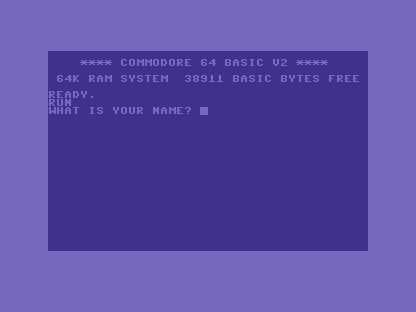
Type a name and press RETURN. The word goes into N$, and line 20 greets it:
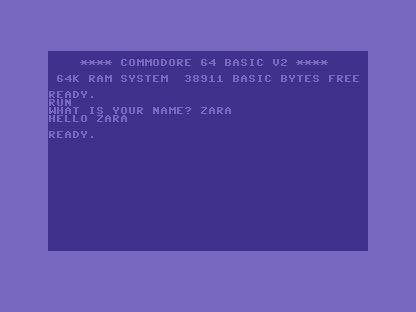
The ; after the prompt string is what keeps the prompt and the ? on the same line. The
box is a string box (N$) because a name is text — the $ you met in Unit 4.
Milestone 2 — ask for a number
Drop the $ and INPUT collects a number instead, ready for arithmetic:
10 INPUT "HOW MANY LIVES";L
20 PRINT "YOU HAVE";L;"LIVES LEFT"
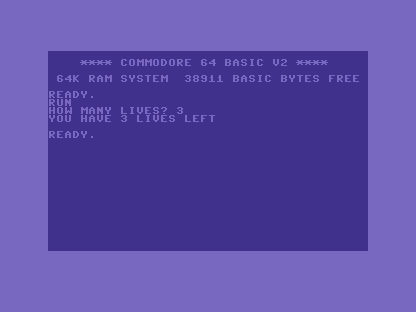
RUN it, type 3, and the value lands in L as a number — not the text "3". Line 20
prints it back inside a sentence:
When it doesn’t work
?REDO FROM START. You typed letters into a numberINPUT. A plain name wants a number; type one, or change the variable to a$name to accept text.- The prompt and
?landed on different lines. You used a comma instead of the;after the prompt string. Use;to keep them together. ?EXTRA IGNORED. You typed a comma in your answer — the C64 treats a comma as the gap between two inputs and drops the rest. For one plain answer, leave commas out.
Before and after
You started with a program that only knew what you wrote into it, and finished with one
that asks and listens — a name into a $ box, a number into a plain one. The idea
underneath: INPUT stops, prompts, waits, and stores what’s typed. Output plus input
is everything a conversation needs; from here the program can react.
Try this
- Two questions. Ask for a first name and a count of lives, then print one sentence using both.
- Greet by length. After
INPUT N$, print"YOUR NAME HAS";LEN(N$);"LETTERS". - Provoke the redo. Answer a number
INPUTwith a word and read the?REDO FROM START.
What you’ve learnt
INPUTstops the program, prints your prompt plus a?, and stores what’s typed.- Use
;after the prompt string to keep the prompt and?on one line. - A
$name collects text; a plain name collects a number you can compute with. - Wrong-kind answers raise
?REDO FROM START; stray commas raise?EXTRA IGNORED.
What’s next
The program can ask a question — but it does the same thing no matter what the answer is.
In Unit 6 we let it decide: IF / THEN, the test that makes one line run only when
a condition holds.