Keeping Your Work
A program lives in RAM and vanishes when the power goes off. The disk drive keeps it: SAVE writes your program to disk, LOAD brings it back, and the directory shows what's there. The save-and-reload cycle every C64 session is built on.
Everything you’ve typed so far has lived in one place: RAM, the C64’s working
memory. It’s there while the power’s on and gone the moment you switch off. To keep a
program, you write it to a disk with the 1541 drive — and read it back another day.
Two commands do it: SAVE and LOAD. They’re how every real C64 session begins and ends.
Milestone 1 — SAVE your program
Here’s a short program worth keeping:
10 PRINT "HELLO FROM DISK"
20 PRINT "I CAME BACK"
Type it in, then save it to the disk with one command:
SAVE"HELLO",8"HELLO" is the name you’re giving it — up to 16 characters — and ,8 means “to
device 8”, the disk drive. The C64 reports as it works:
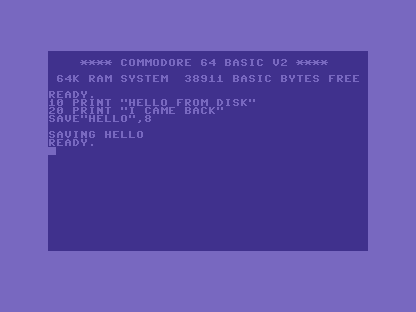
The ,8 matters: leave it off and the C64 tries the tape instead. On the disk drive,
every save needs that ,8.
Milestone 2 — see what’s on the disk
The disk keeps a directory — a list of its files — and you can read it like a program.
LOAD"$",8 loads the directory (the $ is its special name), and LIST shows it:
LOAD"$",8
LIST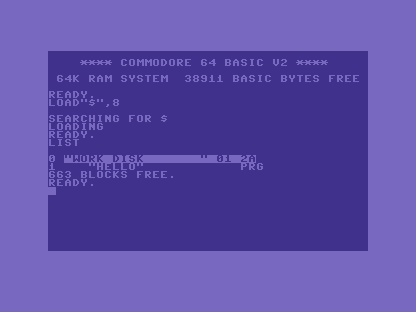
There’s HELLO, marked PRG — a program file. The number beside it is its size in
blocks (each block holds 254 bytes), and 663 BLOCKS FREE is the room left on the
disk. Loading the directory replaces whatever program was in memory, so save your work
before you peek.
Milestone 3 — bring it back
Switch off, come back tomorrow, and the program’s gone from RAM — but it’s safe on the
disk. LOAD reads it back:
LOAD"HELLO",8
RUN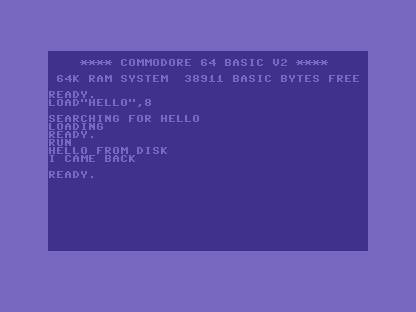
SEARCHING FOR HELLO, LOADING, READY. — the program is back in memory, ready to RUN
or edit. That round trip — SAVE it, switch off, LOAD it, carry on — is the rhythm of
every project bigger than one sitting.
When it doesn’t work
?DEVICE NOT PRESENT ERROR. No,8, or no drive. Disk commands always end in,8.?FILE NOT FOUND ERROR. The name doesn’t match. Names are exact —LOAD"$",8thenLISTto see the spelling. A*wildcard loads the first match:LOAD"HE*",8.?FILE EXISTS ERRORon SAVE. That name’s already on the disk. Pick another, or save with@0:in front to overwrite —SAVE"@0:HELLO",8.- The directory wiped my program.
LOAD"$",8overwrites memory with the directory. Save first; the directory is a program too.
Before and after
You began with programs that vanished at the switch and finished with work that lasts: saved
to disk by name, listed in the directory, and loaded back to run again. The idea underneath:
SAVE"NAME",8 writes your program to the disk, LOAD"NAME",8 reads it back — and
everything to the drive ends in ,8.
Try this
- Save two versions.
SAVE"HELLO2",8after a change, so you keep both. - Read the directory often.
LOAD"$",8+LISTis how you remember what you named things — disk names get forgotten fast. - Overwrite on purpose. Change the program, then
SAVE"@0:HELLO",8to replace the old copy with the new one.
What’s next
You can write programs, give them colour and sound, read the stick, and keep your work. One
skill is left, and it’s the one you’ll use most: in Unit 15 we meet the C64’s error
messages — ?SYNTAX ERROR and friends — and learn to read them as help, not scolding.