When It's Wrong
The C64's error messages are terse, but each one names the problem and points to the line. SYNTAX ERROR, UNDEF'D STATEMENT, ILLEGAL QUANTITY — read them as directions, not scolding, and you can fix anything you write.
Every programmer’s screen fills with errors — that’s the job, not a sign you’re bad at it.
The C64’s messages are blunt: a ?, a couple of words, sometimes a line number. They
won’t coddle you, but each one names the kind of problem and, inside a program, points to
the exact line. Learn to read them and nothing you type can stay broken for long. This unit
is a tour of the three you’ll meet most.
Milestone 1 — SYNTAX ERROR, the catch-all
Mistype a keyword and the C64 can’t understand the line at all:
PRONT "HELLO"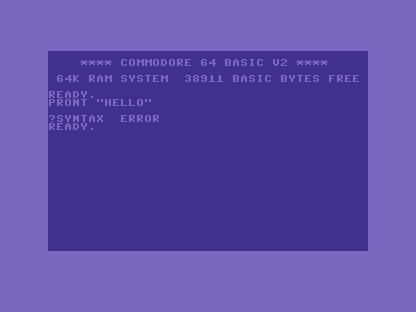
?SYNTAX ERROR is the one you’ll see most, and it means exactly one thing: the C64
couldn’t make sense of what you typed. Check the spelling of every keyword, that your
quotes come in pairs, and that brackets match. Typed at the READY. prompt like this, there’s
no line number — the mistake is right there on the line above.
Milestone 2 — errors point to the line
Inside a program, an error tells you which line it died on. This one runs, then jumps to a line that isn’t there:
10 PRINT "START"
20 GOTO 100
RUN it and the C64 prints START, reaches line 20, and stops:
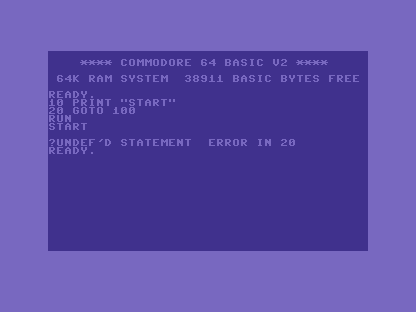
Two gifts in that one message. UNDEF'D STATEMENT means a GOTO or GOSUB aimed at a
line number that isn’t in the program — a typo’d target, or a line you deleted. And
ERROR IN 20 points your finger at the line: type LIST 20 to see just that line and
fix it.
Milestone 3 — errors wait until they happen
Some mistakes aren’t typos — the line is spelled fine, but it asks for something impossible.
The C64 only notices when RUN reaches it:
10 POKE 53281,300
POKE takes values 0–255, and 300 is too big:
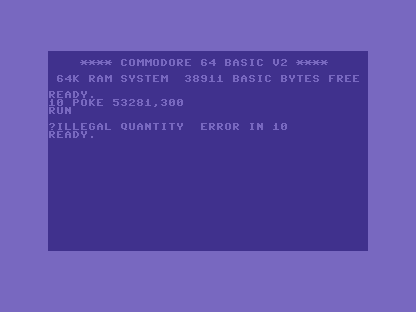
You met this one back when the screen was memory: ILLEGAL QUANTITY is a number outside
what a command allows — a POKE value over 255, a screen cell past the last, a negative where
none is allowed. It’s a runtime error: the line looked fine when you typed it, and only broke
when the program ran into it.
The errors you’ll meet
A handful covers almost everything:
| Message | What it usually means |
|---|---|
?SYNTAX ERROR |
A typo — misspelt keyword, unmatched quote or bracket. |
?UNDEF'D STATEMENT ERROR |
GOTO/GOSUB to a line number that doesn’t exist. |
?ILLEGAL QUANTITY ERROR |
A number out of range (e.g. POKE over 255). |
?DIVISION BY ZERO ERROR |
You divided by zero. |
?RETURN WITHOUT GOSUB ERROR |
A RETURN ran without a matching GOSUB. |
?OUT OF MEMORY ERROR |
The program is too big, or a loop nested too deep. |
When you’re stuck
- Read the line number first.
ERROR IN 40meansLIST 40and stare at that one line. - Print to peek. Add a temporary
PRINTof a variable just before the broken line to see the value it holds at that moment. - Split a busy line. If a line does several things, break it across line numbers so the error points at the exact part.
- No line number? The error is in what you just typed at the
READY.prompt, not in the program.
Before and after
You started treating an error as a dead end and finished reading it as a map: the kind of
problem in the words, the place in the line number. The idea underneath: C64 errors are
terse directions, not verdicts — SYNTAX for “I can’t read it”, UNDEF'D STATEMENT for a
missing line, ILLEGAL QUANTITY for a number out of range, each one pointing you to the fix.
Try this
- Break it on purpose. Type
PRINT 5/0and meet?DIVISION BY ZERO. Knowing a message in advance makes it friendly when it turns up for real. - Chase a line number. Write a three-line program with a
GOTOto a wrong line, run it, and useLISTwith the reported number to find and fix it. - Catch a range error.
POKE 53280, 999and read what the C64 says — then fix it to a number it accepts.
What’s next
That’s the whole of BASIC you need: type and run, variables and input, decisions and loops, the screen as memory, colour, sound, the joystick, movement, saving your work, and reading the machine when it complains. You can write C64 programs. From here the primer hands you to the games — real, complete C64 programs you build a piece at a time, starting from the first one. Time to make something.