Lights in the Windows
Colour memory stops being a flat wash. As each tower goes up, some cells get a bright window colour against the tower's body — same coordinate, different byte — and the skyline comes alive.
So far every cell of every tower has been the same grey. But the colour cell can hold anything — so as the tower goes up, you can give some floors a bright “window” colour and leave the rest dark. Same block, same address; a different colour byte.
10 PRINT CHR$(147)
20 POKE 53281,0
30 H=8
40 FOR C=2 TO 38 STEP 4
50 FOR R=24 TO 24-H+1 STEP -1
60 POKE 1024+R*40+C,160
70 CO=12
80 IF (R AND 1)=0 THEN CO=7
90 POKE 55296+R*40+C,CO
100 NEXT R
110 NEXT C
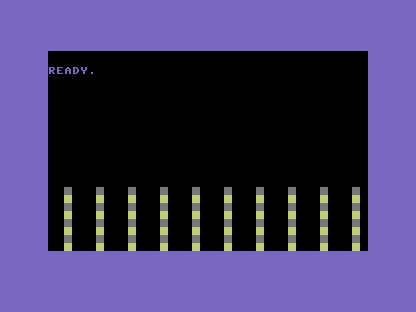
The new lines are 70–90. CO = 12 sets the default colour to grey — the tower’s body. Then
IF (R AND 1) = 0 THEN CO = 7 lights the even rows yellow: R AND 1 is 0 on even row
numbers, so every other floor gets colour 7. Line 90 POKEs whichever colour CO ended up
holding. The screen code in line 60 never changes — it’s the colour memory doing all the
work, turning identical blocks into a building with lit and dark floors.
Lighting every other floor looks a little mechanical — real buildings have a window here and a dark one there, not a perfect stripe. That’s a job for randomness, and it’s next.
Try this
- Change the light. Swap colour 7 (yellow) for 1 (white) — cold office light — or 3 (cyan) for a neon look.
- Light fewer floors. Change line 80 to test
(R AND 3) = 0so only every fourth floor lights. Fewer windows, more night.
What’s next
Every tower is identical, and the windows march in a perfect stripe. In Unit 5 RND
breaks the pattern — random heights, random windows — and the program starts producing more
than you typed.