The Farmyard
Compose the playfield: the Copper paints the farmyard's bands from above, and one bitplane plays fence, footbridge and lane markings — recoloured per band.
A green fold with five pens. A stream with a footbridge. A grey lane with dashed markings. A wide field at the bottom where the flock will wait. One screen that reads as a place — and the trick that draws it is the unit’s whole lesson.
This is Unit 1 of Flock, a sheep-crossing arcade game. Over the coming units you’ll put a sheep on this screen, steer her, dodge tractors, ride hay bales, and fill the fold. Today there are no sheep — today you build the farm. The Primer taught you the Copper and the bitplane as separate ideas; this unit composes them with intent, and adds one move the Primer didn’t: making a single bitplane do four different jobs.
The Display
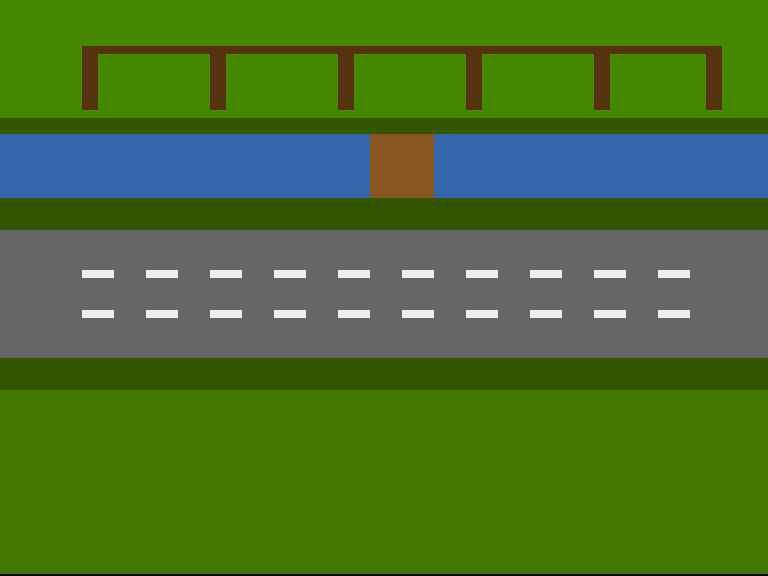
Looked at from above, the farmyard is horizontal bands — and horizontal bands are what the Copper does best:
- The fold (top) — brighter pasture, with a fence and five pens drawn into the bitplane. Each pen opens to the south. This is where saved sheep will live.
- The stream — a blue band with a wooden footbridge across the middle. In Arc 1 the bridge is the only way over.
- The lane — grey tarmac, two dashed lines dividing it into three traffic lanes. Tractors arrive in Unit 5.
- The field (bottom) — where the flock waits its turn.
Between each pair, a thin dark strip of hedgerow, bank or verge keeps the bands from touching.
Run It First
Step 1: Build the Executable
vasmm68k_mot -Fhunkexe -kick1hunks -nosym -o flock flock.asmStep 2: Create a Bootable Disk
xdftool flock.adf create + format "Flock" ofs + boot install boot1x
xdftool flock.adf + makedir s
echo "flock" > startup-sequence
xdftool flock.adf + write startup-sequence s/startup-sequence
xdftool flock.adf + write flock + protect flock +e
rm startup-sequence
Step 3: Run in an Emulator
Boot flock.adf in an A500 configuration with a Kickstart 1.3 ROM (FS-UAE, WinUAE, or Emu198x). The disk boots straight into the farmyard. To exit: click the left mouse button, then reset.
One Plane, Four Jobs
Here’s the move that makes this screen cheap. The detail — fence, bridge, lane dashes — is all drawn into one bitplane. A single plane gives every set pixel the same colour: whatever’s in COLOR01. That sounds like a limitation, until you remember the Copper can rewrite any register as the beam sweeps down.
So at each band boundary, the Copper changes two colours, not one:
            ; --- THE FOLD (from the top of the frame) ---
            dc.w    COLOR00,COLOUR_FOLD_GRASS
            dc.w    COLOR01,COLOUR_FENCE        ; Pixels here are fence

            ; --- HEDGEROW (row 40) ---
            dc.w    $5401,$fffe                 ; Wait: line $2C+40 = $54
            dc.w    COLOR00,COLOUR_HEDGE
            dc.w    COLOR01,COLOUR_TUFT

            ; --- THE STREAM (row 48) ---
            dc.w    $5c01,$fffe                 ; Wait: line $2C+48 = $5C
            dc.w    COLOR00,COLOUR_WATER
            dc.w    COLOR01,COLOUR_WOOD         ; Pixels here are bridge

            ; --- THE BANK (row 80) ---
            dc.w    $7c01,$fffe                 ; Wait: line $2C+80 = $7C
            dc.w    COLOR00,COLOUR_BANK
            dc.w    COLOR01,COLOUR_TUFT

            ; --- THE LANE (row 96) ---
            dc.w    $8c01,$fffe                 ; Wait: line $2C+96 = $8C
            dc.w    COLOR00,COLOUR_LANE
            dc.w    COLOR01,COLOUR_DASH         ; Pixels here are markings
COLOR00 is the band itself — pasture, water, tarmac. COLOR01 is what a set pixel means in that band: brown fence in the fold, wood on the stream, white paint on the lane. The same plane, recoloured by position, plays four parts. The fence and the lane markings can never collide, because they live in different bands — so they can share a bitplane without ever sharing a colour.
This is the Amiga way of thinking: don’t draw more, redefine what you’ve drawn as the beam passes.
Drawing the Detail
The shapes themselves are nothing exotic — byte-aligned rectangles of set pixels, written by the CPU at startup:
;──────────────────────────────────────────────────────────────
; rectfill — set a byte-aligned rectangle of pixels
;   d0 = x (bytes)   d1 = row   d2 = width (bytes)   d3 = height
;   Trashes d1, d4, d5, a0, a1.
;──────────────────────────────────────────────────────────────
rectfill:
            lea     plane,a0
            move.w  d1,d4
            mulu    #ROW_BYTES,d4       ; row * 40
            add.w   d0,d4               ; + x
            adda.w  d4,a0               ; A0 = first byte of the rectangle
            move.w  d3,d4               ; D4 = rows to go
.row:
            movea.l a0,a1
            move.w  d2,d5               ; D5 = bytes to go
.col:
            move.b  #$ff,(a1)+          ; 8 pixels on
            subq.w  #1,d5
            bne.s   .col
            lea     ROW_BYTES(a0),a0    ; down one row
            subq.w  #1,d4
            bne.s   .row
            rts
rectfill walks the plane row by row — the address arithmetic is row × 40 + x, since a 320-pixel row is 40 bytes. Everything on screen is calls to this one routine: a full-width bar plus six posts makes the fence and pens; a 4-byte-wide block makes the bridge; a loop of short bars makes each dashed line.
One habit worth noticing: the band rows live in named constants (ROW_STREAM, ROW_LANE…) and the Copper waits are derived from the same numbers — the display window starts at beam line $2C, so band row 48 means wait for line $2C + 48 = $5C. Keep the map in one place and the bands and their detail can’t drift apart.
Experiment: Rearrange the Farm
Everything tweakable sits at the top of flock.asm:
COLOUR_WATER        equ $036A       ; The stream
COLOUR_LANE         equ $0666       ; The lane's tarmac
ROW_STREAM          equ 48
ROW_LANE            equ 96
Try these:
COLOUR_WATER equ $0248— a deeper, moodier stream.COLOUR_FIELD equ $0640— parched late-summer grass.- Move
ROW_LANEto80— but remember to move its Copper WAIT to match ($2C + 80 = $7C). Watch what happens to the dashes if you move the band but not the bitplane rows: the markings stay where they were drawn, and stop being white. That mismatch is the lesson of this unit, seen from the other side. - Widen the bridge: in
drawfarmyard, change the bridge’s width from4to6bytes.
The Complete Code
;──────────────────────────────────────────────────────────────
; FLOCK - A sheep-crossing arcade game for the Commodore Amiga
; Unit 1: The Farmyard
;
; Compose the playfield: a Copper list paints the farmyard's
; bands from above (fold, stream, lane, field), and one
; bitplane carries the detail — pens, footbridge, lane
; markings. The Copper recolours that same bitplane per band:
; brown fence in the fold, wood on the bridge, white dashes
; on the lane. One plane, four jobs.
;──────────────────────────────────────────────────────────────

;══════════════════════════════════════════════════════════════
; TWEAKABLE VALUES — Change these and see what happens!
;══════════════════════════════════════════════════════════════

; Colours are $0RGB (4 bits per component, values 0-F)
COLOUR_FOLD_GRASS   equ $0480       ; The fold's pasture
COLOUR_HEDGE        equ $0350       ; Hedgerow between fold and stream
COLOUR_WATER        equ $036A       ; The stream
COLOUR_BANK         equ $0350       ; Grassy bank below the stream
COLOUR_LANE         equ $0666       ; The lane's tarmac
COLOUR_VERGE        equ $0350       ; Verge below the lane
COLOUR_FIELD        equ $0470       ; The field where the flock waits

COLOUR_FENCE        equ $0531       ; Pen walls (bitplane, fold band)
COLOUR_WOOD         equ $0852       ; The footbridge (bitplane, stream band)
COLOUR_DASH         equ $0EEE       ; Lane markings (bitplane, lane band)
COLOUR_TUFT         equ $0360       ; Spare (bitplane, grass bands)

; Where each band begins (screen row 0-255, top to bottom)
ROW_HEDGE           equ 40
ROW_STREAM          equ 48
ROW_BANK            equ 80
ROW_LANE            equ 96
ROW_VERGE           equ 160
ROW_FIELD           equ 176

;══════════════════════════════════════════════════════════════
; HARDWARE REGISTERS
;══════════════════════════════════════════════════════════════

CUSTOM      equ $dff000

DMACON      equ $096        ; DMA control (write)
INTENA      equ $09a        ; Interrupt enable (write)
INTREQ      equ $09c        ; Interrupt request (write)
COP1LC      equ $080        ; Copper list pointer
COPJMP1     equ $088        ; Copper restart strobe
VPOSR       equ $004        ; Beam position

BPLCON0     equ $100        ; Bitplane control
BPLCON1     equ $102        ; Scroll
BPLCON2     equ $104        ; Priority
BPL1MOD     equ $108        ; Odd plane modulo
DDFSTRT     equ $092        ; Display data fetch start
DDFSTOP     equ $094        ; Display data fetch stop
DIWSTRT     equ $08e        ; Display window start
DIWSTOP     equ $090        ; Display window stop
BPL1PTH     equ $0e0        ; Bitplane 1 pointer (high)
BPL1PTL     equ $0e2        ; Bitplane 1 pointer (low)
COLOR00     equ $180        ; Background colour
COLOR01     equ $182        ; Bitplane colour 1

ROW_BYTES   equ 40          ; 320 pixels / 8

;══════════════════════════════════════════════════════════════
; CODE (Chip RAM — the Copper and bitplane DMA read from here)
;══════════════════════════════════════════════════════════════

            section code,code_c

start:
            lea     CUSTOM,a5           ; A5 = custom chip base ($DFF000)

            ; --- Take over the machine ---
            move.w  #$7fff,INTENA(a5)   ; Disable all interrupts
            move.w  #$7fff,INTREQ(a5)   ; Clear pending interrupts
            move.w  #$7fff,DMACON(a5)   ; Disable all DMA

            ; --- Point the Copper's bitplane MOVEs at our plane ---
            lea     plane,a0
            move.l  a0,d0
            lea     copbpl,a1           ; The two MOVEs in the list below
            move.w  d0,6(a1)            ; Low word into the BPL1PTL move
            swap    d0
            move.w  d0,2(a1)            ; High word into the BPL1PTH move

            ; --- Draw the farmyard's detail into the bitplane ---
            bsr     drawfarmyard

            ; --- Install Copper list ---
            lea     copperlist,a0
            move.l  a0,COP1LC(a5)
            move.w  d0,COPJMP1(a5)      ; Strobe: restart Copper from COP1LC

            ; --- Enable DMA ---
            move.w  #$8380,DMACON(a5)   ; SET + DMAEN + BPLEN + COPEN
                                        ;  bit 15 = SET (turn bits ON)
                                        ;  bit  9 = DMAEN (master enable)
                                        ;  bit  8 = BPLEN (bitplane DMA)
                                        ;  bit  7 = COPEN (Copper DMA)

            ; === Main Loop ===
mainloop:
            ; Wait for vertical blank (beam reaches line 0)
            move.l  #$1ff00,d1          ; Mask: bits 8-16 of beam position
.vbwait:
            move.l  VPOSR(a5),d0        ; Read beam position
            and.l   d1,d0               ; Isolate line number
            bne.s   .vbwait             ; Loop until line 0

            ; Check left mouse button (active low at CIAA)
            btst    #6,$bfe001          ; CIAA Port A, bit 6
            bne.s   mainloop            ; Not pressed — keep going

            ; Button pressed — halt
.halt:
            bra.s   .halt

;══════════════════════════════════════════════════════════════
; DRAW THE FARMYARD
;
; Everything here is plain CPU writes into the bitplane —
; the Primer's bitmap lesson, now composing a place. Each
; shape is a byte-aligned rectangle of set pixels; the Copper
; decides what colour those pixels are, band by band.
;══════════════════════════════════════════════════════════════

drawfarmyard:
            ; --- The fold's pens (rows 4-35) ---
            ; A fence bar across the top, then posts dividing
            ; five pens, each open to the south.
            moveq   #0,d0               ; x = byte 0
            moveq   #4,d1               ; row 4
            moveq   #ROW_BYTES,d2       ; full width
            moveq   #4,d3               ; 4 rows thick
            bsr     rectfill

            lea     penposts,a2         ; Post positions (byte columns)
            moveq   #6-1,d6             ; Six posts
.posts:
            moveq   #0,d0
            move.b  (a2)+,d0            ; x = next post column
            moveq   #8,d1               ; rows 8-35
            moveq   #1,d2               ; one byte wide
            moveq   #28,d3
            bsr     rectfill
            dbf     d6,.posts

            ; --- The footbridge (rows 48-79, mid-stream) ---
            moveq   #18,d0              ; byte 18 = pixel 144
            moveq   #ROW_STREAM,d1
            moveq   #4,d2               ; 32 pixels wide
            moveq   #32,d3              ; the stream's full height
            bsr     rectfill

            ; --- Lane markings: two dashed lines (rows 116, 136) ---
            moveq   #116,d1
            bsr     dashline
            move.w  #136,d1
            ; falls through

;──────────────────────────────────────────────────────────────
; dashline — a row of dashes across the lane
;   d1 = starting row. 2 bytes on, 2 bytes off, 4 rows thick.
;──────────────────────────────────────────────────────────────
dashline:
            moveq   #0,d0               ; x = byte 0
.dash:
            move.w  d1,-(sp)            ; rectfill trashes d1
            move.w  d0,-(sp)            ; ...and d0
            moveq   #2,d2               ; 2 bytes of dash
            moveq   #4,d3               ; 4 rows thick
            bsr     rectfill
            move.w  (sp)+,d0
            move.w  (sp)+,d1
            addq.w  #4,d0               ; next dash 4 bytes along
            cmp.w   #ROW_BYTES,d0
            blt.s   .dash
            rts

;──────────────────────────────────────────────────────────────
; rectfill — set a byte-aligned rectangle of pixels
;   d0 = x (bytes)   d1 = row   d2 = width (bytes)   d3 = height
;   Trashes d1, d4, d5, a0, a1.
;──────────────────────────────────────────────────────────────
rectfill:
            lea     plane,a0
            move.w  d1,d4
            mulu    #ROW_BYTES,d4       ; row * 40
            add.w   d0,d4               ; + x
            adda.w  d4,a0               ; A0 = first byte of the rectangle
            move.w  d3,d4               ; D4 = rows to go
.row:
            movea.l a0,a1
            move.w  d2,d5               ; D5 = bytes to go
.col:
            move.b  #$ff,(a1)+          ; 8 pixels on
            subq.w  #1,d5
            bne.s   .col
            lea     ROW_BYTES(a0),a0    ; down one row
            subq.w  #1,d4
            bne.s   .row
            rts

penposts:   dc.b    0,8,16,24,32,39     ; Byte columns of the six posts
            even

;══════════════════════════════════════════════════════════════
; COPPER LIST — the farmyard from above
;
; The display is set up once at the top, then the list rides
; the beam down the screen, switching COLOR00 (the band) and
; COLOR01 (what the bitplane's pixels mean in that band) at
; each boundary. Same pixels, different job, four times over.
;
;   WAIT: dc.w $VVHH,$FFFE   (VV = line, HH = position)
;   MOVE: dc.w register,value
;
; Band rows are screen rows; the beam's line is row + $2C
; (the display window starts at line $2C).
;══════════════════════════════════════════════════════════════

copperlist:
            ; --- Display setup ---
            dc.w    DIWSTRT,$2c81       ; Window: top-left
            dc.w    DIWSTOP,$2cc1       ; Window: bottom-right
            dc.w    DDFSTRT,$0038       ; Fetch start (lores)
            dc.w    DDFSTOP,$00d0       ; Fetch stop
            dc.w    BPLCON0,$1200       ; 1 bitplane, colour burst on
            dc.w    BPLCON1,$0000       ; No scroll
            dc.w    BPLCON2,$0000       ; Default priority
            dc.w    BPL1MOD,$0000       ; No modulo — rows pack tight
copbpl:
            dc.w    BPL1PTH,$0000       ; Plane address, poked in
            dc.w    BPL1PTL,$0000       ;   by the CPU at startup

            ; --- THE FOLD (from the top of the frame) ---
            dc.w    COLOR00,COLOUR_FOLD_GRASS
            dc.w    COLOR01,COLOUR_FENCE        ; Pixels here are fence

            ; --- HEDGEROW (row 40) ---
            dc.w    $5401,$fffe                 ; Wait: line $2C+40 = $54
            dc.w    COLOR00,COLOUR_HEDGE
            dc.w    COLOR01,COLOUR_TUFT

            ; --- THE STREAM (row 48) ---
            dc.w    $5c01,$fffe                 ; Wait: line $2C+48 = $5C
            dc.w    COLOR00,COLOUR_WATER
            dc.w    COLOR01,COLOUR_WOOD         ; Pixels here are bridge

            ; --- THE BANK (row 80) ---
            dc.w    $7c01,$fffe                 ; Wait: line $2C+80 = $7C
            dc.w    COLOR00,COLOUR_BANK
            dc.w    COLOR01,COLOUR_TUFT

            ; --- THE LANE (row 96) ---
            dc.w    $8c01,$fffe                 ; Wait: line $2C+96 = $8C
            dc.w    COLOR00,COLOUR_LANE
            dc.w    COLOR01,COLOUR_DASH         ; Pixels here are markings

            ; --- THE VERGE (row 160) ---
            dc.w    $cc01,$fffe                 ; Wait: line $2C+160 = $CC
            dc.w    COLOR00,COLOUR_VERGE
            dc.w    COLOR01,COLOUR_TUFT

            ; --- THE FIELD (row 176, down to the bottom) ---
            dc.w    $dc01,$fffe                 ; Wait: line $2C+176
            dc.w    COLOR00,COLOUR_FIELD
            dc.w    COLOR01,COLOUR_TUFT

            ; --- END OF COPPER LIST ---
            dc.w    $ffff,$fffe                 ; Wait for impossible position

;══════════════════════════════════════════════════════════════
; THE BITPLANE (Chip RAM)
;══════════════════════════════════════════════════════════════

            section data,data_c

plane:      ds.b    ROW_BYTES*256       ; One plane, 320 x 256
If It Doesn’t Work
- Black screen? DMA needs
$8380— SET + DMAEN + BPLEN + COPEN. This unit displays a bitplane, so bit 8 (BPLEN) matters now; the Primer’s pure-Copper screens got away without it. - Bands but no detail? The Copper list’s
BPL1PTH/BPL1PTLMOVEs must point at the plane — the CPU pokes the address into the list at startup (copbpl). If those two words are still zero, Denise fetches plane data from address 0 and you’ll see garbage or nothing. - Detail in the wrong colours? Check the WAIT lines. Band row N is beam line
$2C + N— in hex. Mixing decimal rows with hex lines puts a band’sCOLOR01change on the wrong boundary, and the bridge turns fence-brown. - Everything shifted or smeared?
BPL1MODmust be 0 for a 320-wide plane with no extra fetch — andDDFSTRT/DDFSTOPshould be$38/$D0for lores.
Try This
- A second hedgerow. Add a dark strip between the fold’s pens and the hedge — a new WAIT + two MOVEs. Bands cost four words each; spend a few.
- Plank the bridge. The bridge is a solid block. In
drawfarmyard, skip every eighth row of it (draw four 7-row blocks instead of one 32-row block) and it reads as planks over the water. - Count the cost. The whole farmyard’s detail is one subroutine and a handful of calls. Estimate how many bytes of bitplane the fence touches — then check it against the plane’s 10,240 total. How much of the screen did you not have to draw?
What You’ve Learnt
- Composing a playfield — Copper bands for the zones, one bitplane for the detail, and named constants keeping the two in step.
COLOR01per band — a single plane’s pixels can mean different things at different screen positions. Recolour, don’t redraw.BPLEN— bitplane DMA has its own enable bit; a display with planes needs$8380, not the Primer’s$8280.- Poking the Copper list — the CPU writes the plane’s address into the list’s
BPL1PTH/BPL1PTLMOVEs at startup, so the Copper re-points Denise at the plane every frame. rectfill— row × 40 + x, and a rectangle is two nested loops. The workhorse this game will lean on until the Blitter takes over (that’s Exodus, the next game).
What’s Next
In Unit 2, the first hardware sprite appears: a white sheep, standing in the field. No bitplane drawing, no erasing — the chip overlays her on the farmyard for free, and from then on the screen has a character in it.