The Sheep
The first hardware sprite: a white sheep standing in the field. Denise overlays her on the farmyard for free — sprite data is a list of words, her position is two more.
There’s a sheep in the field.
She wasn’t drawn into the bitplane. Nothing erased the grass to make room for her, and nothing will repair it when she moves. She’s a hardware sprite — Denise overlays her on the farmyard as the beam passes, every frame, for free. The playfield underneath doesn’t know she exists.
This is the Amiga’s cheapest moving graphic, and the foundation of this whole game. The sheep is a sprite. The tractors will be sprites. The hay bales you’ll ride are sprites. Today: what a sprite is, and how to put one on screen.
The Display
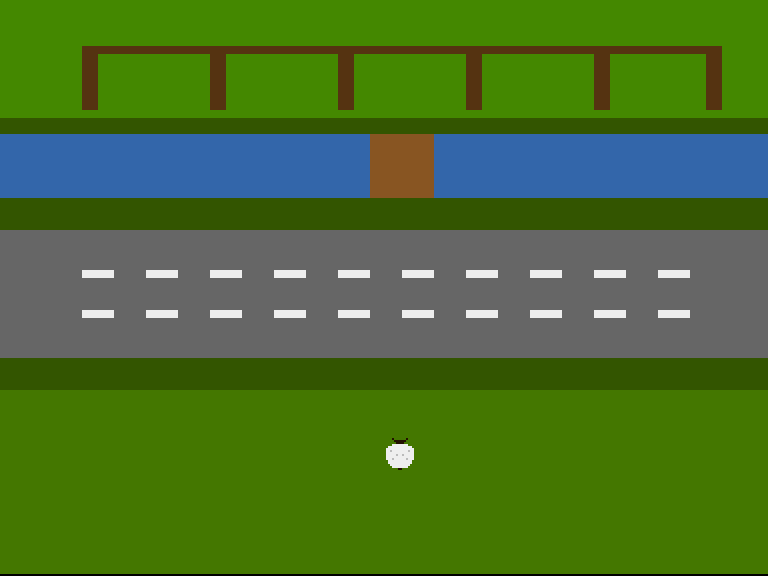
One white sheep, standing in the field, facing the lane she’ll someday have to cross. Fleece, two dark ears, a dark face, a tail nub. Sixteen pixels square.
A Sprite Is a List of Words
A hardware sprite is nothing more than a structure in Chip RAM:
- Two control words —
POSandCTL— say where the sprite appears. - Two data words per row — plane A and plane B — say what it looks like. Two planes give each pixel four possible values:
00transparent,01,10,11— three colours plus see-through. - Two zero words end the sprite.
That’s the entire format. No registers to load pixel data into, no drawing calls — Denise’s sprite DMA fetches the list itself, row by row, as the beam reaches the sprite’s position.
sheep:
            dc.w    (VSTART<<8)|((HSTART>>1)&$ff)               ; POS
            dc.w    ((VSTOP&$ff)<<8)|((VSTART>>8)<<2)|((VSTOP>>8)<<1)|(HSTART&1) ; CTL

            ;        plane A (fleece)    plane B (face/shade)
            dc.w    %0000000000000000,%0000100000010000  ; ..ears..
            dc.w    %0000000000000000,%0000011111100000  ; ..head..
            dc.w    %0000000000000000,%0000001111000000  ; ..face..
            dc.w    %0000111111110000,%0000000000000000  ; fleece ruff
            dc.w    %0011111111111100,%0000000000000000  ; shoulders
            dc.w    %0111111111111110,%0000000000000000
            dc.w    %0111111111111110,%0001000000001000  ; shade flecks
            dc.w    %0111111111111110,%0000000000000000
            dc.w    %0111111111111110,%0000001001000000  ; shade flecks
            dc.w    %0111111111111110,%0000000000000000
            dc.w    %0111111111111110,%0000100000010000  ; shade flecks
            dc.w    %0011111111111100,%0000000000000000  ; haunches
            dc.w    %0011111111111100,%0000000000000000
            dc.w    %0001111111111000,%0000000000000000
            dc.w    %0000111111110000,%0000000000000000  ; rump
            dc.w    %0000000000000000,%0000000110000000  ; ..tail..

            dc.w    0,0                 ; End of sprite
Read the % patterns like a pixel grid — the art is right there in the source. Plane A lights the fleece (colour 1), plane B the face, ears and tail (colour 2), and both planes together make the shade flecks (colour 3).
Where She Stands
The control words speak beam coordinates, not screen rows. The display window opens at beam line $2C, and its left edge sits at horizontal position $80 — so a screen position becomes a sprite position like this:
VSTART      equ $2c+SHEEP_Y         ; beam line of her top row
VSTOP       equ VSTART+16           ; 16 rows tall
HSTART      equ $80+SHEEP_X         ; beam position of her left edge
POS packs VSTART with the top eight bits of HSTART; CTL packs VSTOP with the leftover low bits. The assembler does the packing at build time — change SHEEP_X and SHEEP_Y at the top of the file and she stands somewhere else. (In Unit 3 the CPU starts rewriting these words at runtime. That’s all “movement” is.)
Eight Channels, All Accounted For
Denise has eight sprite channels. Each needs a pointer — set in the Copper list, every frame, exactly like the bitplane pointer from Unit 1:
            ; --- Point sprite 0 at the sheep, the rest at nothing ---
            lea     copsprites,a1       ; Eight pointer pairs in the list
            lea     sheep,a0
            move.l  a0,d0
            move.w  d0,6(a1)            ; Sprite 0 low word
            swap    d0
            move.w  d0,2(a1)            ; Sprite 0 high word

            lea     nullspr,a0          ; Sprites 1-7: an empty sprite
            move.l  a0,d0
            moveq   #7-1,d6
.nulls:
            lea     8(a1),a1            ; Next pointer pair in the list
            move.w  d0,6(a1)
            swap    d0
            move.w  d0,2(a1)
            swap    d0
            dbf     d6,.nulls
The sheep goes into sprite 0. The other seven point at nullspr — an empty sprite that displays nothing. This isn’t optional tidiness: once sprite DMA is on, every channel fetches from somewhere. Leave a pointer at zero and channel hardware happily interprets whatever lives at address 0 as sprite data — garbage pixels in unpredictable places. Park the unused channels somewhere safe.
Two more pieces and she’s on screen:
- Colours. Sprites 0 and 1 share palette entries 17–19 (
COLOR17–COLOR19). The Copper sets them: wool white, face brown, shade grey. - DMA.
DMACONgains a bit:$83A0— the Unit 1 set plus SPREN (bit 5), sprite DMA enable.
Experiment: A Different Sheep
- Move her:
SHEEP_X equ 40puts her by the left hedge;SHEEP_Y equ 100stands her in the middle of the lane (ominous). - Recolour her:
COLOUR_WOOL equ $0221is a sheep that needs a bath.COLOUR_FACE equ $0FFFwithCOLOUR_WOOL equ $0210is the negative — a black sheep with a white face. Worth remembering for later. - Redraw her: the
%grid is yours. Give her a wonky ear. Make the shade flecks a pattern. The fastest pixel-art tool on the Amiga is the binary literal. - Break her on purpose: delete the terminating
dc.w 0,0and see what Denise makes of the words that follow.
The Complete Code
;──────────────────────────────────────────────────────────────
; FLOCK - A sheep-crossing arcade game for the Commodore Amiga
; Unit 2: The Sheep
;
; The first hardware sprite: a white sheep standing in the
; field. No bitplane drawing, no erasing — Denise overlays
; her on the farmyard for free. Sprite data is a list of
; words; her position is two more. The chip does the rest.
;──────────────────────────────────────────────────────────────

;══════════════════════════════════════════════════════════════
; TWEAKABLE VALUES — Change these and see what happens!
;══════════════════════════════════════════════════════════════

; Colours are $0RGB (4 bits per component, values 0-F)
COLOUR_FOLD_GRASS   equ $0480       ; The fold's pasture
COLOUR_HEDGE        equ $0350       ; Hedgerow between fold and stream
COLOUR_WATER        equ $036A       ; The stream
COLOUR_BANK         equ $0350       ; Grassy bank below the stream
COLOUR_LANE         equ $0666       ; The lane's tarmac
COLOUR_VERGE        equ $0350       ; Verge below the lane
COLOUR_FIELD        equ $0470       ; The field where the flock waits

COLOUR_FENCE        equ $0531       ; Pen walls (bitplane, fold band)
COLOUR_WOOD         equ $0852       ; The footbridge (bitplane, stream band)
COLOUR_DASH         equ $0EEE       ; Lane markings (bitplane, lane band)
COLOUR_TUFT         equ $0360       ; Spare (bitplane, grass bands)

COLOUR_WOOL         equ $0EEE       ; The sheep's fleece (sprite colour 1)
COLOUR_FACE         equ $0210       ; Her face, ears and tail (sprite colour 2)
COLOUR_SHADE        equ $0BBB       ; Fleece shading (sprite colour 3)

; Where each band begins (screen row 0-255, top to bottom)
ROW_HEDGE           equ 40
ROW_STREAM          equ 48
ROW_BANK            equ 80
ROW_LANE            equ 96
ROW_VERGE           equ 160
ROW_FIELD           equ 176

; Where the sheep stands (screen position of her top-left)
SHEEP_X             equ 152
SHEEP_Y             equ 200

;══════════════════════════════════════════════════════════════
; HARDWARE REGISTERS
;══════════════════════════════════════════════════════════════

CUSTOM      equ $dff000

DMACON      equ $096        ; DMA control (write)
INTENA      equ $09a        ; Interrupt enable (write)
INTREQ      equ $09c        ; Interrupt request (write)
COP1LC      equ $080        ; Copper list pointer
COPJMP1     equ $088        ; Copper restart strobe
VPOSR       equ $004        ; Beam position

BPLCON0     equ $100        ; Bitplane control
BPLCON1     equ $102        ; Scroll
BPLCON2     equ $104        ; Priority
BPL1MOD     equ $108        ; Odd plane modulo
DDFSTRT     equ $092        ; Display data fetch start
DDFSTOP     equ $094        ; Display data fetch stop
DIWSTRT     equ $08e        ; Display window start
DIWSTOP     equ $090        ; Display window stop
BPL1PTH     equ $0e0        ; Bitplane 1 pointer (high)
BPL1PTL     equ $0e2        ; Bitplane 1 pointer (low)
SPR0PTH     equ $120        ; Sprite 0 pointer (high)
COLOR00     equ $180        ; Background colour
COLOR01     equ $182        ; Bitplane colour 1
COLOR17     equ $1a2        ; Sprite 0/1 colour 1
COLOR18     equ $1a4        ; Sprite 0/1 colour 2
COLOR19     equ $1a6        ; Sprite 0/1 colour 3

ROW_BYTES   equ 40          ; 320 pixels / 8

; The sprite hardware speaks beam coordinates, not screen rows.
; The display window starts at beam line $2C and the left edge
; sits at horizontal position $80 — so screen (x, y) becomes:
VSTART      equ $2c+SHEEP_Y
VSTOP       equ VSTART+16           ; 16 rows tall
HSTART      equ $80+SHEEP_X

;══════════════════════════════════════════════════════════════
; CODE (Chip RAM — the Copper, planes and sprites live here)
;══════════════════════════════════════════════════════════════

            section code,code_c

start:
            lea     CUSTOM,a5           ; A5 = custom chip base ($DFF000)

            ; --- Take over the machine ---
            move.w  #$7fff,INTENA(a5)   ; Disable all interrupts
            move.w  #$7fff,INTREQ(a5)   ; Clear pending interrupts
            move.w  #$7fff,DMACON(a5)   ; Disable all DMA

            ; --- Point the Copper's bitplane MOVEs at our plane ---
            lea     plane,a0
            move.l  a0,d0
            lea     copbpl,a1
            move.w  d0,6(a1)            ; Low word into the BPL1PTL move
            swap    d0
            move.w  d0,2(a1)            ; High word into the BPL1PTH move

            ; --- Point sprite 0 at the sheep, the rest at nothing ---
            lea     copsprites,a1       ; Eight pointer pairs in the list
            lea     sheep,a0
            move.l  a0,d0
            move.w  d0,6(a1)            ; Sprite 0 low word
            swap    d0
            move.w  d0,2(a1)            ; Sprite 0 high word

            lea     nullspr,a0          ; Sprites 1-7: an empty sprite
            move.l  a0,d0
            moveq   #7-1,d6
.nulls:
            lea     8(a1),a1            ; Next pointer pair in the list
            move.w  d0,6(a1)
            swap    d0
            move.w  d0,2(a1)
            swap    d0
            dbf     d6,.nulls

            ; --- Draw the farmyard's detail into the bitplane ---
            bsr     drawfarmyard

            ; --- Install Copper list ---
            lea     copperlist,a0
            move.l  a0,COP1LC(a5)
            move.w  d0,COPJMP1(a5)      ; Strobe: restart Copper from COP1LC

            ; --- Enable DMA ---
            move.w  #$83a0,DMACON(a5)   ; SET + DMAEN + BPLEN + COPEN + SPREN
                                        ;  bit 15 = SET (turn bits ON)
                                        ;  bit  9 = DMAEN (master enable)
                                        ;  bit  8 = BPLEN (bitplane DMA)
                                        ;  bit  7 = COPEN (Copper DMA)
                                        ;  bit  5 = SPREN (sprite DMA)

            ; === Main Loop ===
mainloop:
            ; Wait for vertical blank (beam reaches line 0)
            move.l  #$1ff00,d1          ; Mask: bits 8-16 of beam position
.vbwait:
            move.l  VPOSR(a5),d0        ; Read beam position
            and.l   d1,d0               ; Isolate line number
            bne.s   .vbwait             ; Loop until line 0

            ; Check left mouse button (active low at CIAA)
            btst    #6,$bfe001          ; CIAA Port A, bit 6
            bne.s   mainloop            ; Not pressed — keep going

            ; Button pressed — halt
.halt:
            bra.s   .halt

;══════════════════════════════════════════════════════════════
; DRAW THE FARMYARD (unchanged from Unit 1)
;══════════════════════════════════════════════════════════════

drawfarmyard:
            ; --- The fold's pens (rows 4-35) ---
            moveq   #0,d0               ; x = byte 0
            moveq   #4,d1               ; row 4
            moveq   #ROW_BYTES,d2       ; full width
            moveq   #4,d3               ; 4 rows thick
            bsr     rectfill

            lea     penposts,a2         ; Post positions (byte columns)
            moveq   #6-1,d6             ; Six posts
.posts:
            moveq   #0,d0
            move.b  (a2)+,d0            ; x = next post column
            moveq   #8,d1               ; rows 8-35
            moveq   #1,d2               ; one byte wide
            moveq   #28,d3
            bsr     rectfill
            dbf     d6,.posts

            ; --- The footbridge (rows 48-79, mid-stream) ---
            moveq   #18,d0              ; byte 18 = pixel 144
            moveq   #ROW_STREAM,d1
            moveq   #4,d2               ; 32 pixels wide
            moveq   #32,d3              ; the stream's full height
            bsr     rectfill

            ; --- Lane markings: two dashed lines (rows 116, 136) ---
            moveq   #116,d1
            bsr     dashline
            move.w  #136,d1
            ; falls through

;──────────────────────────────────────────────────────────────
; dashline — a row of dashes across the lane
;   d1 = starting row. 2 bytes on, 2 bytes off, 4 rows thick.
;──────────────────────────────────────────────────────────────
dashline:
            moveq   #0,d0               ; x = byte 0
.dash:
            move.w  d1,-(sp)            ; rectfill trashes d1
            move.w  d0,-(sp)            ; ...and d0
            moveq   #2,d2               ; 2 bytes of dash
            moveq   #4,d3               ; 4 rows thick
            bsr     rectfill
            move.w  (sp)+,d0
            move.w  (sp)+,d1
            addq.w  #4,d0               ; next dash 4 bytes along
            cmp.w   #ROW_BYTES,d0
            blt.s   .dash
            rts

;──────────────────────────────────────────────────────────────
; rectfill — set a byte-aligned rectangle of pixels
;   d0 = x (bytes)   d1 = row   d2 = width (bytes)   d3 = height
;   Trashes d1, d4, d5, a0, a1.
;──────────────────────────────────────────────────────────────
rectfill:
            lea     plane,a0
            move.w  d1,d4
            mulu    #ROW_BYTES,d4       ; row * 40
            add.w   d0,d4               ; + x
            adda.w  d4,a0               ; A0 = first byte of the rectangle
            move.w  d3,d4               ; D4 = rows to go
.row:
            movea.l a0,a1
            move.w  d2,d5               ; D5 = bytes to go
.col:
            move.b  #$ff,(a1)+          ; 8 pixels on
            subq.w  #1,d5
            bne.s   .col
            lea     ROW_BYTES(a0),a0    ; down one row
            subq.w  #1,d4
            bne.s   .row
            rts

penposts:   dc.b    0,8,16,24,32,39     ; Byte columns of the six posts
            even

;══════════════════════════════════════════════════════════════
; COPPER LIST — the farmyard, plus eight sprite pointers
;══════════════════════════════════════════════════════════════

copperlist:
            ; --- Display setup ---
            dc.w    DIWSTRT,$2c81       ; Window: top-left
            dc.w    DIWSTOP,$2cc1       ; Window: bottom-right
            dc.w    DDFSTRT,$0038       ; Fetch start (lores)
            dc.w    DDFSTOP,$00d0       ; Fetch stop
            dc.w    BPLCON0,$1200       ; 1 bitplane, colour burst on
            dc.w    BPLCON1,$0000       ; No scroll
            dc.w    BPLCON2,$0024       ; Sprites in front of playfield
            dc.w    BPL1MOD,$0000       ; No modulo — rows pack tight
copbpl:
            dc.w    BPL1PTH,$0000       ; Plane address, poked in
            dc.w    BPL1PTL,$0000       ;   by the CPU at startup

copsprites:
            dc.w    SPR0PTH+0,$0000     ; Sprite 0: the sheep (poked in)
            dc.w    SPR0PTH+2,$0000
            dc.w    SPR0PTH+4,$0000     ; Sprites 1-7: the null sprite
            dc.w    SPR0PTH+6,$0000     ;   (poked in — every sprite
            dc.w    SPR0PTH+8,$0000     ;    channel needs SOMEWHERE
            dc.w    SPR0PTH+10,$0000    ;    safe to point)
            dc.w    SPR0PTH+12,$0000
            dc.w    SPR0PTH+14,$0000
            dc.w    SPR0PTH+16,$0000
            dc.w    SPR0PTH+18,$0000
            dc.w    SPR0PTH+20,$0000
            dc.w    SPR0PTH+22,$0000
            dc.w    SPR0PTH+24,$0000
            dc.w    SPR0PTH+26,$0000
            dc.w    SPR0PTH+28,$0000
            dc.w    SPR0PTH+30,$0000

            ; --- The sheep's colours (sprites 0-1 share 17-19) ---
            dc.w    COLOR17,COLOUR_WOOL
            dc.w    COLOR18,COLOUR_FACE
            dc.w    COLOR19,COLOUR_SHADE

            ; --- THE FOLD (from the top of the frame) ---
            dc.w    COLOR00,COLOUR_FOLD_GRASS
            dc.w    COLOR01,COLOUR_FENCE        ; Pixels here are fence

            ; --- HEDGEROW (row 40) ---
            dc.w    $5401,$fffe                 ; Wait: line $2C+40 = $54
            dc.w    COLOR00,COLOUR_HEDGE
            dc.w    COLOR01,COLOUR_TUFT

            ; --- THE STREAM (row 48) ---
            dc.w    $5c01,$fffe                 ; Wait: line $2C+48 = $5C
            dc.w    COLOR00,COLOUR_WATER
            dc.w    COLOR01,COLOUR_WOOD         ; Pixels here are bridge

            ; --- THE BANK (row 80) ---
            dc.w    $7c01,$fffe                 ; Wait: line $2C+80 = $7C
            dc.w    COLOR00,COLOUR_BANK
            dc.w    COLOR01,COLOUR_TUFT

            ; --- THE LANE (row 96) ---
            dc.w    $8c01,$fffe                 ; Wait: line $2C+96 = $8C
            dc.w    COLOR00,COLOUR_LANE
            dc.w    COLOR01,COLOUR_DASH         ; Pixels here are markings

            ; --- THE VERGE (row 160) ---
            dc.w    $cc01,$fffe                 ; Wait: line $2C+160 = $CC
            dc.w    COLOR00,COLOUR_VERGE
            dc.w    COLOR01,COLOUR_TUFT

            ; --- THE FIELD (row 176, down to the bottom) ---
            dc.w    $dc01,$fffe                 ; Wait: line $2C+176
            dc.w    COLOR00,COLOUR_FIELD
            dc.w    COLOR01,COLOUR_TUFT

            ; --- END OF COPPER LIST ---
            dc.w    $ffff,$fffe                 ; Wait for impossible position

;══════════════════════════════════════════════════════════════
; THE SHEEP — sprite 0
;
; A hardware sprite is a list of words in Chip RAM. Two control
; words first: POS (vertical start, horizontal start) and CTL
; (vertical stop + flag bits). Then two data words per row —
; plane A and plane B — giving each pixel one of four values:
;   00 transparent   01 wool   10 face   11 shade
; A pair of zero words ends the sprite.
;
; The art is drawn right here in the binary: read the %patterns
; like a pixel grid. Plane A lights the fleece; plane B the
; face, ears and tail; both together the shading.
;══════════════════════════════════════════════════════════════

            section data,data_c

sheep:
            dc.w    (VSTART<<8)|((HSTART>>1)&$ff)               ; POS
            dc.w    ((VSTOP&$ff)<<8)|((VSTART>>8)<<2)|((VSTOP>>8)<<1)|(HSTART&1) ; CTL

            ;        plane A (fleece)    plane B (face/shade)
            dc.w    %0000000000000000,%0000100000010000  ; ..ears..
            dc.w    %0000000000000000,%0000011111100000  ; ..head..
            dc.w    %0000000000000000,%0000001111000000  ; ..face..
            dc.w    %0000111111110000,%0000000000000000  ; fleece ruff
            dc.w    %0011111111111100,%0000000000000000  ; shoulders
            dc.w    %0111111111111110,%0000000000000000
            dc.w    %0111111111111110,%0001000000001000  ; shade flecks
            dc.w    %0111111111111110,%0000000000000000
            dc.w    %0111111111111110,%0000001001000000  ; shade flecks
            dc.w    %0111111111111110,%0000000000000000
            dc.w    %0111111111111110,%0000100000010000  ; shade flecks
            dc.w    %0011111111111100,%0000000000000000  ; haunches
            dc.w    %0011111111111100,%0000000000000000
            dc.w    %0001111111111000,%0000000000000000
            dc.w    %0000111111110000,%0000000000000000  ; rump
            dc.w    %0000000000000000,%0000000110000000  ; ..tail..

            dc.w    0,0                 ; End of sprite

nullspr:    dc.w    0,0                 ; A sprite that displays nothing
            dc.w    0,0

;══════════════════════════════════════════════════════════════
; THE BITPLANE (Chip RAM)
;══════════════════════════════════════════════════════════════

plane:      ds.b    ROW_BYTES*256       ; One plane, 320 x 256
If It Doesn’t Work
- No sheep? Check
DMACONis$83A0— without SPREN (bit 5) the sprite channels never fetch. And check the Copper list pokes: the CPU writes the sheep’s address into the sprite 0 pointer words at startup, the same trick as the bitplane pointer. - Garbage sprites scattered around? The unused channels aren’t parked. All eight pointers need a target; sprites 1–7 must point at the null sprite.
- She’s in the wrong place — or torn? The control words are beam coordinates: screen Y +
$2C, screen X +$80. AndVSTOPmust equalVSTART + 16exactly — a mismatched stop row makes Denise fetch the wrong number of rows and the image shears. - Wrong colours? Sprite 0 uses
COLOR17–COLOR19, not the playfield’sCOLOR01. The bitplane’s colours and the sprite’s colours are separate palettes.
Try This
- A second sheep. Point sprite 1 at the same
sheepdata — two identical sheep from one set of words. (They’ll be the same colours: sprites 0 and 1 share a palette. That sharing becomes interesting in Unit 15.) - Behind the fence.
BPLCON2controls whether sprites pass in front of or behind the playfield. Change$0024to$0000and walk her… no, stand her behind the bitplane’s detail. Where might hiding-behind-scenery be useful in a farmyard? - Count her cost. The sheep is 2 + 32 + 2 words. Work out what 16×16 of her would cost drawn into the bitplane instead — bytes touched, and the save/restore you’d need when she moves. That difference is the whole argument for sprites.
What You’ve Learnt
- Hardware sprites — a list of words in Chip RAM: POS, CTL, two data words per row, zero-terminated. Denise overlays them; the playfield never knows.
- Beam coordinates — sprite positions are display coordinates (
$2C/$80offsets), packed into POS/CTL. Position is data, which is why movement will be cheap. - Eight channels — every sprite channel needs a pointer once SPREN is on; unused ones park at a null sprite.
- Sprite palettes — sprites 0/1 share
COLOR17–19; sprite colours live apart from playfield colours. - Art in binary — a 4-colour sprite is two
%patterns per row, and the source listing is the pixel grid.
What’s Next
In Unit 3 the joystick arrives, and those POS/CTL words stop being constants: read the stick, rewrite the words, and the sheep steps where you point her. Steering — the moment the screen gets a player.