Steering
The joystick arrives. Read the stick each frame, hop the sheep in 8-pixel steps, rewrite the sprite's POS/CTL — position is data, and now the player owns it.
Push the stick, and the sheep goes where you point her.
That sentence is the whole of game programming, reduced to its bones: read an input, change a number, show the result, every frame. Unit 2 ended with a promise — that movement is nothing but rewriting the sprite’s two control words. This unit keeps it. The sheep’s position becomes a pair of variables; the joystick edits them; updsprite packs them back into POS/CTL each frame. The screen has a player now.
The Display
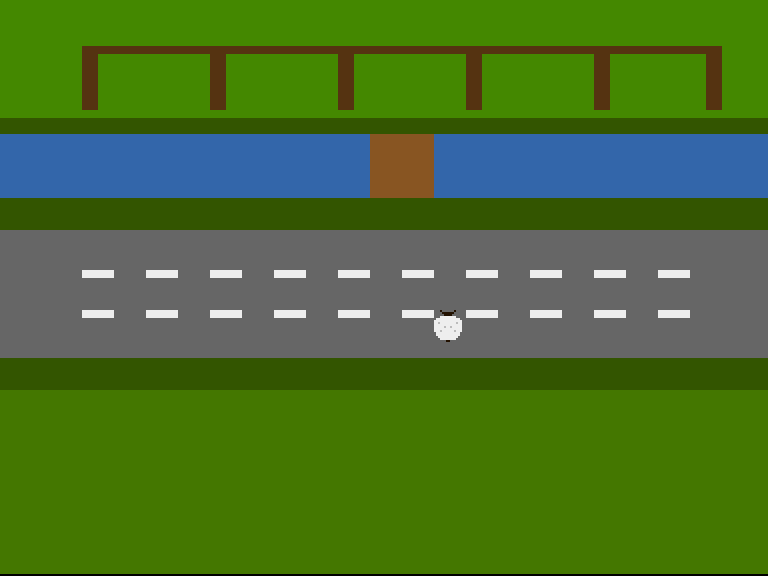
She’s left the field. The screenshot’s capture script holds up for forty frames and right for twenty — six hops north and three east — and there she stands, mid-lane, on tarmac she has no business being on. Nothing dangerous drives it. Yet.
Reading the Stick
The joystick lives on control port 2, readable at JOY1DAT. And the Amiga’s joystick decode is famously sideways — the register was designed for mice, and stick directions hide in counter bits:
- right = bit 1, left = bit 9 — fine so far;
- down = bit 0 XOR bit 1, up = bit 8 XOR bit 9 — not fine.
One trick untangles it: XOR the register with itself shifted right a bit, and the awkward pairs collapse into plainly testable bits.
steer:
            tst.w   cooldown
            beq.s   .ready
            subq.w  #1,cooldown         ; Still mid-hop rhythm — wait
            rts
.ready:
            move.w  JOY1DAT(a5),d0      ; Read the stick
            move.w  d0,d1
            lsr.w   #1,d1
            eor.w   d0,d1               ; Now: bit 0 = down, bit 8 = up

            btst    #8,d1               ; Up?
            beq.s   .notup
            sub.w   #STEP,sheepy
            bra.s   .stepped
.notup:
            btst    #0,d1               ; Down?
            beq.s   .notdown
            add.w   #STEP,sheepy
            bra.s   .stepped
.notdown:
            btst    #9,d0               ; Left?
            beq.s   .notleft
            sub.w   #STEP,sheepx
            bra.s   .stepped
.notleft:
            btst    #1,d0               ; Right?
            beq.s   .done               ; Stick centred — no hop
            add.w   #STEP,sheepx
.stepped:
            move.w  #COOLDOWN,cooldown  ; Set the hop rhythm

            ; --- Hold her inside the farm ---
            tst.w   sheepx
            bge.s   .xlow
            clr.w   sheepx
.xlow:      cmp.w   #320-16,sheepx
            ble.s   .xhigh
            move.w  #320-16,sheepx
.xhigh:     tst.w   sheepy
            bge.s   .ylow
            clr.w   sheepy
.ylow:      cmp.w   #256-16,sheepy
            ble.s   .done
            move.w  #256-16,sheepy
.done:
            rts
After the XOR, d1 bit 8 means up and bit 0 means down, while d0 keeps left and right where they always were. Four btsts, four directions.
Hop, Don’t Glide
A crosser wants steps, not sliding — Frogger’s frog hops, and so does our sheep. Two tweakables make the feel:
STEP        equ 8           ; Pixels per hop
COOLDOWN    equ 6           ; Frames between hops
When she hops, cooldown is set; until it counts back to zero, the stick is ignored. Hold up and she crosses the farm in a steady hop-hop-hop rhythm instead of gliding like a cursor. (Try COOLDOWN equ 0 and feel the difference — she stops being an animal at all.)
The last job in steer is the clamp: hold her inside the farm’s 320×256, so the bounds are part of the same routine that moves her.
Position Is Data
What the assembler computed once at build time in Unit 2, the CPU now computes sixty times a second:
updsprite:
            lea     sheep,a0
            move.w  sheepy,d0
            add.w   #$2c,d0             ; D0 = VSTART (beam line)
            move.w  d0,d1
            add.w   #16,d1              ; D1 = VSTOP (16 rows tall)
            move.w  sheepx,d2
            add.w   #$80,d2             ; D2 = HSTART (beam position)

            ; POS = VSTART[7:0] << 8 | HSTART[8:1]
            move.w  d0,d3
            lsl.w   #8,d3
            move.w  d2,d4
            lsr.w   #1,d4
            and.w   #$ff,d4
            or.w    d4,d3
            move.w  d3,(a0)             ; Write POS

            ; CTL = VSTOP[7:0] << 8 | V8START<<2 | V8STOP<<1 | H0START
            move.w  d1,d3
            and.w   #$ff,d3
            lsl.w   #8,d3
            btst    #8,d0               ; VSTART's ninth bit
            beq.s   .nv8s
            or.w    #%100,d3
.nv8s:      btst    #8,d1               ; VSTOP's ninth bit
            beq.s   .nv8e
            or.w    #%010,d3
.nv8e:      btst    #0,d2               ; HSTART's odd-pixel bit
            beq.s   .nh0
            or.w    #%001,d3
.nh0:       move.w  d3,2(a0)            ; Write CTL
            rts
Same packing, new author. Screen coordinates gain their beam offsets (+$2C, +$80), POS takes the vertical start and the top eight horizontal bits, CTL takes the stop row and the leftover ninth bits — needed for real now, because the bottom of the field pushes VSTART past 255. The sprite data’s control words start as zeros; updsprite writes them before the first frame is ever fetched, and every frame after.
One Frame, Exactly Once
This unit hides a trap that catches nearly everyone, so it’s worth springing deliberately. The Unit 1 main loop waited for the beam to reach line 0 — and that was fine while the loop body did nothing. Now the body does work, and a subtle bug appears: if steer and updsprite finish while the beam is still on line 0, the wait falls straight through and the body runs again in the same frame. The sheep hops at double speed, or worse — and inconsistently, because it depends on how long the body took.
The fix is to wait in two phases:
.vbleave:                               ; First: wait to LEAVE line 0
            move.l  VPOSR(a5),d0
            and.l   d1,d0
            beq.s   .vbleave
.vbwait:                                ; Then: wait to reach it again
            move.l  VPOSR(a5),d0
            and.l   d1,d0
            bne.s   .vbwait
Leave the line, then catch it coming round again — the body now runs exactly once per frame, whatever it costs. This capture caught the bug live: the first build of this unit hopped the sheep twice as far as the cooldown allowed, and the two-phase wait was the cure.
Experiment: The Feel of Her
STEP equ 4withCOOLDOWN equ 2— small quick steps; more nervous, more rodent.STEP equ 16withCOOLDOWN equ 10— full body-length bounds; more deliberate, almost turn-based.- Swap the order of the direction tests so down wins over up — then hold both (you can’t on a real stick, but the register can show it). Which direction should win a conflict, and why is “the first one tested” a design decision?
- Remove the clamp and walk her off the right-hand edge. Where does she reappear, and what does that tell you about HSTART’s nine bits?
The Complete Code
;──────────────────────────────────────────────────────────────
; FLOCK - A sheep-crossing arcade game for the Commodore Amiga
; Unit 3: Steering
;
; The joystick arrives. The sheep's position stops being a
; constant: each frame the CPU reads the stick, steps her
; across the farm in 8-pixel hops, and rewrites the sprite's
; POS/CTL words. Position is data — that's all movement is.
;──────────────────────────────────────────────────────────────
;══════════════════════════════════════════════════════════════
; TWEAKABLE VALUES — Change these and see what happens!
;══════════════════════════════════════════════════════════════
; Colours are $0RGB (4 bits per component, values 0-F)
COLOUR_FOLD_GRASS equ $0480 ; The fold's pasture
COLOUR_HEDGE equ $0350 ; Hedgerow between fold and stream
COLOUR_WATER equ $036A ; The stream
COLOUR_BANK equ $0350 ; Grassy bank below the stream
COLOUR_LANE equ $0666 ; The lane's tarmac
COLOUR_VERGE equ $0350 ; Verge below the lane
COLOUR_FIELD equ $0470 ; The field where the flock waits
COLOUR_FENCE equ $0531 ; Pen walls (bitplane, fold band)
COLOUR_WOOD equ $0852 ; The footbridge (bitplane, stream band)
COLOUR_DASH equ $0EEE ; Lane markings (bitplane, lane band)
COLOUR_TUFT equ $0360 ; Spare (bitplane, grass bands)
COLOUR_WOOL equ $0EEE ; The sheep's fleece (sprite colour 1)
COLOUR_FACE equ $0210 ; Her face, ears and tail (sprite colour 2)
COLOUR_SHADE equ $0BBB ; Fleece shading (sprite colour 3)
; Where each band begins (screen row 0-255, top to bottom)
ROW_HEDGE equ 40
ROW_STREAM equ 48
ROW_BANK equ 80
ROW_LANE equ 96
ROW_VERGE equ 160
ROW_FIELD equ 176
; Where the sheep starts, and how she moves
SHEEP_X equ 152
SHEEP_Y equ 200
STEP equ 8 ; Pixels per hop
COOLDOWN equ 6 ; Frames between hops
;══════════════════════════════════════════════════════════════
; HARDWARE REGISTERS
;══════════════════════════════════════════════════════════════
CUSTOM equ $dff000
DMACON equ $096 ; DMA control (write)
INTENA equ $09a ; Interrupt enable (write)
INTREQ equ $09c ; Interrupt request (write)
COP1LC equ $080 ; Copper list pointer
COPJMP1 equ $088 ; Copper restart strobe
VPOSR equ $004 ; Beam position
JOY1DAT equ $00c ; Joystick, control port 2
BPLCON0 equ $100 ; Bitplane control
BPLCON1 equ $102 ; Scroll
BPLCON2 equ $104 ; Priority
BPL1MOD equ $108 ; Odd plane modulo
DDFSTRT equ $092 ; Display data fetch start
DDFSTOP equ $094 ; Display data fetch stop
DIWSTRT equ $08e ; Display window start
DIWSTOP equ $090 ; Display window stop
BPL1PTH equ $0e0 ; Bitplane 1 pointer (high)
BPL1PTL equ $0e2 ; Bitplane 1 pointer (low)
SPR0PTH equ $120 ; Sprite 0 pointer (high)
COLOR00 equ $180 ; Background colour
COLOR01 equ $182 ; Bitplane colour 1
COLOR17 equ $1a2 ; Sprite 0/1 colour 1
COLOR18 equ $1a4 ; Sprite 0/1 colour 2
COLOR19 equ $1a6 ; Sprite 0/1 colour 3
ROW_BYTES equ 40 ; 320 pixels / 8
;══════════════════════════════════════════════════════════════
; CODE (Chip RAM — the Copper, planes and sprites live here)
;══════════════════════════════════════════════════════════════
section code,code_c
start:
lea CUSTOM,a5 ; A5 = custom chip base ($DFF000)
; --- Take over the machine ---
move.w #$7fff,INTENA(a5) ; Disable all interrupts
move.w #$7fff,INTREQ(a5) ; Clear pending interrupts
move.w #$7fff,DMACON(a5) ; Disable all DMA
; --- Point the Copper's bitplane MOVEs at our plane ---
lea plane,a0
move.l a0,d0
lea copbpl,a1
move.w d0,6(a1) ; Low word into the BPL1PTL move
swap d0
move.w d0,2(a1) ; High word into the BPL1PTH move
; --- Point sprite 0 at the sheep, the rest at nothing ---
lea copsprites,a1 ; Eight pointer pairs in the list
lea sheep,a0
move.l a0,d0
move.w d0,6(a1) ; Sprite 0 low word
swap d0
move.w d0,2(a1) ; Sprite 0 high word
lea nullspr,a0 ; Sprites 1-7: an empty sprite
move.l a0,d0
moveq #7-1,d6
.nulls:
lea 8(a1),a1 ; Next pointer pair in the list
move.w d0,6(a1)
swap d0
move.w d0,2(a1)
swap d0
dbf d6,.nulls
; --- Draw the farmyard's detail into the bitplane ---
bsr drawfarmyard
; --- Place the sheep at her starting spot ---
bsr updsprite
; --- Install Copper list ---
lea copperlist,a0
move.l a0,COP1LC(a5)
move.w d0,COPJMP1(a5) ; Strobe: restart Copper from COP1LC
; --- Enable DMA ---
move.w #$83a0,DMACON(a5) ; SET + DMAEN + BPLEN + COPEN + SPREN
; === Main Loop ===
mainloop:
; Wait for vertical blank — in two phases. If we only
; waited FOR line 0, a fast loop body could finish while
; the beam is still ON line 0 and run again in the same
; frame. Wait to leave line 0 first, then to reach it.
move.l #$1ff00,d1 ; Mask: bits 8-16 of beam position
.vbleave:
move.l VPOSR(a5),d0 ; Read beam position
and.l d1,d0 ; Isolate line number
beq.s .vbleave ; Loop while still on line 0
.vbwait:
move.l VPOSR(a5),d0 ; Read beam position
and.l d1,d0 ; Isolate line number
bne.s .vbwait ; Loop until line 0 again
bsr steer ; Read the stick, maybe hop
bsr updsprite ; Position is data: rewrite POS/CTL
; Check left mouse button (active low at CIAA)
btst #6,$bfe001 ; CIAA Port A, bit 6
bne.s mainloop ; Not pressed — keep going
; Button pressed — halt
.halt:
bra.s .halt
;══════════════════════════════════════════════════════════════
; STEER — read the joystick, hop the sheep
;
; JOY1DAT is control port 2. The decode is famously sideways:
; right = bit 1 left = bit 9
; down = bit 0 XOR bit 1 up = bit 8 XOR bit 9
; One XOR of the register with itself-shifted turns the two
; awkward pairs into plain testable bits.
;
; A hop is STEP pixels; COOLDOWN frames must pass between hops
; — that's what makes her *step* like a sheep rather than glide
; like a cursor.
;══════════════════════════════════════════════════════════════
steer:
tst.w cooldown
beq.s .ready
subq.w #1,cooldown ; Still mid-hop rhythm — wait
rts
.ready:
move.w JOY1DAT(a5),d0 ; Read the stick
move.w d0,d1
lsr.w #1,d1
eor.w d0,d1 ; Now: bit 0 = down, bit 8 = up
btst #8,d1 ; Up?
beq.s .notup
sub.w #STEP,sheepy
bra.s .stepped
.notup:
btst #0,d1 ; Down?
beq.s .notdown
add.w #STEP,sheepy
bra.s .stepped
.notdown:
btst #9,d0 ; Left?
beq.s .notleft
sub.w #STEP,sheepx
bra.s .stepped
.notleft:
btst #1,d0 ; Right?
beq.s .done ; Stick centred — no hop
add.w #STEP,sheepx
.stepped:
move.w #COOLDOWN,cooldown ; Set the hop rhythm
; --- Hold her inside the farm ---
tst.w sheepx
bge.s .xlow
clr.w sheepx
.xlow: cmp.w #320-16,sheepx
ble.s .xhigh
move.w #320-16,sheepx
.xhigh: tst.w sheepy
bge.s .ylow
clr.w sheepy
.ylow: cmp.w #256-16,sheepy
ble.s .done
move.w #256-16,sheepy
.done:
rts
;══════════════════════════════════════════════════════════════
; UPDSPRITE — pack screen (x, y) into the sprite's POS/CTL
;
; What the assembler did for us in Unit 2, the CPU now does
; every frame. Beam coordinates: VSTART = y + $2C, HSTART =
; x + $80 — and both can pass 255 near the bottom of the farm,
; so their ninth bits ride in CTL's low flags.
;══════════════════════════════════════════════════════════════
updsprite:
lea sheep,a0
move.w sheepy,d0
add.w #$2c,d0 ; D0 = VSTART (beam line)
move.w d0,d1
add.w #16,d1 ; D1 = VSTOP (16 rows tall)
move.w sheepx,d2
add.w #$80,d2 ; D2 = HSTART (beam position)
; POS = VSTART[7:0] << 8 | HSTART[8:1]
move.w d0,d3
lsl.w #8,d3
move.w d2,d4
lsr.w #1,d4
and.w #$ff,d4
or.w d4,d3
move.w d3,(a0) ; Write POS
; CTL = VSTOP[7:0] << 8 | V8START<<2 | V8STOP<<1 | H0START
move.w d1,d3
and.w #$ff,d3
lsl.w #8,d3
btst #8,d0 ; VSTART's ninth bit
beq.s .nv8s
or.w #%100,d3
.nv8s: btst #8,d1 ; VSTOP's ninth bit
beq.s .nv8e
or.w #%010,d3
.nv8e: btst #0,d2 ; HSTART's odd-pixel bit
beq.s .nh0
or.w #%001,d3
.nh0: move.w d3,2(a0) ; Write CTL
rts
;══════════════════════════════════════════════════════════════
; DRAW THE FARMYARD (unchanged from Unit 1)
;══════════════════════════════════════════════════════════════
drawfarmyard:
; --- The fold's pens (rows 4-35) ---
moveq #0,d0 ; x = byte 0
moveq #4,d1 ; row 4
moveq #ROW_BYTES,d2 ; full width
moveq #4,d3 ; 4 rows thick
bsr rectfill
lea penposts,a2 ; Post positions (byte columns)
moveq #6-1,d6 ; Six posts
.posts:
moveq #0,d0
move.b (a2)+,d0 ; x = next post column
moveq #8,d1 ; rows 8-35
moveq #1,d2 ; one byte wide
moveq #28,d3
bsr rectfill
dbf d6,.posts
; --- The footbridge (rows 48-79, mid-stream) ---
moveq #18,d0 ; byte 18 = pixel 144
moveq #ROW_STREAM,d1
moveq #4,d2 ; 32 pixels wide
moveq #32,d3 ; the stream's full height
bsr rectfill
; --- Lane markings: two dashed lines (rows 116, 136) ---
moveq #116,d1
bsr dashline
move.w #136,d1
; falls through
;──────────────────────────────────────────────────────────────
; dashline — a row of dashes across the lane
; d1 = starting row. 2 bytes on, 2 bytes off, 4 rows thick.
;──────────────────────────────────────────────────────────────
dashline:
moveq #0,d0 ; x = byte 0
.dash:
move.w d1,-(sp) ; rectfill trashes d1
move.w d0,-(sp) ; ...and d0
moveq #2,d2 ; 2 bytes of dash
moveq #4,d3 ; 4 rows thick
bsr rectfill
move.w (sp)+,d0
move.w (sp)+,d1
addq.w #4,d0 ; next dash 4 bytes along
cmp.w #ROW_BYTES,d0
blt.s .dash
rts
;──────────────────────────────────────────────────────────────
; rectfill — set a byte-aligned rectangle of pixels
; d0 = x (bytes) d1 = row d2 = width (bytes) d3 = height
; Trashes d1, d4, d5, a0, a1.
;──────────────────────────────────────────────────────────────
rectfill:
lea plane,a0
move.w d1,d4
mulu #ROW_BYTES,d4 ; row * 40
add.w d0,d4 ; + x
adda.w d4,a0 ; A0 = first byte of the rectangle
move.w d3,d4 ; D4 = rows to go
.row:
movea.l a0,a1
move.w d2,d5 ; D5 = bytes to go
.col:
move.b #$ff,(a1)+ ; 8 pixels on
subq.w #1,d5
bne.s .col
lea ROW_BYTES(a0),a0 ; down one row
subq.w #1,d4
bne.s .row
rts
penposts: dc.b 0,8,16,24,32,39 ; Byte columns of the six posts
even
;══════════════════════════════════════════════════════════════
; COPPER LIST — the farmyard, plus eight sprite pointers
;══════════════════════════════════════════════════════════════
copperlist:
; --- Display setup ---
dc.w DIWSTRT,$2c81 ; Window: top-left
dc.w DIWSTOP,$2cc1 ; Window: bottom-right
dc.w DDFSTRT,$0038 ; Fetch start (lores)
dc.w DDFSTOP,$00d0 ; Fetch stop
dc.w BPLCON0,$1200 ; 1 bitplane, colour burst on
dc.w BPLCON1,$0000 ; No scroll
dc.w BPLCON2,$0024 ; Sprites in front of playfield
dc.w BPL1MOD,$0000 ; No modulo — rows pack tight
copbpl:
dc.w BPL1PTH,$0000 ; Plane address, poked in
dc.w BPL1PTL,$0000 ; by the CPU at startup
copsprites:
dc.w SPR0PTH+0,$0000 ; Sprite 0: the sheep (poked in)
dc.w SPR0PTH+2,$0000
dc.w SPR0PTH+4,$0000 ; Sprites 1-7: the null sprite
dc.w SPR0PTH+6,$0000
dc.w SPR0PTH+8,$0000
dc.w SPR0PTH+10,$0000
dc.w SPR0PTH+12,$0000
dc.w SPR0PTH+14,$0000
dc.w SPR0PTH+16,$0000
dc.w SPR0PTH+18,$0000
dc.w SPR0PTH+20,$0000
dc.w SPR0PTH+22,$0000
dc.w SPR0PTH+24,$0000
dc.w SPR0PTH+26,$0000
dc.w SPR0PTH+28,$0000
dc.w SPR0PTH+30,$0000
; --- The sheep's colours (sprites 0-1 share 17-19) ---
dc.w COLOR17,COLOUR_WOOL
dc.w COLOR18,COLOUR_FACE
dc.w COLOR19,COLOUR_SHADE
; --- THE FOLD (from the top of the frame) ---
dc.w COLOR00,COLOUR_FOLD_GRASS
dc.w COLOR01,COLOUR_FENCE ; Pixels here are fence
; --- HEDGEROW (row 40) ---
dc.w $5401,$fffe ; Wait: line $2C+40 = $54
dc.w COLOR00,COLOUR_HEDGE
dc.w COLOR01,COLOUR_TUFT
; --- THE STREAM (row 48) ---
dc.w $5c01,$fffe ; Wait: line $2C+48 = $5C
dc.w COLOR00,COLOUR_WATER
dc.w COLOR01,COLOUR_WOOD ; Pixels here are bridge
; --- THE BANK (row 80) ---
dc.w $7c01,$fffe ; Wait: line $2C+80 = $7C
dc.w COLOR00,COLOUR_BANK
dc.w COLOR01,COLOUR_TUFT
; --- THE LANE (row 96) ---
dc.w $8c01,$fffe ; Wait: line $2C+96 = $8C
dc.w COLOR00,COLOUR_LANE
dc.w COLOR01,COLOUR_DASH ; Pixels here are markings
; --- THE VERGE (row 160) ---
dc.w $cc01,$fffe ; Wait: line $2C+160 = $CC
dc.w COLOR00,COLOUR_VERGE
dc.w COLOR01,COLOUR_TUFT
; --- THE FIELD (row 176, down to the bottom) ---
dc.w $dc01,$fffe ; Wait: line $2C+176
dc.w COLOR00,COLOUR_FIELD
dc.w COLOR01,COLOUR_TUFT
; --- END OF COPPER LIST ---
dc.w $ffff,$fffe ; Wait for impossible position
;══════════════════════════════════════════════════════════════
; THE SHEEP — sprite 0
;
; The control words are zero here: updsprite packs them from
; sheepx/sheepy before the display ever fetches the sprite,
; and again every frame. Position is data the program owns.
;══════════════════════════════════════════════════════════════
section data,data_c
sheep:
dc.w 0 ; POS — written by updsprite
dc.w 0 ; CTL — written by updsprite
; plane A (fleece) plane B (face/shade)
dc.w %0000000000000000,%0000100000010000 ; ..ears..
dc.w %0000000000000000,%0000011111100000 ; ..head..
dc.w %0000000000000000,%0000001111000000 ; ..face..
dc.w %0000111111110000,%0000000000000000 ; fleece ruff
dc.w %0011111111111100,%0000000000000000 ; shoulders
dc.w %0111111111111110,%0000000000000000
dc.w %0111111111111110,%0001000000001000 ; shade flecks
dc.w %0111111111111110,%0000000000000000
dc.w %0111111111111110,%0000001001000000 ; shade flecks
dc.w %0111111111111110,%0000000000000000
dc.w %0111111111111110,%0000100000010000 ; shade flecks
dc.w %0011111111111100,%0000000000000000 ; haunches
dc.w %0011111111111100,%0000000000000000
dc.w %0001111111111000,%0000000000000000
dc.w %0000111111110000,%0000000000000000 ; rump
dc.w %0000000000000000,%0000000110000000 ; ..tail..
dc.w 0,0 ; End of sprite
nullspr: dc.w 0,0 ; A sprite that displays nothing
dc.w 0,0
; --- The sheep's state ---
sheepx: dc.w SHEEP_X ; Screen x (0-304)
sheepy: dc.w SHEEP_Y ; Screen y (0-240)
cooldown: dc.w 0 ; Frames until the next hop
;══════════════════════════════════════════════════════════════
; THE BITPLANE (Chip RAM)
;══════════════════════════════════════════════════════════════
plane: ds.b ROW_BYTES*256 ; One plane, 320 x 256
If It Doesn’t Work
- She moves too fast, or inconsistently? Your loop is running more than once per frame — the single-phase vblank wait bug from above. Wait to leave line 0 before waiting to reach it.
- Still a shade fast, even with both phases — maybe one frame in nine? That’s real, it’s subtle, and it isn’t your fault yet. The beam counter spans two registers and a longword read can catch it mid-crossing. Unit 12 meets this properly, when a mechanic finally forces it into the open; until then it changes nothing you can see.
- She doesn’t move at all? Check you’re reading
JOY1DAT($DFF00C, port 2) —JOY0DATis the mouse port. In an emulator, make sure a joystick is mapped to port 2. - Up/down work but left/right are swapped — or diagonal chaos? The decode is the sideways part: left is bit 9, right is bit 1, and up/down need the XOR. Test against the table, not intuition.
- She tears or vanishes near the bottom of the field? The ninth bits. Below screen row 211,
VSTARTexceeds 255 and theV8flags in CTL must be set —updspritehandles it; a hand-packed POS/CTL probably doesn’t.
Try This
- Diagonals. The current
steertakes the first active direction and ignores the rest. Make a hop apply both axes when the stick is diagonal. Does the farm feel better with or without it? (Frogger says without; you’re allowed to disagree.) - A footprint trail. Each hop, before moving, write one dark pixel into the bitplane at her old position —
rectfillwith a 1×1 rectangle. Watch her path accumulate across the farm. (You’ve built a primitive paint program; you’ve also previewed why moving bitplane graphics needs save/restore, which sprites let us skip.) - Count her speed. At
STEP 8/COOLDOWN 6, how many seconds does she take to cross all 256 rows on a 50Hz PAL machine? Check your answer against the screen with a stopwatch.
What You’ve Learnt
JOY1DAT— control port 2’s stick, and the sideways decode: right bit 1, left bit 9, up/down behind an XOR.- Hop-and-cooldown — input feel as two constants; a step rhythm instead of a glide. The first game-feel decision in the track.
- Runtime POS/CTL packing — the same arithmetic the assembler did, now done per frame; the ninth bits earn their keep at the bottom of the screen.
- The two-phase vblank wait — run the loop body exactly once per frame, however fast it finishes. Every later unit stands on this loop.
- Bounds as part of movement — clamp where you move, so there’s exactly one place position changes.
What’s Next
In Unit 4 she stops gliding rigidly and starts to amble — a two-frame walk cycle, swapped by pointing the sprite at different data as she steps. One sheep, two pictures, and suddenly she’s alive.