The Amble
Two pictures of the same sheep and a pointer that alternates between them on every hop. Animation is choosing which data the sprite channel fetches — nothing more.
She waddles now.
Hold the stick and watch her: feet plant on one diagonal, then the other; her tail swings with each step. Stop, and she stands still. The sheep has gone from a token that teleports in 8-pixel jumps to an animal that walks — and the entire mechanism is one variable and a pointer.
This is the cheapest animation on any machine, and the Amiga makes it almost embarrassing: the sprite channel fetches its image from wherever its pointer aims, every frame, forever. Aim it somewhere else and the sheep is the other picture. No drawing, no copying, no erasing. Choosing which data gets fetched is the whole art.
The Display
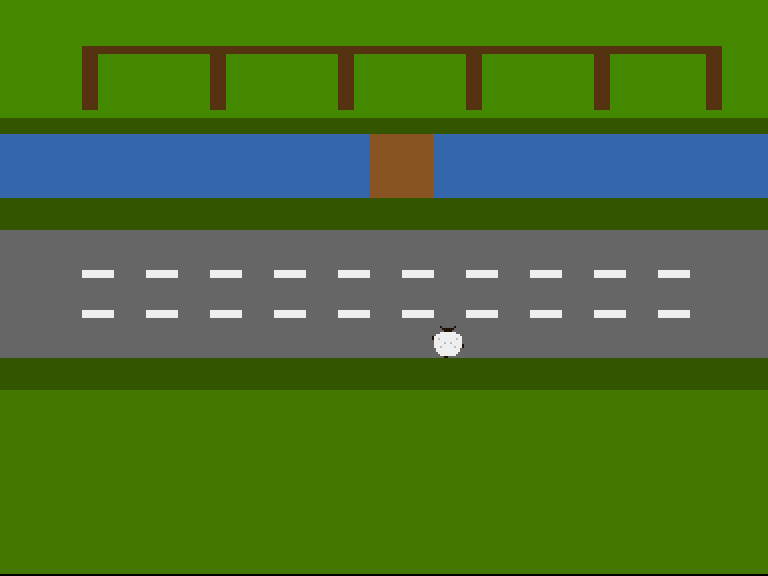
Caught mid-amble at the lane’s edge: one forefoot out on her left, the opposite hind foot trailing on her right, tail mid-swing. The other step image mirrors the diagonal. Alternating between them as she hops is what your eye reads as walking.
Two Pictures of One Sheep
The data section now holds sheep0 and sheep1 — the full sprite structure twice, each with its own control words, image and terminator:
sheep0:
            dc.w    0                   ; POS — written by updsprite
            dc.w    0                   ; CTL — written by updsprite

            ;        plane A (fleece)    plane B (face/shade/feet)
            dc.w    %0000000000000000,%0000100000010000  ; ..ears..
            dc.w    %0000000000000000,%0000011111100000  ; ..head..
            dc.w    %0000000000000000,%0000001111000000  ; ..face..
            dc.w    %0000111111110000,%0000000000000000  ; fleece ruff
            dc.w    %0011111111111100,%0000000000000000  ; shoulders
            dc.w    %0111111111111110,%1000000000000000  ; < front foot
            dc.w    %0111111111111110,%1001000000001000  ; < + flecks
            dc.w    %0111111111111110,%0000000000000000
            dc.w    %0111111111111110,%0000001001000000  ; shade flecks
            dc.w    %0111111111111110,%0000000000000001  ; back foot >
            dc.w    %0111111111111110,%0000100000010001  ; + flecks  >
            dc.w    %0011111111111100,%0000000000000000  ; haunches
            dc.w    %0011111111111100,%0000000000000000
            dc.w    %0001111111111000,%0000000000000000
            dc.w    %0000111111110000,%0000000000000000  ; rump
            dc.w    %0000000000000000,%0000001100000000  ; tail, left

            dc.w    0,0                 ; End of sprite

sheep1:
            dc.w    0                   ; POS — written by updsprite
            dc.w    0                   ; CTL — written by updsprite

            ;        plane A (fleece)    plane B (face/shade/feet)
            dc.w    %0000000000000000,%0000100000010000  ; ..ears..
            dc.w    %0000000000000000,%0000011111100000  ; ..head..
            dc.w    %0000000000000000,%0000001111000000  ; ..face..
            dc.w    %0000111111110000,%0000000000000000  ; fleece ruff
            dc.w    %0011111111111100,%0000000000000000  ; shoulders
            dc.w    %0111111111111110,%0000000000000001  ; front foot >
            dc.w    %0111111111111110,%0001000000001001  ; + flecks  >
            dc.w    %0111111111111110,%0000000000000000
            dc.w    %0111111111111110,%0000001001000000  ; shade flecks
            dc.w    %0111111111111110,%1000000000000000  ; < back foot
            dc.w    %0111111111111110,%1000100000010000  ; < + flecks
            dc.w    %0011111111111100,%0000000000000000  ; haunches
            dc.w    %0011111111111100,%0000000000000000
            dc.w    %0001111111111000,%0000000000000000
            dc.w    %0000111111110000,%0000000000000000  ; rump
            dc.w    %0000000000000000,%0000000011000000  ; tail, right

            dc.w    0,0                 ; End of sprite
Compare the % grids row by row. The body, head, ears and flecks are identical; what changes is four bits of plane B — a foot nub at each end of one diagonal, then the other — and the tail’s two pixels swinging side to side. Tiny differences read as gait; big differences read as flicker. The restraint is the craft.
(Each image gets its own POS/CTL words because each is a complete, fetchable sprite. updsprite now writes the same position into both, so whichever picture shows, she stands in the same spot.)
The Pointer Is the Animator
One new variable holds which step she’s on, and steer flips it as part of taking a hop:
.stepped:
            move.w  #COOLDOWN,cooldown  ; Set the hop rhythm
            eori.w  #1,curframe         ; The other feet, next picture
Note where that flip lives: inside the hop, not the main loop. She changes step when she steps — stand still and the picture freezes mid-stance, exactly as an animal stands. Animation driven by movement, not by time, is the right feel for an amble (a flag fluttering or water shimmering would want the opposite choice).
Then, once per frame, showframe aims the hardware at the current picture:
showframe:
            lea     sheep0,a0
            tst.w   curframe
            beq.s   .picked
            lea     sheep1,a0
.picked:
            move.l  a0,d0
            lea     copsprites,a1
            move.w  d0,6(a1)            ; Sprite 0 low word
            swap    d0
            move.w  d0,2(a1)            ; Sprite 0 high word
            rts
It’s the same poke the startup code performed in Unit 2 — write an address into the Copper list’s sprite 0 pointer words — now performed every frame with a chosen address. That’s the upgrade in one sentence: the pointer stopped being configuration and became state.
Experiment: Her Gait Is Yours
- Make the feet bigger — two bits per foot instead of one. At what size does “waddle” become “scuttle”?
- Re-time her:
COOLDOWN equ 10gives a slow, deliberate plod that shows each stance in full.COOLDOWN equ 3trots. - Add a third step image —
sheep2, feet tucked — and cycle 0 → 1 → 0 → 2 (plant, pass, plant, pass).curframebecomes a counter andshowframea table lookup. Does four-beat read better than two-beat? - Break the discipline on purpose: flip
curframein the main loop instead of in.stepped, every frame. She vibrates on the spot — animation divorced from movement. Now you’ve felt why the flip lives in the hop.
The Complete Code
;──────────────────────────────────────────────────────────────
; FLOCK - A sheep-crossing arcade game for the Commodore Amiga
; Unit 4: The Amble
;
; Two pictures of the same sheep — feet on opposite corners,
; tail mid-wag — and a pointer that alternates between them
; on every hop. That's a walk cycle: the sprite channel
; fetches whichever image the pointer names this frame. She
; only animates when she steps, which is exactly how an
; animal walks.
;──────────────────────────────────────────────────────────────
;══════════════════════════════════════════════════════════════
; TWEAKABLE VALUES — Change these and see what happens!
;══════════════════════════════════════════════════════════════
; Colours are $0RGB (4 bits per component, values 0-F)
COLOUR_FOLD_GRASS equ $0480 ; The fold's pasture
COLOUR_HEDGE equ $0350 ; Hedgerow between fold and stream
COLOUR_WATER equ $036A ; The stream
COLOUR_BANK equ $0350 ; Grassy bank below the stream
COLOUR_LANE equ $0666 ; The lane's tarmac
COLOUR_VERGE equ $0350 ; Verge below the lane
COLOUR_FIELD equ $0470 ; The field where the flock waits
COLOUR_FENCE equ $0531 ; Pen walls (bitplane, fold band)
COLOUR_WOOD equ $0852 ; The footbridge (bitplane, stream band)
COLOUR_DASH equ $0EEE ; Lane markings (bitplane, lane band)
COLOUR_TUFT equ $0360 ; Spare (bitplane, grass bands)
COLOUR_WOOL equ $0EEE ; The sheep's fleece (sprite colour 1)
COLOUR_FACE equ $0210 ; Her face, ears and tail (sprite colour 2)
COLOUR_SHADE equ $0BBB ; Fleece shading (sprite colour 3)
; Where each band begins (screen row 0-255, top to bottom)
ROW_HEDGE equ 40
ROW_STREAM equ 48
ROW_BANK equ 80
ROW_LANE equ 96
ROW_VERGE equ 160
ROW_FIELD equ 176
; Where the sheep starts, and how she moves
SHEEP_X equ 152
SHEEP_Y equ 200
STEP equ 8 ; Pixels per hop
COOLDOWN equ 6 ; Frames between hops
;══════════════════════════════════════════════════════════════
; HARDWARE REGISTERS
;══════════════════════════════════════════════════════════════
CUSTOM equ $dff000
DMACON equ $096 ; DMA control (write)
INTENA equ $09a ; Interrupt enable (write)
INTREQ equ $09c ; Interrupt request (write)
COP1LC equ $080 ; Copper list pointer
COPJMP1 equ $088 ; Copper restart strobe
VPOSR equ $004 ; Beam position
JOY1DAT equ $00c ; Joystick, control port 2
BPLCON0 equ $100 ; Bitplane control
BPLCON1 equ $102 ; Scroll
BPLCON2 equ $104 ; Priority
BPL1MOD equ $108 ; Odd plane modulo
DDFSTRT equ $092 ; Display data fetch start
DDFSTOP equ $094 ; Display data fetch stop
DIWSTRT equ $08e ; Display window start
DIWSTOP equ $090 ; Display window stop
BPL1PTH equ $0e0 ; Bitplane 1 pointer (high)
BPL1PTL equ $0e2 ; Bitplane 1 pointer (low)
SPR0PTH equ $120 ; Sprite 0 pointer (high)
COLOR00 equ $180 ; Background colour
COLOR01 equ $182 ; Bitplane colour 1
COLOR17 equ $1a2 ; Sprite 0/1 colour 1
COLOR18 equ $1a4 ; Sprite 0/1 colour 2
COLOR19 equ $1a6 ; Sprite 0/1 colour 3
ROW_BYTES equ 40 ; 320 pixels / 8
;══════════════════════════════════════════════════════════════
; CODE (Chip RAM — the Copper, planes and sprites live here)
;══════════════════════════════════════════════════════════════
section code,code_c
start:
lea CUSTOM,a5 ; A5 = custom chip base ($DFF000)
; --- Take over the machine ---
move.w #$7fff,INTENA(a5) ; Disable all interrupts
move.w #$7fff,INTREQ(a5) ; Clear pending interrupts
move.w #$7fff,DMACON(a5) ; Disable all DMA
; --- Point the Copper's bitplane MOVEs at our plane ---
lea plane,a0
move.l a0,d0
lea copbpl,a1
move.w d0,6(a1) ; Low word into the BPL1PTL move
swap d0
move.w d0,2(a1) ; High word into the BPL1PTH move
; --- Point sprite 0 at the sheep, the rest at nothing ---
lea copsprites,a1 ; Eight pointer pairs in the list
lea sheep0,a0
move.l a0,d0
move.w d0,6(a1) ; Sprite 0 low word
swap d0
move.w d0,2(a1) ; Sprite 0 high word
lea nullspr,a0 ; Sprites 1-7: an empty sprite
move.l a0,d0
moveq #7-1,d6
.nulls:
lea 8(a1),a1 ; Next pointer pair in the list
move.w d0,6(a1)
swap d0
move.w d0,2(a1)
swap d0
dbf d6,.nulls
; --- Draw the farmyard's detail into the bitplane ---
bsr drawfarmyard
; --- Place the sheep at her starting spot ---
bsr updsprite
; --- Install Copper list ---
lea copperlist,a0
move.l a0,COP1LC(a5)
move.w d0,COPJMP1(a5) ; Strobe: restart Copper from COP1LC
; --- Enable DMA ---
move.w #$83a0,DMACON(a5) ; SET + DMAEN + BPLEN + COPEN + SPREN
; === Main Loop ===
mainloop:
; Wait for vertical blank — in two phases. If we only
; waited FOR line 0, a fast loop body could finish while
; the beam is still ON line 0 and run again in the same
; frame. Wait to leave line 0 first, then to reach it.
move.l #$1ff00,d1 ; Mask: bits 8-16 of beam position
.vbleave:
move.l VPOSR(a5),d0 ; Read beam position
and.l d1,d0 ; Isolate line number
beq.s .vbleave ; Loop while still on line 0
.vbwait:
move.l VPOSR(a5),d0 ; Read beam position
and.l d1,d0 ; Isolate line number
bne.s .vbwait ; Loop until line 0 again
bsr steer ; Read the stick, maybe hop
bsr updsprite ; Position is data: rewrite POS/CTL
bsr showframe ; Point sprite 0 at this step's image
; Check left mouse button (active low at CIAA)
btst #6,$bfe001 ; CIAA Port A, bit 6
bne.s mainloop ; Not pressed — keep going
; Button pressed — halt
.halt:
bra.s .halt
;══════════════════════════════════════════════════════════════
; STEER — read the joystick, hop the sheep
;
; JOY1DAT is control port 2. The decode is famously sideways:
; right = bit 1 left = bit 9
; down = bit 0 XOR bit 1 up = bit 8 XOR bit 9
; One XOR of the register with itself-shifted turns the two
; awkward pairs into plain testable bits.
;
; A hop is STEP pixels; COOLDOWN frames must pass between hops
; — that's what makes her *step* like a sheep rather than glide
; like a cursor.
;══════════════════════════════════════════════════════════════
steer:
tst.w cooldown
beq.s .ready
subq.w #1,cooldown ; Still mid-hop rhythm — wait
rts
.ready:
move.w JOY1DAT(a5),d0 ; Read the stick
move.w d0,d1
lsr.w #1,d1
eor.w d0,d1 ; Now: bit 0 = down, bit 8 = up
btst #8,d1 ; Up?
beq.s .notup
sub.w #STEP,sheepy
bra.s .stepped
.notup:
btst #0,d1 ; Down?
beq.s .notdown
add.w #STEP,sheepy
bra.s .stepped
.notdown:
btst #9,d0 ; Left?
beq.s .notleft
sub.w #STEP,sheepx
bra.s .stepped
.notleft:
btst #1,d0 ; Right?
beq.s .done ; Stick centred — no hop
add.w #STEP,sheepx
.stepped:
move.w #COOLDOWN,cooldown ; Set the hop rhythm
eori.w #1,curframe ; The other feet, next picture
; --- Hold her inside the farm ---
tst.w sheepx
bge.s .xlow
clr.w sheepx
.xlow: cmp.w #320-16,sheepx
ble.s .xhigh
move.w #320-16,sheepx
.xhigh: tst.w sheepy
bge.s .ylow
clr.w sheepy
.ylow: cmp.w #256-16,sheepy
ble.s .done
move.w #256-16,sheepy
.done:
rts
;══════════════════════════════════════════════════════════════
; UPDSPRITE — pack screen (x, y) into the sprite's POS/CTL
;
; What the assembler did for us in Unit 2, the CPU now does
; every frame. Beam coordinates: VSTART = y + $2C, HSTART =
; x + $80 — and both can pass 255 near the bottom of the farm,
; so their ninth bits ride in CTL's low flags.
;
; Both step images get the same control words, so whichever
; one showframe picks, she stands in the same place.
;══════════════════════════════════════════════════════════════
updsprite:
move.w sheepy,d0
add.w #$2c,d0 ; D0 = VSTART (beam line)
move.w d0,d1
add.w #16,d1 ; D1 = VSTOP (16 rows tall)
move.w sheepx,d2
add.w #$80,d2 ; D2 = HSTART (beam position)
; POS = VSTART[7:0] << 8 | HSTART[8:1]
move.w d0,d3
lsl.w #8,d3
move.w d2,d4
lsr.w #1,d4
and.w #$ff,d4
or.w d4,d3 ; D3 = POS
; CTL = VSTOP[7:0] << 8 | V8START<<2 | V8STOP<<1 | H0START
move.w d1,d5
and.w #$ff,d5
lsl.w #8,d5
btst #8,d0 ; VSTART's ninth bit
beq.s .nv8s
or.w #%100,d5
.nv8s: btst #8,d1 ; VSTOP's ninth bit
beq.s .nv8e
or.w #%010,d5
.nv8e: btst #0,d2 ; HSTART's odd-pixel bit
beq.s .nh0
or.w #%001,d5 ; D5 = CTL
.nh0:
lea sheep0,a0 ; Same place, both pictures
move.w d3,(a0)
move.w d5,2(a0)
lea sheep1,a0
move.w d3,(a0)
move.w d5,2(a0)
rts
;══════════════════════════════════════════════════════════════
; SHOWFRAME — point sprite 0 at this step's image
;
; Animation is nothing but choosing which data the channel
; fetches. The Copper list's sprite 0 pointer words are
; rewritten with whichever picture curframe names — the same
; poke the startup code did, now done every frame.
;══════════════════════════════════════════════════════════════
showframe:
lea sheep0,a0
tst.w curframe
beq.s .picked
lea sheep1,a0
.picked:
move.l a0,d0
lea copsprites,a1
move.w d0,6(a1) ; Sprite 0 low word
swap d0
move.w d0,2(a1) ; Sprite 0 high word
rts
;══════════════════════════════════════════════════════════════
; DRAW THE FARMYARD (unchanged from Unit 1)
;══════════════════════════════════════════════════════════════
drawfarmyard:
; --- The fold's pens (rows 4-35) ---
moveq #0,d0 ; x = byte 0
moveq #4,d1 ; row 4
moveq #ROW_BYTES,d2 ; full width
moveq #4,d3 ; 4 rows thick
bsr rectfill
lea penposts,a2 ; Post positions (byte columns)
moveq #6-1,d6 ; Six posts
.posts:
moveq #0,d0
move.b (a2)+,d0 ; x = next post column
moveq #8,d1 ; rows 8-35
moveq #1,d2 ; one byte wide
moveq #28,d3
bsr rectfill
dbf d6,.posts
; --- The footbridge (rows 48-79, mid-stream) ---
moveq #18,d0 ; byte 18 = pixel 144
moveq #ROW_STREAM,d1
moveq #4,d2 ; 32 pixels wide
moveq #32,d3 ; the stream's full height
bsr rectfill
; --- Lane markings: two dashed lines (rows 116, 136) ---
moveq #116,d1
bsr dashline
move.w #136,d1
; falls through
;──────────────────────────────────────────────────────────────
; dashline — a row of dashes across the lane
; d1 = starting row. 2 bytes on, 2 bytes off, 4 rows thick.
;──────────────────────────────────────────────────────────────
dashline:
moveq #0,d0 ; x = byte 0
.dash:
move.w d1,-(sp) ; rectfill trashes d1
move.w d0,-(sp) ; ...and d0
moveq #2,d2 ; 2 bytes of dash
moveq #4,d3 ; 4 rows thick
bsr rectfill
move.w (sp)+,d0
move.w (sp)+,d1
addq.w #4,d0 ; next dash 4 bytes along
cmp.w #ROW_BYTES,d0
blt.s .dash
rts
;──────────────────────────────────────────────────────────────
; rectfill — set a byte-aligned rectangle of pixels
; d0 = x (bytes) d1 = row d2 = width (bytes) d3 = height
; Trashes d1, d4, d5, a0, a1.
;──────────────────────────────────────────────────────────────
rectfill:
lea plane,a0
move.w d1,d4
mulu #ROW_BYTES,d4 ; row * 40
add.w d0,d4 ; + x
adda.w d4,a0 ; A0 = first byte of the rectangle
move.w d3,d4 ; D4 = rows to go
.row:
movea.l a0,a1
move.w d2,d5 ; D5 = bytes to go
.col:
move.b #$ff,(a1)+ ; 8 pixels on
subq.w #1,d5
bne.s .col
lea ROW_BYTES(a0),a0 ; down one row
subq.w #1,d4
bne.s .row
rts
penposts: dc.b 0,8,16,24,32,39 ; Byte columns of the six posts
even
;══════════════════════════════════════════════════════════════
; COPPER LIST — the farmyard, plus eight sprite pointers
;══════════════════════════════════════════════════════════════
copperlist:
; --- Display setup ---
dc.w DIWSTRT,$2c81 ; Window: top-left
dc.w DIWSTOP,$2cc1 ; Window: bottom-right
dc.w DDFSTRT,$0038 ; Fetch start (lores)
dc.w DDFSTOP,$00d0 ; Fetch stop
dc.w BPLCON0,$1200 ; 1 bitplane, colour burst on
dc.w BPLCON1,$0000 ; No scroll
dc.w BPLCON2,$0024 ; Sprites in front of playfield
dc.w BPL1MOD,$0000 ; No modulo — rows pack tight
copbpl:
dc.w BPL1PTH,$0000 ; Plane address, poked in
dc.w BPL1PTL,$0000 ; by the CPU at startup
copsprites:
dc.w SPR0PTH+0,$0000 ; Sprite 0: the sheep (poked in)
dc.w SPR0PTH+2,$0000
dc.w SPR0PTH+4,$0000 ; Sprites 1-7: the null sprite
dc.w SPR0PTH+6,$0000
dc.w SPR0PTH+8,$0000
dc.w SPR0PTH+10,$0000
dc.w SPR0PTH+12,$0000
dc.w SPR0PTH+14,$0000
dc.w SPR0PTH+16,$0000
dc.w SPR0PTH+18,$0000
dc.w SPR0PTH+20,$0000
dc.w SPR0PTH+22,$0000
dc.w SPR0PTH+24,$0000
dc.w SPR0PTH+26,$0000
dc.w SPR0PTH+28,$0000
dc.w SPR0PTH+30,$0000
; --- The sheep's colours (sprites 0-1 share 17-19) ---
dc.w COLOR17,COLOUR_WOOL
dc.w COLOR18,COLOUR_FACE
dc.w COLOR19,COLOUR_SHADE
; --- THE FOLD (from the top of the frame) ---
dc.w COLOR00,COLOUR_FOLD_GRASS
dc.w COLOR01,COLOUR_FENCE ; Pixels here are fence
; --- HEDGEROW (row 40) ---
dc.w $5401,$fffe ; Wait: line $2C+40 = $54
dc.w COLOR00,COLOUR_HEDGE
dc.w COLOR01,COLOUR_TUFT
; --- THE STREAM (row 48) ---
dc.w $5c01,$fffe ; Wait: line $2C+48 = $5C
dc.w COLOR00,COLOUR_WATER
dc.w COLOR01,COLOUR_WOOD ; Pixels here are bridge
; --- THE BANK (row 80) ---
dc.w $7c01,$fffe ; Wait: line $2C+80 = $7C
dc.w COLOR00,COLOUR_BANK
dc.w COLOR01,COLOUR_TUFT
; --- THE LANE (row 96) ---
dc.w $8c01,$fffe ; Wait: line $2C+96 = $8C
dc.w COLOR00,COLOUR_LANE
dc.w COLOR01,COLOUR_DASH ; Pixels here are markings
; --- THE VERGE (row 160) ---
dc.w $cc01,$fffe ; Wait: line $2C+160 = $CC
dc.w COLOR00,COLOUR_VERGE
dc.w COLOR01,COLOUR_TUFT
; --- THE FIELD (row 176, down to the bottom) ---
dc.w $dc01,$fffe ; Wait: line $2C+176
dc.w COLOR00,COLOUR_FIELD
dc.w COLOR01,COLOUR_TUFT
; --- END OF COPPER LIST ---
dc.w $ffff,$fffe ; Wait for impossible position
;══════════════════════════════════════════════════════════════
; THE SHEEP — sprite 0, two step images
;
; Same sheep, two pictures. Step image 0: front-left and
; back-right feet planted. Step image 1: the other diagonal,
; tail swung the other way. Alternate them as she hops and
; she waddles. The control words are written by updsprite.
;══════════════════════════════════════════════════════════════
section data,data_c
sheep0:
dc.w 0 ; POS — written by updsprite
dc.w 0 ; CTL — written by updsprite
; plane A (fleece) plane B (face/shade/feet)
dc.w %0000000000000000,%0000100000010000 ; ..ears..
dc.w %0000000000000000,%0000011111100000 ; ..head..
dc.w %0000000000000000,%0000001111000000 ; ..face..
dc.w %0000111111110000,%0000000000000000 ; fleece ruff
dc.w %0011111111111100,%0000000000000000 ; shoulders
dc.w %0111111111111110,%1000000000000000 ; < front foot
dc.w %0111111111111110,%1001000000001000 ; < + flecks
dc.w %0111111111111110,%0000000000000000
dc.w %0111111111111110,%0000001001000000 ; shade flecks
dc.w %0111111111111110,%0000000000000001 ; back foot >
dc.w %0111111111111110,%0000100000010001 ; + flecks >
dc.w %0011111111111100,%0000000000000000 ; haunches
dc.w %0011111111111100,%0000000000000000
dc.w %0001111111111000,%0000000000000000
dc.w %0000111111110000,%0000000000000000 ; rump
dc.w %0000000000000000,%0000001100000000 ; tail, left
dc.w 0,0 ; End of sprite
sheep1:
dc.w 0 ; POS — written by updsprite
dc.w 0 ; CTL — written by updsprite
; plane A (fleece) plane B (face/shade/feet)
dc.w %0000000000000000,%0000100000010000 ; ..ears..
dc.w %0000000000000000,%0000011111100000 ; ..head..
dc.w %0000000000000000,%0000001111000000 ; ..face..
dc.w %0000111111110000,%0000000000000000 ; fleece ruff
dc.w %0011111111111100,%0000000000000000 ; shoulders
dc.w %0111111111111110,%0000000000000001 ; front foot >
dc.w %0111111111111110,%0001000000001001 ; + flecks >
dc.w %0111111111111110,%0000000000000000
dc.w %0111111111111110,%0000001001000000 ; shade flecks
dc.w %0111111111111110,%1000000000000000 ; < back foot
dc.w %0111111111111110,%1000100000010000 ; < + flecks
dc.w %0011111111111100,%0000000000000000 ; haunches
dc.w %0011111111111100,%0000000000000000
dc.w %0001111111111000,%0000000000000000
dc.w %0000111111110000,%0000000000000000 ; rump
dc.w %0000000000000000,%0000000011000000 ; tail, right
dc.w 0,0 ; End of sprite
nullspr: dc.w 0,0 ; A sprite that displays nothing
dc.w 0,0
; --- The sheep's state ---
sheepx: dc.w SHEEP_X ; Screen x (0-304)
sheepy: dc.w SHEEP_Y ; Screen y (0-240)
cooldown: dc.w 0 ; Frames until the next hop
curframe: dc.w 0 ; Which step image: 0 or 1
;══════════════════════════════════════════════════════════════
; THE BITPLANE (Chip RAM)
;══════════════════════════════════════════════════════════════
plane: ds.b ROW_BYTES*256 ; One plane, 320 x 256
If It Doesn’t Work
- She walks but never animates?
showframemust run every frame (afterupdspritein the main loop), and the flip must be inside.stepped. Ifcurframenever changes, check theeori— it toggles a word in memory. - She animates but jumps position as the picture changes? One of the step images isn’t getting the position write.
updspritemust write POS/CTL into both structures — two sprites, two sets of control words, one location. - One step image is garbage? Each structure needs its own
dc.w 0,0terminator. Miss one and the channel reads on into whatever follows. - She flickers between pictures while standing still? The flip has escaped into the per-frame path. Movement-driven animation changes only when movement happens.
Try This
- A nervous idle. Leave her gait alone, but after ~100 frames without a hop, swap briefly to the other stance and back — a little weight-shift fidget. (You’ll want a second counter. You’re also one step from Unit 16’s nervous clock — file the thought.)
- Face the way she walks. Two more images — a left-facing and right-facing head row — selected by the direction of the last hop.
curframeis about to become two pieces of state: stance and facing. Sketch howshowframe’s pick grows before you code it. - Count the cost again. Unit 2’s sum, revisited: what did this whole walk cycle cost in bytes and in per-frame CPU work? Compare that with redrawing a 16×16 into the bitplane twice per step. (This is the argument the Blitter will have to beat in the next game.)
What You’ve Learnt
- Pointer-swap animation — the sprite channel fetches what its pointer names; naming different data is the animation. No drawing happens at all.
- Movement-driven frames — flip the image where the hop happens, so her gait belongs to her steps. Time-driven animation exists too; choosing between them is a design decision, made deliberately.
- Multiple sprite structures — each image is a complete sprite (POS/CTL, data, terminator), and shared state (her position) must be written to all of them.
- Subtlety in sprite art — four bits of feet and two of tail turn a token into an animal. Restraint reads; excess flickers.
What’s Next
She can walk the whole farm, and nothing can stop her — which is exactly the problem. In Unit 5 the tractor arrives: a second sprite, moving on its own deterministic loop across the lane. Nobody steers it. Learning to read it is the game’s first real skill.