The Tractor
The first sprite nobody steers. A red tractor crosses the lane on a fixed, learnable loop — deterministic traffic is the skill this whole game is built on.
Something else is moving.
A red tractor trundles along the top traffic lane — off the right-hand edge, back on at the left, the same pace, forever. Nobody steers it. It doesn’t react to the sheep, the stick, or you. And that indifference is precisely what makes it a game object and not a decoration: it follows a rule, the rule never changes, and so the rule can be learnt.
Watch it for ten seconds and you already know everything it will ever do. That act — reading a moving hazard until its rhythm is yours — is the skill every crosser is built on, from Freeway to Frogger. This unit builds the thing worth reading. (It can’t hurt her yet: she’s a ghost to it until the next unit. Walk her through it and feel how wrong that is.)
The Display
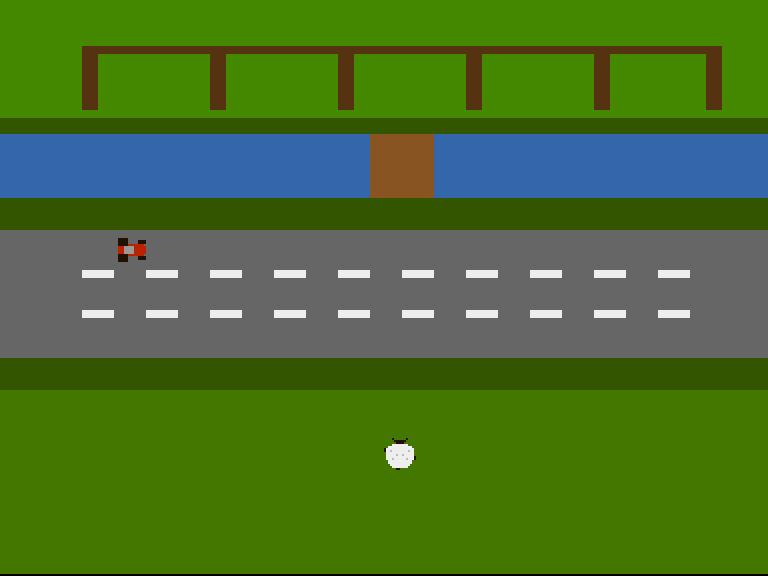
The tractor mid-lane, bonnet pointing the way it drives; the sheep in the field below, with a decision to make for the first time in her life.
A Sprite Nobody Steers
The tractor is sprite 2, and its mover is almost insultingly short:
drivetractor:
            move.w  tractx,d0
            add.w   #TRACTOR_SPEED,d0
            cmp.w   #320,d0             ; Clear of the right edge?
            blt.s   .keep
            move.w  #-16,d0             ; Re-enter from the left
.keep:      move.w  d0,tractx
            rts
Add the speed, wrap at the edge, done. No input, no cooldown, no decisions. Compare it with steer — the sheep’s mover is five times the code, because she has a player attached. The tractor just has physics. One detail does real work: it re-enters at -16, a full body off-screen left, so it drives into view instead of popping into existence. (HSTART’s arithmetic swallows the negative x without complaint — -16 + $80 is still a valid beam position, just one in the border.)
And note what the mover doesn’t contain: position packing. drivetractor only changes a number.
One Packer for Everyone
Unit 3’s updsprite knew too much — it packed coordinates and knew they were the sheep’s. With two moving things that splits cleanly in half:
setpos:
            add.w   #$2c,d1             ; D1 = VSTART (beam line)
            move.w  d1,d2
            add.w   #16,d2              ; D2 = VSTOP (16 rows tall)
            add.w   #$80,d0             ; D0 = HSTART (beam position)

            ; POS = VSTART[7:0] << 8 | HSTART[8:1]
            move.w  d1,d3
            lsl.w   #8,d3
            move.w  d0,d4
            lsr.w   #1,d4
            and.w   #$ff,d4
            or.w    d4,d3
            move.w  d3,(a0)             ; Write POS

            ; CTL = VSTOP[7:0] << 8 | V8START<<2 | V8STOP<<1 | H0START
            move.w  d2,d3
            and.w   #$ff,d3
            lsl.w   #8,d3
            btst    #8,d1               ; VSTART's ninth bit
            beq.s   .nv8s
            or.w    #%100,d3
.nv8s:      btst    #8,d2               ; VSTOP's ninth bit
            beq.s   .nv8e
            or.w    #%010,d3
.nv8e:      btst    #0,d0               ; HSTART's odd-pixel bit
            beq.s   .nh0
            or.w    #%001,d3
.nh0:       move.w  d3,2(a0)            ; Write CTL
            rts
setpos packs any (x, y) into any sprite structure — the same beam arithmetic, now taking its target in a0. updsprite becomes the roll-call: sheep image 0, sheep image 1, tractor, each one lea + two move.w + bsr. Every later unit adds traffic by adding a line to the roll-call, not by writing another packer.
The tractor also brings the sprite palette story forward: sprites come in pairs. Sprites 0–1 share colours 17–19 (the sheep’s wool, face and shade); sprites 2–3 share colours 21–23, which is why the tractor can be red, dark-tyred and grey-cabbed without touching the sheep’s palette. Eight sprites, four palettes — remember that exchange rate when the lane gets busy.
Deterministic Is a Promise
TRACTOR_SPEED equ 2 and the wrap rule are the tractor’s entire personality, and they are a promise to the player: it will be at the same place, at the same time, every loop. The gap you spot on this pass will be there on the next one. Frogger kept that promise; so does every fair crosser — the moment traffic moves randomly, reading the lane stops being a skill and starts being a gamble.
It’s also, quietly, a promise to the toolchain: this game’s screenshots and videos are captured by scripts that replay fixed inputs, and they only stay truthful because the world unfolds identically every run. Determinism is a gameplay value and an engineering value, and Flock keeps it everywhere — there is no RNG in this game’s hazards, ever.
Experiment: Run the Lane
TRACTOR_SPEED equ 4— the lane gets serious. At what speed does crossing stop feeling possible? (Remember the sheep covers 8 pixels per hop, no faster.)- Make it drive the other way: subtract the speed, wrap at the left edge to re-enter from
320. Which direction is harder to judge, and why might alternating lanes alternate directions? - Put it in the bottom traffic lane instead:
TRACTOR_Y equ 140. Now the dangerous part of the crossing is the last moment, not the first. Feel how different the same hazard is by position alone. - Walk the sheep straight through it. Nothing happens — and now the next unit needs no introduction.
The Complete Code
;──────────────────────────────────────────────────────────────
; FLOCK - A sheep-crossing arcade game for the Commodore Amiga
; Unit 5: The Tractor
;
; The first sprite nobody steers. A red tractor crosses the
; lane on its own fixed loop — off the right edge, back on
; the left, the same speed every time. Deterministic is the
; point: the player learns to READ it. (It can't hurt the
; sheep yet. That's the next unit.)
;──────────────────────────────────────────────────────────────
;══════════════════════════════════════════════════════════════
; TWEAKABLE VALUES — Change these and see what happens!
;══════════════════════════════════════════════════════════════
; Colours are $0RGB (4 bits per component, values 0-F)
COLOUR_FOLD_GRASS equ $0480 ; The fold's pasture
COLOUR_HEDGE equ $0350 ; Hedgerow between fold and stream
COLOUR_WATER equ $036A ; The stream
COLOUR_BANK equ $0350 ; Grassy bank below the stream
COLOUR_LANE equ $0666 ; The lane's tarmac
COLOUR_VERGE equ $0350 ; Verge below the lane
COLOUR_FIELD equ $0470 ; The field where the flock waits
COLOUR_FENCE equ $0531 ; Pen walls (bitplane, fold band)
COLOUR_WOOD equ $0852 ; The footbridge (bitplane, stream band)
COLOUR_DASH equ $0EEE ; Lane markings (bitplane, lane band)
COLOUR_TUFT equ $0360 ; Spare (bitplane, grass bands)
COLOUR_WOOL equ $0EEE ; The sheep's fleece (sprite colour 1)
COLOUR_FACE equ $0210 ; Her face, ears and tail (sprite colour 2)
COLOUR_SHADE equ $0BBB ; Fleece shading (sprite colour 3)
COLOUR_TRACTOR equ $0B20 ; The tractor's bodywork (sprite colour 1)
COLOUR_TYRE equ $0210 ; Wheels and trim (sprite colour 2)
COLOUR_CAB equ $0999 ; The cab roof (sprite colour 3)
; Where each band begins (screen row 0-255, top to bottom)
ROW_HEDGE equ 40
ROW_STREAM equ 48
ROW_BANK equ 80
ROW_LANE equ 96
ROW_VERGE equ 160
ROW_FIELD equ 176
; Where the sheep starts, and how she moves
SHEEP_X equ 152
SHEEP_Y equ 200
STEP equ 8 ; Pixels per hop
COOLDOWN equ 6 ; Frames between hops
; The tractor's lane and pace
TRACTOR_Y equ 98 ; Top traffic lane
TRACTOR_SPEED equ 2 ; Pixels per frame, rightward
;══════════════════════════════════════════════════════════════
; HARDWARE REGISTERS
;══════════════════════════════════════════════════════════════
CUSTOM equ $dff000
DMACON equ $096 ; DMA control (write)
INTENA equ $09a ; Interrupt enable (write)
INTREQ equ $09c ; Interrupt request (write)
COP1LC equ $080 ; Copper list pointer
COPJMP1 equ $088 ; Copper restart strobe
VPOSR equ $004 ; Beam position
JOY1DAT equ $00c ; Joystick, control port 2
BPLCON0 equ $100 ; Bitplane control
BPLCON1 equ $102 ; Scroll
BPLCON2 equ $104 ; Priority
BPL1MOD equ $108 ; Odd plane modulo
DDFSTRT equ $092 ; Display data fetch start
DDFSTOP equ $094 ; Display data fetch stop
DIWSTRT equ $08e ; Display window start
DIWSTOP equ $090 ; Display window stop
BPL1PTH equ $0e0 ; Bitplane 1 pointer (high)
BPL1PTL equ $0e2 ; Bitplane 1 pointer (low)
SPR0PTH equ $120 ; Sprite 0 pointer (high)
COLOR00 equ $180 ; Background colour
COLOR01 equ $182 ; Bitplane colour 1
COLOR17 equ $1a2 ; Sprite 0/1 colour 1
COLOR18 equ $1a4 ; Sprite 0/1 colour 2
COLOR19 equ $1a6 ; Sprite 0/1 colour 3
COLOR21 equ $1aa ; Sprite 2/3 colour 1
COLOR22 equ $1ac ; Sprite 2/3 colour 2
COLOR23 equ $1ae ; Sprite 2/3 colour 3
ROW_BYTES equ 40 ; 320 pixels / 8
;══════════════════════════════════════════════════════════════
; CODE (Chip RAM — the Copper, planes and sprites live here)
;══════════════════════════════════════════════════════════════
section code,code_c
start:
lea CUSTOM,a5 ; A5 = custom chip base ($DFF000)
; --- Take over the machine ---
move.w #$7fff,INTENA(a5) ; Disable all interrupts
move.w #$7fff,INTREQ(a5) ; Clear pending interrupts
move.w #$7fff,DMACON(a5) ; Disable all DMA
; --- Point the Copper's bitplane MOVEs at our plane ---
lea plane,a0
move.l a0,d0
lea copbpl,a1
move.w d0,6(a1) ; Low word into the BPL1PTL move
swap d0
move.w d0,2(a1) ; High word into the BPL1PTH move
; --- Point sprite 0 at the sheep, the rest at nothing ---
lea copsprites,a1 ; Eight pointer pairs in the list
lea sheep0,a0
move.l a0,d0
move.w d0,6(a1) ; Sprite 0 low word
swap d0
move.w d0,2(a1) ; Sprite 0 high word
lea nullspr,a0 ; Sprites 1-7: an empty sprite
move.l a0,d0
moveq #7-1,d6
.nulls:
lea 8(a1),a1 ; Next pointer pair in the list
move.w d0,6(a1)
swap d0
move.w d0,2(a1)
swap d0
dbf d6,.nulls
; --- ...except sprite 2, which carries the tractor ---
lea copsprites+16,a1 ; Sprite 2's pointer pair
lea tractor,a0
move.l a0,d0
move.w d0,6(a1)
swap d0
move.w d0,2(a1)
; --- Draw the farmyard's detail into the bitplane ---
bsr drawfarmyard
; --- Place the sheep at her starting spot ---
bsr updsprite
; --- Install Copper list ---
lea copperlist,a0
move.l a0,COP1LC(a5)
move.w d0,COPJMP1(a5) ; Strobe: restart Copper from COP1LC
; --- Enable DMA ---
move.w #$83a0,DMACON(a5) ; SET + DMAEN + BPLEN + COPEN + SPREN
; === Main Loop ===
mainloop:
; Wait for vertical blank — in two phases. If we only
; waited FOR line 0, a fast loop body could finish while
; the beam is still ON line 0 and run again in the same
; frame. Wait to leave line 0 first, then to reach it.
move.l #$1ff00,d1 ; Mask: bits 8-16 of beam position
.vbleave:
move.l VPOSR(a5),d0 ; Read beam position
and.l d1,d0 ; Isolate line number
beq.s .vbleave ; Loop while still on line 0
.vbwait:
move.l VPOSR(a5),d0 ; Read beam position
and.l d1,d0 ; Isolate line number
bne.s .vbwait ; Loop until line 0 again
bsr steer ; Read the stick, maybe hop
bsr drivetractor ; The lane moves whether you do or not
bsr updsprite ; Position is data: rewrite POS/CTL
bsr showframe ; Point sprite 0 at this step's image
; Check left mouse button (active low at CIAA)
btst #6,$bfe001 ; CIAA Port A, bit 6
bne.s mainloop ; Not pressed — keep going
; Button pressed — halt
.halt:
bra.s .halt
;══════════════════════════════════════════════════════════════
; STEER — read the joystick, hop the sheep
;
; JOY1DAT is control port 2. The decode is famously sideways:
; right = bit 1 left = bit 9
; down = bit 0 XOR bit 1 up = bit 8 XOR bit 9
; One XOR of the register with itself-shifted turns the two
; awkward pairs into plain testable bits.
;
; A hop is STEP pixels; COOLDOWN frames must pass between hops
; — that's what makes her *step* like a sheep rather than glide
; like a cursor.
;══════════════════════════════════════════════════════════════
steer:
tst.w cooldown
beq.s .ready
subq.w #1,cooldown ; Still mid-hop rhythm — wait
rts
.ready:
move.w JOY1DAT(a5),d0 ; Read the stick
move.w d0,d1
lsr.w #1,d1
eor.w d0,d1 ; Now: bit 0 = down, bit 8 = up
btst #8,d1 ; Up?
beq.s .notup
sub.w #STEP,sheepy
bra.s .stepped
.notup:
btst #0,d1 ; Down?
beq.s .notdown
add.w #STEP,sheepy
bra.s .stepped
.notdown:
btst #9,d0 ; Left?
beq.s .notleft
sub.w #STEP,sheepx
bra.s .stepped
.notleft:
btst #1,d0 ; Right?
beq.s .done ; Stick centred — no hop
add.w #STEP,sheepx
.stepped:
move.w #COOLDOWN,cooldown ; Set the hop rhythm
eori.w #1,curframe ; The other feet, next picture
; --- Hold her inside the farm ---
tst.w sheepx
bge.s .xlow
clr.w sheepx
.xlow: cmp.w #320-16,sheepx
ble.s .xhigh
move.w #320-16,sheepx
.xhigh: tst.w sheepy
bge.s .ylow
clr.w sheepy
.ylow: cmp.w #256-16,sheepy
ble.s .done
move.w #256-16,sheepy
.done:
rts
;══════════════════════════════════════════════════════════════
; DRIVETRACTOR — advance the lane's traffic
;
; No input, no decisions: tractx grows by TRACTOR_SPEED every
; frame, and past the right edge it wraps round to enter from
; the left again. A fixed loop the player can learn by watching
; — which is the entire skill this game is about.
;══════════════════════════════════════════════════════════════
drivetractor:
move.w tractx,d0
add.w #TRACTOR_SPEED,d0
cmp.w #320,d0 ; Clear of the right edge?
blt.s .keep
move.w #-16,d0 ; Re-enter from the left
.keep: move.w d0,tractx
rts
;══════════════════════════════════════════════════════════════
; SETPOS — pack screen (x, y) into one sprite's POS/CTL
; a0 = sprite structure d0 = x d1 = y
;
; Unit 3's packing, generalised: any sprite, any position. Beam
; coordinates: VSTART = y + $2C, HSTART = x + $80 — and the
; ninth bits ride in CTL's low flags.
;══════════════════════════════════════════════════════════════
setpos:
add.w #$2c,d1 ; D1 = VSTART (beam line)
move.w d1,d2
add.w #16,d2 ; D2 = VSTOP (16 rows tall)
add.w #$80,d0 ; D0 = HSTART (beam position)
; POS = VSTART[7:0] << 8 | HSTART[8:1]
move.w d1,d3
lsl.w #8,d3
move.w d0,d4
lsr.w #1,d4
and.w #$ff,d4
or.w d4,d3
move.w d3,(a0) ; Write POS
; CTL = VSTOP[7:0] << 8 | V8START<<2 | V8STOP<<1 | H0START
move.w d2,d3
and.w #$ff,d3
lsl.w #8,d3
btst #8,d1 ; VSTART's ninth bit
beq.s .nv8s
or.w #%100,d3
.nv8s: btst #8,d2 ; VSTOP's ninth bit
beq.s .nv8e
or.w #%010,d3
.nv8e: btst #0,d0 ; HSTART's odd-pixel bit
beq.s .nh0
or.w #%001,d3
.nh0: move.w d3,2(a0) ; Write CTL
rts
;══════════════════════════════════════════════════════════════
; UPDSPRITE — place every sprite for this frame
;
; One routine owns every position write: the sheep (both step
; images, so whichever showframe picks she stands in the same
; place) and the tractor.
;══════════════════════════════════════════════════════════════
updsprite:
lea sheep0,a0
move.w sheepx,d0
move.w sheepy,d1
bsr setpos
lea sheep1,a0
move.w sheepx,d0
move.w sheepy,d1
bsr setpos
lea tractor,a0
move.w tractx,d0
move.w #TRACTOR_Y,d1
bsr setpos
rts
;══════════════════════════════════════════════════════════════
; SHOWFRAME — point sprite 0 at this step's image
;
; Animation is nothing but choosing which data the channel
; fetches. The Copper list's sprite 0 pointer words are
; rewritten with whichever picture curframe names — the same
; poke the startup code did, now done every frame.
;══════════════════════════════════════════════════════════════
showframe:
lea sheep0,a0
tst.w curframe
beq.s .picked
lea sheep1,a0
.picked:
move.l a0,d0
lea copsprites,a1
move.w d0,6(a1) ; Sprite 0 low word
swap d0
move.w d0,2(a1) ; Sprite 0 high word
rts
;══════════════════════════════════════════════════════════════
; DRAW THE FARMYARD (unchanged from Unit 1)
;══════════════════════════════════════════════════════════════
drawfarmyard:
; --- The fold's pens (rows 4-35) ---
moveq #0,d0 ; x = byte 0
moveq #4,d1 ; row 4
moveq #ROW_BYTES,d2 ; full width
moveq #4,d3 ; 4 rows thick
bsr rectfill
lea penposts,a2 ; Post positions (byte columns)
moveq #6-1,d6 ; Six posts
.posts:
moveq #0,d0
move.b (a2)+,d0 ; x = next post column
moveq #8,d1 ; rows 8-35
moveq #1,d2 ; one byte wide
moveq #28,d3
bsr rectfill
dbf d6,.posts
; --- The footbridge (rows 48-79, mid-stream) ---
moveq #18,d0 ; byte 18 = pixel 144
moveq #ROW_STREAM,d1
moveq #4,d2 ; 32 pixels wide
moveq #32,d3 ; the stream's full height
bsr rectfill
; --- Lane markings: two dashed lines (rows 116, 136) ---
moveq #116,d1
bsr dashline
move.w #136,d1
; falls through
;──────────────────────────────────────────────────────────────
; dashline — a row of dashes across the lane
; d1 = starting row. 2 bytes on, 2 bytes off, 4 rows thick.
;──────────────────────────────────────────────────────────────
dashline:
moveq #0,d0 ; x = byte 0
.dash:
move.w d1,-(sp) ; rectfill trashes d1
move.w d0,-(sp) ; ...and d0
moveq #2,d2 ; 2 bytes of dash
moveq #4,d3 ; 4 rows thick
bsr rectfill
move.w (sp)+,d0
move.w (sp)+,d1
addq.w #4,d0 ; next dash 4 bytes along
cmp.w #ROW_BYTES,d0
blt.s .dash
rts
;──────────────────────────────────────────────────────────────
; rectfill — set a byte-aligned rectangle of pixels
; d0 = x (bytes) d1 = row d2 = width (bytes) d3 = height
; Trashes d1, d4, d5, a0, a1.
;──────────────────────────────────────────────────────────────
rectfill:
lea plane,a0
move.w d1,d4
mulu #ROW_BYTES,d4 ; row * 40
add.w d0,d4 ; + x
adda.w d4,a0 ; A0 = first byte of the rectangle
move.w d3,d4 ; D4 = rows to go
.row:
movea.l a0,a1
move.w d2,d5 ; D5 = bytes to go
.col:
move.b #$ff,(a1)+ ; 8 pixels on
subq.w #1,d5
bne.s .col
lea ROW_BYTES(a0),a0 ; down one row
subq.w #1,d4
bne.s .row
rts
penposts: dc.b 0,8,16,24,32,39 ; Byte columns of the six posts
even
;══════════════════════════════════════════════════════════════
; COPPER LIST — the farmyard, plus eight sprite pointers
;══════════════════════════════════════════════════════════════
copperlist:
; --- Display setup ---
dc.w DIWSTRT,$2c81 ; Window: top-left
dc.w DIWSTOP,$2cc1 ; Window: bottom-right
dc.w DDFSTRT,$0038 ; Fetch start (lores)
dc.w DDFSTOP,$00d0 ; Fetch stop
dc.w BPLCON0,$1200 ; 1 bitplane, colour burst on
dc.w BPLCON1,$0000 ; No scroll
dc.w BPLCON2,$0024 ; Sprites in front of playfield
dc.w BPL1MOD,$0000 ; No modulo — rows pack tight
copbpl:
dc.w BPL1PTH,$0000 ; Plane address, poked in
dc.w BPL1PTL,$0000 ; by the CPU at startup
copsprites:
dc.w SPR0PTH+0,$0000 ; Sprite 0: the sheep (poked in)
dc.w SPR0PTH+2,$0000
dc.w SPR0PTH+4,$0000 ; Sprites 1-7: the null sprite
dc.w SPR0PTH+6,$0000
dc.w SPR0PTH+8,$0000
dc.w SPR0PTH+10,$0000
dc.w SPR0PTH+12,$0000
dc.w SPR0PTH+14,$0000
dc.w SPR0PTH+16,$0000
dc.w SPR0PTH+18,$0000
dc.w SPR0PTH+20,$0000
dc.w SPR0PTH+22,$0000
dc.w SPR0PTH+24,$0000
dc.w SPR0PTH+26,$0000
dc.w SPR0PTH+28,$0000
dc.w SPR0PTH+30,$0000
; --- The sheep's colours (sprites 0-1 share 17-19) ---
dc.w COLOR17,COLOUR_WOOL
dc.w COLOR18,COLOUR_FACE
dc.w COLOR19,COLOUR_SHADE
; --- The tractor's colours (sprites 2-3 share 21-23) ---
dc.w COLOR21,COLOUR_TRACTOR
dc.w COLOR22,COLOUR_TYRE
dc.w COLOR23,COLOUR_CAB
; --- THE FOLD (from the top of the frame) ---
dc.w COLOR00,COLOUR_FOLD_GRASS
dc.w COLOR01,COLOUR_FENCE ; Pixels here are fence
; --- HEDGEROW (row 40) ---
dc.w $5401,$fffe ; Wait: line $2C+40 = $54
dc.w COLOR00,COLOUR_HEDGE
dc.w COLOR01,COLOUR_TUFT
; --- THE STREAM (row 48) ---
dc.w $5c01,$fffe ; Wait: line $2C+48 = $5C
dc.w COLOR00,COLOUR_WATER
dc.w COLOR01,COLOUR_WOOD ; Pixels here are bridge
; --- THE BANK (row 80) ---
dc.w $7c01,$fffe ; Wait: line $2C+80 = $7C
dc.w COLOR00,COLOUR_BANK
dc.w COLOR01,COLOUR_TUFT
; --- THE LANE (row 96) ---
dc.w $8c01,$fffe ; Wait: line $2C+96 = $8C
dc.w COLOR00,COLOUR_LANE
dc.w COLOR01,COLOUR_DASH ; Pixels here are markings
; --- THE VERGE (row 160) ---
dc.w $cc01,$fffe ; Wait: line $2C+160 = $CC
dc.w COLOR00,COLOUR_VERGE
dc.w COLOR01,COLOUR_TUFT
; --- THE FIELD (row 176, down to the bottom) ---
dc.w $dc01,$fffe ; Wait: line $2C+176
dc.w COLOR00,COLOUR_FIELD
dc.w COLOR01,COLOUR_TUFT
; --- END OF COPPER LIST ---
dc.w $ffff,$fffe ; Wait for impossible position
;══════════════════════════════════════════════════════════════
; THE SHEEP — sprite 0, two step images
;
; Same sheep, two pictures. Step image 0: front-left and
; back-right feet planted. Step image 1: the other diagonal,
; tail swung the other way. Alternate them as she hops and
; she waddles. The control words are written by updsprite.
;══════════════════════════════════════════════════════════════
section data,data_c
sheep0:
dc.w 0 ; POS — written by updsprite
dc.w 0 ; CTL — written by updsprite
; plane A (fleece) plane B (face/shade/feet)
dc.w %0000000000000000,%0000100000010000 ; ..ears..
dc.w %0000000000000000,%0000011111100000 ; ..head..
dc.w %0000000000000000,%0000001111000000 ; ..face..
dc.w %0000111111110000,%0000000000000000 ; fleece ruff
dc.w %0011111111111100,%0000000000000000 ; shoulders
dc.w %0111111111111110,%1000000000000000 ; < front foot
dc.w %0111111111111110,%1001000000001000 ; < + flecks
dc.w %0111111111111110,%0000000000000000
dc.w %0111111111111110,%0000001001000000 ; shade flecks
dc.w %0111111111111110,%0000000000000001 ; back foot >
dc.w %0111111111111110,%0000100000010001 ; + flecks >
dc.w %0011111111111100,%0000000000000000 ; haunches
dc.w %0011111111111100,%0000000000000000
dc.w %0001111111111000,%0000000000000000
dc.w %0000111111110000,%0000000000000000 ; rump
dc.w %0000000000000000,%0000001100000000 ; tail, left
dc.w 0,0 ; End of sprite
sheep1:
dc.w 0 ; POS — written by updsprite
dc.w 0 ; CTL — written by updsprite
; plane A (fleece) plane B (face/shade/feet)
dc.w %0000000000000000,%0000100000010000 ; ..ears..
dc.w %0000000000000000,%0000011111100000 ; ..head..
dc.w %0000000000000000,%0000001111000000 ; ..face..
dc.w %0000111111110000,%0000000000000000 ; fleece ruff
dc.w %0011111111111100,%0000000000000000 ; shoulders
dc.w %0111111111111110,%0000000000000001 ; front foot >
dc.w %0111111111111110,%0001000000001001 ; + flecks >
dc.w %0111111111111110,%0000000000000000
dc.w %0111111111111110,%0000001001000000 ; shade flecks
dc.w %0111111111111110,%1000000000000000 ; < back foot
dc.w %0111111111111110,%1000100000010000 ; < + flecks
dc.w %0011111111111100,%0000000000000000 ; haunches
dc.w %0011111111111100,%0000000000000000
dc.w %0001111111111000,%0000000000000000
dc.w %0000111111110000,%0000000000000000 ; rump
dc.w %0000000000000000,%0000000011000000 ; tail, right
dc.w 0,0 ; End of sprite
;══════════════════════════════════════════════════════════════
; THE TRACTOR — sprite 2
;
; Big rear wheels on the left, small front wheels and the
; bonnet pointing right — the way it drives. Red bodywork,
; dark tyres, a grey cab roof. Its own palette: sprites 2-3
; share colours 21-23.
;══════════════════════════════════════════════════════════════
tractor:
dc.w 0 ; POS — written by updsprite
dc.w 0 ; CTL — written by updsprite
; plane A (body/cab) plane B (tyres/cab)
dc.w %0000000000000000,%0000000000000000
dc.w %0000000000000000,%0000000000000000
dc.w %0000000000000000,%0111110000000000 ; rear wheel
dc.w %0000000000000000,%0111110000011110 ; + front wheel
dc.w %0000000000000000,%0111110000011110
dc.w %0000001111111100,%0111110000000000 ; chassis
dc.w %0111111111111110,%0000111110000000 ; body + cab
dc.w %0111111111111110,%0000111110000000
dc.w %0111111111111110,%0000111110000000
dc.w %0111111111111110,%0000111110000000
dc.w %0000001111111100,%0111110000000000 ; chassis
dc.w %0000000000000000,%0111110000011110
dc.w %0000000000000000,%0111110000011110 ; + front wheel
dc.w %0000000000000000,%0111110000000000 ; rear wheel
dc.w %0000000000000000,%0000000000000000
dc.w %0000000000000000,%0000000000000000
dc.w 0,0 ; End of sprite
nullspr: dc.w 0,0 ; A sprite that displays nothing
dc.w 0,0
; --- The sheep's state ---
sheepx: dc.w SHEEP_X ; Screen x (0-304)
sheepy: dc.w SHEEP_Y ; Screen y (0-240)
cooldown: dc.w 0 ; Frames until the next hop
curframe: dc.w 0 ; Which step image: 0 or 1
; --- The tractor's state ---
tractx: dc.w -16 ; Enters from the left edge
;══════════════════════════════════════════════════════════════
; THE BITPLANE (Chip RAM)
;══════════════════════════════════════════════════════════════
plane: ds.b ROW_BYTES*256 ; One plane, 320 x 256
If It Doesn’t Work
- No tractor? Sprite 2’s pointer words must be poked after the null-sprite loop parks sprites 1–7 — the loop covers all seven, then the tractor poke overwrites sprite 2’s pair. Get the order backwards and the tractor pointer gets parked at nothing.
- The tractor is wool-coloured? It’s reading the wrong palette. Sprites 2–3 use
COLOR21–23($1AA–$1AE) — setting 17–19 twice recolours the sheep instead. - It crosses, vanishes, and never returns? Check the wrap: past
320it must reset to-16, andtractxmust be treated as a signed word for that to mean “off the left edge”. - It flickers or tears at the left edge? That’s the one-frame window where it straddles the border — harmless, and instructive: sprites exist in beam space, not screen space.
Try This
- A puff of pace. Make the tractor’s speed vary by position — slower up the slight hill (left half), faster down (right half). Still deterministic, still learnable, but now the gap breathes. Two speeds and one comparison.
- The roll-call grows. Without writing it, count the lines
updspriteneeds for Unit 8’s full lane (cart and Land Rover joining). Then count the sprite channels used so far — sheep, tractor — against the budget of eight. Which runs out first, code or channels? - Watch like a player. Boot the game and don’t touch the stick for a full minute. Can you predict, to the hop, when it’s safe to cross? That feeling of earned certainty is what deterministic design buys — and what you’d lose with one line of randomness.
What You’ve Learnt
- The autonomous mover — a hazard is position + rule, run every frame; no input attached. The shortest routine in the program is the whole personality of its first antagonist.
setpos— coordinate packing generalised to any sprite;updspritebecomes a roll-call that grows by one line per moving thing.- Sprite pairs and palettes — 0–1 share 17–19, 2–3 share 21–23; eight sprites, four palettes.
- Off-screen entry — start a body-width outside and drive in; beam coordinates make negative screen x legal.
- Determinism as design — fixed loops are a promise to the player (readable lanes), and to the pipeline (replayable captures). This game keeps it everywhere.
What’s Next
She can walk through a tractor and shrug. In Unit 6, CLXCON and CLXDAT arrive — the hardware that watches every sprite and reports what touched what — and the lane finally gets its teeth. Squashed is the unit where Flock becomes a game.