Type, Compile, Run
Everything in Blitz starts with one loop: type a program, compile it, run it. That compile step is the whole point — Blitz turns your BASIC into a native Amiga program that runs at full speed. Let's go round the loop once and make the machine say hello.
Before you can make anything in Blitz, you need the loop that everything else hangs off: type a program, compile it, run it. That middle word is what makes Blitz different from most BASICs. An interpreted BASIC reads your program line by line as it runs; Blitz compiles — it turns your whole program into a native Amiga program first, then runs that. The payoff is speed: compiled code runs many times faster, which is exactly why real games shipped in Blitz. This whole course is that write-compile-run loop, over and over. So let’s go round it once and make the machine say hello.
What you’ll see by the end
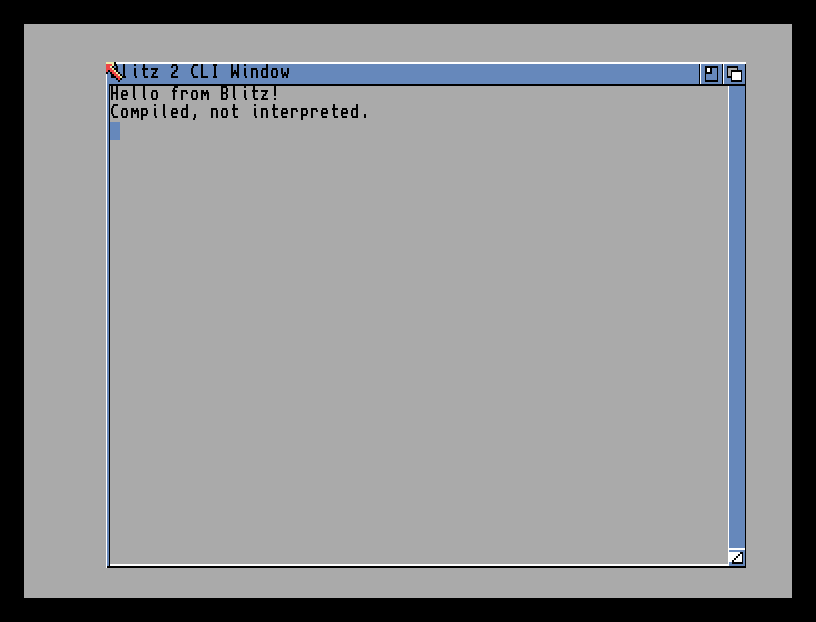
Two lines of text in Blitz’s output window. It looks modest, but what’s behind it isn’t: Blitz took your source, compiled it into a real program, and ran that. The same two lines on a bare Amiga would be a serious chunk of work; Blitz makes the compile invisible and instant.
The whole program
NPrint "Hello from Blitz!"
NPrint "Compiled, not interpreted."
MouseWait
End
Four short lines:
NPrint "Hello from Blitz!"prints the text, then moves to a new line. (NPrint= “print, then newline.” There’s also plainPrint, which stays on the same line.) Give it something in quotes and it shows up — the workhorse you’ll lean on constantly.NPrint "Compiled, not interpreted."— a second line, to prove printing carries on down the window.MouseWaitpauses the program until you click the mouse. Without it, Blitz would run all the lines in a blink and whisk you back to the editor before you saw a thing — soMouseWaitholds your result on screen.Endmarks the end of the program. Blitz stops cleanly here.
Type it and compile it
Open the Ted editor, type the four lines, and press right-Amiga + X — that’s the Compiler menu’s Compile & Run. (Hold the right-Amiga key, the one just right of the space bar, and tap X.)
Watch what happens: Blitz compiles your program — building it into native code — and, finding no errors, runs it straight away. The output window opens, your text appears, and MouseWait holds it there. Click the mouse to come back to the editor.
That compile step is the difference. There’s a moment, just before it runs, where Blitz is turning your words into a program. On a tiny listing like this it’s instant; on a real game it’s the step that makes the finished thing fast.
Try this: say something else
Change the words inside the quotes — your name, a question, anything — and press right-Amiga + X again. Whatever you put between the " marks is what appears. The quotes matter: they tell Blitz “this is text to show,” not a command to obey.
Try this: print a number
Numbers don’t need quotes. Add a line before MouseWait:
NPrint "Twice 21 is "
NPrint 2*21
Run it, and Blitz works out 2*21 and prints 42. Text in quotes is shown as-is; a sum without quotes is calculated first. That difference — literal text versus a value to work out — runs through everything you’ll write.
If it doesn’t work
- A window flashes and vanishes. The
MouseWaitline is missing or misspelt, so the program ends instantly. It needs to be there to hold the output. - Blitz stops and highlights a line instead of running. That’s a compile error — Blitz caught a mistake while building your program, before it ran. Check the highlighted line for a typo, and especially that every
"that opens text has a"to close it. - Nothing happens when you press right-Amiga + X. Make sure you’re holding the right Amiga key (just right of the space bar) and that the editor window is the active one.
What you’ve learnt
The whole loop: type a program in Ted, press right-Amiga + X to compile and run, watch it go. NPrint shows text or numbers and moves to a new line, MouseWait holds the result on screen, and End finishes the program. The thing that makes Blitz Blitz is the compile in the middle — your BASIC becomes a native program before it runs, and that’s where its speed comes from.
What’s next
You compiled a program — but Blitz has two modes it can work in, and which one you’re in changes what your program can do. Next — Amiga Mode and Blitz Mode — the single most important idea in the language, and the door to everything fast that follows.