A Job With a Name
Give a piece of work a name, write it once, and call it whenever you need it — the idea that keeps a growing program from drowning in copies of itself.
As a program grows, the same little job turns up again and again — draw the border, print the score, play the sound. Copy it everywhere and two things go wrong: the program bloats, and the day you want to change that job you have to find and fix every copy. The answer is to package the job up, write it once, and call on it wherever you need it.
Write it once, call it
That package is a subroutine. The idea is to give it a name and call it by that name — which is exactly what the pseudocode does:
DEFINE divider
  SHOW "----------"
END

CALL divider
SHOW "Top news"
Here’s the honest wrinkle: the BASIC we’re using has no names for blocks at all. It’s
an old, plain language, and it identifies a subroutine by the line number it starts
at. So where the pseudocode says CALL divider, BASIC says GO SUB 100 — go to the
block at line 100 — and RETURN comes back to where you called from. The name is the
idea; the line number is this BASIC’s cruder stand-in for it. (Most later languages, and
the pseudocode, let you use a real name; the reuse you get is the same.)
  10 GO SUB 100
  20 PRINT "Top news"
  30 STOP
 100 PRINT "----------"
 110 RETURN
Line 10 calls the block at line 100; line 100 prints the divider; line 110’s RETURN
sends the program back to line 20, which carries on. Run it:
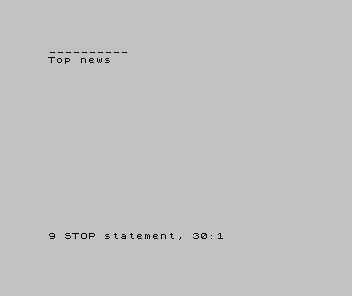
Two new ideas there. GO SUB/RETURN is the call — go and do that named job, then come
back and continue. And STOP ends the program cleanly before it can fall into the
subroutine sitting below; the report it leaves, 9 STOP statement, isn’t a fault — it’s
the machine telling you it stopped where you told it to.
The point is reuse
A block written once can be called as many times as you like — and that’s where it earns its keep:
| 1 | 1 | 10 GO SUB 100 | |
| 2 | 2 | 20 PRINT "Top news" | |
| 3 | - | 30 STOP | |
| 3 | + | 30 GO SUB 100 | |
| 4 | + | 40 PRINT "More news" | |
| 5 | + | 50 GO SUB 100 | |
| 6 | + | 60 STOP | |
| 4 | 7 | 100 PRINT "----------" | |
| 5 | 8 | 110 RETURN | |
| 6 | 9 | |
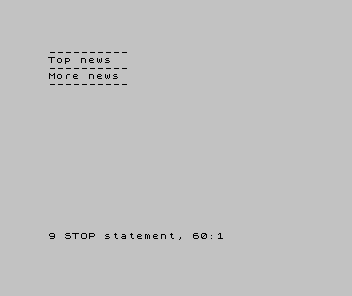
The divider appears three times on screen but exists once in the program. That’s the whole value: say a thing once. Want a fancier divider? Change line 100, and every call gets the new one — no hunting for copies. As programs grow into real games, naming the jobs — draw the player, check for a hit, add to the score — is what keeps them readable instead of a wall of repetition.
When it’s wrong, see why
- The program runs the block when it shouldn’t, or twice over. It fell into the
subroutine instead of being called into it. A block at the bottom needs a
STOP(or an end) above it, so the main program can’t wander in. RETURN without GOSUB. The program reached aRETURNit neverGO SUB’d to — usually because it fell into the block. Same fix: stop the main program before the block.- It calls the block but never comes back, or jumps to the wrong place. A missing
RETURN, or aGO SUBto the wrong line number. The call must land on the first line of the block, and the block must end inRETURN.
What you’ve learnt
- A subroutine is a reusable block of work — written once, called wherever you need it. The idea is to give it a name; this BASIC points at it by line number instead — the same reuse, a plainer label.
- Call and return:
GO SUBgoes and does the job,RETURNcomes back and carries on from where you were. - The value is say it once — one copy to read, one place to change.
- Not every report line is an error:
9 STOP statementmeans the program stopped on purpose. Reading the report tells you which — the habit this whole course is built on.
What’s next
You now have every idea a program is built from — instructions, sequence, output, memory, input, arithmetic, decisions, loops, and named jobs. One thing remains, and it’s the most useful of all: what to do when a program does the wrong thing. In Unit 11 — the last — we learn to debug: to find out why, by looking instead of guessing.