Until You Get It
The loop that runs until something happens — not a fixed number of times. It's the shape of every game, and it turns the guessing game into one you can play.
The counted loop from Unit 8 is for when you know how many times. But often you don’t. You keep going until something happens — until the player guesses right, runs out of lives, or quits. You can’t count that in advance. This is the loop that runs until a condition is met, and it is the heartbeat of every game ever written.
One guess isn’t a game
Here is the guessing game from Unit 7, with all three reactions in place:
  10 INPUT "Guess my number (1-10)? "; g
  20 IF g < 7 THEN PRINT "Too low"
  30 IF g > 7 THEN PRINT "Too high"
  40 IF g = 7 THEN PRINT "Correct! Well done."
Run it and guess 4:
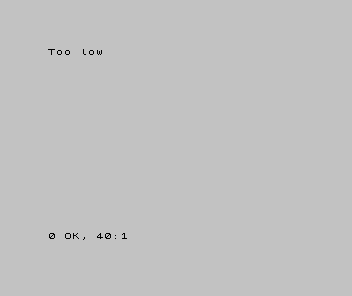
It tells you too low, and then it’s over. To guess again you’d run it again. A game needs to let you keep trying until you get there.
Loop until you get it
The idea is “repeat the asking until the guess is right.” In pseudocode:
REPEAT
  ASK "Guess my number? " INTO guess
  IF guess < 7 THEN SHOW "Too low"
  IF guess > 7 THEN SHOW "Too high"
UNTIL guess = 7
SHOW "Correct! Well done."
BASIC has no single “repeat-until” instruction — so we build one out of pieces we
already have: a test, and a jump back. GO TO sends the program to a line number, and
that’s the jump:
| 1 | 1 | 10 INPUT "Guess my number (1-10)? "; g | |
| 2 | 2 | 20 IF g < 7 THEN PRINT "Too low" | |
| 3 | 3 | 30 IF g > 7 THEN PRINT "Too high" | |
| 4 | - | 40 IF g = 7 THEN PRINT "Correct! Well done." | |
| 4 | + | 40 IF g <> 7 THEN GO TO 10 | |
| 5 | + | 50 PRINT "Correct! Well done." | |
| 5 | 6 | |
Line 40 now reads: if the guess is not 7, go back to line 10 and ask again. So the
program asks, hints, and loops to the top — over and over — and the only way out is
to guess 7, which makes the test false, skips the jump, and runs line 50. Play it —
guess 4, then 9, then 7:
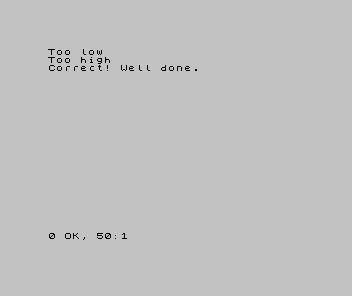
That shape — do the round, check if it’s over, and if not, go round again — is the game loop. Read, react, repeat until the end condition. Every game you build, in any language, has one beating at its centre; the guessing game just has a small one.
When it’s wrong, see why
- It never stops (an endless loop). The condition that exits the loop is never true,
so it can never leave. Here, if line 40 jumped back for every guess — even
7— you could never escape. Make sure the winning case doesn’t loop. (To break out of a runaway program on a Spectrum, pressBREAK— Caps Shift + Space.) - It stops after one go. The jump back is missing or points to the wrong line.
GO TO 10must land on the asking line, not below it. - It exits at the wrong moment. Read the exit test out loud. “Loop back if the guess is not 7” leaves exactly when the guess is 7 — which is what you want. Get the test backwards and it either never loops or never stops.
What you’ve learnt
- A loop-until repeats until a condition is met — for when you don’t know how many times in advance.
- It’s built from a test and a jump back: keep going while the end condition is false; fall through when it’s true.
- That do-react-repeat-until-done shape is the game loop — the centre of every game.
- An endless loop is the failure mode to watch for: the exit condition must be reachable.
What’s next
The guessing game works — but as programs grow, the same jobs get done in more and more places, and copying them around gets messy. In Unit 10 we learn to give a job a name and call it whenever we need it — writing it once, using it everywhere.