Doing It Again
A loop repeats work without writing it out over and over — a set number of times, with a counter you can use as it goes.
To print the numbers 1 to 10 with what you know so far, you’d write ten PRINT lines.
To print 1 to 100, a hundred. That’s absurd, and computers exist precisely so you never
have to. A loop does a piece of work over and over, as many times as you say,
without you writing it out more than once.
Count, without writing it out
A counted loop runs a set number of times, keeping a counter that climbs as it goes. In pseudocode:
REPEAT FOR count = 1 TO 10
  SHOW count
END
In BASIC:
  10 FOR i = 1 TO 10
  20 PRINT i
  30 NEXT i
FOR i = 1 TO 10 starts a loop with a counter called i; NEXT i marks the end of the
work to repeat. The computer runs everything between them with i set to 1, then
again with i set to 2, and so on up to 10 — then stops. Run it:
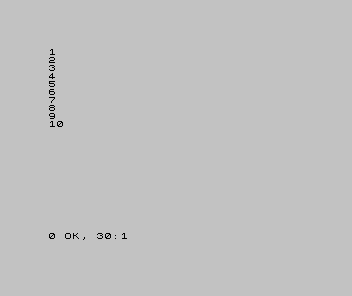
Three lines did what ten PRINTs would have, and changing 10 to 100 would do a
hundred without another keystroke. That is the loop’s whole point: the amount of
repetition is a number you set, not lines you type.
The counter is a value you can use
The counter isn’t only for keeping count — it’s a variable, holding a different value each time round, and you can use it in the work. Put it to work in a times table:
| 1 | 1 | 10 FOR i = 1 TO 10 | |
| 2 | - | 20 PRINT i | |
| 2 | + | 20 PRINT i; " times 7 is "; i * 7 | |
| 3 | 3 | 30 NEXT i | |
| 4 | 4 | |
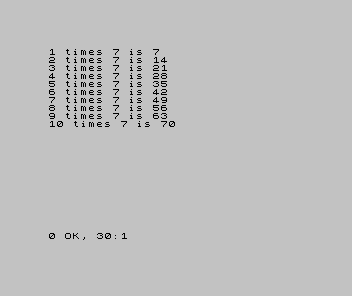
Each time round, i holds the next number, and i * 7 is worked out from it. A loop
that counts and hands you the count is how you fill a row, draw a grid, step through a
list, or lay out a level — anywhere the work is “the same thing, once per number”.
When it’s wrong, see why
- It runs once, or not at all. Check the range.
FOR i = 1 TO 1runs once;FOR i = 1 TO 0runs not at all, because the start is already past the end. - The numbers are off by one.
1 TO 10gives ten passes (1,2,…,10);0 TO 10gives eleven (0,1,…,10). Decide whether you’re counting things or counting from zero, and set the range to match. - Only the last line repeats, or nothing lines up. The work to repeat is everything
between the loop’s start and its end marker (
FOR…NEXT). A line outside them runs once, not each time round. Check what’s inside the loop and what’s outside it.
What you’ve learnt
- A loop repeats work without writing it out — the number of repeats is a value you set, not lines you type.
- A counted loop runs a fixed number of times and keeps a counter that climbs each pass.
- The counter is a variable you can use in the repeated work — that’s what makes a loop build things, not just count.
What’s next
A counted loop is for when you know how many times. But often you don’t — you repeat until something happens: until the player wins, loses, or quits. In Unit 9 we meet that loop, and use it to turn the guessing game from Unit 7 into something you can play.