Making a Choice
A program that decides. Test a value, and do one thing if the test passes and another if it doesn't — the moment a program can react, and the start of an actual game.
Everything so far runs the same way every time, whatever the values are. The program can’t yet react. This unit changes that: it teaches the computer to decide — to do something only if a test passes. That single idea is the difference between a program that recites and a program you can play.
Do it only if
A decision is a test with a true-or-false answer, and an instruction to carry out only if the answer is true. In pseudocode:
ASK "Guess my number (1-10)? " INTO guess
IF guess = 7 THEN SHOW "Correct!"
In BASIC:
  10 INPUT "Guess my number (1-10)? "; g
  20 IF g = 7 THEN PRINT "Correct!"
Line 20 asks a true-or-false question — is g equal to 7? — and only runs the
PRINT if the answer is true. Guess 7:
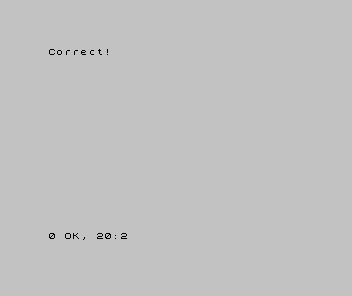
That’s a condition: a question with only two possible answers, true or false. When
it’s true, the instruction after THEN happens; when it’s false, it’s skipped. (Note
that = here is asking “are these equal?” — a question — not “put into the box” from
Unit 6. Same symbol, two jobs; the computer tells them apart by where it sits.)
React differently
One test is a yes/no. Real choices need more than that — too low, too high, spot
on. The tests < (less than) and > (greater than) give us the rest:
| 1 | 1 | 10 INPUT "Guess my number (1-10)? "; g | |
| 2 | 2 | 20 IF g = 7 THEN PRINT "Correct!" | |
| 3 | + | 30 IF g < 7 THEN PRINT "Too low" | |
| 4 | + | 40 IF g > 7 THEN PRINT "Too high" | |
| 3 | 5 | |
Now every guess is met by exactly one of three reactions. Guess 4:
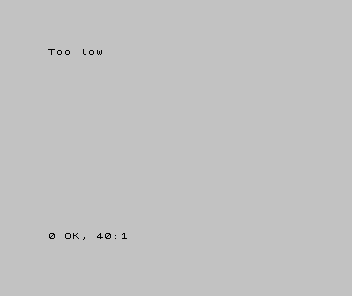
Three lines, three tests, and only the one that’s true does anything. That is genuinely a tiny game: a secret, a guess, and a response that depends on the guess. It just can’t let you try again yet — that’s the next idea but one.
Conditions can also be combined. g > 0 AND g < 11 is true only when both halves
are (a guess in range); g = 1 OR g = 7 is true when either is. AND demands both;
OR accepts either — the two ways of joining yes/no questions into a bigger one.
When it’s wrong, see why
- The reaction never happens. The test is never true — check it against the value you
typed. If you guess
7and nothing says “Correct!”, read line 20: is it testingg = 7, and isgthe box you put the guess in? - Two reactions happen at once. Two of your tests can be true together.
g < 7andg < 10are both true for a4. Make the tests cover separate cases —<,=,>share nothing. - It always reacts, whatever you type. Look for a test that’s always true —
g > 0for a guess that’s never negative, say. A condition that can’t be false isn’t a decision.
What you’ve learnt
- A condition is a test with a true-or-false answer; an
IFcarries out its instruction only when the test is true, and skips it otherwise. - The tests are
=(equal),<(less than),>(greater than) and their kin — and=as a question is a different job from=as put-into-a-box. - Conditions combine with
AND(both must hold) andOR(either will do). - A decision is what lets a program react — the first thing that makes it feel like a game, not a recital.
What’s next
The guessing game can tell you too high or too low — but then it stops, and you have to run it again to guess once more. A real game would let you keep going. In Unit 8 we meet the first kind of loop: doing something a set number of times without writing it out over and over.