The Cobbles and the Brick
Write the bitmap under the attributes — meet the Spectrum's famous screen layout, blit an 8-byte texture into every ground cell, then let the map itself decide where the brick goes.
The square stands, but look at it: solid blocks of colour. Paint with no canvas under it. The ground should be cobbled — worn stone catching what light is left — and the walls should read as built, course on course of brick. This unit lays both, and on the way it meets the most famous oddity on the machine: how the Spectrum’s bitmap is actually arranged.
A confession, first
When we first built this game, we skipped this unit. The attributes worked, the game grew — and weeks later, whole mechanics landed invisible, because they worked by recolouring pixels and there were no pixels to recolour. A feature’s visibility can live in a different subsystem from its logic. We built the rules before the canvas, and the canvas turned out to be load-bearing. So it comes second in the whole course, right after the square itself: the canvas precedes the paint.
Writing the canvas
Unit 1 called the bitmap and the attributes the screen’s two memories, and then only ever wiped the bitmap. Today we write it. The rules of the game don’t change: a lit pixel shows its cell’s INK, an unlit one its PAPER. The cobbles’ INK has been blue since Unit 1 — set pixels in a ground cell and they’ll come up blue on black without touching the attributes at all. The paint has been waiting for the canvas.
The famous layout
One cell’s pixels are eight bytes — but they are not eight bytes in a row. The Spectrum’s screen is wired in three thirds of eight character rows each, and inside a cell the eight pixel rows sit 256 bytes apart. Step down one pixel row by adding 256 — on the Z80, that’s a single inc h.
To texture any cell, we need its bitmap address from its column and row at run time. This is scr_addr_cr, and it’s pure bit-shuffling: write the row number as %000ttrrr — two bits tt naming the third, three bits rrr for the character row within it — and the pieces land straight into the two halves of the address:
Two ANDs, three rotates, two ORs — no multiplication, no lookup table. The wiring that makes the layout strange also makes the address cheap.
Milestone 1 — one texture, every ground cell
A texture is just eight defb bytes — an 8×8 stamp. The cobbles are a sparse stipple: a scatter of single pixels, black left dominant so the ground stays dark:
blit_tex stamps those eight bytes into one cell — scr_addr_cr finds the top row, inc h walks the other seven. fill_ground calls it for every cell in rows 1–23 (row 0 stays clean: the HUD). Note the loop order — texture first, then the attribute wash — mirrors what you already know: canvas, then paint.
| 18 | 18 | ; screen before us still lives there. Zero it so only our | |
| 19 | 19 | ; attribute colours show. | |
| 20 | 20 | call clear_bitmap | |
| 21 | + | | |
| 22 | + | ; --- texture the ground --- | |
| 23 | + | ; Blit the cobble stipple into every cell's bitmap, rows 1-23. | |
| 24 | + | ; The attributes will colour these pixels in a moment. | |
| 25 | + | call fill_ground | |
| 21 | 26 | | |
| 22 | 27 | ; --- wash in the cobbles --- | |
| 23 | 28 | ; Seed the first attribute cell, point DE one cell ahead, and | |
| ... | |||
| 83 | 88 | ld (hl), 0 | |
| 84 | 89 | ld bc, 6143 | |
| 85 | 90 | ldir | |
| 91 | + | ret | |
| 92 | + | | |
| 93 | + | ; ---------------------------------------------------------------------------- | |
| 94 | + | ; fill_ground — the cobble stipple. Not decoration: the stipple is what | |
| 95 | + | ; makes ground-state changes visible later, when the game starts | |
| 96 | + | ; recolouring these pixels. Rows 1-23 (row 0 is the HUD). | |
| 97 | + | ; ---------------------------------------------------------------------------- | |
| 98 | + | fill_ground: | |
| 99 | + | ld b, 1 ; rows 1-23 (row 0 is the HUD) | |
| 100 | + | .fgr: | |
| 101 | + | ld c, 0 | |
| 102 | + | .fgc: | |
| 103 | + | ld de, cobble_tex | |
| 104 | + | call blit_tex | |
| 105 | + | inc c | |
| 106 | + | ld a, c | |
| 107 | + | cp 32 | |
| 108 | + | jr c, .fgc | |
| 109 | + | inc b | |
| 110 | + | ld a, b | |
| 111 | + | cp 24 | |
| 112 | + | jr c, .fgr | |
| 113 | + | ret | |
| 114 | + | | |
| 115 | + | ; blit_tex — write the 8-byte texture at DE into cell (C, B)'s bitmap. | |
| 116 | + | ; scr_addr_cr finds the cell's first pixel row; INC H steps down the | |
| 117 | + | ; other seven, 256 bytes apart. | |
| 118 | + | blit_tex: | |
| 119 | + | push bc | |
| 120 | + | call scr_addr_cr | |
| 121 | + | ld b, 8 | |
| 122 | + | .bt: | |
| 123 | + | ld a, (de) | |
| 124 | + | ld (hl), a | |
| 125 | + | inc de | |
| 126 | + | inc h | |
| 127 | + | djnz .bt | |
| 128 | + | pop bc | |
| 129 | + | ret | |
| 130 | + | | |
| 131 | + | cobble_tex: | |
| 132 | + | defb %10000010 | |
| 133 | + | defb %00000000 | |
| 134 | + | defb %00001000 | |
| 135 | + | defb %00000000 | |
| 136 | + | defb %00100001 | |
| 137 | + | defb %00000000 | |
| 138 | + | defb %00010000 | |
| 139 | + | defb %00000000 | |
| 140 | + | | |
| 141 | + | ; ---------------------------------------------------------------------------- | |
| 142 | + | ; scr_addr_cr — HL = bitmap address of cell (C, B)'s first pixel row. | |
| 143 | + | ; The row's top two bits pick the third of the screen (H), its bottom | |
| 144 | + | ; three become L's top bits, and the column fills L's low five. | |
| 145 | + | ; ---------------------------------------------------------------------------- | |
| 146 | + | | |
| 147 | + | scr_addr_cr: | |
| 148 | + | ld a, b | |
| 149 | + | and %00011000 ; the third (row bits 4-3) ... | |
| 150 | + | or %01000000 ; ... under the screen base $40xx | |
| 151 | + | ld h, a | |
| 152 | + | ld a, b | |
| 153 | + | and %00000111 ; the char row within the third ... | |
| 154 | + | rrca ; ... rotated into bits 7-5 | |
| 155 | + | rrca | |
| 156 | + | rrca | |
| 157 | + | or c ; the column in bits 4-0 | |
| 158 | + | ld l, a | |
| 86 | 159 | ret | |
| 87 | 160 | | |
| 88 | 161 | end start |
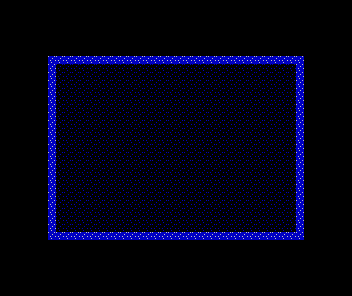
Look closely at the walls: they’ve caught the stipple as well, in their INK — white flecks on blue. fill_ground textures every cell in its rows; it doesn’t know some of them are wall. That’s not a bug to fix by making the loop cleverer. It’s the cue for the second milestone.
Milestone 2 — the map decides where the brick goes
The walls deserve their own stamp — mortar courses, staggered verticals:
But which cells get it? Here’s the move that matters: don’t keep a second list of where the walls are — ask the screen. Unit 1 said a cell’s type and its colour are the same byte. fill_walls walks all the cells, reads each attribute back with attr_addr_cr, and tests one bit: wall attributes ($0F) have PAPER blue, so bit 3 — WALL_BIT — is set; cobble attributes ($01) have it clear. Wherever the bit says wall, the brick goes down, overwriting the stray stipple from milestone 1.
| 6 | 6 | | |
| 7 | 7 | COBBLE equ %00000001 ; PAPER black (0), INK blue (1) — dark ground | |
| 8 | 8 | WALL equ %00001111 ; PAPER blue (1), INK white (7) — pale stone | |
| 9 | + | WALL_BIT equ 3 ; the attribute bit that says "this is wall" | |
| 9 | 10 | | |
| 10 | 11 | start: | |
| 11 | 12 | ; --- the border goes black — the night beyond the square --- | |
| ... | |||
| 34 | 35 | ldir | |
| 35 | 36 | | |
| 36 | 37 | call paint_walls | |
| 38 | + | | |
| 39 | + | ; --- brick the walls --- | |
| 40 | + | ; Now that the wall cells are painted, fill_walls can read the | |
| 41 | + | ; map back and lay brick wherever the wall bit is set. | |
| 42 | + | call fill_walls | |
| 37 | 43 | | |
| 38 | 44 | forever: | |
| 39 | 45 | jr forever | |
| ... | |||
| 110 | 116 | ld a, b | |
| 111 | 117 | cp 24 | |
| 112 | 118 | jr c, .fgr | |
| 119 | + | ret | |
| 120 | + | | |
| 121 | + | ; fill_walls — brickwork. Driven by the wall attribute bit, so anything | |
| 122 | + | ; painted as wall — now or later in the game — gets its brick for free: | |
| 123 | + | ; the map itself decides where the brick goes. | |
| 124 | + | fill_walls: | |
| 125 | + | ld b, 1 | |
| 126 | + | .fwr: | |
| 127 | + | ld c, 0 | |
| 128 | + | .fwc: | |
| 129 | + | push bc | |
| 130 | + | call attr_addr_cr | |
| 131 | + | bit WALL_BIT, (hl) | |
| 132 | + | pop bc | |
| 133 | + | jr z, .fwn | |
| 134 | + | ld de, brick_tex | |
| 135 | + | call blit_tex | |
| 136 | + | .fwn: | |
| 137 | + | inc c | |
| 138 | + | ld a, c | |
| 139 | + | cp 32 | |
| 140 | + | jr c, .fwc | |
| 141 | + | inc b | |
| 142 | + | ld a, b | |
| 143 | + | cp 24 | |
| 144 | + | jr c, .fwr | |
| 113 | 145 | ret | |
| 114 | 146 | | |
| 115 | 147 | ; blit_tex — write the 8-byte texture at DE into cell (C, B)'s bitmap. | |
| ... | |||
| 137 | 169 | defb %00000000 | |
| 138 | 170 | defb %00010000 | |
| 139 | 171 | defb %00000000 | |
| 172 | + | | |
| 173 | + | brick_tex: | |
| 174 | + | ; mortar courses with staggered verticals — dusk-lit stone | |
| 175 | + | defb %00001000 | |
| 176 | + | defb %00001000 | |
| 177 | + | defb %00001000 | |
| 178 | + | defb %11111111 | |
| 179 | + | defb %10000000 | |
| 180 | + | defb %10000000 | |
| 181 | + | defb %10000000 | |
| 182 | + | defb %11111111 | |
| 140 | 183 | | |
| 141 | 184 | ; ---------------------------------------------------------------------------- | |
| 142 | 185 | ; scr_addr_cr — HL = bitmap address of cell (C, B)'s first pixel row. | |
| ... | |||
| 155 | 198 | rrca | |
| 156 | 199 | rrca | |
| 157 | 200 | or c ; the column in bits 4-0 | |
| 201 | + | ld l, a | |
| 202 | + | ret | |
| 203 | + | | |
| 204 | + | ; attr_addr_cr — HL = attribute address of cell (C, B): | |
| 205 | + | ; $5800 + row*32 + col, the row shifted up five times. | |
| 206 | + | attr_addr_cr: | |
| 207 | + | ld a, b | |
| 158 | 208 | ld l, a | |
| 209 | + | ld h, 0 | |
| 210 | + | add hl, hl | |
| 211 | + | add hl, hl | |
| 212 | + | add hl, hl | |
| 213 | + | add hl, hl | |
| 214 | + | add hl, hl | |
| 215 | + | ld de, $5800 | |
| 216 | + | add hl, de | |
| 217 | + | ld a, c | |
| 218 | + | ld e, a | |
| 219 | + | ld d, 0 | |
| 220 | + | add hl, de | |
| 159 | 221 | ret | |
| 160 | 222 | | |
| 161 | 223 | end start |
The complete program
; Gloaming — Unit 2: The Cobbles and the Brick
; Cumulative build; every step runs on its own. Narrative: the unit page.
; Textures: 8 bytes per cell — cobble stipple on the ground, brick on the walls.

            org     32768

COBBLE      equ     %00000001       ; PAPER black (0), INK blue (1) — dark ground
WALL        equ     %00001111       ; PAPER blue (1), INK white (7) — pale stone
WALL_BIT    equ     3               ; the attribute bit that says "this is wall"

start:
            ; --- the border goes black — the night beyond the square ---
            ; Port $FE bits 0-2 set the BORDER colour. A = 0 = black.
            ld      a, 0
            out     ($FE), a

            ; --- wipe the canvas ---
            ; The bitmap ($4000-$57FF) is the pixel layer; whatever was on
            ; screen before us still lives there. Zero it so only our
            ; attribute colours show.
            call    clear_bitmap

            ; --- texture the ground ---
            ; Blit the cobble stipple into every cell's bitmap, rows 1-23.
            ; The attributes will colour these pixels in a moment.
            call    fill_ground

            ; --- wash in the cobbles ---
            ; Seed the first attribute cell, point DE one cell ahead, and
            ; let LDIR cascade the byte through all 768 cells.
            ld      hl, $5800
            ld      de, $5801
            ld      (hl), COBBLE
            ld      bc, 767
            ldir

            call    paint_walls

            ; --- brick the walls ---
            ; Now that the wall cells are painted, fill_walls can read the
            ; map back and lay brick wherever the wall bit is set.
            call    fill_walls

forever:
            jr      forever

; ----------------------------------------------------------------------------
; paint_walls — the square's edge, one attribute write per cell.
; ----------------------------------------------------------------------------
paint_walls:
            ld      c, WALL         ; the byte every wall cell gets

            ; the top wall: row 1 is 32 cells in a row from $5820
            ; (row 0 is kept back — it becomes the HUD later)
            ld      hl, $5820
            ld      b, 32
.wt:
            ld      (hl), c
            inc     hl
            djnz    .wt

            ; the bottom wall: row 23, 32 cells from $5AE0
            ld      hl, $5AE0
            ld      b, 32
.wb:
            ld      (hl), c
            inc     hl
            djnz    .wb

            ; the side walls: column 0 and column 31 of rows 1-23.
            ; Write the row's first cell, hop 31 cells to its last,
            ; then step a full row (32) down — 23 times.
            ld      hl, $5820
            ld      b, 23
.ws:
            ld      (hl), c
            push    hl
            ld      de, 31
            add     hl, de
            ld      (hl), c
            pop     hl
            ld      de, 32
            add     hl, de
            djnz    .ws
            ret

; ----------------------------------------------------------------------------
; clear_bitmap — zero the pixel layer, $4000-$57FF, with the same
; seed-and-cascade LDIR idiom the cobble wash uses.
; ----------------------------------------------------------------------------
clear_bitmap:
            ld      hl, $4000
            ld      de, $4001
            ld      (hl), 0
            ld      bc, 6143
            ldir
            ret

; ----------------------------------------------------------------------------
; fill_ground — the cobble stipple. Not decoration: the stipple is what
; makes ground-state changes visible later, when the game starts
; recolouring these pixels. Rows 1-23 (row 0 is the HUD).
; ----------------------------------------------------------------------------
fill_ground:
            ld      b, 1                ; rows 1-23 (row 0 is the HUD)
.fgr:
            ld      c, 0
.fgc:
            ld      de, cobble_tex
            call    blit_tex
            inc     c
            ld      a, c
            cp      32
            jr      c, .fgc
            inc     b
            ld      a, b
            cp      24
            jr      c, .fgr
            ret

; fill_walls — brickwork. Driven by the wall attribute bit, so anything
; painted as wall — now or later in the game — gets its brick for free:
; the map itself decides where the brick goes.
fill_walls:
            ld      b, 1
.fwr:
            ld      c, 0
.fwc:
            push    bc
            call    attr_addr_cr
            bit     WALL_BIT, (hl)
            pop     bc
            jr      z, .fwn
            ld      de, brick_tex
            call    blit_tex
.fwn:
            inc     c
            ld      a, c
            cp      32
            jr      c, .fwc
            inc     b
            ld      a, b
            cp      24
            jr      c, .fwr
            ret

; blit_tex — write the 8-byte texture at DE into cell (C, B)'s bitmap.
; scr_addr_cr finds the cell's first pixel row; INC H steps down the
; other seven, 256 bytes apart.
blit_tex:
            push    bc
            call    scr_addr_cr
            ld      b, 8
.bt:
            ld      a, (de)
            ld      (hl), a
            inc     de
            inc     h
            djnz    .bt
            pop     bc
            ret

cobble_tex:
            defb    %10000010
            defb    %00000000
            defb    %00001000
            defb    %00000000
            defb    %00100001
            defb    %00000000
            defb    %00010000
            defb    %00000000

brick_tex:
            ; mortar courses with staggered verticals — dusk-lit stone
            defb    %00001000
            defb    %00001000
            defb    %00001000
            defb    %11111111
            defb    %10000000
            defb    %10000000
            defb    %10000000
            defb    %11111111

; ----------------------------------------------------------------------------
; scr_addr_cr — HL = bitmap address of cell (C, B)'s first pixel row.
; The row's top two bits pick the third of the screen (H), its bottom
; three become L's top bits, and the column fills L's low five.
; ----------------------------------------------------------------------------

scr_addr_cr:
            ld      a, b
            and     %00011000       ; the third (row bits 4-3) ...
            or      %01000000       ; ... under the screen base $40xx
            ld      h, a
            ld      a, b
            and     %00000111       ; the char row within the third ...
            rrca                    ; ... rotated into bits 7-5
            rrca
            rrca
            or      c               ; the column in bits 4-0
            ld      l, a
            ret

; attr_addr_cr — HL = attribute address of cell (C, B):
; $5800 + row*32 + col, the row shifted up five times.
attr_addr_cr:
            ld      a, b
            ld      l, a
            ld      h, 0
            add     hl, hl
            add     hl, hl
            add     hl, hl
            add     hl, hl
            add     hl, hl
            ld      de, $5800
            add     hl, de
            ld      a, c
            ld      e, a
            ld      d, 0
            add     hl, de
            ret

            end     start
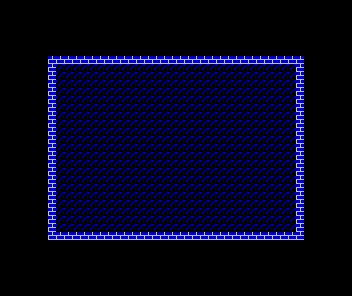
This is why fill_walls runs after paint_walls in the setup: the map has to exist before it can be read. And it’s a promise about the future — when buildings appear inside the square later in the game, they’ll be painted as wall attributes, and this same loop will brick them without changing a line.
Assemble and run
As ever, either assembler takes the pasmo-syntax source to the same snapshot:
asm198x --dialect pasmonext --sna steps/step-02.asm -o steps/step-02.sna
pasmonext --sna steps/step-02.asm steps/step-02.sna
Both fills together touch every one of the 6,144 bitmap bytes and still finish in a blink — the square is textured before the first frame is out.
When it’s wrong, see why
Texture bugs are address bugs, and each symptom names its own bit:
- The texture is there but scrambled — slivers in wrong rows.
scr_addr_cr. Check the two AND masks: the third comes from row bits 4–3 (%00011000), the char row from bits 2–0 (%00000111), rotated three times into L’s top bits. One wrong mask shreds the layout. - The stamp’s rows are consecutive on screen but the cells are wrong. The
inc hwalk started from a bad base — same routine, checkor %01000000: the screen lives at$4000, and H must carry that base. - Stipple everywhere, but no brick.
fill_wallsisn’t seeing wall. Confirm the bit test reads the attribute (viaattr_addr_cr,$5800+) and testsWALL_BIT(bit 3 — set in$0F, clear in$01), and that the branch skips on zero. - Brick everywhere, cobbles gone. The branch is inverted —
jr zandjr nzswapped reads the map exactly backwards. - A stippled HUD row. The ground loop’s bounds. It starts at row 1 and stops before 24; a loop from 0 stipples the ledge the HUD is saving for later.
- The texture flickers or tears at the top. It doesn’t — not in this program. Both fills finish well inside a frame. If you see garbage for an instant on a real machine, it’s the old screen contents before
clear_bitmapruns; the wipe from Unit 1 must stay first.
Before and after
The square began this unit as flat colour and ends it as a place — stippled stone inside brick walls. Two ideas did all of it: a texture is eight bytes stamped through inc h, and the second fill found its targets by reading the map back instead of keeping a list. The screen isn’t just output — it’s the game’s own data structure, and that idea does a lot of work between here and the end of the module.
Try this: cut your own cobbles
Design a different ground texture — click pixels below (it starts as the shipped stipple), and the defb rows update as you draw. Copy them over cobble_tex and rebuild. Keep it sparse (eight to twelve pixels): the dusk needs the black. If your pattern tiles into obvious stripes, stagger the marks between rows — the shipped stipple never puts two pixels in the same column twice.
Try this: a second wall course
Make the brick finer: change the two %11111111 mortar rows to %01111111 and %11110111. The joins break up and the wall reads older, more weathered. One byte per course — texture is cheap to art-direct when it’s just data.
Try this: prove the map is in charge
In step 2’s setup, paint one interior cell as wall before fill_walls runs — after the ldir wash, write $0F somewhere mid-square (say $5800 + 12*32 + 16). Rebuild: a single bricked block appears in the middle of the cobbles. You never told fill_walls about it. That’s the promise this unit makes to the rest of the game — and buildings will collect on it.
What you’ve learnt
- The bitmap’s thirds layout: a cell’s eight pixel rows sit 256 bytes apart, and
inc hwalks them. scr_addr_cr— column and row to bitmap address with two masks and three rotates;attr_addr_cr— the same cell’s attribute at$5800 + row*32 + col.- A texture is data: eight
defbbytes stamped by one smallblit_texloop. - Read the map, don’t keep a list —
fill_wallsfinds every wall by testing one attribute bit, so future walls get brick for free. - Fill order matters: canvas before paint, and the map must be painted before it can be read.
What’s next
The square is ready for someone to stand in it. In Unit 3 the lamplighter arrives — an 8×8 figure defined the same way the textures were, eight bytes of data — and the first thing you’ll learn about him is that on this machine, a character is just a texture with a name. Until, that is, he needs a colour of his own.