Changing What It Knows
Change the numbers that control the game's colours, difficulty, and secret answer — your first look at LET and variables.
Every number the game uses is stored somewhere. The secret number. The digit colour. The scoring thresholds. Change the number, change the game. That’s what a variable is — a name that holds a value.
Fix the Answer
Find line 280. It picks the secret number:
280 LET n=INT (RND*100)+1That formula picks a random number between 1 and 100. You don’t need to understand the formula yet — just replace the whole line:
280 LET n=50
Type RUN. Now you know the answer is 50. The game still works — the temperature bar climbs, the big digits track your guess, the border shifts — but the surprise is gone. The variable n controls everything. Whatever number you put after LET n= becomes the secret number.
Try LET n=1. Try LET n=99. The game adapts because every comparison in the program uses n.
Change the Digit Colour
Find line 430:
430 LET pc=6: LET v=g: LET dr=4: GO SUB 8200The variable pc controls the colour the big digits are drawn in. The number 6 means yellow. Change it to 2:
430 LET pc=2: LET v=g: LET dr=4: GO SUB 8200
Type RUN and make a guess.
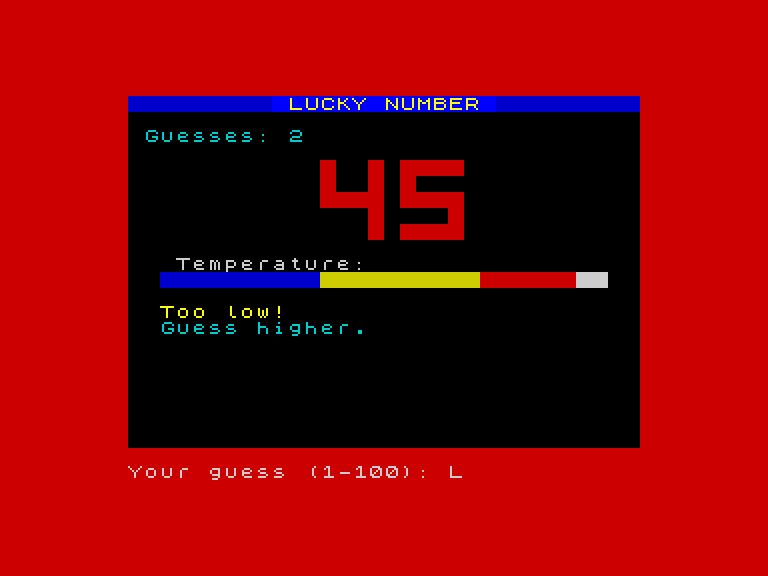
The big digits are red. One number — pc — changed from 6 to 2, and the entire look of the game shifted. You don’t need to understand what GO SUB 8200 does. You just need to know that pc controls the colour.
The Spectrum’s colour numbers:
| Number | Colour |
|---|---|
| 0 | Black |
| 1 | Blue |
| 2 | Red |
| 3 | Magenta |
| 4 | Green |
| 5 | Cyan |
| 6 | Yellow |
| 7 | White |
Try them all. LET pc=3 for magenta digits. LET pc=7 for white. LET pc=1 for blue (hard to see against the blue header, but it works).
Change the Victory Colour
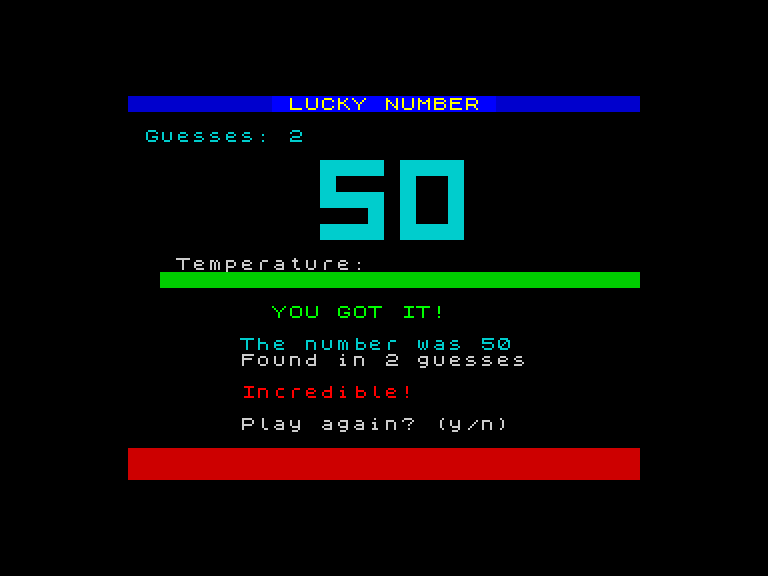
Line 770 sets the digit colour for the win screen. The original is 4 (green). Change it to 5:
770 LET pc=5: LET v=g: LET dr=4: GO SUB 8200
Win the game and the victory digits are cyan instead of green.
Make It Harder
Line 880 decides who gets “Incredible!”:
880 IF c<=5 THEN PRINT AT 18,7; INK 2; BRIGHT 1;"Incredible!"The 5 is a threshold — five guesses or fewer earns the top rating. Change it:
880 IF c<=3 THEN PRINT AT 18,7; INK 2; BRIGHT 1;"Incredible!"
Now “Incredible!” requires three guesses, not five. The number 3 is stored nowhere except in that line — it’s not a named variable like n or pc, but it works the same way. A number controls a behaviour. Change the number, change the behaviour.
What’s a Variable?
To see variables at their simplest, type NEW then:
  10 LET a=5
  20 PRINT a
  30 LET a=42
  40 PRINT a
Type RUN. The Spectrum prints 5, then 42. The variable a held 5, then it held 42. LET puts a value in. PRINT reads it out. The variable holds whatever you last put in it.
Notice that PRINT a (no quotation marks) prints the number inside a. Compare with PRINT "a" (with quotation marks) which would print the letter a. Quotation marks mean text. No quotation marks means look up the variable.
In Lucky Number, n, pc, c, g, d, h — these are all variables. Each one stores a number that controls something in the game. You’ve already changed n (the secret number) and pc (the digit colour). Over the next few units, you’ll meet the rest.
Try This
- Set
LET n=50and play. Does the temperature bar reach maximum when you guess 50? What about 49? - Change
pcon line 430 to matchpcon line 770 — make the guess digits and the victory digits the same colour. - Change the thresholds on lines 890 and 895 too. Design your own difficulty curve.
- What happens if you set
LET n=0? OrLET n=101? (The validation on line 410 won’t let you guess outside 1-100, so the game becomes unwinnable.)
What You’ve Learnt
- LET — stores a value in a variable (
LET n=50,LET pc=2) - Variables — named storage;
nholds the secret number,pcholds the digit colour,ccounts guesses - Colour numbers — 0-7 map to black, blue, red, magenta, green, cyan, yellow, white
- Changing behaviour — every visible feature of the game is controlled by a number somewhere; change the number, change the game
- PRINT with variables — no quotation marks prints the value, not the name