The Game
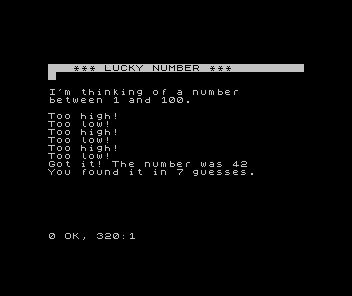
Lucky Number is the guessing game you built in Meet BASIC, grown up: a secret between 1 and 100, fresh every play, with a guess counter. Here it is, working — the foundation the rest of the game is built on.
You’ve built this game before. In Meet BASIC you wrote a guess-the-number loop: the computer picks a secret, you guess, it says higher or lower, and it counts your tries. Lucky Number is that game, grown into something you’d show someone — a secret between 1 and 100, a colour-coded border, sound that means something, and a verdict at the end. This unit lays the foundation: the working game.
  10 BORDER 0: PAPER 0: INK 7: CLS
  20 RANDOMIZE
  30 LET n = INT (RND * 100) + 1
  40 LET c = 0
  50 INVERSE 1: PRINT AT 2, 0; "   *** LUCKY NUMBER ***          ": INVERSE 0
  60 PRINT
  70 PRINT "I'm thinking of a number"
  80 PRINT "between 1 and 100."
  90 PRINT
 120 INPUT "Your guess: "; g
 130 LET c = c + 1
 200 IF g = n THEN GO TO 310
 210 IF g < n THEN PRINT "Too low!"
 220 IF g > n THEN PRINT "Too high!"
 230 GO TO 120
 310 PRINT "Got it! The number was "; n
 320 PRINT "You found it in "; c; " guesses."
Nothing here is new. RANDOMIZE and INT (RND * 100) + 1 pick a fresh secret each play
(the range formula from Meet BASIC, set to 1–100). Line 40 starts a guess counter; line
130 bumps it each turn. Lines 200–230 are the game loop you know — check the guess, say
too low or too high, and GO TO 120 to ask again — and lines 310–320 announce the win
and the tally.
Why open here
The mechanics — input, decisions, the loop, random numbers, a counter — are all yours already. So Lucky Number doesn’t re-teach them; it uses them. From here on, every unit adds one thing that turns this working program into a game: feedback you can see, feedback you can hear, and a result that means something. The code above is the spine; the rest is what makes it worth playing.
Room to grow
The line numbers leave room on purpose. The colour feedback drops into the gap between 130 and 200; an offered start goes between 90 and 120; a win fanfare and a rating slot into the win section. Numbering in tens, the habit from Meet BASIC, is what lets each new unit add a line without disturbing the ones around it.
Next: the border starts talking — colour for how close you are.