The Oracle's Chamber
The last touches make it look built, not typed: solid block-graphic bars in place of equals signs, a flashing verdict, and a subroutine that centres the title — written once, called twice. The Oracle Stone, complete.
The Oracle speaks in cyan, but the screen still looks typed — rows of equals signs, a title shoved to the left. Three finishing touches make it look built: real block graphics, a flashing verdict, and a subroutine that centres the title.
  10 BORDER 1: PAPER 1: INK 7: CLS
  20 RANDOMIZE
  30 LET a$ = "*** THE ORACLE STONE ***": LET y = 3: GO SUB 9000
  50 PRINT
  60 PRINT "  Ask any yes-or-no question."
  70 PRINT "  The Oracle will answer."
  80 PRINT
  90 INPUT "  Speak, mortal: "; q$
 100 PRINT
 110 PRINT "  The Oracle ponders..."
 120 BEEP 0.3, 20: BEEP 0.3, 15: BEEP 0.3, 10: BEEP 0.3, 5
 130 PAUSE 25
 140 CLS
 150 PRINT
 160 LET a$ = "*** THE ORACLE STONE ***": LET y = 3: GO SUB 9000
 170 PRINT
 180 INK 5: FOR i = 1 TO 28: PRINT CHR$ 143;: NEXT i: INK 7
 190 PRINT
 200 LET r = INT (RND * 10) + 1
 210 BEEP 0.1, 24
 220 INK 5: FLASH 1
 230 IF r = 1 THEN PRINT "  YES"
 240 IF r = 2 THEN PRINT "  NO"
 250 IF r = 3 THEN PRINT "  PERHAPS"
 260 IF r = 4 THEN PRINT "  ASK AGAIN LATER"
 270 IF r = 5 THEN PRINT "  THE SIGNS ARE UNCLEAR"
 280 IF r = 6 THEN PRINT "  DEFINITELY NOT"
 290 IF r = 7 THEN PRINT "  THE STARS SAY YES"
 300 IF r = 8 THEN PRINT "  NOT ON A TUESDAY"
 310 IF r = 9 THEN PRINT "  THE ORACLE IS UNSURE"
 320 IF r = 10 THEN PRINT "  WITHOUT A DOUBT"
 330 FLASH 0: INK 7
 340 PRINT
 350 INK 5: FOR i = 1 TO 28: PRINT CHR$ 143;: NEXT i: INK 7
 360 STOP
9000 PRINT AT y, (32 - LEN a$) / 2; BRIGHT 1; a$
9010 RETURN
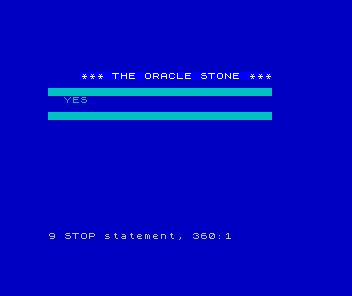
Block graphics with CHR$ 143
CHR$ 143 is a solid block — a fully-filled character cell. Line 180 prints 28 of them
in a row with a FOR loop, in cyan: a clean, solid bar where the equals signs used to be.
PRINT CHR$ 143; with a semicolon keeps them touching, so they form an unbroken line. The
Spectrum has a set of these block-graphic characters (CHR$ 128–143); they’re how you draw
chunky shapes without touching a single pixel.
A subroutine for the title
The title appears twice — once on the asking screen, once on the answer screen — and both
need centring. Instead of working out the column twice, line 30 and line 160 both GO SUB 9000, which prints a$ centred: PRINT AT y, (32 - LEN a$) / 2; .... Write the centring
once, call it from anywhere. You met GO SUB in Meet BASIC; here it earns its keep —
one job, named, reused. Change the centring in one place and both titles follow.
And FLASH 1 on line 220 makes the verdict pulse, ink and paper swapping — the stone’s
answer, alive on the screen.
Make it yours
The Oracle is yours now. Write your own answers — funnier, darker, in your own voice. Change
the chamber’s colours, the pondering tune, the block-graphic bars. Add more answers and widen
the RND range to match. Give it a name. It’s a toy; bend it however amuses you.
What you built
Oracle Stone began as a random number and a chain of IFs — a coin flip with extra steps.
Six units of ceremony turned it into a stone with a chamber, a voice, and a sense of
timing. None of it changed the verdict; all of it changed the ritual. That gap — between a
program that prints an answer and a toy that delivers one — is the whole craft of making
something feel built.
Next: Reflex — a test of speed, where the computer dares you to be quick.