The Lander
Turn the altitude into a screen position and draw the ship there — then erase the old position each pass so it moves cleanly instead of smearing a trail.
Numbers tell you where the lander is; a ship on the screen lets you feel it. This unit draws the lander at a height that tracks its altitude — and introduces the trick behind all character animation: erase where it was before drawing where it is.
  10 BORDER 0: PAPER 0: INK 7: CLS
  90 CLS
 100 LET alt = 100
 110 LET spd = 0
 120 LET fuel = 50
 130 PRINT AT 1, 1; "ALT:         SPD:      FUEL:"
 140 PRINT AT 21, 0; "================================"
 150 LET spd = spd + 1
 160 IF INKEY$ = " " AND fuel > 0 THEN LET spd = spd - 2: LET fuel = fuel - 1
 170 IF spd < 0 THEN LET spd = 0
 180 LET prev = alt
 190 LET alt = alt - spd
 200 IF alt <= 0 THEN LET alt = 0
 210 PRINT AT 1, 6; alt; "  "
 220 PRINT AT 1, 18; spd; "  "
 230 PRINT AT 1, 29; fuel; "  "
 360 LET row = 20 - INT (alt / 5)
 370 IF row < 4 THEN LET row = 4
 380 IF row > 20 THEN LET row = 20
 390 LET prow = 20 - INT (prev / 5)
 400 IF prow < 4 THEN LET prow = 4
 410 IF prow > 20 THEN LET prow = 20
 420 PRINT AT prow, 15; " "
 430 PRINT AT row, 15; "V"
 440 PAUSE 3
 450 IF alt = 0 AND spd <= 2 THEN PRINT AT 10, 8; "PERFECT LANDING!": STOP
 460 IF alt = 0 AND spd <= 5 THEN PRINT AT 10, 8; "Bumpy but safe": STOP
 470 IF alt = 0 AND spd > 5 THEN PRINT AT 10, 8; "CRASH!": STOP
 480 GO TO 150
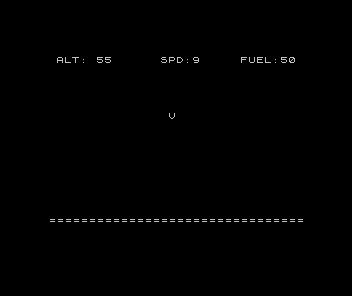
Altitude becomes a row
The screen has 24 rows; the altitude runs 0–100. Line 360 maps one to the other: `LET row = 20
- INT (alt / 5)
. High altitude gives a small row number (near the top); asaltfalls,rowgrows and the ship moves down. Lines 370–380 clamp it so the lander never draws into the dashboard or below the ground. Line 430 then prints aV` at that row — a stand-in ship for now. Turning a value into a position like this is how any game puts a moving thing on screen.
Erase, then draw
Print the ship each pass and nothing erases the last one — you get a vertical smear of Vs.
The fix is to remember the previous position and blank it first. Line 180 saves prev = alt
before the altitude changes; lines 390–410 turn that into prow, the old row; line 420 prints
a space there to rub the ship out; then line 430 draws it at the new row. Erase old, draw
new, every frame — that is the whole secret of smooth movement on a character screen, and you
will use it for every sprite, paddle, and player from here on.
Next: make the world react — colour and sound that respond to the descent.