How a Cassette Becomes a Game
From magnetic stripes to moving sprites
Cassettes were slow, cheap, and everywhere. Here's how data marched from tape to RAM, one bit at a time.
Before disks were common, games rode in on humble audio cassettes. The computer listened for pulses, decoded them into bits, and slowly filled RAM with the program you were desperate to play. Loading a typical 16 KB Spectrum game took 1-2 minutes; the same on a stock C64 Datassette took several minutes; with a turbo loader, both dropped to seconds.
Encoding: how bits become audio
A cassette can only store an audio signal — to encode digital data, the loader writes alternating tones whose pulse widths represent ones and zeros. The C64’s stock encoding uses three pulse widths (short, medium, long), and records every program twice, end to end: an error in the first copy is patched from the second, and the ?LOAD ERROR only appears after more than thirty errors on the first pass or one the second pass cannot fix. Harrie De Ceukelaire, writing in COMPUTE! in 1985, called it “probably the most sophisticated used by any microcomputer manufacturer” — “extremely reliable”, and the reason for “long waits for programs to load”. The Spectrum uses two pulse widths (short = 0, long = 1) with a leader tone to find sync.
The decoder side is interrupt-driven: a timer fires whenever an edge is detected on the cassette input pin, the gap between edges is measured, and that gap classifies the bit as 0 or 1.
Stock loading speeds
| Platform | Baud | Bytes/sec | 16 KB load time |
|---|---|---|---|
| C64 Datassette (default) | Three pulse widths, every byte written twice | — | “many minutes” for a program a 1541 loads in seconds |
| ZX Spectrum (default) | 1500 baud | ~187 B/s | ~90 seconds |
| Amstrad CPC (default) | 1000 baud | ~125 B/s | ~130 seconds |
| Amstrad CPC (speed-write) | 2000 baud | ~250 B/s | ~65 seconds |
| BBC Micro tape | 1200 baud | ~150 B/s | ~110 seconds |
The C64 is the slowest because Commodore’s stock format trades speed for robustness — the three-width pulses can be told apart on a deck running slightly fast or slow, and the second copy repairs the first. Spectrum’s format assumes a properly-aligned deck and runs nearly 4× faster.
The journey from tape to screen
- Motor on:
LOAD ""(Spectrum),LOAD(C64) starts the datasette motor and the computer listens for the pilot tone. - Pilot tone: several seconds of constant pulses lets the loader sync its timing to whatever speed this particular tape was recorded at.
- Header: a short block announces the filename, type, start address, and length, giving the loader the info it needs.
- Data blocks: the program streams in, each chunk followed by a checksum byte. Errors meant rewinding a few turns and trying again.
- Turbo loaders: custom routines replaced the slow stock loaders for speed — and colourful border theatrics while you waited (see below).
- Autoboot: some commercial tapes auto-ran after loading by appending
SYS(C64) orRANDOMIZE USR(Spectrum) commands or self-starting loaders. On the C64 the usual trick is a short stock-format file that lands on a KERNAL vector: TurboTape’s ten-byte bootstrap loads over the CLALL vector at$032C, which the KERNAL calls as the last step of everyLOAD, and the loader proper rides in the 187-character filename field of the 192-byte tape header, which the KERNAL has already read into the buffer at$033Cby the time the filename is on screen. Later loaders claim the BASIC warm-start vector at$0302and keep their code at$0351-$03FBin the same buffer.
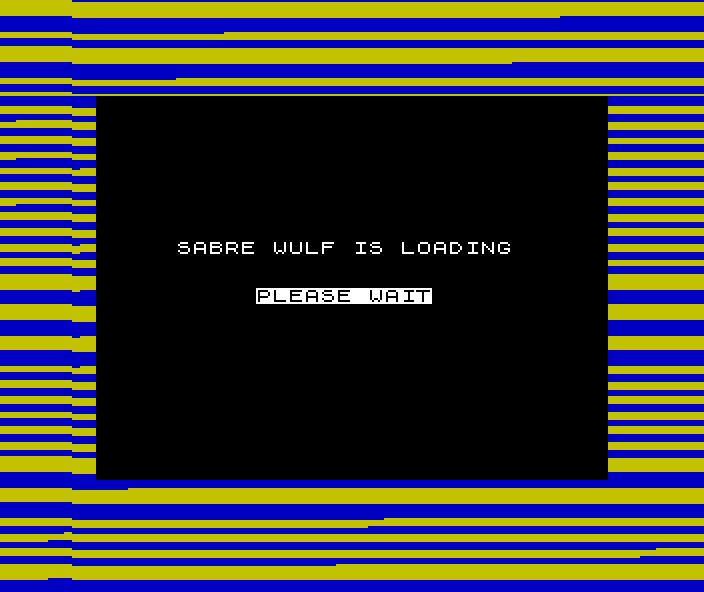
This is what step 4 actually looked like. The stripes are not decoration and not a progress bar — they are the border colour being changed by the loading routine as it decodes, so the pattern is a direct readout of the pulses arriving off the tape. A steady rhythm meant the load was healthy. A stutter, or stripes that went wide and irregular, meant a bad patch coming and usually a wasted five minutes.
Reading them was a learned skill, and one of the few times a home computer showed its users what it was doing at the level of individual bits.
Loading commands by platform:
- C64 tape:
LOAD ""(any program) orLOAD "name"(specific). Note:LOAD "*",8,1is disk, not tape — the,8,1refers to drive 8.- Spectrum:
LOAD ""for BASIC programs,LOAD ""CODEfor machine code blocks,LOAD ""SCREEN$for screen images.- Amstrad CPC:
RUN""runs the first program;LOAD"name"loads explicitly.
Turbo loaders
Commercial publishers shipped tapes with custom loaders several times faster than stock — “10 times faster” was The Final Cartridge’s claim for its tape turbo in 1985, and COMPUTE!’s TurboTape loaded a 12K program in 28 seconds against 34 for a 1541. On the C64 the most-named loader of 1984–85 was Novaload, from Novagen (Encounter, Mercenary): when Commodore Computing International added a “Fast loader:” line to its review boxes in September 1984, Novaload appeared there far more often than any other named loader — sixteen times, against four for Pavloda and three each for Burner and Ultraload. Cyberload came later and from the other direction — John Twiddy’s loader-and-protection system, first shipped on Thalamus’s Sanxion in 1986, which loads a fresh copy of itself over the old one, encrypts its data and carries the message “hackers f*ck off and die”. On the Spectrum, Speedlock dominated commercial releases — it bundled turbo loading with copy protection.
| Loader | Platform | Notable use |
|---|---|---|
| TurboTape | C64, VIC-20 | Harrie De Ceukelaire’s type-in, COMPUTE!, January 1985: “as fast as a disk drive” |
| Novaload | C64 | Novagen; “that hugely popular fast-loader” (Zzap!64, 1985) |
| Pavloda, Burner, Ultraload, Flashload, Wildload | C64 | The other loaders CCI’s reviewers named in 1984–85 |
| Cyberload | C64 | John Twiddy; Thalamus from Sanxion (1986); “the mother of all tape protection schemes” |
| Bleepload | ZX Spectrum | Firebird’s loader |
| Speedlock | ZX Spectrum | Most commercial Spectrum releases 1985+ |
| Alkatraz | ZX Spectrum | Heavy copy-protection turbo |
| Hyperload | Amstrad CPC | Common Amstrad commercial loader |
How a C64 turbo loader works
De Ceukelaire’s second article, “How TurboTape Works” (COMPUTE!, February 1985), is the period description. Where the stock format spends a series of pulses on each bit, TurboTape “uses a single square wave for each”, a 1 “roughly three times as long as” a 0, and drops the second copy. The CIA timer measures each pulse: the loader starts a countdown on the edge and reads bit 1 of $DD0D to see whether the timer ran out before the next edge. A leader of 256 bytes of value 2 followed by a countdown from 9 to 1 lets the loader find byte boundaries and notice a dropped bit. Modern loaders of the same shape use CIA timer A on the saving side too, so the pulse lengths on tape are exact; the Codebase64 autoboot loader gets “approximately 8% faster than FreeLoad” that way.
Turbo loaders trade compatibility for speed: a slightly misaligned deck might load stock-format tapes fine but fail on turbo. Hence the user rituals below.
Loading entertainment
While the data trickled in, loaders kept the user occupied:
- Border colour bars — every block-decode toggled the border colour. Kids learned to read the loader’s progress by the rate of border changes.
- Loading screens — the title screen loaded first as a small fast-loaded block, then displayed throughout the rest of the load.
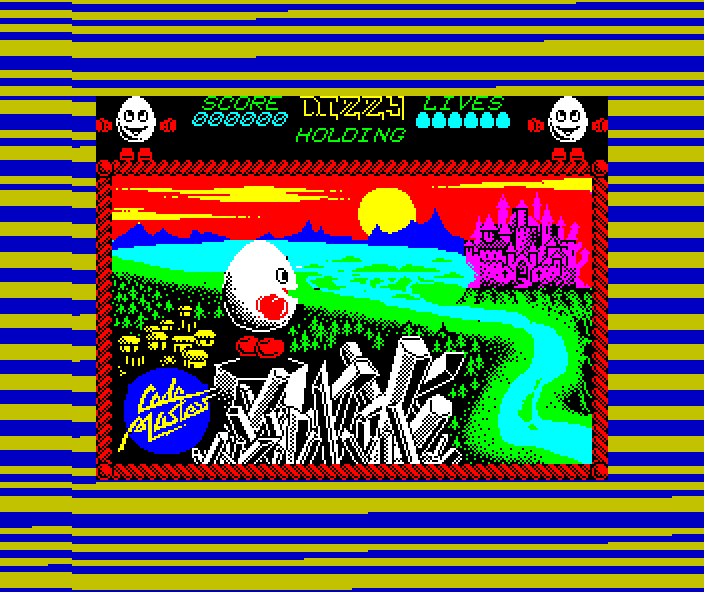
The economics are worth stating. A Spectrum screen is 6,912 bytes, so the picture above costs about 37 seconds of the load — against roughly four minutes for the 41,803-byte game behind it. Publishers spent a sixth of the loading time on something the player could only look at.
It bought two things. The picture proved the tape was working, which mattered when the alternative was three minutes of staring at stripes and wondering. And it was the only full-screen artwork most players ever saw of a game whose actual graphics had to fit in the same memory as its code.
- Mini-games during load — Mastertronic’s Invade-a-Load on the C64 let you play Space Invaders to Rob Hubbard’s One Man and His Droid music while the game loaded; Zzap!64‘s reviewer of 3-D Pinball “enjoyed playing the Invade-a-load more than the game itself”. Players’ Painter did the same with Amidar, and Delta’s Mix-e-Load let you remix a Hubbard tune. The CPU was idle during pulse decoding, so why waste it?
- Music during load — some tapes streamed music through the SID/AY while loading, decoded from a small first block.
Why tapes ruled (especially in Europe)
- Cheap & everywhere: blank cassettes cost pennies and every music shop stocked them.
- Copyable: home duplication spread shareware, piracy, and schoolyard trading — much to publishers’ chagrin.
- Publisher-friendly: mail-order and newsagents could stock them without committing to expensive disks or cartridges.
- Massive Spectrum / C64 / Amstrad install bases — the European 8-bit market was tape-first; disk-first was a North American pattern.
Rituals and remedies
- Head alignment: a tiny screwdriver adjusted the playback head’s azimuth angle. Some kids taped charts to their decks showing the optimal angle for their favourite games.
- Volume games: Spectrum owners nudged the volume knob to a “good loading” range (too loud = clipping, too quiet = missed pulses). C64 users toggled tone controls on their hi-fis.
- Environmental noise: creaky tape mechanisms, loud siblings, or vibration from passing buses could ruin a load. Many households treated loading like a sacred quiet time.
- Repeated attempts: if a load failed near the end, you’d rewind a few seconds, hit play, and pray. Commercial tape inlays often included instructions for “Loading error? Try…”
Storage capacity
A 60-minute (C60) cassette holds roughly:
| Platform | Stock | Turbo |
|---|---|---|
| C64 | ~150-200 KB per side | ~600 KB-1 MB per side |
| Spectrum | ~600 KB per side | ~1.5 MB per side |
| Amstrad CPC | ~400 KB per side | ~800 KB per side |
A C90 holds 50% more. Multi-load games (with multiple sections / levels) used both sides; flipping the tape was a normal part of gameplay on big titles like The Hobbit or Lords of Midnight.