Character Graphics
Building worlds from 8×8 blocks
Character graphics used redefined text characters as game graphics, enabling colourful displays with minimal memory on systems designed primarily for text.
Before dedicated graphics hardware, computers displayed text using character sets—grids of 8×8 pixel patterns. Programmers realised they could redefine these characters to create game graphics, building entire worlds from 256 small tiles. The technique was memory-efficient and surprisingly flexible.
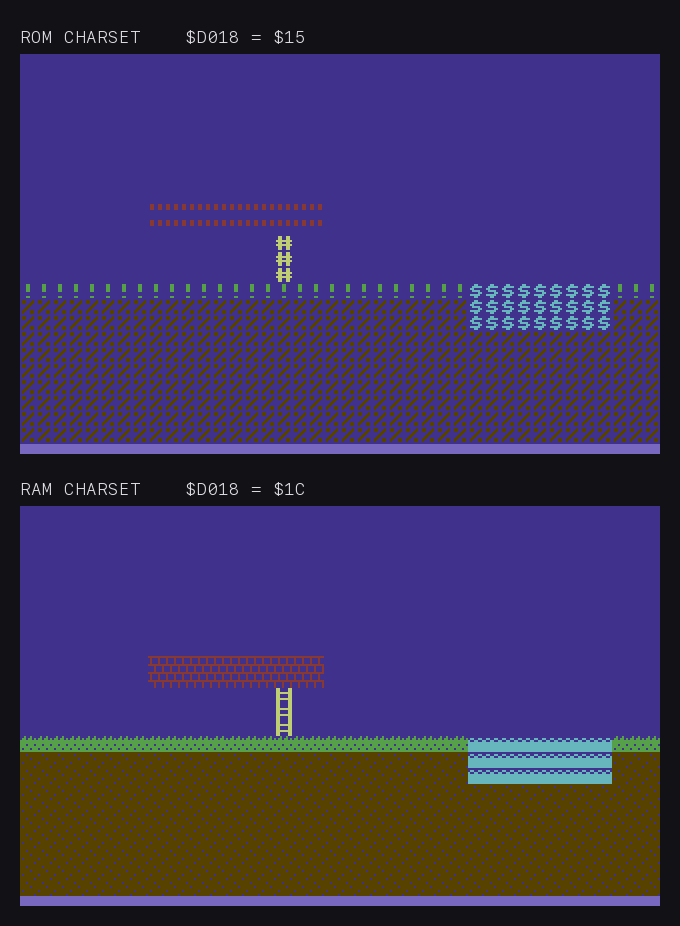
That is the whole technique. The tile map is not a picture of a level — it is 1,000 bytes naming 1,000 characters, and the character set decides what a name means.
How it works
Standard text mode
| Element | Description |
|---|---|
| Screen memory | One byte per character position |
| Character ROM | 256 pre-defined 8×8 patterns |
| Display | ROM pattern at screen position |
Custom characters
| Change | Result |
|---|---|
| Point to RAM | Use custom definitions |
| Define 8 bytes | Create 8×8 tile |
| Reference by number | Display anywhere |
Memory efficiency
| Display method | Memory for 40×25 screen |
|---|---|
| Bitmap (mono) | 8,000 bytes |
| Bitmap (colour) | 8,000 + 1,000 colour RAM |
| Character mode | 1,000 (screen) + 1,000 (colour RAM at $D800-$DBE7) + 2,048 (charset) = 4,048 bytes |
Character mode uses far less RAM. The C64 has dedicated colour RAM at $D800-$DBE7 (one nibble per cell, hard-wired and not configurable) that holds the per-character colour for text and multicolour modes.
C64 implementation
Pointing to custom charset
    lda #$1c        ; Bits 1-3 select charset
    sta $d018       ; Character at $3000
This is the write the figure above makes. $D018 holds two pointers in one byte, which is why the value is $1C and not the charset bits alone: bits 1-3 are %110, giving 6 × 2,048 = $3000 for the character set, while bits 4-7 are %0001, giving 1 × 1,024 = $0400 for screen memory. Write the charset bits without preserving the screen bits and the display moves out from under you. Commodore’s own manual gives the same warning — $D018 is “the same register that determines where screen memory is located so avoid disturbing the screen memory bits” — and the BASIC idiom POKE 53272, (PEEK(53272) AND 240) OR A.
The manual also sets out the arithmetic and the catch. A set is “256 characters in which each character is defined by 8 bytes”, 2K in all; the VIC-II “looks at 16K of memory at a time”, so “there are 8 possible locations for a complete character set”, selected by bits 1-3 in 2K steps. And switching is “an all or nothing process”: once the pointer leaves ROM, “you must copy any letters, numbers, or standard Commodore 64 graphics you intend to use into your own character memory in RAM. You can pick and choose, take only the ones you want, and don’t even have to keep them in order!” Most games do exactly that — a few dozen letters and digits copied in for the score, the rest of the 256 slots given over to tiles.
Defining a character
; Character 0 = solid block
    lda #$ff
    sta $3000       ; Row 0
    sta $3001       ; Row 1
    ; ... continue for 8 rows
Building game screens
Tile-based levels
| Tile number | Represents |
|---|---|
| 0 | Empty space |
| 1 | Ground |
| 2 | Brick |
| 3 | Ladder |
| 4-7 | Decorations |
Screen composition
Level data: 32 × 8 = 256 bytes per screen
Charset: 64 tiles × 8 = 512 bytes
Total: 768 bytes vs 8KB bitmap
Multicolour character mode
On C64:
- Each character uses 4 colours
- Half horizontal resolution
- Richer graphics
- 160×200 effective pixels
Animation techniques
Character cycling
Animate by changing character definitions:
- Water ripples
- Fire flickering
- Blinking lights
Character swapping
Change which character displays:
- Player animation frames
- Different tiles same position
Platform variations
| Platform | Characters | Colours | Custom-character method |
|---|---|---|---|
| C64 | 256 | Per-character (text mode) or per-cell colour RAM | Point $D018 bits 1-3 to RAM-based charset |
| Spectrum | 256 | Per-8×8 attribute block | Point CHARS to RAM, OR use the 21 UDGs (codes 144-164) — the cleaner approach for small sets |
| BBC Micro | 256 | Mode-dependent | OSWORD calls or direct VDU 23 redefine commands |
| VIC-20 | 256 | Per-character | Point character pointer to RAM |
The Spectrum’s UDG (User-Defined Graphics) system gives 21 redefinable characters in the upper printable range — sufficient for small games without disturbing the rest of the character set. Larger graphics need full charset replacement.
Limitations
| Limitation | Workaround |
|---|---|
| 8×8 grid alignment | Sprite overlay |
| 256 character max | Bank switching |
| Colour restrictions | Careful palette |
Notable uses
| Game | Character graphics use |
|---|---|
| Boulder Dash | Entire playfield |
| Impossible Mission | Backgrounds |
| Manic Miner | Level tiles |
| Most platformers | Background scenery |