Timing the Press
The flash catches you out — but how fast did you answer? Meet TI, the C64's built-in clock, ticking sixty times a second. Reset it at the flash, read it at the keypress, and you have a time.
You can flash, and you can surprise — but the program still has no idea how fast the player reacted. To measure that, you need a clock. The C64 has one running already, and it’s been ticking since you switched the machine on.
10 PRINT CHR$(147)
20 POKE 53281,0
30 PRINT "WATCH THE SCREEN..."
40 W=INT(RND(1)*120)+60
50 FOR T=1 TO W*8:NEXT T
60 POKE 53281,1
70 TI$="000000"
80 INPUT A$
90 RT=TI
100 POKE 53281,0
110 PRINT
120 PRINT "YOUR TIME:";RT;"JIFFIES"
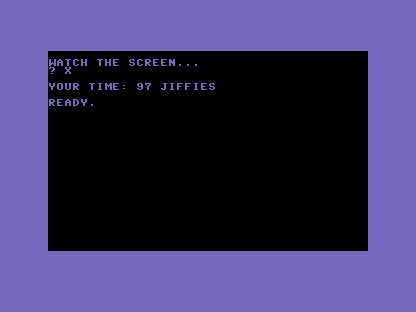
The clock is called TI, and it counts in jiffies — sixtieths of a second. It climbs on
its own, sixty every second, no matter what your program is doing. Two new lines put it to work.
Line 70, TI$="000000", resets the clock to zero the instant the screen flashes. Line 90,
RT=TI, reads it the moment the player answers — so RT holds exactly how many jiffies passed
between the two.
There’s a rough edge, though, and it’s deliberate. Line 80 uses INPUT to wait for the key —
the same INPUT you’ve used all along. But INPUT makes the player type and press RETURN,
which is two actions when a reaction test wants one. You can see it in the ? prompt and the
need to hit RETURN. It works, but it’s clumsy. The next unit fixes exactly that.
Try this
- Read it raw. Print
TIon its own line right after the flash, before anyone presses a key, and watch it race upward — proof the clock never stops. - Slow yourself down. Take a deliberate pause before answering and watch the jiffy count climb. Sixty means a whole second went by.
What’s next
The timing works, but INPUT makes you press RETURN — clumsy for a reaction test. In Unit 4
you meet GET, which catches a single keypress the instant it lands, no RETURN required.