Drawing and Shapes
Text is one thing; now you draw. Dots, lines, outlined boxes, filled bars and circles go straight onto the screen at the pixel coordinates you name, in the colours you mixed. This is the raw material every game's graphics are built from.
You’ve been putting text on the screen. Now you put graphics on it — shapes drawn straight onto the pixels, wherever you point them. AMOS gives you a small kit of drawing commands: a dot, a line, a box, a filled block, a circle. Each is modest on its own, but together they’re the raw material everything visual is made from — a health bar is a filled block, a starfield is a scatter of dots, a wireframe is a heap of lines. Learn the five, and you can draw anything.
What you’ll see by the end
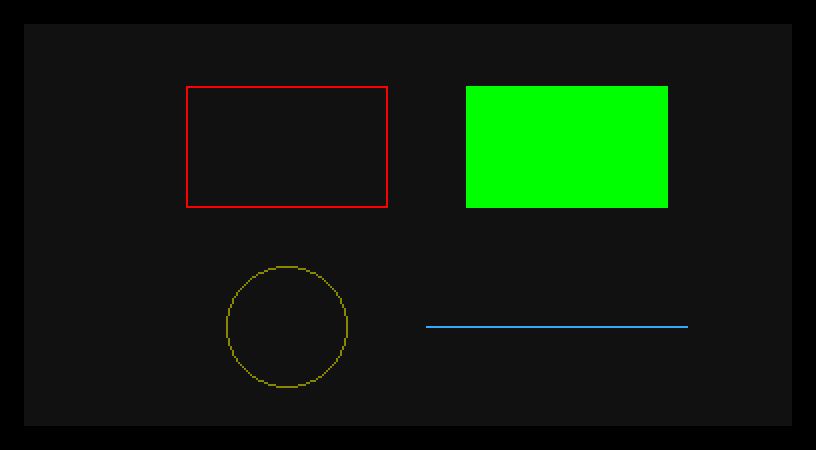
A hollow red box, a solid green block, a yellow ring, a blue line. Each came from one drawing command, placed by pixel coordinates and coloured by the palette you built last unit.
The whole program
Hide
Screen Open 0,320,200,16,Lowres
Colour 0,$111
Colour 1,$F00
Colour 2,$0F0
Colour 3,$FF0
Colour 4,$3AF
Cls 0
Ink 1
Box 40,30 To 140,90
Ink 2
Bar 180,30 To 280,90
Ink 3
Circle 90,150,30
Ink 4
Draw 160,150 To 290,150
Wait Key
After mixing a few colours and clearing the screen, four shapes get drawn. Each is preceded by an Ink — the graphics equivalent of Pen. Where Pen sets the colour for text, Ink sets it for shapes; both pick a palette slot.
Pixels, not cells
There’s a big change from everything before. Print and Locate worked in character cells — a coarse grid of letter-sized slots. Drawing works in pixels — the individual dots of the screen, 320 across and 200 down on this screen. That’s far finer control: you’re naming exact points, not grid squares. Coordinates start at 0,0 in the top-left; x grows rightward, y grows downward.
The four shapes
Box 40,30 To 140,90Box draws the outline of a rectangle. The two points are opposite corners — top-left 40,30 and bottom-right 140,90. Just the edges, hollow inside.
Bar 180,30 To 280,90Bar draws a filled rectangle — same two-corner idea, but solid all the way through. Box is the frame, Bar is the block.
Circle 90,150,30Circle takes a centre and a radius: centre at 90,150, radius 30 pixels. The outline is drawn around that centre.
Draw 160,150 To 290,150Draw draws a straight line from the first point to the second. Here both have y of 150, so the line runs flat across; change one end’s coordinates and it slopes.
There’s a fifth you’ll reach for constantly: Plot x,y sets a single pixel — one dot in the current ink. It’s the smallest mark there is, and the building block under all the others.
Coordinates are the whole game
Every one of these commands is position plus size, given in pixels. That’s deliberately fiddly the first time and second nature by the tenth: you’ll get a feel for where 160,150 lands, how big a radius of 30 looks, how wide 40 to 140 comes out. The fastest way to that feel is exactly what you’d guess — draw something, look, nudge the numbers, draw again.
Type it and run it
Type the program in and press F1. The four shapes appear across the screen. Press a key to return to the editor.
Try this: fill the box
Change Box 40,30 To 140,90 to Bar 40,30 To 140,90 and run it. The hollow red outline becomes a solid red block — the same two corners, but filled instead of framed. That one-word swap is the whole difference between an outline and a solid.
Try this: move and resize the circle
Change Circle 90,150,30 to Circle 90,150,60. The ring doubles in radius. Now change the centre — Circle 160,100,60 — and it jumps to the middle of the screen. Centre and radius, the two things a circle needs, both yours to set.
Try this: a sloped line
Change Draw 160,150 To 290,150 to Draw 160,180 To 290,120. The two ends are now at different heights, so the line slants up across the screen. A line is just two points; move either one and the line follows.
If it doesn’t work
- A shape is the wrong colour, or invisible. Each shape draws in the current
Ink. SetInkto a slot before the shape, and make sure that slot holds a colour you can see against the background — a shape drawn in the background colour is there, just hidden. - AMOS complains about
To.Box,BarandDrawuse the wordTobetween their two points —Box 40,30 To 140,90.CircleandPlotdon’t; they take their numbers straight. - Nothing’s where you expected. Remember it’s pixels from the top-left, and
ygrows downward — a biggeryis lower on screen, not higher.
What you’ve learnt
You can draw straight onto the screen in pixels. Plot sets a dot, Draw … To … a line, Box … To … a hollow rectangle, Bar … To … a filled one, and Circle centre,radius a ring. Ink picks the colour — the graphics partner to Pen — and everything is placed by pixel coordinates from the top-left, far finer than the character grid that Print uses. These five shapes are the raw material all 2D graphics are built from. That’s the third phase done: the screen is fully yours — opened, coloured, and drawn on.
What’s next
You’ve drawn shapes that sit still. Next phase, things start to move. Your First Bob — you’ll put a proper graphic object on the screen, one you can pick up and reposition, and take the first step towards something that flies, walks, or shoots.