Colour and the Palette
Your screen shows 16 colours — but which 16? You choose them. Mix your own shades from red, green and blue, drop them into numbered slots, and pick which slot the text is drawn in. This is where the screen starts to look like yours.
When you opened a 16-colour screen, AMOS filled those 16 slots with a default set of colours — handy to start, but not yours. The Amiga can show 4,096 different colours, and you get to choose which sixteen of them your screen uses. That set of choices is the palette, and learning to mix it is the difference between a screen that looks like everyone else’s and one that looks like your game. Two commands do it: Colour to set a slot, and Pen to draw with it.
What you’ll see by the end
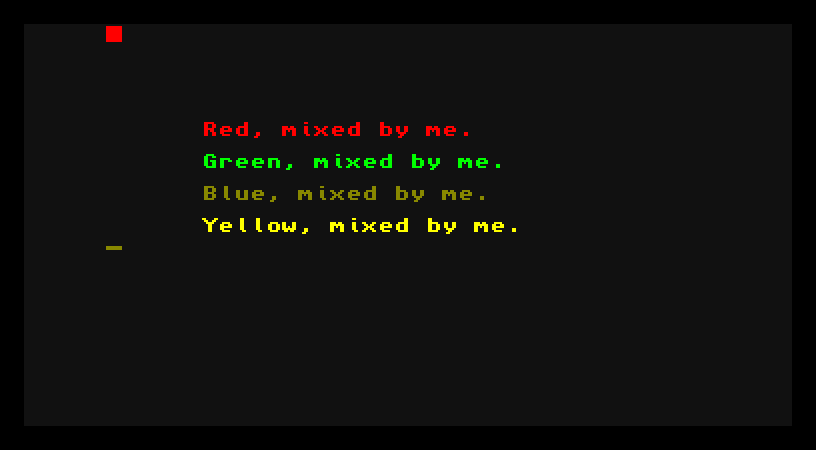
Four lines, four colours — and not one of them came from the default palette. You mixed each shade by hand, put it in a numbered slot, and told AMOS to draw with that slot. (Blue always looks a touch softer than the others as text; it’s the dimmest of the three primaries to the eye, not a mistake in the mix.)
The whole program
Hide
Screen Open 0,320,200,16,Lowres
Colour 0,$111
Colour 1,$F00
Colour 2,$0F0
Colour 3,$22F
Colour 4,$FF0
Cls 0
Paper 0
Pen 1
Locate 6,6
Print "Red, mixed by me."
Pen 2
Locate 6,8
Print "Green, mixed by me."
Pen 3
Locate 6,10
Print "Blue, mixed by me."
Pen 4
Locate 6,12
Print "Yellow, mixed by me."
Wait Key
Two new commands, each doing a distinct job.
Mixing a colour with Colour
Colour 1,$F00Colour sets one palette slot. The first number is which slot — here, slot 1. The $F00 is what colour to put in it, written as three hex digits: red, green, blue.
Each digit runs from 0 to F (that’s 0 to 15), giving sixteen levels of each primary. Mix those, and you get the Amiga’s full range:
$F00— red full on, green and blue off → red.$0F0— green only → green.$22F— a little red and green, blue nearly full → blue.$FF0— red and green full, no blue → yellow.$FFFwould be all three full → white;$000all off → black.
The $ tells AMOS the number is in hex (base sixteen), which is why the digits go up to F. You don’t have to love hex to use it — just remember each of the three digits is one primary, 0 is none and F is full, and mix to taste.
Drawing with Pen
Mixing a colour doesn’t use it — it just loads the slot. To draw with a slot, you pick it as the pen:
Pen 1
Print "Red, mixed by me."
Pen 1 says “from now on, text is drawn in slot 1.” Everything you Print after that comes out in whatever colour slot 1 holds — red, because that’s what you mixed into it. Change the pen, and the next Print changes colour. That’s why each line in the program is a Pen then a Print: choose the slot, then draw with it.
There’s a partner command, Paper, for the colour behind the text — the program sets Paper 0 so the text sits on slot 0, the near-black background, instead of AMOS’s default backing. Pen is the ink; paper is the page.
Slots, not colours
Here’s the idea worth holding onto: you don’t draw in red, you draw in slot 1 — and slot 1 happens to hold red because you put it there. The drawing refers to the slot number, not the colour. That seems like a detail now, but it’s the secret behind many Amiga effects: change what a slot holds, and everything drawn in that slot changes colour at once, with nothing redrawn. You’ll use that later to make things flash, fade, and cycle. For now: mix into a slot, draw with the slot.
Type it and run it
Type the program in and press F1. Four colours appear, each one yours. Press a key to return to the editor.
Try this: remix a colour
Change Colour 1,$F00 to Colour 1,$F8F and run it. The first line — still drawn with Pen 1 — comes out pink, because you changed what slot 1 holds. You didn’t touch the Print; you changed the slot, and the drawing followed.
Try this: find a colour you like
Pick any line’s Colour and try your own three digits. $F80 is orange, $80F purple, $0FF cyan, $888 a mid grey. Nudge a digit up or down and run it again — that try-and-see loop is how you’ll mix every palette you ever build.
If it doesn’t work
- The colour doesn’t change. Check the slot numbers line up: the slot you set with
Colourmust be the same one you select withPen. Mixing slot 1 but drawing withPen 2shows slot 2’s colour, not yours. - AMOS complains about the
$value. It needs exactly three hex digits after the$—$F00, not$F0or$FF00. One digit each for red, green, blue. - The text has a coloured strip behind it. That’s the paper colour. Set
Paper 0(or another slot) before printing to choose what sits behind the text.
What you’ve learnt
You took charge of the palette. Colour slot,$RGB mixes a colour from three hex digits — red, green, blue, each 0 to F — and drops it into a numbered slot. Pen chooses the slot text is drawn in, and Paper the slot behind it. The crucial idea: drawing refers to a slot, not a colour, so changing a slot recolours everything drawn with it at once. Sixteen slots, mixed from 4,096 possible colours, all yours.
What’s next
You can colour text and choose a background — but you’ve only been printing. Next — Drawing and Shapes — you’ll put dots, lines, boxes and circles straight onto the screen, in the colours you just learnt to mix.