Variables and Blitz's Types
Most BASICs hide how a number is stored. Blitz doesn't — it lets you choose, because it's working close to the machine. A byte, a word, a long: each holds a different range, and picking the right one is part of writing fast, lean code. Here's the idea, and the surprise when a number doesn't fit.
A variable is a named box that holds a value — you’ve met those. But here Blitz shows its hand. Most BASICs keep one kind of number box and hide the details; Blitz lets you say how big each box is, because it compiles down close to the hardware, where size and speed are real. A small number can live in a small, fast box; a big one needs a bigger box. Choosing is a new habit — and getting it wrong has a visible consequence, which is the best way to learn why it matters.
What you’ll see by the end
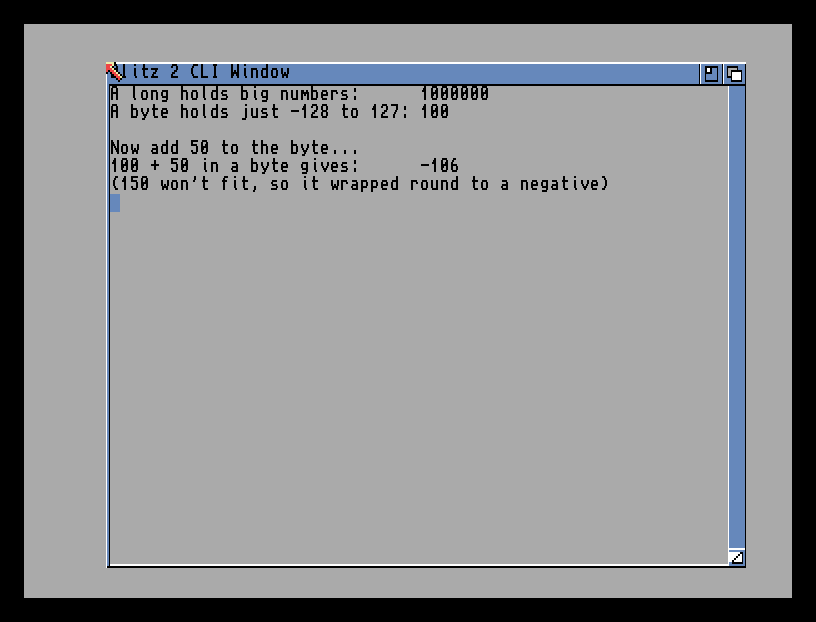
The long holds a million without blinking. The byte holds 100. But add 50 to the byte and the answer comes back −106, not 150 — because a byte is a small box, and 150 doesn’t fit. That wrap-around is the lesson made visible.
The whole program
; Blitz lets you choose how big each number is.
big.l = 1000000
small.b = 100

NPrint "A long holds big numbers:      ", big
NPrint "A byte holds just -128 to 127: ", small
NPrint ""
NPrint "Now add 50 to the byte..."
small = small + 50
NPrint "100 + 50 in a byte gives:      ", small
NPrint "(150 won't fit, so it wrapped round to a negative)"
MouseWait
End
The new idea is the little suffix after each variable’s name:
big.l— the.lmakesbiga long: a 32-bit box that holds huge numbers (into the billions). Roomy, but uses the most memory.small.b— the.bmakessmalla byte: an 8-bit box that holds only −128 to 127. Tiny and fast, but quick to overflow.
You write the suffix once, when you first use the variable. After that, just the name — big, small — and Blitz remembers the size. The suffix is you telling the compiler “make this box exactly this big.”
The sizes you’ll use
Blitz has a handful of number types. The three integer ones cover almost everything:
| Suffix | Name | Holds | Use it for |
|---|---|---|---|
.b |
byte | −128 to 127 | tiny counts — lives, a small index |
.w |
word | about −32,000 to 32,000 | most things — positions, scores |
.l |
long | billions | big totals, memory addresses |
There are two more for fractions — .q (a fast fixed-point number) and .f (a floating-point number) — for when you need values between the whole numbers, like smooth sub-pixel movement. You’ll reach for those later; for now, the three integer sizes are the toolkit.
Why this is a Blitz thing
In an interpreted BASIC like AMOS, you don’t think about any of this — a number is just a number, and the language quietly uses a big, safe box for everything. That’s friendly, but it’s slower and heavier, because every number carries the cost of the biggest case. Blitz makes the opposite trade: you pick the smallest box that fits, the compiler packs your data tight, and the program runs lean and fast. The price is the responsibility you just saw — choose a box too small, and the value wraps. That trade, control and speed in exchange for care, is Blitz in a nutshell.
Type it and compile it
Type the program into Ted and press right-Amiga + X. You’ll see the long hold its big number, the byte hold 100, and then overflow to a negative when you push it past 127. Click the mouse to return to the editor.
Try this: give it a bigger box
Change small.b to small.w — make it a word instead of a byte. Run it again. Now 100 + 50 gives 150, the right answer, because a word has room to spare. Same program, one letter changed, and the overflow is gone. That’s the whole skill: match the box to the numbers it has to hold.
Try this: a string box
Numbers aren’t the only kind. Add these lines before MouseWait:
name$ = "Blitz"
NPrint "A string holds text: ", name$
The $ marks a string variable — a box for text, the same as in other BASICs. So Blitz has the familiar string box and a choice of number boxes. Text in quotes goes in a $; numbers go in a .b, .w or .l.
If it doesn’t work
- Blitz complains about the
.bor.l. The type suffix goes on the variable name with no space —small.b, notsmall .b— and only the first time you use the variable. - Your number is wrong, with no warning. It may have overflowed quietly. If a value misbehaves once it gets large, its box is too small — move it up to a
.wor.l. - A string assignment is rejected. Text needs both the
$on the name and quotes round the value:name$ = "Blitz".
What you’ve learnt
Blitz lets you choose how a number is stored, because it compiles close to the machine. A suffix on the variable’s name — set once — picks the box: .b byte (−128 to 127), .w word, .l long, with .q and .f for fractions, and $ for text. Pick a box too small and the value wraps, as the byte did. Choosing the right size is the trade at Blitz’s heart: tighter, faster code in exchange for thinking about size yourself.
What’s next
That’s the groundwork done — you can compile, you know the two modes, and you can store values the Blitz way. Next phase, the payoff begins: Decisions, Loops, and the Frame — the control flow every game runs on, and the VWait that paces it to the screen.