Decisions, Loops, and the Frame
The control flow every game runs on: repeat work with a loop, branch on a decision with If, and meet VWait — the command that paces a Blitz program to the screen's 50-times-a-second beat. The skeleton of every game loop, in compiled Blitz.
Two ideas carry every program ever written: doing something many times (a loop) and choosing between paths (a decision). You’ve likely met both elsewhere, so this unit moves quickly — the point isn’t that loops and If are new, it’s seeing them in Blitz, drawing real graphics, and meeting the one command that turns a loop into a game loop: VWait, which paces your program to the screen’s heartbeat.
What you’ll see by the end
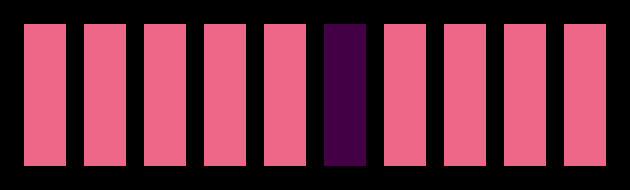
Ten bars, drawn by a loop that ran ten times. The sixth is a different colour because, on that one pass, an If decided to change it. Loop plus decision: nearly every pattern you’ll ever draw is some mix of those two.
The whole program
; A loop draws ten bars; a decision picks out the middle one.
BLITZ
  BitMap 0,320,256,3
  Cls 0
  For x = 0 To 9
    c = 2
    If x = 5 Then c = 5
    Boxf x*30+10, 90, x*30+30, 160, c
  Next
  VWait 100
  Slice 0,44,3
  Show 0
  MouseWait
Inside the Blitz-mode setup you know, the work is the loop:
For x = 0 To 9
  c = 2
  If x = 5 Then c = 5
  Boxf x*30+10, 90, x*30+30, 160, c
Next
For x = 0 To 9…Nextruns the lines between them ten times, withxcounting 0, 1, 2 … 9. Each pass draws one bar, andxis used to place it —x*30+10spaces the bars across the screen. A counter you can read is what makes a loop draw ten different bars instead of one bar ten times.c = 2sets the colour for this bar to 2 (pink).If x = 5 Then c = 5is the decision: on the pass wherexis 5, change the colour to 5. Every other pass leaves it pink; that one pass makes it purple.Boxf …, cdraws the bar in whatevercnow holds.
So the loop repeats, and the If makes one pass behave differently. That’s the whole engine of variety in a program.
Blitz’s loops and decisions
Blitz gives you the full set, and they read much like any BASIC:
For … Next— count a known number of times (as above).While … Wend— repeat while something stays true.Repeat … Until— repeat until something becomes true.If … Then …, withElseandEndIffor longer branches.
You’ll lean on While … Wend in a moment, because it’s the natural shape for a game loop: keep going while the game is running.
The frame: VWait
Here’s the Blitz-specific piece. The Amiga’s display redraws 50 times a second, top to bottom. VWait pauses your program until the next redraw begins. That matters for two reasons: it’s the metronome that makes motion smooth (one step per redraw, in time with the screen), and it’s the heartbeat of a game loop:
While Joyb(0) = 0    ; keep looping until the fire button
  VWait              ; wait for the next frame
  ; ... move things, draw things ...
Wend
Wait for the frame, do a frame’s work, repeat — fifty times a second. You used VWait 100 earlier just to pause; inside a loop, a bare VWait is what paces a game. The next unit puts real motion inside this shape; here, just recognise it — the While/VWait/Wend skeleton is what every Blitz game beats to.
Type it and compile it
Type the program into Ted and press right-Amiga + X. (Choose the recompile option if Blitz asks about memory.) The ten bars appear with the middle one picked out. Click the mouse to return to the editor.
Try this: change the decision
Change If x = 5 Then c = 5 to If x = 5 Then c = 5 Else c = 3. Now the loop sets every bar that isn’t the middle to colour 3 instead of 2 — Else gives the “all the other times” path. The middle stays purple; the rest change together.
Try this: every other bar
Replace the If line with a decision based on whether x is even:
If x/2*2 = x Then c = 5x/2*2 throws away any remainder and multiplies back, so it equals x only for even numbers. Run it, and every other bar turns purple — a striped pattern, from one small condition inside the loop. (This even-or-odd trick is a staple you’ll see again.)
If it doesn’t work
- Blitz complains about
Next. EveryForneeds a matchingNext. In Blitz,Nexton its own is fine — it doesn’t need the variable name after it. - All ten bars are the same colour. The
Ifisn’t changingc, orcisn’t being passed toBoxf. Check the decision setsc, and that theBoxfends withc. - The bars are on top of each other. The loop isn’t using
xto place them. Each bar’s position must be worked out fromx— that’s what spreads them across.
What you’ve learnt
The control flow every game is built from. For … Next repeats a known number of times with a counter you can use; While … Wend and Repeat … Until repeat on a condition; If … Then (with Else, EndIf) branches. And the Blitz heartbeat: VWait waits for the screen’s next redraw, pacing a loop to the Amiga’s 50-frames-a-second — the While/VWait/Wend shape that every game loop runs on.
What’s next
You have the loop, the decision, and the frame. Time to put them to work at speed. Next — Many Things at Once — you’ll move a crowd of objects inside the frame loop and watch compiled Blitz do, smoothly, what would leave an interpreted BASIC gasping.