
A line has no gaps. A screen is nothing but gaps, with a grid of dots between them. How do we choose which dots to light?
Start with a line eight pixels across and three down. You can already draw it using the Pattern Library’s reusable geometry routines. Here we’ll unpack the decisions those routines make, then turn a curved edge into a filled shape.
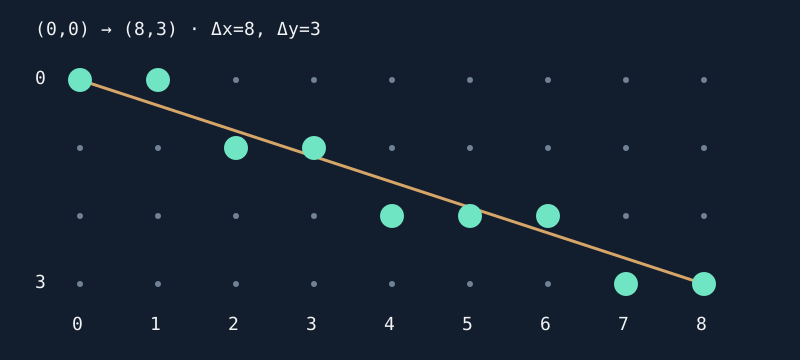
Eight across, three down
Subtract start from finish: Δx=8, Δy=3. The gradient is 3/8: every step right adds three eighths of a row to the ideal Y position. We cannot light three eighths of a pixel, but we can keep the fraction until it earns a whole step.
| X | Ideal Y | Selected Y |
|---|---|---|
| 0 | 0 | 0 |
| 1 | 0.375 | 0 |
| 2 | 0.75 | 1 |
| 3 | 1.125 | 1 |
| 4 | 1.5 | 2 |
| 5 | 1.875 | 2 |
| 6 | 2.25 | 2 |
| 7 | 2.625 | 3 |
| 8 | 3 | 3 |
We could multiply, divide and round at each X. A cheaper approach carries the leftover error forward. For this shallow, positive line, one equivalent way to make the decisions is to start an accumulator at Δx, add 2*Δy per X step, and step Y whenever the accumulator reaches 2*Δx; subtract that threshold after stepping.
Here the start is 8, the addition is 6 and the threshold is 16. At X=1 the accumulator is 14: stay on row 0. At X=2 it reaches 20: step to row 1 and keep the remainder 4. Those additions distribute three vertical steps across eight horizontal ones. Doubling avoids storing a half-pixel threshold as a fraction.
That is the useful idea behind accumulated-error line drawing. The assembly handles steep and negative lines too: use the larger axis as the main direction and retain the signs of the steps. A vertical line needs no division by Δx at all. Our routines send horizontal and vertical lines to a span backend.
A line goes from (20,30) to (28,33). Have its gradient and pattern of steps changed?
Show the explanation
No. Both endpoints moved by the same displacement, so Δx=8 and Δy=3 still. The same shape of steps appears at a new location. Adding a displacement changes position; subtracting endpoints removes that shared translation.
Rounding is part of the interface
At X=4 the ideal Y is 1.5. Either adjacent row is half a pixel away. Choose a tie rule, then keep it consistent when the caller reverses the endpoints. The library orders endpoints first, which makes reversal choose the same pixel set. A different algorithm may choose a different valid raster; that matters when erasing a line by drawing it again with XOR.
Endpoints need an ownership rule too. Two inclusive lines meeting at a corner both draw the shared pixel. With set that looks harmless; with XOR they toggle it twice and erase it. For a closed outline, omit each edge’s original final endpoint, letting the next edge own it. The library supplies that flag. A standalone line normally includes both ends.
Clip the picture without moving the line
A scissor is a rectangle in which drawing is allowed. Its left/top edges are included; right/bottom are excluded. A scissor [2,7) across and [1,3) down keeps (2,1), (3,1), (4,2), (5,2) and (6,2) from our example. Width is 7-2=5, height 3-1=2.
The library generates the original line’s samples and discards those outside. That preserves its rounding phase. Calculating intersections and rounding new endpoints can create a slightly different line inside the rectangle. It can save offscreen work, but needs a carefully defined phase/tie rule if it must match exactly.
The accepted coordinate range is −512..511. Its largest possible endpoint difference is 1023, not 511; a signed coordinate and a distance have different bounds. Even a completely clipped line may still take those steps. Clipping protects the destination here; it is not a promise of constant work.
A curved edge from a centre and two radii
An ellipse has a horizontal radius a and a vertical radius b. Relative to its centre, points on its ideal edge satisfy:
b²*x² + a²*y² = a²*b²
For a circle a=b=r, this reduces to x²+y²=r²: squared distance from the centre is fixed. We can compare squared distances without taking a square root for every pixel. An ellipse instead scales the two axes differently.
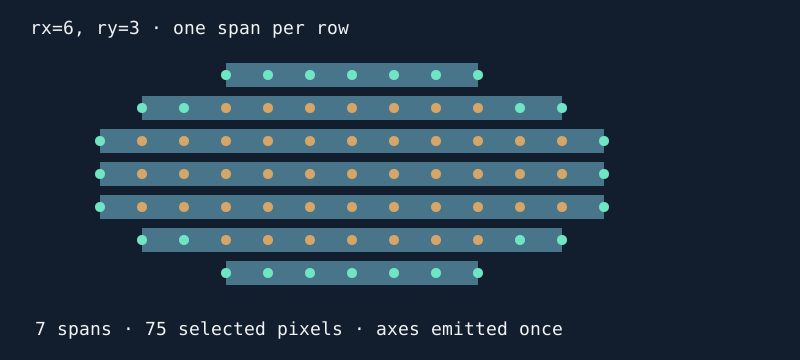
For a=6, b=3, the edge runs from X=−6 to +6 and Y=−3 to +3 relative to the centre. When we choose (−5,2), symmetry gives (5,2), (−5,−2) and (5,−2). On an axis some reflections coincide. Emit the coincident point once or XOR will undo it.
The native ellipse routine updates an integer error and its changes as X/Y advance. Those changes are simpler than recalculating the squares every step. Its independent verifier takes the other route and evaluates the implicit equation afresh, so a faulty increment is not copied into both implementations.
A circle uses equal radii through the same four-quadrant kernel here. An eight-way circle specialisation can also exchange X and Y. For an ellipse with unequal axes, that swap changes the shape, so four-quadrant reflection is the appropriate shared path.
Turn an edge into a fill
On each row, keep the leftmost and rightmost chosen edge pixels and draw the interval between them. Our (6,3) example selects 75 pixels in seven spans. That is a raster count. The continuous area π*a*b, about 56.5 square units, describes a different thing: the area enclosed by the ideal curve, not the number of boundary-inclusive grid samples selected by this raster rule.
A filled row with leftmost X=4 and rightmost X=12 becomes span [4,13). The span’s end is exclusive, so add one to include the right boundary. Width is 13-4=9. Keeping endpoint conventions explicit avoids losing a column or drawing a corner twice.
Several edge steps can land on one row. Save the widest extent and emit it once, then mirror to the other row if different. Repeated spans would waste work and break XOR. A zero vertical radius becomes one horizontal span; a zero horizontal radius becomes one vertical span. Both zero gives one pixel.
The two outermost pixels of a filled row are X=7 and X=15. What span should you pass, and how many pixels does it contain?
Show the explanation
[7,16), containing 16-7=9 pixels. The outermost coordinates differ by eight, but counting both endpoints adds one.
The bytes underneath the dots
With eight monochrome pixels per byte, X division by eight chooses a byte column and the remainder chooses a bit. A span from X=5 up to 13 has eight pixels but touches two bytes; their other bits must survive. On CPC MODE 1, four pixels share a byte and each pen uses two separated bits. Replacing a pen requires clearing those selected bits before inserting the new value. The CPC backend makes that packing visible.
A filled ellipse of radii (37,15) uses 31 spans for 1,833 selected pixels in the native tests. The mono backends make 258 destination-byte writes; CPC makes 484. Alignment, packing and span width determine those counts. A byte write is not a CPU cycle, and two machines with the same write count need not take the same time.
Small inputs can need wide arithmetic
A radius of 255 fits an unsigned byte. Its square, 65,025, fits an unsigned word but not a signed 16-bit word. Products and doubled error terms grow further. Choosing the input width alone is not enough; check every intermediate operation.
The library bounds radii at 255 and uses signed 32-bit curve errors. An exhaustive host check across all 65,025 nonzero radius pairs finds a maximum absolute native intermediate of 94,739,400, including the error after an X update. The worst pair, (255,253), also runs in each emulator. That is evidence for this recurrence and range, not permission to increase radii without rechecking the arithmetic.
Wide arithmetic costs code and instructions on these CPUs. A smaller bounded kernel, a precomputed edge table, cached shapes or a specialised circle routine may suit a game better. Fixed-point movement makes the same kind of bargain between range, precision and storage. Trig sampling can suit arcs and angle-driven effects, but also needs a sampling rule and trig/table budget; uneven samples can leave gaps or repeat pixels.
A circle in pixels, a circle on screen
Equal radii mean equal coordinate distances. They do not guarantee a circular physical picture if pixels are stretched. Keep the coordinate calculation separate from the presentation: the mode, display aspect and capture scaling matter. If your display needs different X/Y scaling to look round, use an explicit mapping or ellipse radii rather than quietly changing what the circle API means.
Try the machine routines in either direction: use these decisions to understand the code, or start with a visible shape and investigate why moving it by one pixel changes its work. Bresenham’s original line paper and Alois Zingl’s curve derivations provide the primary algorithm references; the assembly retains Zingl’s MIT licence and attribution.
Move a glyph, keep its shape takes coordinates into reusable bitmap text: translate local dots, retain advance when clipping, and account for byte boundaries.