
Move onto the star. The count changes from 0 to 1, and you hear a short sound. Stay there: the star has gone, so it cannot score again. Press restart and it returns.
Those few seconds bring several useful routines together. Here is the BBC Micro version, with each part kept small enough to lift into a project of your own.
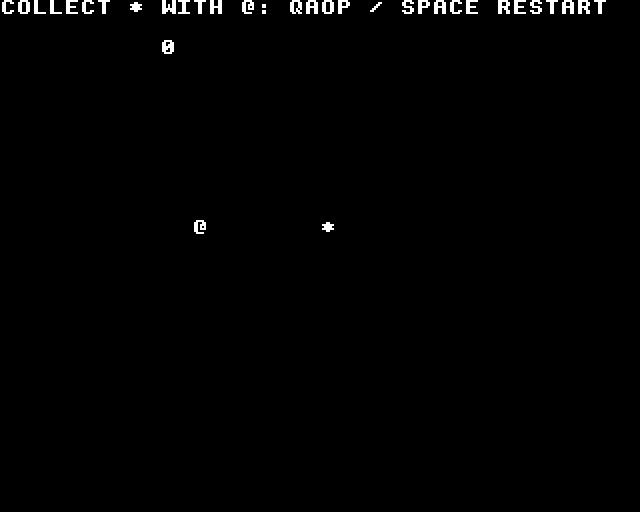
Run it first
Target: BBC Model B, MOS 1.20 and BASIC II. Controls: Q/A/O/P; Space restarts. Reset the machine to leave.
With Asm198x available, keep the code-sample folders together and build:
make -C bbc-micro/patterns/assembly/framework/collect-and-respondType the generated build/loader.bas listing into BASIC, then RUN. The sample folder contains the complete program, build recipe and integration notes. The comparison explains the choices across all five versions.
The player moves one cell per six accepted updates. Hold a direction to keep moving. Restart reacts to a new press, so holding it will not trap the player at the starting position.
Connect the pieces
Read the controls once. Calculate the new and released bits from that sample. Update the world, then draw its new state. That order is visible in the caller:
The jobs in one update
main_loop:
    jsr wait_frame
    jsr read_controls
    jsr detect_edges
    jsr update_player
    jsr draw_screen
    inc updates
Startup owns the machine-specific work. It establishes the memory and hardware assumptions that the smaller routines rely on:
Initialise this caller
start:
    cli
    jsr reset_game
This program owns the MODE 6 screen, program memory from $3000 and MOS SOUND channel 1. The loader lowers HIMEM before writing program bytes; MOS keeps its IRQ services. The routines together change A/X/Y and flags. Keep competing writers out of those resources; adding a music player or IRQ handler requires an explicit agreement about who writes what.
Move, test and consume
The playfield is 16 × 10 cells. The player begins at (2,5); the star occupies (10,5). The rules keep X between 0 and 15 and Y between 0 and 9. Diagonals move on both axes. Opposing directions are processed left/right, then up/down; choose cancellation or last-direction priority if that better suits your game.
previous, pressed and released belong to input sampling. player_x/player_y, move_delay, item_active and score belong to the rules. Reset preserves input history: clearing it while a button is held would invent another press.
The collision uses half-open boxes. A cell at (x,y) has edges (x,y,x+1,y+1), so merely touching the star’s edge leaves it alone. The routine can also compare larger rectangles or pixel coordinates, provided both boxes use the same units and edge arithmetic does not wrap.
Reusable box overlap
; Half-open boxes [left,top,right,bottom]; all edges unsigned bytes.
; Reject empty/reversed boxes and touching edges. Returns C=1 on overlap.
; Changes A/flags; preserves X/Y. No arithmetic inside the test.
boxes_overlap:
    lda rect_a
    cmp rect_a+2
    bcs boxes_apart
    lda rect_a+1
    cmp rect_a+3
    bcs boxes_apart
    lda rect_b
    cmp rect_b+2
    bcs boxes_apart
    lda rect_b+1
    cmp rect_b+3
    bcs boxes_apart
    lda rect_a
    cmp rect_b+2
    bcs boxes_apart
    lda rect_b
    cmp rect_a+2
    bcs boxes_apart
    lda rect_a+1
    cmp rect_b+3
    bcs boxes_apart
    lda rect_b+1
    cmp rect_a+3
    bcs boxes_apart
    sec
    rts
boxes_apart:
    clc
    rts
rect_a: !byte 0,0,0,0
rect_b: !byte 10,5,11,6
The update consumes the star before starting feedback. That single state change is what prevents the next frame from collecting it again.
Input edges, movement and collection
; Writable byte state is allocated by demo.asm. Bounds: x=0..15, y=0..9.
; read_controls supplies controls; up/down/left/right/action = 1/2/4/8/16.
; All routines change A/X/Y/flags; no IRQ may write this state.
; Call edges -> service_sound -> update_player -> draw_screen once per frame.
detect_edges:
    lda previous
    eor #$ff
    and controls
    sta pressed
    lda controls
    eor #$ff
    and previous
    sta released
    lda controls
    sta previous
    rts
reset_game:
    lda #2
    sta player_x
    lda #5
    sta player_y
    lda #1
    sta item_active
    lda #0
    sta score
    sta move_delay
    rts
update_player:
    lda pressed
    and #16
    beq movement
    jsr reset_game
    rts
movement:
    lda move_delay
    beq move_now
    dec move_delay
    rts
move_now:
    lda #5
    sta move_delay
    lda controls
    and #4
    beq move_right
    lda player_x
    beq move_right
    dec player_x
move_right:
    lda controls
    and #8
    beq move_up
    lda player_x
    cmp #15
    beq move_up
    inc player_x
move_up:
    lda controls
    and #1
    beq move_down
    lda player_y
    beq move_down
    dec player_y
move_down:
    lda controls
    and #2
    beq test_collection
    lda player_y
    cmp #9
    beq test_collection
    inc player_y
test_collection:
    lda item_active
    beq collection_done
    lda player_x
    sta rect_a
    clc
    adc #1
    sta rect_a+2
    lda player_y
    sta rect_a+1
    clc
    adc #1
    sta rect_a+3
    jsr boxes_overlap
    bcc collection_done
    lda #0
    sta item_active           ; consume BEFORE starting feedback
    inc score
    jsr trigger_sound
collection_done:
    rts
For this exact one-cell scene, coordinate equality would do less work. The general box routine earns its extra comparisons when objects have different sizes. Box collision and its alternatives explains when a more precise second test helps. A fast object can skip over a target between samples; that calls for a path or swept test as well.
Show the new state
This version uses MOS cursor positioning and text characters. old_x/old_y remember which cell to erase. The item is drawn before the player, so the player wins the draw order when they overlap.
Draw, erase and show the count
; VDU31,x,y,char. Input A=ASCII, X/Y=logical cell; changes A/X/Y/flags.
; MODE6 text cell positions x+10, y+6. MOS handles the screen representation.
put_cell:
    pha
    txa
    pha
    tya
    pha
    lda #31
    jsr OSWRCH
    pla
    sta draw_y
    pla
    clc
    adc #10
    jsr OSWRCH
    lda draw_y
    clc
    adc #6
    jsr OSWRCH
    pla
    jmp OSWRCH
draw_screen:
    lda #32
    ldx old_x
    ldy old_y
    jsr put_cell
    lda #32
    ldx #10
    ldy #5
    jsr put_cell
    lda item_active
    beq draw_player
    lda #42
    ldx #10
    ldy #5
    jsr put_cell
draw_player:
    lda #64
    ldx player_x
    ldy player_y
    jsr put_cell
    lda player_x
    sta old_x
    lda player_y
    sta old_y
    lda #31
    jsr OSWRCH
    lda #10
    jsr OSWRCH
    lda #2
    jsr OSWRCH
    lda score
    clc
    adc #48
    jsr OSWRCH
    rts
draw_y: !byte 0
Painting a blank over the old position works because the background is empty. With a map behind the player, restore its tile. With overlapping objects, redraw the affected scene or choose another renderer. Keep that decision in the drawing routine so the rules can stay useful.
Make the event audible
On this machine, MOS queues SOUND on channel 1 and services it alongside the program. The count also changes visibly, so sound carries useful feedback without being the only signal.
Collection sound
; OSWORD7 copies this eight-byte SOUND block into MOS's sound system.
; Flush channel 1, amplitude -15, pitch 100, duration 2 twentieths of a second.
; MOS services audio asynchronously. Call only from main, not inside IRQ.
; Changes A/X/Y/flags. Caller owns channel 1; no music arbitration here.
trigger_sound:
    lda #7
    ldx #<sound_block
    ldy #>sound_block
    jmp OSWORD
sound_block: !word 17,-15,100,2
The keyboard wrapper uses MOS’s negative-INKEY key scans. It does not remove characters from the text buffer:
Read Q/A/O/P and Space
; MOS OSBYTE 129: negative INKEY scans. No key-buffer consumption.
; Returns controls bits U/D/L/R/action=1/2/4/8/16; changes A/X/Y/flags.
read_controls:
    lda #0
    sta controls
    ldx #0
key_next:
    stx key_index
    lda #129
    ldy #$ff
    lda key_numbers,x
    tax
    lda #129
    jsr OSBYTE
    txa
    ldx key_index
    cmp #0
    beq key_up
    lda controls
    ora key_masks,x
    sta controls
key_up:
    inx
    cpx #5
    bne key_next
    rts
key_numbers: !byte $ef,$be,$c9,$c8,$9d ; Q/A/O/P/Space (-17/-66/-55/-56/-99)
key_masks: !byte 1,2,4,8,16
key_index: !byte 0
Take it into your game
Copy the routine you need, its state and its maintained includes. Read the declaration and caller together: the caller shows initialisation, call frequency and ownership. The sample README lists register effects and resource limits. Preserve the relative include layout, or update those paths deliberately when moving files.
These examples use whole-cell movement and a frame-based repeat counter. Fractional motion, scrolling, multiple items and sound priorities are useful next steps when a game needs them. A 50 Hz and a 60 Hz machine give this counter different wall-clock speeds.
Code status: assembled and emulator-executed for the named configuration. Checks drive real input, exercise all four bounds, reject edge-only contact, collect once, restart while held and capture the picture and PCM. A broken collection caller must fail the same guard. The execution record identifies the exact sources, binary, emulator and firmware; it establishes this caller rather than every feature of the machine.