The Heartbeat
Replace the idle spin with a frame-locked loop — IM 1, EI, and HALT beat once per 50 Hz frame — then build a one-line probe to watch the pulse, and take it out again.
The square is built and the lamplighter stands in it — but the program drew them once and then just sat there, spinning on a jr that goes nowhere. That was fine for a still scene. A game is not a still scene. A game runs — frame after frame, reading the player, moving the world, drawing the result — and it never stops until the night is held or fallen.
So this unit builds the loop everything else will live in. On screen it changes nothing at all — and because “nothing” is a hard thing to trust, we’ll also build a tiny probe to watch the pulse, then take the probe out and move on.
A game is a loop
Every game, on every machine, is the same shape underneath:
Round and round, many times a second; one trip through the cycle is one frame. In our program that trip is a routine called play_step — one beat of the game. Today it’s empty. Every unit from here to the end of the module earns its living inside it.
Why lock it to the screen
We could spin the loop as fast as the Z80 can go. But “as fast as possible” is a different speed on every machine, and work done at random moments smears across the screen-draw as flicker and tearing.
The fix is to pace the loop to the screen. The Spectrum redraws its display 50 times a second, and each time it finishes a screen it raises an interrupt — a precise tap on the shoulder, identical on every Spectrum ever made. Run the loop once per tap and the game beats at a rock-steady 50 Hz everywhere. That beat is the heartbeat.
IM 1, EI, and the magic of HALT
Three instructions:
IM 1— interrupt mode 1: use the ROM’s built-in handler for that 50 Hz tap. (It keeps the system clock ticking and scans the keyboard — we’ll want that in the very next unit.)EI— enable interrupts: until this, the Z80 ignores the taps entirely.HALT— sleep until the next interrupt arrives.
The last one is the trick. With interrupts enabled, HALT doesn’t freeze — it waits: the CPU dozes until the next tap wakes it, then carries straight on. One HALT means “wait for exactly one frame.” Put it at the top of the loop and the loop is bolted to the screen.
Milestone 1 — the spin becomes the beat
Everything that draws the fixed scene stays in setup, drawn once. Then IM 1 / EI start the pulse, and the dead spin becomes main_loop: wait a frame, take one play_step, go round:
| 53 | 53 | call fill_walls | |
| 54 | 54 | call draw_lamp | |
| 55 | 55 | | |
| 56 | - | forever: | |
| 57 | - | jr forever | |
| 56 | + | ; --- start the heartbeat --- | |
| 57 | + | ; IM 1: every 50 Hz frame interrupt calls the ROM's handler. | |
| 58 | + | ; EI: let it. HALT then sleeps until the next frame arrives, | |
| 59 | + | ; so the loop below beats exactly once per frame. | |
| 60 | + | im 1 | |
| 61 | + | ei | |
| 62 | + | | |
| 63 | + | main_loop: | |
| 64 | + | halt | |
| 65 | + | call play_step | |
| 66 | + | jr main_loop | |
| 67 | + | | |
| 68 | + | ; play_step — one beat of the game. Empty today; every unit from | |
| 69 | + | ; here on earns its living inside this routine. | |
| 70 | + | play_step: | |
| 71 | + | ret | |
| 58 | 72 | | |
| 59 | 73 | ; ---------------------------------------------------------------------------- | |
| 60 | 74 | ; paint_walls — the square's edge, one attribute write per cell. |
On screen, nothing changes:
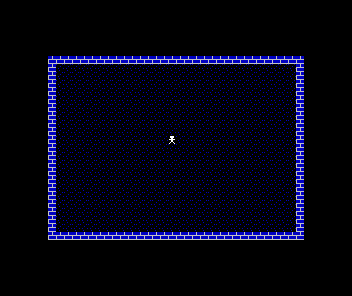
The steadiness is the correct result. But “trust me, it’s beating” is not how this course works — so let’s see it.
Milestone 2 — a probe, to watch the pulse
One line in play_step: pick an attribute cell — the far corner of the HUD row — and increment it every beat.
| 65 | 65 | call play_step | |
| 66 | 66 | jr main_loop | |
| 67 | 67 | | |
| 68 | - | ; play_step — one beat of the game. Empty today; every unit from | |
| 69 | - | ; here on earns its living inside this routine. | |
| 68 | + | ; play_step — one beat of the game. For one step only, a probe: | |
| 69 | + | ; one attribute cell counts the frames, so the beat can be seen. | |
| 70 | 70 | play_step: | |
| 71 | + | ld hl, $5800 + 31 ; the HUD row's far corner | |
| 72 | + | inc (hl) ; one tick per beat | |
| 71 | 73 | ret | |
| 72 | 74 | | |
| 73 | 75 | ; ---------------------------------------------------------------------------- |
The cell becomes a byte counting upward at 50 Hz, worn as colour — and because you know the attribute byte’s layout from Unit 1, you can read the count in the colours. The INK bits tick fastest, but there are no pixels in that cell to show them; the PAPER changes every 8 frames, so the block steps through the palette about six times a second; the BRIGHT bit flips every 64 frames; wait long enough and FLASH joins in. The attribute byte’s whole anatomy, animated by a counter:
Everything else holds still while one cell counts. That’s the loop, seen: steady world, steady pulse.
Milestone 3 — take the probe out
The probe did its job; the game doesn’t want a disco tile in its HUD. Remove the line, and play_step is empty again — this time with your trust earned:
| 65 | 65 | call play_step | |
| 66 | 66 | jr main_loop | |
| 67 | 67 | | |
| 68 | - | ; play_step — one beat of the game. For one step only, a probe: | |
| 69 | - | ; one attribute cell counts the frames, so the beat can be seen. | |
| 68 | + | ; play_step — one beat of the game. Empty today; every unit from | |
| 69 | + | ; here on earns its living inside this routine. | |
| 70 | 70 | play_step: | |
| 71 | - | ld hl, $5800 + 31 ; the HUD row's far corner | |
| 72 | - | inc (hl) ; one tick per beat | |
| 73 | 71 | ret | |
| 74 | 72 | | |
| 75 | 73 | ; ---------------------------------------------------------------------------- |
The complete program
; Gloaming — Unit 4: The Heartbeat
; Cumulative build; every step runs on its own. Narrative: the unit page.
; The structured loop, locked to the 50 Hz frame: HALT; update; repeat.

            org     32768

COBBLE      equ     %00000001       ; PAPER black (0), INK blue (1) — dark ground
WALL        equ     %00001111       ; PAPER blue (1), INK white (7) — pale stone
WALL_BIT    equ     3               ; the attribute bit that says "this is wall"
LAMP_ATTR   equ     %01000111       ; BRIGHT, PAPER black, INK white — his own light

START_COL   equ     15              ; where the lamplighter begins
START_ROW   equ     11

start:
            ; --- the border goes black — the night beyond the square ---
            ; Port $FE bits 0-2 set the BORDER colour. A = 0 = black.
            ld      a, 0
            out     ($FE), a

            ; --- place the lamplighter ---
            ; His position is data. Everything that draws him reads it.
            ld      a, START_COL
            ld      (lamp_col), a
            ld      a, START_ROW
            ld      (lamp_row), a

            ; --- wipe the canvas ---
            ; The bitmap ($4000-$57FF) is the pixel layer; whatever was on
            ; screen before us still lives there. Zero it so only our
            ; attribute colours show.
            call    clear_bitmap

            ; --- texture the ground ---
            ; Blit the cobble stipple into every cell's bitmap, rows 1-23.
            ; The attributes will colour these pixels in a moment.
            call    fill_ground

            ; --- wash in the cobbles ---
            ; Seed the first attribute cell, point DE one cell ahead, and
            ; let LDIR cascade the byte through all 768 cells.
            ld      hl, $5800
            ld      de, $5801
            ld      (hl), COBBLE
            ld      bc, 767
            ldir

            call    paint_walls

            ; --- brick the walls ---
            ; Now that the wall cells are painted, fill_walls can read the
            ; map back and lay brick wherever the wall bit is set.
            call    fill_walls
            call    draw_lamp

            ; --- start the heartbeat ---
            ; IM 1: every 50 Hz frame interrupt calls the ROM's handler.
            ; EI: let it. HALT then sleeps until the next frame arrives,
            ; so the loop below beats exactly once per frame.
            im      1
            ei

main_loop:
            halt
            call    play_step
            jr      main_loop

; play_step — one beat of the game. Empty today; every unit from
; here on earns its living inside this routine.
play_step:
            ret

; ----------------------------------------------------------------------------
; paint_walls — the square's edge, one attribute write per cell.
; ----------------------------------------------------------------------------
paint_walls:
            ld      c, WALL         ; the byte every wall cell gets

            ; the top wall: row 1 is 32 cells in a row from $5820
            ; (row 0 is kept back — it becomes the HUD later)
            ld      hl, $5820
            ld      b, 32
.wt:
            ld      (hl), c
            inc     hl
            djnz    .wt

            ; the bottom wall: row 23, 32 cells from $5AE0
            ld      hl, $5AE0
            ld      b, 32
.wb:
            ld      (hl), c
            inc     hl
            djnz    .wb

            ; the side walls: column 0 and column 31 of rows 1-23.
            ; Write the row's first cell, hop 31 cells to its last,
            ; then step a full row (32) down — 23 times.
            ld      hl, $5820
            ld      b, 23
.ws:
            ld      (hl), c
            push    hl
            ld      de, 31
            add     hl, de
            ld      (hl), c
            pop     hl
            ld      de, 32
            add     hl, de
            djnz    .ws
            ret

; ----------------------------------------------------------------------------
; clear_bitmap — zero the pixel layer, $4000-$57FF, with the same
; seed-and-cascade LDIR idiom the cobble wash uses.
; ----------------------------------------------------------------------------
clear_bitmap:
            ld      hl, $4000
            ld      de, $4001
            ld      (hl), 0
            ld      bc, 6143
            ldir
            ret

; ----------------------------------------------------------------------------
; fill_ground — the cobble stipple. Not decoration: the stipple is what
; makes ground-state changes visible later, when the game starts
; recolouring these pixels. Rows 1-23 (row 0 is the HUD).
; ----------------------------------------------------------------------------
fill_ground:
            ld      b, 1                ; rows 1-23 (row 0 is the HUD)
.fgr:
            ld      c, 0
.fgc:
            ld      de, cobble_tex
            call    blit_tex
            inc     c
            ld      a, c
            cp      32
            jr      c, .fgc
            inc     b
            ld      a, b
            cp      24
            jr      c, .fgr
            ret

; fill_walls — brickwork. Driven by the wall attribute bit, so anything
; painted as wall — now or later in the game — gets its brick for free:
; the map itself decides where the brick goes.
fill_walls:
            ld      b, 1
.fwr:
            ld      c, 0
.fwc:
            push    bc
            call    attr_addr_cr
            bit     WALL_BIT, (hl)
            pop     bc
            jr      z, .fwn
            ld      de, brick_tex
            call    blit_tex
.fwn:
            inc     c
            ld      a, c
            cp      32
            jr      c, .fwc
            inc     b
            ld      a, b
            cp      24
            jr      c, .fwr
            ret

; blit_tex — write the 8-byte texture at DE into cell (C, B)'s bitmap.
; scr_addr_cr finds the cell's first pixel row; INC H steps down the
; other seven, 256 bytes apart.
blit_tex:
            push    bc
            call    scr_addr_cr
            ld      b, 8
.bt:
            ld      a, (de)
            ld      (hl), a
            inc     de
            inc     h
            djnz    .bt
            pop     bc
            ret

cobble_tex:
            defb    %10000010
            defb    %00000000
            defb    %00001000
            defb    %00000000
            defb    %00100001
            defb    %00000000
            defb    %00010000
            defb    %00000000

brick_tex:
            ; mortar courses with staggered verticals — dusk-lit stone
            defb    %00001000
            defb    %00001000
            defb    %00001000
            defb    %11111111
            defb    %10000000
            defb    %10000000
            defb    %10000000
            defb    %11111111

; ----------------------------------------------------------------------------
; scr_addr_cr — HL = bitmap address of cell (C, B)'s first pixel row.
; The row's top two bits pick the third of the screen (H), its bottom
; three become L's top bits, and the column fills L's low five.
; ----------------------------------------------------------------------------

scr_addr_cr:
            ld      a, b
            and     %00011000       ; the third (row bits 4-3) ...
            or      %01000000       ; ... under the screen base $40xx
            ld      h, a
            ld      a, b
            and     %00000111       ; the char row within the third ...
            rrca                    ; ... rotated into bits 7-5
            rrca
            rrca
            or      c               ; the column in bits 4-0
            ld      l, a
            ret

; attr_addr_cr — HL = attribute address of cell (C, B):
; $5800 + row*32 + col, the row shifted up five times.
attr_addr_cr:
            ld      a, b
            ld      l, a
            ld      h, 0
            add     hl, hl
            add     hl, hl
            add     hl, hl
            add     hl, hl
            add     hl, hl
            ld      de, $5800
            add     hl, de
            ld      a, c
            ld      e, a
            ld      d, 0
            add     hl, de
            ret

; ----------------------------------------------------------------------------
; The lamplighter's draw.
; ----------------------------------------------------------------------------

; pos_bc — the lamplighter's cell into (C, B), read fresh from the data.
pos_bc:
            ld      a, (lamp_row)
            ld      b, a
            ld      a, (lamp_col)
            ld      c, a
            ret

draw_lamp:
            ; his colour first: the cell's attribute becomes his own —
            ; bright white on the black, his own light about him
            call    pos_bc
            call    attr_addr_cr
            ld      (hl), LAMP_ATTR
            ; then his shape, eight bytes down the cell like any texture
            call    pos_bc
            call    scr_addr_cr
            ld      de, lamplighter
            ld      b, 8
.dl:
            ld      a, (de)
            ld      (hl), a
            inc     de
            inc     h
            djnz    .dl
            ret

; ----------------------------------------------------------------------------
; Data.
; ----------------------------------------------------------------------------

lamp_col:
            defb    START_COL
lamp_row:
            defb    START_ROW

lamplighter:
            defb    %00111100
            defb    %00111100
            defb    %00011000
            defb    %01111110
            defb    %00011000
            defb    %00011000
            defb    %00100100
            defb    %01000010

            end     start
Build an instrument, observe, take the instrument out, leave no trace: it won’t be the last time this course debugs that way. The probe pattern costs one line whenever you doubt a loop is running — cheaper than wondering.
Assemble and run
As ever, either assembler takes the pasmo-syntax source to the same snapshot — assemble whichever step you’re on:
asm198x --dialect pasmonext --sna steps/step-03.asm -o steps/step-03.sna
pasmonext --sna steps/step-03.asm steps/step-03.sna
When it’s wrong, see why
- The screen freezes and never settles. Missing
ei, or it runs beforeim 1. With interrupts off, the firsthaltsleeps forever, waiting for a tap that can’t arrive. Order itim 1thenei, both before the loop. - It runs briefly, then garbles or crashes. The ROM’s interrupt handler uses the stack every frame; if
SPpoints somewhere unfortunate, each tap corrupts a little more memory. Leave the stack pointer alone. - The probe cell doesn’t move.
play_stepisn’t being called — checkmain_loopishalt,call play_step,jr main_loop— or the probe wrote to a bitmap address instead of$5800 + 31. - The probe cycles absurdly fast or visibly stutters. More than one
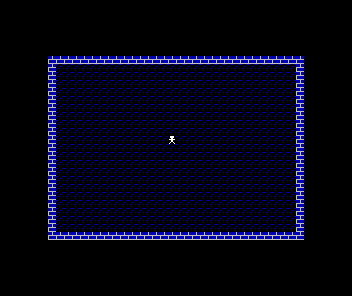
call play_stepperhalt(double speed), or a second strayhaltin the path (half speed). One wait, one step, per trip round. - It looks exactly like Unit 3. Correct — that’s milestone 1’s expected result. The probe step exists precisely so you don’t have to take it on faith.
Before and after
The picture didn’t change; its nature did. You started with a drawing being held and finished with a drawing being run — a 50 Hz frame-locked loop with an empty play_step waiting for the game. And you proved it, with a one-line instrument you then removed. From here on, every new behaviour — keys, movement, the draught, the win — is a tenant of this loop.
Try this: slow the beat
Put a second halt above the first. The loop now waits two frames per trip — 25 Hz — and with the probe in, the counting visibly halves in speed. The number of HALTs is a pace dial; Gloaming keeps it at one, but knowing the dial exists demystifies every “slow motion” effect you’ve ever seen.
Try this: probe the border instead
Move the probe outdoors: instead of incrementing the corner cell, count in a variable and out ($FE), a the result. The whole border cycles through its eight colours, six-and-a-quarter times a second. Same pulse, bigger dial — and a classic Spectrum debugging trick: the border costs no screen memory, so real games flash it to show where in the frame their work happens.
Try this: time the machine with your eyes
With the probe in, watch the BRIGHT boundary: the cell runs dark colours, then the same colours brighter, then flips back — that flip is bit 6, every 64 beats. Count the flips over ten seconds: you should see about eight (64 frames ≈ 1.28 s). You’ve just measured the interrupt rate with no tools but an attribute byte and patience.
What you’ve learnt
- A game is a loop: input, update, draw — one trip per frame, here named
play_step. IM 1+EI+HALTlock the loop to the 50 Hz frame interrupt — the same beat on every Spectrum.HALTwith interrupts enabled means wait exactly one frame — the pace of everything.- A one-line probe turns an invisible loop into a visible one; instrument, observe, remove.
- The probe was also a lesson in reading the attribute byte — paper, bright and flash bits ticking at their own rates as the byte counts.
What’s next
The loop beats, and nothing listens. In Unit 5 the lamplighter starts to feel you: play_step learns to scan the keyboard’s half-rows through port $FE, and the figure glows the instant a direction key goes down. Not movement yet — first, the machine has to notice you exist.