Reading the Keys
Fill the loop's INPUT stage: select a keyboard half-row through port $FE, read it with IN A,(C), test the active-low bits — and the lamplighter glows the instant a direction key goes down.
The heartbeat beats, but the lamplighter can’t feel you. The loop’s INPUT stage is still empty — each frame it reads nothing, decides nothing. This unit fills it in. By the end, the figure glows warm the instant you touch any direction key, and settles back to white the instant you let go.
He won’t move yet — that’s the next unit — but he will react, fifty times a second. This is the moment the machine starts listening.
One port, eight half-rows
The Spectrum reads its whole keyboard through a single port: $FE. Forty keys would never fit in one byte, so they’re wired into eight half-rows of five keys each, and you choose which half-row to read with the high byte of the port address. The low byte is always $FE; the high byte selects the row:
| Port | Keys (bit 0 → bit 4) | Port | Keys (bit 0 → bit 4) | |
|---|---|---|---|---|
$FEFE |
SHIFT Z X C V | $EFFE |
0 9 8 7 6 | |
$FDFE |
A S D F G | $DFFE |
P O I U Y | |
$FBFE |
Q W E R T | $BFFE |
ENTER L K J H | |
$F7FE |
1 2 3 4 5 | $7FFE |
SPACE SYM M N B |
Gloaming steers with the classics — Q up, A down, O left, P right — which live in three different half-rows (bolded above). Today’s first read is the $DFFE row, where O and P sit together.
Active low: a held key reads zero
Here’s the catch that trips everyone once. The bits are active low: a key’s bit reads 1 when the key is up and 0 when it’s held down. It’s backwards from what you’d guess, but it’s how the hardware works — pressing a key pulls its line down to zero. So to find a held key, we test for a zero bit:
Milestone 1 — read one key
Start with just O. Load BC with the full port address $DFFE — IN A,(C) drives the whole of BC onto the bus, so the row-select rides along — then test O’s bit with BIT 1,A. BIT sets the Z flag when the bit is zero, and zero means held: jr z, .held. While O is down, the lamplighter’s cell takes a warm glow (LAMP_GLOW — lamp-yellow, and that’s a small promise about where this game is going); otherwise it’s repainted his usual white. All of it lives in player_step, called from play_step — the INPUT stage of the loop, running every single frame.
| 8 | 8 | WALL equ %00001111 ; PAPER blue (1), INK white (7) — pale stone | |
| 9 | 9 | WALL_BIT equ 3 ; the attribute bit that says "this is wall" | |
| 10 | 10 | LAMP_ATTR equ %01000111 ; BRIGHT, PAPER black, INK white — his own light | |
| 11 | + | LAMP_GLOW equ %01000110 ; his warmth while a key is down (this unit only) | |
| 11 | 12 | | |
| 12 | 13 | START_COL equ 15 ; where the lamplighter begins | |
| 13 | 14 | START_ROW equ 11 | |
| 15 | + | | |
| 16 | + | KEYS_OP equ $DFFE ; half-row P O I U Y — bit 1 is O | |
| 14 | 17 | | |
| 15 | 18 | start: | |
| 16 | 19 | ; --- the border goes black — the night beyond the square --- | |
| ... | |||
| 65 | 68 | call play_step | |
| 66 | 69 | jr main_loop | |
| 67 | 70 | | |
| 68 | - | ; play_step — one beat of the game. Empty today; every unit from | |
| 69 | - | ; here on earns its living inside this routine. | |
| 71 | + | ; play_step — one beat of the game: ask the keyboard. | |
| 70 | 72 | play_step: | |
| 73 | + | call player_step | |
| 71 | 74 | ret | |
| 72 | 75 | | |
| 73 | 76 | ; ---------------------------------------------------------------------------- | |
| ... | |||
| 120 | 123 | ld (hl), 0 | |
| 121 | 124 | ld bc, 6143 | |
| 122 | 125 | ldir | |
| 126 | + | ret | |
| 127 | + | | |
| 128 | + | ; ---------------------------------------------------------------------------- | |
| 129 | + | ; player_step — scan the keyboard. Reading port $FE with a half-row | |
| 130 | + | ; address in B selects five keys; a key held pulls its bit LOW. While | |
| 131 | + | ; O is down, the lamplighter glows — proof the machine can feel you. | |
| 132 | + | ; ---------------------------------------------------------------------------- | |
| 133 | + | player_step: | |
| 134 | + | ld bc, KEYS_OP | |
| 135 | + | in a, (c) | |
| 136 | + | bit 1, a ; O — a zero bit is a pressed key | |
| 137 | + | jr z, .held | |
| 138 | + | call pos_bc | |
| 139 | + | call attr_addr_cr | |
| 140 | + | ld (hl), LAMP_ATTR | |
| 141 | + | ret | |
| 142 | + | .held: | |
| 143 | + | call pos_bc | |
| 144 | + | call attr_addr_cr | |
| 145 | + | ld (hl), LAMP_GLOW | |
| 123 | 146 | ret | |
| 124 | 147 | | |
| 125 | 148 | ; ---------------------------------------------------------------------------- |
The complete step 1 program
; Gloaming — Unit 5: Reading the Keys
; Cumulative build; every step runs on its own. Narrative: the unit page.
; Port $FE, one half-row at a time — the lamplighter glows while a key is down.

            org     32768

COBBLE      equ     %00000001       ; PAPER black (0), INK blue (1) — dark ground
WALL        equ     %00001111       ; PAPER blue (1), INK white (7) — pale stone
WALL_BIT    equ     3               ; the attribute bit that says "this is wall"
LAMP_ATTR   equ     %01000111       ; BRIGHT, PAPER black, INK white — his own light
LAMP_GLOW   equ     %01000110       ; his warmth while a key is down (this unit only)

START_COL   equ     15              ; where the lamplighter begins
START_ROW   equ     11

KEYS_OP     equ     $DFFE           ; half-row P O I U Y — bit 1 is O

start:
            ; --- the border goes black — the night beyond the square ---
            ; Port $FE bits 0-2 set the BORDER colour. A = 0 = black.
            ld      a, 0
            out     ($FE), a

            ; --- place the lamplighter ---
            ; His position is data. Everything that draws him reads it.
            ld      a, START_COL
            ld      (lamp_col), a
            ld      a, START_ROW
            ld      (lamp_row), a

            ; --- wipe the canvas ---
            ; The bitmap ($4000-$57FF) is the pixel layer; whatever was on
            ; screen before us still lives there. Zero it so only our
            ; attribute colours show.
            call    clear_bitmap

            ; --- texture the ground ---
            ; Blit the cobble stipple into every cell's bitmap, rows 1-23.
            ; The attributes will colour these pixels in a moment.
            call    fill_ground

            ; --- wash in the cobbles ---
            ; Seed the first attribute cell, point DE one cell ahead, and
            ; let LDIR cascade the byte through all 768 cells.
            ld      hl, $5800
            ld      de, $5801
            ld      (hl), COBBLE
            ld      bc, 767
            ldir

            call    paint_walls

            ; --- brick the walls ---
            ; Now that the wall cells are painted, fill_walls can read the
            ; map back and lay brick wherever the wall bit is set.
            call    fill_walls
            call    draw_lamp

            ; --- start the heartbeat ---
            ; IM 1: every 50 Hz frame interrupt calls the ROM's handler.
            ; EI: let it. HALT then sleeps until the next frame arrives,
            ; so the loop below beats exactly once per frame.
            im      1
            ei

main_loop:
            halt
            call    play_step
            jr      main_loop

; play_step — one beat of the game: ask the keyboard.
play_step:
            call    player_step
            ret

; ----------------------------------------------------------------------------
; paint_walls — the square's edge, one attribute write per cell.
; ----------------------------------------------------------------------------
paint_walls:
            ld      c, WALL         ; the byte every wall cell gets

            ; the top wall: row 1 is 32 cells in a row from $5820
            ; (row 0 is kept back — it becomes the HUD later)
            ld      hl, $5820
            ld      b, 32
.wt:
            ld      (hl), c
            inc     hl
            djnz    .wt

            ; the bottom wall: row 23, 32 cells from $5AE0
            ld      hl, $5AE0
            ld      b, 32
.wb:
            ld      (hl), c
            inc     hl
            djnz    .wb

            ; the side walls: column 0 and column 31 of rows 1-23.
            ; Write the row's first cell, hop 31 cells to its last,
            ; then step a full row (32) down — 23 times.
            ld      hl, $5820
            ld      b, 23
.ws:
            ld      (hl), c
            push    hl
            ld      de, 31
            add     hl, de
            ld      (hl), c
            pop     hl
            ld      de, 32
            add     hl, de
            djnz    .ws
            ret

; ----------------------------------------------------------------------------
; clear_bitmap — zero the pixel layer, $4000-$57FF, with the same
; seed-and-cascade LDIR idiom the cobble wash uses.
; ----------------------------------------------------------------------------
clear_bitmap:
            ld      hl, $4000
            ld      de, $4001
            ld      (hl), 0
            ld      bc, 6143
            ldir
            ret

; ----------------------------------------------------------------------------
; player_step — scan the keyboard. Reading port $FE with a half-row
; address in B selects five keys; a key held pulls its bit LOW. While
; O is down, the lamplighter glows — proof the machine can feel you.
; ----------------------------------------------------------------------------
player_step:
            ld      bc, KEYS_OP
            in      a, (c)
            bit     1, a            ; O — a zero bit is a pressed key
            jr      z, .held
            call    pos_bc
            call    attr_addr_cr
            ld      (hl), LAMP_ATTR
            ret
.held:
            call    pos_bc
            call    attr_addr_cr
            ld      (hl), LAMP_GLOW
            ret

; ----------------------------------------------------------------------------
; fill_ground — the cobble stipple. Not decoration: the stipple is what
; makes ground-state changes visible later, when the game starts
; recolouring these pixels. Rows 1-23 (row 0 is the HUD).
; ----------------------------------------------------------------------------
fill_ground:
            ld      b, 1                ; rows 1-23 (row 0 is the HUD)
.fgr:
            ld      c, 0
.fgc:
            ld      de, cobble_tex
            call    blit_tex
            inc     c
            ld      a, c
            cp      32
            jr      c, .fgc
            inc     b
            ld      a, b
            cp      24
            jr      c, .fgr
            ret

; fill_walls — brickwork. Driven by the wall attribute bit, so anything
; painted as wall — now or later in the game — gets its brick for free:
; the map itself decides where the brick goes.
fill_walls:
            ld      b, 1
.fwr:
            ld      c, 0
.fwc:
            push    bc
            call    attr_addr_cr
            bit     WALL_BIT, (hl)
            pop     bc
            jr      z, .fwn
            ld      de, brick_tex
            call    blit_tex
.fwn:
            inc     c
            ld      a, c
            cp      32
            jr      c, .fwc
            inc     b
            ld      a, b
            cp      24
            jr      c, .fwr
            ret

; blit_tex — write the 8-byte texture at DE into cell (C, B)'s bitmap.
; scr_addr_cr finds the cell's first pixel row; INC H steps down the
; other seven, 256 bytes apart.
blit_tex:
            push    bc
            call    scr_addr_cr
            ld      b, 8
.bt:
            ld      a, (de)
            ld      (hl), a
            inc     de
            inc     h
            djnz    .bt
            pop     bc
            ret

cobble_tex:
            defb    %10000010
            defb    %00000000
            defb    %00001000
            defb    %00000000
            defb    %00100001
            defb    %00000000
            defb    %00010000
            defb    %00000000

brick_tex:
            ; mortar courses with staggered verticals — dusk-lit stone
            defb    %00001000
            defb    %00001000
            defb    %00001000
            defb    %11111111
            defb    %10000000
            defb    %10000000
            defb    %10000000
            defb    %11111111

; ----------------------------------------------------------------------------
; scr_addr_cr — HL = bitmap address of cell (C, B)'s first pixel row.
; The row's top two bits pick the third of the screen (H), its bottom
; three become L's top bits, and the column fills L's low five.
; ----------------------------------------------------------------------------

scr_addr_cr:
            ld      a, b
            and     %00011000       ; the third (row bits 4-3) ...
            or      %01000000       ; ... under the screen base $40xx
            ld      h, a
            ld      a, b
            and     %00000111       ; the char row within the third ...
            rrca                    ; ... rotated into bits 7-5
            rrca
            rrca
            or      c               ; the column in bits 4-0
            ld      l, a
            ret

; attr_addr_cr — HL = attribute address of cell (C, B):
; $5800 + row*32 + col, the row shifted up five times.
attr_addr_cr:
            ld      a, b
            ld      l, a
            ld      h, 0
            add     hl, hl
            add     hl, hl
            add     hl, hl
            add     hl, hl
            add     hl, hl
            ld      de, $5800
            add     hl, de
            ld      a, c
            ld      e, a
            ld      d, 0
            add     hl, de
            ret

; ----------------------------------------------------------------------------
; The lamplighter's draw.
; ----------------------------------------------------------------------------

; pos_bc — the lamplighter's cell into (C, B), read fresh from the data.
pos_bc:
            ld      a, (lamp_row)
            ld      b, a
            ld      a, (lamp_col)
            ld      c, a
            ret

draw_lamp:
            ; his colour first: the cell's attribute becomes his own —
            ; bright white on the black, his own light about him
            call    pos_bc
            call    attr_addr_cr
            ld      (hl), LAMP_ATTR
            ; then his shape, eight bytes down the cell like any texture
            call    pos_bc
            call    scr_addr_cr
            ld      de, lamplighter
            ld      b, 8
.dl:
            ld      a, (de)
            ld      (hl), a
            inc     de
            inc     h
            djnz    .dl
            ret

; ----------------------------------------------------------------------------
; Data.
; ----------------------------------------------------------------------------

lamp_col:
            defb    START_COL
lamp_row:
            defb    START_ROW

lamplighter:
            defb    %00111100
            defb    %00111100
            defb    %00011000
            defb    %01111110
            defb    %00011000
            defb    %00011000
            defb    %00100100
            defb    %01000010

            end     start
Hold nothing and he’s white; hold O and he glows — and the change feels instant because it is, re-decided fifty times a second:
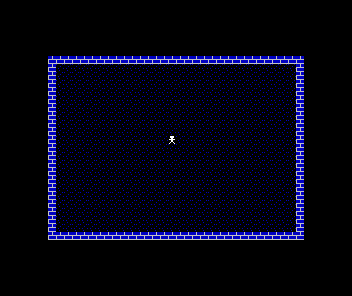
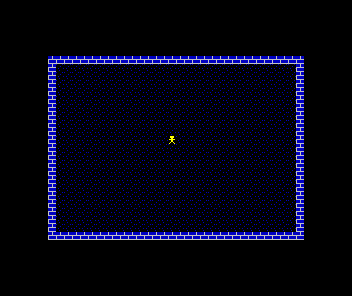
The glow is just a flag we raise to prove the read worked. What matters is underneath: every frame, the program asks the keyboard a question and acts on the answer.
Milestone 2 — all four directions
O’s neighbour P is one more BIT test on the byte we already read. Q and A each live in a different half-row, so they each need their own IN — load the row’s address, read, test bit 0. Any of the four hits the same .held branch: one glow for “a direction key is down”.
| 13 | 13 | START_COL equ 15 ; where the lamplighter begins | |
| 14 | 14 | START_ROW equ 11 | |
| 15 | 15 | | |
| 16 | - | KEYS_OP equ $DFFE ; half-row P O I U Y — bit 1 is O | |
| 16 | + | KEYS_OP equ $DFFE ; half-row P O I U Y — bits 1 and 0 | |
| 17 | + | KEYS_Q equ $FBFE ; half-row Q W E R T — bit 0 is Q | |
| 18 | + | KEYS_A equ $FDFE ; half-row A S D F G — bit 0 is A | |
| 17 | 19 | | |
| 18 | 20 | start: | |
| 19 | 21 | ; --- the border goes black — the night beyond the square --- | |
| ... | |||
| 128 | 130 | ; ---------------------------------------------------------------------------- | |
| 129 | 131 | ; player_step — scan the keyboard. Reading port $FE with a half-row | |
| 130 | 132 | ; address in B selects five keys; a key held pulls its bit LOW. While | |
| 131 | - | ; O is down, the lamplighter glows — proof the machine can feel you. | |
| 133 | + | ; any direction key is down, the lamplighter glows — proof the | |
| 134 | + | ; machine can feel you. | |
| 132 | 135 | ; ---------------------------------------------------------------------------- | |
| 133 | 136 | player_step: | |
| 134 | 137 | ld bc, KEYS_OP | |
| 135 | 138 | in a, (c) | |
| 136 | 139 | bit 1, a ; O — a zero bit is a pressed key | |
| 140 | + | jr z, .held | |
| 141 | + | bit 0, a ; P, same half-row | |
| 142 | + | jr z, .held | |
| 143 | + | ld bc, KEYS_Q | |
| 144 | + | in a, (c) | |
| 145 | + | bit 0, a ; Q | |
| 146 | + | jr z, .held | |
| 147 | + | ld bc, KEYS_A | |
| 148 | + | in a, (c) | |
| 149 | + | bit 0, a ; A | |
| 137 | 150 | jr z, .held | |
| 138 | 151 | call pos_bc | |
| 139 | 152 | call attr_addr_cr |
The complete program
; Gloaming — Unit 5: Reading the Keys
; Cumulative build; every step runs on its own. Narrative: the unit page.
; Port $FE, one half-row at a time — the lamplighter glows while a key is down.

            org     32768

COBBLE      equ     %00000001       ; PAPER black (0), INK blue (1) — dark ground
WALL        equ     %00001111       ; PAPER blue (1), INK white (7) — pale stone
WALL_BIT    equ     3               ; the attribute bit that says "this is wall"
LAMP_ATTR   equ     %01000111       ; BRIGHT, PAPER black, INK white — his own light
LAMP_GLOW   equ     %01000110       ; his warmth while a key is down (this unit only)

START_COL   equ     15              ; where the lamplighter begins
START_ROW   equ     11

KEYS_OP     equ     $DFFE           ; half-row P O I U Y — bits 1 and 0
KEYS_Q      equ     $FBFE           ; half-row Q W E R T — bit 0 is Q
KEYS_A      equ     $FDFE           ; half-row A S D F G — bit 0 is A

start:
            ; --- the border goes black — the night beyond the square ---
            ; Port $FE bits 0-2 set the BORDER colour. A = 0 = black.
            ld      a, 0
            out     ($FE), a

            ; --- place the lamplighter ---
            ; His position is data. Everything that draws him reads it.
            ld      a, START_COL
            ld      (lamp_col), a
            ld      a, START_ROW
            ld      (lamp_row), a

            ; --- wipe the canvas ---
            ; The bitmap ($4000-$57FF) is the pixel layer; whatever was on
            ; screen before us still lives there. Zero it so only our
            ; attribute colours show.
            call    clear_bitmap

            ; --- texture the ground ---
            ; Blit the cobble stipple into every cell's bitmap, rows 1-23.
            ; The attributes will colour these pixels in a moment.
            call    fill_ground

            ; --- wash in the cobbles ---
            ; Seed the first attribute cell, point DE one cell ahead, and
            ; let LDIR cascade the byte through all 768 cells.
            ld      hl, $5800
            ld      de, $5801
            ld      (hl), COBBLE
            ld      bc, 767
            ldir

            call    paint_walls

            ; --- brick the walls ---
            ; Now that the wall cells are painted, fill_walls can read the
            ; map back and lay brick wherever the wall bit is set.
            call    fill_walls
            call    draw_lamp

            ; --- start the heartbeat ---
            ; IM 1: every 50 Hz frame interrupt calls the ROM's handler.
            ; EI: let it. HALT then sleeps until the next frame arrives,
            ; so the loop below beats exactly once per frame.
            im      1
            ei

main_loop:
            halt
            call    play_step
            jr      main_loop

; play_step — one beat of the game: ask the keyboard.
play_step:
            call    player_step
            ret

; ----------------------------------------------------------------------------
; paint_walls — the square's edge, one attribute write per cell.
; ----------------------------------------------------------------------------
paint_walls:
            ld      c, WALL         ; the byte every wall cell gets

            ; the top wall: row 1 is 32 cells in a row from $5820
            ; (row 0 is kept back — it becomes the HUD later)
            ld      hl, $5820
            ld      b, 32
.wt:
            ld      (hl), c
            inc     hl
            djnz    .wt

            ; the bottom wall: row 23, 32 cells from $5AE0
            ld      hl, $5AE0
            ld      b, 32
.wb:
            ld      (hl), c
            inc     hl
            djnz    .wb

            ; the side walls: column 0 and column 31 of rows 1-23.
            ; Write the row's first cell, hop 31 cells to its last,
            ; then step a full row (32) down — 23 times.
            ld      hl, $5820
            ld      b, 23
.ws:
            ld      (hl), c
            push    hl
            ld      de, 31
            add     hl, de
            ld      (hl), c
            pop     hl
            ld      de, 32
            add     hl, de
            djnz    .ws
            ret

; ----------------------------------------------------------------------------
; clear_bitmap — zero the pixel layer, $4000-$57FF, with the same
; seed-and-cascade LDIR idiom the cobble wash uses.
; ----------------------------------------------------------------------------
clear_bitmap:
            ld      hl, $4000
            ld      de, $4001
            ld      (hl), 0
            ld      bc, 6143
            ldir
            ret

; ----------------------------------------------------------------------------
; player_step — scan the keyboard. Reading port $FE with a half-row
; address in B selects five keys; a key held pulls its bit LOW. While
; any direction key is down, the lamplighter glows — proof the
; machine can feel you.
; ----------------------------------------------------------------------------
player_step:
            ld      bc, KEYS_OP
            in      a, (c)
            bit     1, a            ; O — a zero bit is a pressed key
            jr      z, .held
            bit     0, a            ; P, same half-row
            jr      z, .held
            ld      bc, KEYS_Q
            in      a, (c)
            bit     0, a            ; Q
            jr      z, .held
            ld      bc, KEYS_A
            in      a, (c)
            bit     0, a            ; A
            jr      z, .held
            call    pos_bc
            call    attr_addr_cr
            ld      (hl), LAMP_ATTR
            ret
.held:
            call    pos_bc
            call    attr_addr_cr
            ld      (hl), LAMP_GLOW
            ret

; ----------------------------------------------------------------------------
; fill_ground — the cobble stipple. Not decoration: the stipple is what
; makes ground-state changes visible later, when the game starts
; recolouring these pixels. Rows 1-23 (row 0 is the HUD).
; ----------------------------------------------------------------------------
fill_ground:
            ld      b, 1                ; rows 1-23 (row 0 is the HUD)
.fgr:
            ld      c, 0
.fgc:
            ld      de, cobble_tex
            call    blit_tex
            inc     c
            ld      a, c
            cp      32
            jr      c, .fgc
            inc     b
            ld      a, b
            cp      24
            jr      c, .fgr
            ret

; fill_walls — brickwork. Driven by the wall attribute bit, so anything
; painted as wall — now or later in the game — gets its brick for free:
; the map itself decides where the brick goes.
fill_walls:
            ld      b, 1
.fwr:
            ld      c, 0
.fwc:
            push    bc
            call    attr_addr_cr
            bit     WALL_BIT, (hl)
            pop     bc
            jr      z, .fwn
            ld      de, brick_tex
            call    blit_tex
.fwn:
            inc     c
            ld      a, c
            cp      32
            jr      c, .fwc
            inc     b
            ld      a, b
            cp      24
            jr      c, .fwr
            ret

; blit_tex — write the 8-byte texture at DE into cell (C, B)'s bitmap.
; scr_addr_cr finds the cell's first pixel row; INC H steps down the
; other seven, 256 bytes apart.
blit_tex:
            push    bc
            call    scr_addr_cr
            ld      b, 8
.bt:
            ld      a, (de)
            ld      (hl), a
            inc     de
            inc     h
            djnz    .bt
            pop     bc
            ret

cobble_tex:
            defb    %10000010
            defb    %00000000
            defb    %00001000
            defb    %00000000
            defb    %00100001
            defb    %00000000
            defb    %00010000
            defb    %00000000

brick_tex:
            ; mortar courses with staggered verticals — dusk-lit stone
            defb    %00001000
            defb    %00001000
            defb    %00001000
            defb    %11111111
            defb    %10000000
            defb    %10000000
            defb    %10000000
            defb    %11111111

; ----------------------------------------------------------------------------
; scr_addr_cr — HL = bitmap address of cell (C, B)'s first pixel row.
; The row's top two bits pick the third of the screen (H), its bottom
; three become L's top bits, and the column fills L's low five.
; ----------------------------------------------------------------------------

scr_addr_cr:
            ld      a, b
            and     %00011000       ; the third (row bits 4-3) ...
            or      %01000000       ; ... under the screen base $40xx
            ld      h, a
            ld      a, b
            and     %00000111       ; the char row within the third ...
            rrca                    ; ... rotated into bits 7-5
            rrca
            rrca
            or      c               ; the column in bits 4-0
            ld      l, a
            ret

; attr_addr_cr — HL = attribute address of cell (C, B):
; $5800 + row*32 + col, the row shifted up five times.
attr_addr_cr:
            ld      a, b
            ld      l, a
            ld      h, 0
            add     hl, hl
            add     hl, hl
            add     hl, hl
            add     hl, hl
            add     hl, hl
            ld      de, $5800
            add     hl, de
            ld      a, c
            ld      e, a
            ld      d, 0
            add     hl, de
            ret

; ----------------------------------------------------------------------------
; The lamplighter's draw.
; ----------------------------------------------------------------------------

; pos_bc — the lamplighter's cell into (C, B), read fresh from the data.
pos_bc:
            ld      a, (lamp_row)
            ld      b, a
            ld      a, (lamp_col)
            ld      c, a
            ret

draw_lamp:
            ; his colour first: the cell's attribute becomes his own —
            ; bright white on the black, his own light about him
            call    pos_bc
            call    attr_addr_cr
            ld      (hl), LAMP_ATTR
            ; then his shape, eight bytes down the cell like any texture
            call    pos_bc
            call    scr_addr_cr
            ld      de, lamplighter
            ld      b, 8
.dl:
            ld      a, (de)
            ld      (hl), a
            inc     de
            inc     h
            djnz    .dl
            ret

; ----------------------------------------------------------------------------
; Data.
; ----------------------------------------------------------------------------

lamp_col:
            defb    START_COL
lamp_row:
            defb    START_ROW

lamplighter:
            defb    %00111100
            defb    %00111100
            defb    %00011000
            defb    %01111110
            defb    %00011000
            defb    %00011000
            defb    %00100100
            defb    %01000010

            end     start
Notice the shape of the code: the tests fall through one another, and the first held key wins the jump — with four keys and one response it makes no difference which, but the shape matters next unit, when each key will mean a different direction.
When it’s wrong, see why
The read fails in ways that point at which half of it slipped:
- He glows even when you hold nothing. The active-low test is backwards — you’re treating bit-set as pressed. A held key reads 0:
jr zis “down”,jr nzis “up”. - Nothing responds at all. Wrong port, or only
Cloaded.IN A,(C)puts the whole of BC on the bus — the row-select lives inB, so it must beld bc, $DFFE, not justld c, $FE. - The wrong keys respond. Wrong half-row, or the wrong bit of the right one. Check the table above — bit 0 is the row’s outermost key (P on its row, Q and A on theirs).
- Q and A do nothing but O and P work. They aren’t on the
$DFFErow — each needs its ownINfrom its own port. One read only ever answers for five keys. - He glows and never settles. The not-held path must repaint
LAMP_ATTR— the glow isn’t “set once”, it’s re-decided every frame, and the white is too.
Before and after
You started with a loop that read nothing and finished with one that feels the keyboard every frame — four keys across three half-rows, answered with a glow. The glow is scaffolding: the next unit takes the same reads and spends them on movement instead. But the mechanism underneath — select a half-row, IN A,(C), test an active-low bit — is exactly how the lamplighter will be steered for the rest of the game, and nothing about it changes again.
Try this: the fifth key
You already read all five keys of the $DFFE row. Make I (bit 2) glow him a different colour — cyan, say, %01000101 — with one more test branching to its own attribute write. One read, three keys answered from a single half-row.
Try this: feel the frame
Tap O as briefly as you physically can. He still glows — for one or two frames, a fiftieth of a second, but the loop caught it, because the loop always catches it: nothing that happens between two HALTs is ever missed, and nothing needs to be “noticed” — the question is simply asked again next frame. Games built on polling feel solid for exactly this reason.
Try this: read SPACE
Look up SPACE in the half-row table ($7FFE, bit 0) and make it glow him too. You’ve just read the key that will one day start the game from its title screen — same port, same test, fifteen units early.
What you’ve learnt
- The keyboard is eight half-rows of five keys, all behind port
$FE; the address’s high byte picks the row. IN A,(C)reads a port with the full 16-bit address inBCon the bus.- The bits are active low — a held key reads 0, and
BIT n,A+jr zfinds it. - Keys on the same row cost one read; keys on different rows cost one read each.
- Input isn’t an event — it’s a question the loop asks every frame, answered fresh each time.
What’s next
The machine feels you; now the touch has to do something. In Unit 6 the four keys become four directions: erase the lamplighter from his old cell, change his position, draw him in the new one. Movement — honest, cell by cell — and the first crack in the floor: watch what the erase does to the stipple.