The Player
Move the instant a key is pressed — INKEY$ with a two-line debounce gives one step per press, no ENTER, the first real-time control in the course.
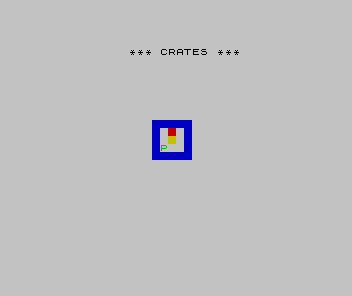
Every game so far has waited for you to type and press ENTER. A puzzle you push pieces around needs
to respond the moment you press a key — so the player moves with INKEY$, the second new idea of
Crates and the first real-time input in the course.
  90 RESTORE 900
 100 READ w, h
 120 LET sr = INT ((22 - h) / 2) + 1
 130 LET sc = INT ((32 - w) / 2)
 150 DIM g(h, w)
 160 CLS
 170 PRINT AT 0, 10; "*** CRATES ***"
 200 FOR r = 1 TO h
 210 READ r$
 220 FOR c = 1 TO w
 230 LET q$ = r$(c TO c)
 240 IF q$ = "W" THEN LET g(r,c) = 1: PRINT AT sr+r-1, sc+c-1; PAPER 1; INK 0; " "
 250 IF q$ = " " THEN PRINT AT sr+r-1, sc+c-1; PAPER 7; INK 0; " "
 260 IF q$ = "." THEN LET g(r,c) = 2: PRINT AT sr+r-1, sc+c-1; PAPER 2; INK 0; " "
 270 IF q$ = "C" THEN LET g(r,c) = 3: PRINT AT sr+r-1, sc+c-1; PAPER 6; INK 0; " "
 280 IF q$ = "P" THEN LET pr = r: LET pc = c: PRINT AT sr+r-1, sc+c-1; PAPER 7; INK 4; "P"
 290 NEXT c
 300 NEXT r
 320 IF INKEY$ <> "" THEN GO TO 320
 330 LET k$ = INKEY$: IF k$ = "" THEN GO TO 330
 350 LET dy = 0: LET dx = 0
 360 IF k$ = "i" OR k$ = "I" THEN LET dy = -1
 370 IF k$ = "k" OR k$ = "K" THEN LET dy = 1
 380 IF k$ = "j" OR k$ = "J" THEN LET dx = -1
 390 IF k$ = "l" OR k$ = "L" THEN LET dx = 1
 400 IF dy = 0 AND dx = 0 THEN GO TO 320
 410 LET nr = pr + dy: LET nc = pc + dx
 460 PRINT AT sr+pr-1, sc+pc-1; PAPER 7; INK 0; " "
 480 LET pr = nr: LET pc = nc
 490 PRINT AT sr+pr-1, sc+pc-1; PAPER 7; INK 4; "P"
 500 GO TO 320
 900 DATA 5,5
 901 DATA "WWWWW"
 902 DATA "W . W"
 903 DATA "W C W"
 904 DATA "W P W"
 905 DATA "WWWWW"
INKEY$ and the debounce
INKEY$ returns whatever key is held right now, or an empty string if none — it never waits, which
is what makes it responsive. But the Spectrum scans the keyboard about fifty times a second, so one
human press would register as dozens of moves. Lines 320–330 fix that with a two-line debounce: line
320 spins until any held key is released, line 330 spins until a fresh key appears. One press, one
move. This pairing is the standard way to read INKEY$, and you will reach for it in every real-time
game from here.
Direction as an offset
Lines 360–390 map the keys I, J, K, L to a row/column offset — dy and dx of −1, 0 or +1 — laid
out as a cursor diamond so one hand controls all four directions. Line 410 adds the offset to the
player’s position, line 460 erases the old P, and line 490 draws it at the new one. Turning a
keypress into a (dy, dx) step is the same move-by-offset idea Sonar used for coordinates, now driving
live movement.
There is no collision yet — the player walks straight through walls and crates. The grid exists, but nothing consults it. Next: make the walls solid.