Colour, and Text in Many Colours
Turn a grey screen into a Spectrum screen. INK, PAPER and BORDER set the colours; BRIGHT and FLASH add punch; and a loop that changes INK per letter paints text in every colour at once. The title card gets its palette.
This is where the Spectrum stops looking like a terminal. The machine has eight colours, numbered 0 to 7 — black, blue, red, magenta, green, cyan, yellow, white — and a handful of keywords to paint with them.
Milestone 1 — INK, PAPER, and BORDER
INK is the colour text is drawn in, PAPER the colour behind it, BORDER the frame
around the screen. Set them, CLS to fill the screen with the new PAPER, then print:
  10 BORDER 1
  20 PAPER 1
  30 INK 6
  40 CLS
  50 PRINT AT 8, 11; "MEET BASIC"
  60 PRINT AT 10, 7; "a Spectrum primer"
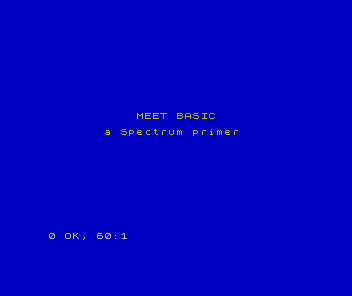
BORDER 1 and PAPER 1 make the frame and background blue; INK 6 draws the text in
yellow. The title card has a palette now.
Milestone 2 — BRIGHT and FLASH
Two more keywords add punch. BRIGHT 1 makes a colour more vivid; FLASH 1 makes a cell
swap its ink and paper several times a second, to catch the eye:
| 4 | 4 | 40 CLS | |
| 5 | 5 | 50 PRINT AT 8, 11; "MEET BASIC" | |
| 6 | 6 | 60 PRINT AT 10, 7; "a Spectrum primer" | |
| 7 | + | 70 PRINT AT 14, 7; "normal"; | |
| 8 | + | 80 PRINT AT 14, 18; BRIGHT 1; "bright" | |
| 9 | + | 90 PRINT AT 16, 11; FLASH 1; "FLASH" | |
| 7 | 10 | |
You can put these inside a PRINT, before the text they affect, so they apply to just
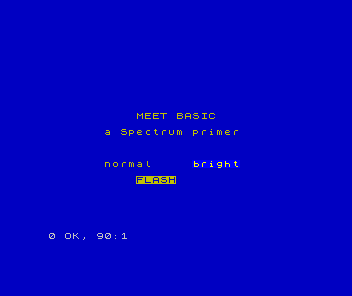
that item. BRIGHT 1 lifts “bright” above the plain “normal” beside it; FLASH 1 sets
“FLASH” swapping.
Milestone 3 — text in many colours
Because colour is set by a keyword, you can change INK between letters. A loop that
bumps the INK each time, printing one character per pass, gives multicolour text — a
rainbow:
  10 BORDER 0
  20 PAPER 0
  30 INK 7
  40 CLS
  50 LET t$ = "RAINBOW"
  60 FOR i = 1 TO 7
  70 INK i
  80 PRINT AT 10, 12 + i; t$(i)
  90 NEXT i
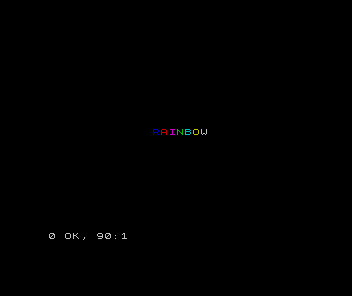
t$(i) is the i-th character of the string t$. Each pass sets INK i and prints one
letter, so the seven letters of RAINBOW come out in colours 1 to 7.
This is the Spectrum’s “multicolour” in the honest sense: colour is stored per 8-by-8 cell, so each character cell can be a different colour — but two colours can’t share one cell. That limit is the famous attribute clash; the games learn to work around it, and the smoothest tricks belong to the assembly track.
When it doesn’t work
Integer out of range. A colour outside 0–7.INK 8doesn’t exist; the eight colours are 0 to 7.- The screen didn’t change colour. You set
PAPERbut didn’tCLSafterwards.CLSfills the screen with the currentPAPER. - Everything went one colour. A statement like
INK 2on its own sets the colour for everything after it. Put the colour inside aPRINTto limit it to one item.
Before and after
You started with grey text on grey and finished painting the screen — a coloured title
card, a bright accent, a flashing word, and a rainbow built one letter at a time. The
idea underneath: INK, PAPER, BORDER, BRIGHT and FLASH colour the screen, per
8-by-8 cell — and changing INK between letters makes multicolour text.
Try this
- Your own scheme. Pick an
INKandPAPERyou like and recolour the title card. - Rainbow the title. Loop over
MEET BASIC, cyclingINK1 to 7, for a rainbow banner. (Keep the colour in range — wrap back to 1 after 7.) - A flashing prompt. Add a
FLASH 1line that says “press a key”.
What you’ve learnt
- Eight colours, 0 to 7:
INK(text),PAPER(background),BORDER(frame). BRIGHT 1makes a colour vivid;FLASH 1swaps ink and paper to catch the eye.- A colour keyword inside a
PRINTaffects just that item; on its own it sets everything after. - Changing
INKper letter gives multicolour text; colour is per 8-by-8 cell.
What’s next
The title card has a place and a palette. Now give it a voice. In Unit 11 the
Spectrum sings: BEEP plays a note, and a loop turns notes into a fanfare.