
Before disk drives were common, a home computer game came on the same kind of cassette as an album, and it went into the computer as sound. The computer listened to the tape the way a person listens to Morse code: it ignored the pitch and timed the gaps. Each edge of the signal started a stopwatch; the length of each pulse said whether it was a 0 or a 1; and eight of those made a byte. A 48K game took several minutes to arrive this way, and how many depended on whose machine you owned. The Spectrum’s ROM loader runs about three times as fast as the Commodore’s, largely because Commodore chose to write everything twice.
The idea was settled before most of these machines existed. In November 1975 BYTE gathered eighteen people in Kansas City to agree how “inexpensive consumer quality audio cassette drives” should store data for “the first generation of personal computers”. Their standard wrote a 1 as eight cycles of a 2400 Hz tone and a 0 as four cycles of 1200 Hz, at up to 300 baud. The home computers of the 1980s kept the principle of tones for bits, and ran several times faster.
Fast facts
- ZX Spectrum: a 0 bit is two pulses of 855 T-states, a 1 bit two pulses of 1,710; between about 1,000 and 2,000 bits a second, depending on the data.
- Commodore 64: each bit is two pairs of pulses, each byte has a marker and a parity bit, and every block is recorded twice; about 58 bytes a second.
- Amstrad CPC: 1,000 baud by default, 2,000 after
SPEED WRITE 1. - BBC Micro: 1,200 baud by default, 300 after
*TAPE3. - Turbo loaders: COMPUTE!’s TurboTape loaded a 12K program on a C64 in 28 seconds once the tape reached it; a 1541 disk drive took 34.
Tones into bits
A cassette records sound, so every format turns each bit into one or more cycles of a square wave, and tells 0s from 1s by how long the cycles last. Reading it back means watching the input for each change of level, an edge, and timing the gap since the last one.
Every block starts with a leader: a long run of identical pulses. It gives the loader a known rhythm to lock on to; on the Commodore and Amstrad machines it also lets the loader measure how fast this tape is running on this deck. Then comes a sync mark that cannot be mistaken for leader, so the loader knows exactly where the first bit begins. The data follows, then a check byte the loader can test.
The Spectrum: a counting loop and a striped border
The Spectrum’s routines that save and load bytes fill a little over 300 bytes of ROM, from $04C2 to $0604, documented line by line in Ian Logan and Frank O’Hara’s Complete Spectrum ROM Disassembly (1983). Its timings are counted in T-states, ticks of the Z80’s 3.5 MHz clock:
| Part of the signal | Length of each pulse | How many |
|---|---|---|
| Leader | 2,168 T-states | About 5 seconds before a header, 2 seconds before data |
| Sync | 667 T-states, then 735 | One pair |
| A 0 bit | 855 T-states | Two |
| A 1 bit | 1,710 T-states | Two |
A 0 therefore takes 1,710 T-states, just under half a millisecond, and a 1 takes twice that. The speed depends on the data: a block of all zeros goes at about 2,050 bits a second, a block of all ones at about 1,020, and an even mix at about 1,360, or 170 bytes a second. There are no gaps between bytes. Each block starts with a flag byte (0 for a header, 255 for data) and ends with a parity byte made by exclusive-ORing every byte before it. A file is two blocks: a 17-byte header, which holds the file’s type, its ten-character name and its length, then the data in one piece.
The loader does not use interrupts at all. It switches them off and sits in a tight loop reading the tape input bit of port $FE, counting how many times round the loop it goes before the level changes. That count is the pulse length. Every time it finds an edge, the routine also flips the border colour: red and cyan while the leader plays, blue and yellow once the data starts. The stripes are a live trace of the signal arriving off the tape.
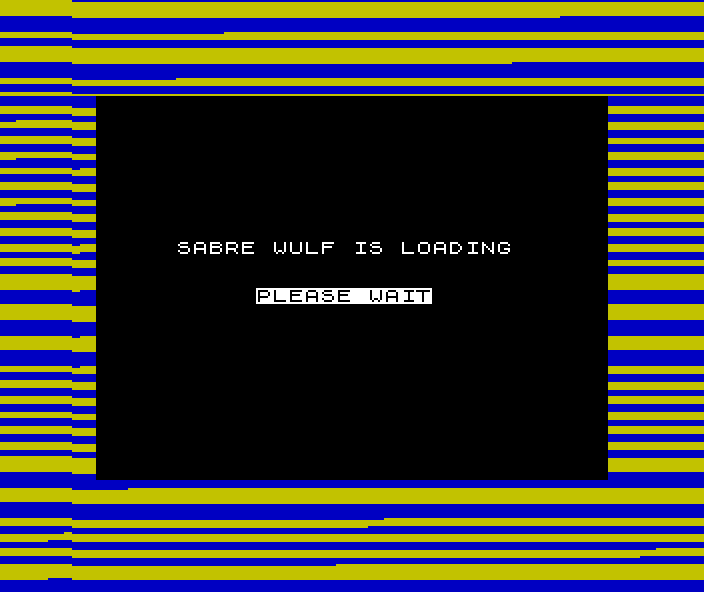
Typing LOAD "" with an empty name takes the first program on the tape. A program saved with SAVE "name" LINE 10 runs itself once loaded, so a short BASIC program could load and start a game’s machine code without the player typing anything more. LOAD "" CODE loads raw bytes, and LOAD "" SCREEN$ loads a picture straight into the display memory, where it appears as it arrives.
The Commodore 64: everything twice
Commodore took the opposite view. Harrie De Ceukelaire, writing in COMPUTE! in February 1985, called its scheme “probably the most sophisticated used by any microcomputer manufacturer”: “extremely reliable”, but the cause of “long waits for programs to load”.
The format uses pulses of three lengths, short, medium and long. Dan Heeb’s Tool Kit book for COMPUTE! (1984) describes how they fit together:
- A 0 bit is a short pair of pulses followed by a medium pair; a 1 bit is the same two pairs the other way round.
- Each byte starts with a marker, a long pair and then a medium pair, which no data bit can imitate, so the loader can find the start of every byte afresh.
- Each byte ends with a parity bit.
- Each block starts with a countdown of nine bytes and ends with a checksum.
- The header and the program are each recorded twice, one copy straight after the other.
On the American VIC-20 Heeb measured, which uses the same format as the 64, a byte took about 8.6 milliseconds, or 116 bytes a second for one copy and 58 for the pair. A ten-second leader precedes the first header. When the copies disagree, the KERNAL repairs the first from the second; De Ceukelaire explained that ?LOAD ERROR appears “only if more than 30 errors are detected on the first pass, or if there are errors in the first pass that can’t be corrected in the second.”
Unlike the Spectrum, the C64 does the timing in hardware. The tape’s read line is wired to the FLAG input of one of the CIA chips, so each falling edge raises an interrupt, and the KERNAL’s interrupt routine reads a CIA timer to see how long the pulse lasted. The screen goes blank while the tape runs. The User’s Guide tells owners that if they do not remember a program’s name, “just type LOAD and the first program on the tape will be loaded”, and that after PLAY is pressed “the screen will blank, turning the border color of the screen as the computer searches for the program.”
Side by side
| Machine | How a bit is written | Stock speed |
|---|---|---|
| ZX Spectrum | Two pulses; a 1 twice as long as a 0 | About 1,000–2,000 bits a second; about 170 bytes a second for mixed data |
| Commodore 64 | Two pairs of pulses from three lengths, plus a marker and parity bit per byte, every block twice | About 116 bytes a second per copy; about 58 overall |
| Amstrad CPC | One cycle per bit; a 1 twice as long as a 0 | 1,000 baud by default; 2,000 with SPEED WRITE 1 |
| BBC Micro | One tone for a 1 and another for a 0, sent through its serial chip | 1,200 baud by default; 300 with *TAPE3 |
The Amstrad’s firmware manual adds a caution that applies to the Spectrum too: because a 1 lasts twice as long as a 0, “the baud rates given above are only averages”, and the true speed depends on the bytes being saved. It also reads the speed from the leader, so a tape written at either setting loads without the user choosing.
As arithmetic: 16K of mixed data takes about a minute and a half on the Spectrum’s ROM loader, plus seven seconds of leader. The same 16K on a stock C64 takes nearly five minutes.
Loading screens
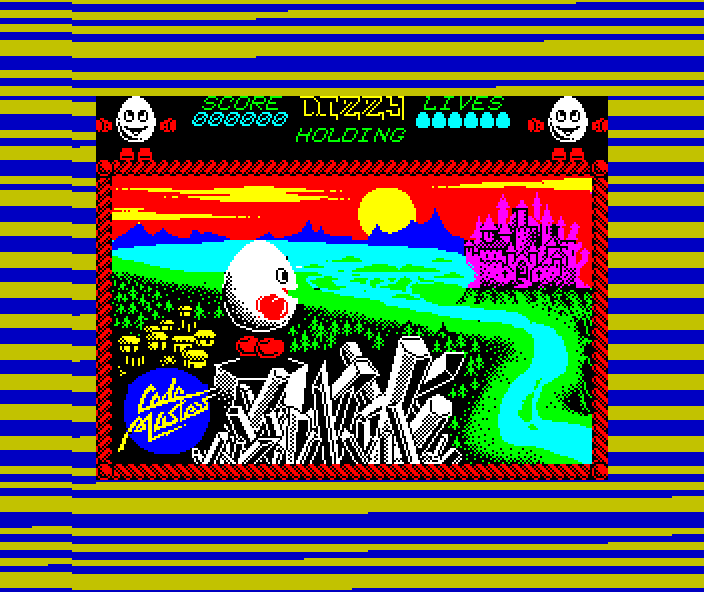
A Spectrum screen is 6,912 bytes, and the manual shows how to save one: SAVE "picture" CODE 16384,6912, or SCREEN$ for short. Publishers put one early on the tape so that the picture built up while the player waited, then stayed on screen while the game loaded behind it. At the ROM’s speeds the picture alone costs between 27 and 54 seconds, depending on how many of its bits are 1s.
Starting itself
A commercial tape had to run once loaded, without the player typing anything. On the Spectrum a short BASIC program saved with LINE could do it: it ran as soon as it loaded, fetched the machine code with LOAD "" CODE and called it.
On the C64 the trick is to load a short file over one of the KERNAL’s own vectors. De Ceukelaire’s TurboTape saved a ten-byte bootstrap in the ordinary format, set to load at $032C. That address holds the vector the KERNAL calls through when it closes all files, the last thing a LOAD does, so the bootstrap redirected it into the turbo loader. The loader itself rode in the tape header: every header is 192 bytes, of which 187 are given over to the filename, “although only the first 16 are commonly used”. The KERNAL reads the whole header into the cassette buffer at $033C before it shows the name on screen, so the turbo code is already in memory. Later loaders, documented on the Codebase64 wiki, claim the BASIC vector at $0302 instead and keep their code at $0351–$03FB in the same buffer.
Turbo loaders
A turbo loader keeps the same tape and the same deck, and changes the format. TurboTape, published as a type-in in COMPUTE! in January 1985, used “a single square wave” for each bit, a 1 “roughly three times as long as” a 0, and recorded the program only once. To find the first bit, it wrote the value 2 two hundred and fifty-six times and then counted down from 9 to 1; a loader that had slipped a bit would see the countdown fail and keep looking. To read a bit it started a CIA timer at each edge, set to run out between the two lengths, and checked bit 1 of $DD0D at the next edge: if the timer had expired, the pulse was long and the bit was a 1. In COMPUTE!’s tests a 12K program took 44 seconds from a rewound tape and 28 seconds once the header was found. A 1541 disk drive took 34.
Commercial publishers wrote their own, and the loaders became brands; Fast Loaders tells their story. On the C64, Novagen’s Novaload was “that hugely popular fast-loader”, in Zzap!64’s words. In the issues of Commodore Computing International from September 1984 to May 1985, whose review boxes had a “Fast loader:” line, Novaload is named sixteen times, Pavloda four, and Burner and Ultra Load three each. John Twiddy’s Cyberload, which loaded on Thalamus’s first game, Sanxion, was as much copy protection as loader. On the Spectrum, the loader “used by Ultimate, Ocean and many others”, a CRASH reader wrote in 1985, was Speedlock, from DJL Software’s Dave Looker and David Aubrey Jones; it reset the machine if it heard too much “noise” on the tape, as a copy would produce. Firebird’s games used its own Bleepload.
The shorter pulses left less room for a worn tape or a badly set head. A loader that worked first time on the stock format could fail on a turbo from the same deck.
While you wait
Some loaders gave the player something to do. Richard Aplin’s Invade-a-Load, a Space Invaders game played to Rob Hubbard’s One Man and His Droid music, ran during the loads of several Mastertronic budget games from 1987 and “ends abruptly once a game has loaded”. Zzap!64’s reviewer of 3-D Pinball in 1991 “enjoyed playing the Invade-a-load more than the game itself.” Thalamus’s Delta came with Mix-e-Load, which let the player remix a Hubbard tune while the game arrived.
When it would not load
Tape loading failed often enough that the magazines ran advice on it. A CRASH reader in June 1985 pointed to “high volume settings on an original tape played on a poor cassette player (or one with dirty or misaligned heads, or unusually high output levels)”, and suggested turning the volume down. The usual culprit was the playback head’s angle, its azimuth. Reviewing an alignment kit in June 1986, CRASH called “faulty alignment of tape recorder heads” “the major cause of tape loading problems — particularly if the program which is being loaded features one of the fancy hyper, mega or giga loaders favoured by software houses in the drive against piracy. Usually all that is needed is a tweak or two on the azimuth alignment screw.”
Sources
- Manfred and Virginia Peschke, “BYTE’s Audio Cassette Standards Symposium”, BYTE issue 6, February 1976, p. 72: the November 1975 meeting and the Kansas City standard.
- Ian Logan and Frank O’Hara, The Complete Spectrum ROM Disassembly (Melbourne House, 1983), pp. 14–19: the SAVE and LOAD routines, leader, sync and bit timings, flag and parity bytes, interrupts disabled, the edge-finding loop and the border colours.
- Steven Vickers, Sinclair ZX Spectrum BASIC Programming (Sinclair Research, 1982), chapter 20, pp. 141–143:
LOAD "",SAVE ... LINE,CODEandSCREEN$, the 6,912-byte screen. - Dan Heeb, COMPUTE!’s VIC-20 and Commodore 64 Tool Kit: Kernal (COMPUTE! Books, 1984), chapter 10, pp. 272–277: the Commodore tape layout, leaders, countdown bytes, checksums, the cycle lengths of each kind of bit and the time per byte.
- Harrie De Ceukelaire, “TurboTape: High-Speed Tape Utility For Commodore 64 And VIC-20”, COMPUTE! issue 56, January 1985, from p. 124: the load and save timings.
- Harrie De Ceukelaire, “How TurboTape Works”, COMPUTE! issue 57, February 1985, pp. 112–115: the stock format’s pulses, markers, parity and double recording, the 30-error limit, TurboTape’s pulses, synchronisation, timer and bootstrap.
- Commodore 64 User’s Guide (Commodore, 1982), pp. 19–20: loading from tape and the blanked screen.
- Bruce Godden, CPC464 Firmware (Locomotive Software and Amstrad, SOFT 158, 1984), section 8.5, p. 85: the cassette manager’s speeds and bit lengths.
- Andrew C. Bray, Adrian C. Dickens and Mark A. Holmes, The Advanced User Guide for the BBC Microcomputer (Cambridge Microcomputer Centre, 1983), sections 2.19 and 14.2.4:
*TAPE, the 300 and 1200 baud rates, and the two tones. - Codebase64 wiki, “Autobooting Tape Turbo Loader” (web, secondary): the
$0302vector and code in the cassette buffer. https://codebase64.org/doku.php?id=base:autoboot_tape_turbo_loader - Zzap!64 issue 3, July 1985: Novagen and Novaload.
- Commodore Computing International, September, October, November and December 1984, January, March and May 1985: the “Fast loader:” line in the review boxes.
- Retro Gamer issue 34, 2007, “The Making of The Last Ninja”, and issue 39, 2007, Thalamus feature: John Twiddy and Cyberload, Sanxion.
- CRASH issue 17, June 1985, p. 58: letter of the month on Speedlock and on loading problems.
- CRASH issue 42, July 1987, p. 8: Dave Looker and Speedlock.
- Your Sinclair issue 58, October 1990, Program Pitstop: Jon North on the Firebird Bleepload.
- Retro Gamer issue 20, 2005, and issue 117, August 2013: Invade-a-Load and Mix-e-Load.
- Zzap!64 issue 71, March 1991: 3-D Pinball review.
- CRASH issue 29, June 1986, p. 74: review of Operation Alignment and head alignment.