Variables and Types
So far every Print has shown text you typed straight into the program. Variables let the program hold a value under a name — a score, a player's name — and change it as it runs. You meet the two kinds AMOS cares about, the number and the string, and the small mark that tells them apart.
Everything you’ve printed so far has been fixed — the words live inside the quotes, and the program shows the same thing every time. A game needs to remember things that change: a score that climbs, a name the player chose, how many lives are left. For that you need variables — names that hold a value you can read back and change later. AMOS keeps two kinds, and telling them apart is the one rule to learn here.
What you’ll see by the end
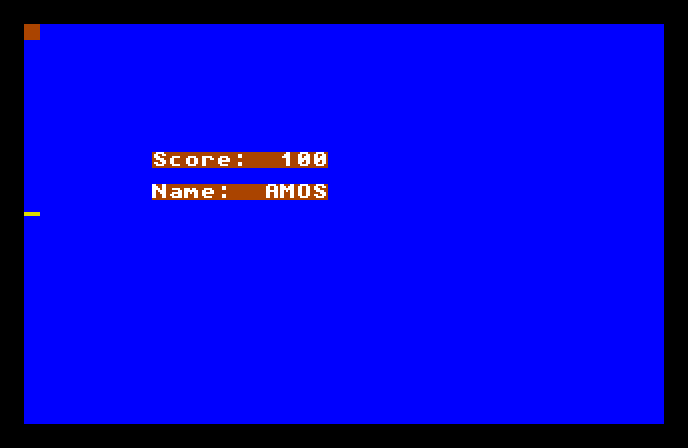
Score: 100 and Name: AMOS — but neither 100 nor AMOS was printed directly. The program stored them under names first, then printed the names back. Change the stored values and the screen changes with them.
The whole program
Hide
Cls 6
SCORE=100
NAME$="AMOS"
Locate 8,8
Print "Score: ";SCORE
Locate 8,10
Print "Name:  ";NAME$
Wait Key
Two variables get set, then printed:
SCORE=100makes a variable calledSCOREand puts the number100in it. From now on, wherever you writeSCORE, AMOS reads back100.NAME$="AMOS"makes a variable calledNAME$holding the textAMOS. The$on the end is the important part — it marks this as a string variable, one that holds text, not a number.
That’s the whole rule: a plain name like SCORE holds a number; a name ending in $ like NAME$ holds a string of text. The $ isn’t decoration — it’s part of the name, and it tells AMOS which kind of value lives there.
Printing a variable
Look at how the variables reach the screen:
Print "Score: ";SCOREThere are two things being printed, joined by a semicolon. First the fixed label "Score: " in quotes, then the variable SCORE with no quotes. The semicolon means “and right after that, print this too,” so the label and the value sit together on one line: Score: 100.
The quotes are the whole distinction. "SCORE" in quotes would print the five letters S-C-O-R-E; SCORE without quotes prints what the variable holds. Quotes mean “the literal text”; no quotes means “look up this name.”
Why two types
A number is for counting and arithmetic — you can add to a score, subtract a life, double a value. A string is for text you show or compare — a name, a message, a word the player typed. AMOS keeps them separate so it knows what each one is for, and the $ is how you tell it which you meant. Mixing them up — putting text in a number variable, or the reverse — is something AMOS will refuse, and the $ is your reminder of which is which.
Type it and run it
Type the program in and press F1. You’ll see the label-and-value lines appear. Press a key to return to the editor.
Try this: change the values
Change SCORE=100 to SCORE=9999, and NAME$="AMOS" to your own name in the quotes. Run it again — the labels stay the same, but the values follow whatever you stored. That’s the point of a variable: the program prints what the name holds now.
Try this: do some sums
Variables holding numbers can do arithmetic. Add a line after SCORE=100:
SCORE=SCORE+50Run it, and the score reads 150. AMOS works out the right-hand side — the current SCORE plus 50 — and stores the answer back in SCORE. That “take a value, change it, put it back” move is how a score climbs through a whole game.
If it doesn’t work
- AMOS complains when you set
NAME$. Text must be in quotes —NAME$="AMOS", notNAME$=AMOS. Without quotes AMOS thinksAMOSis another variable’s name. - It complains about a type. You may have stored text in a number variable, or a number in a
$one. The$has to match the value: text goes in names ending$, numbers in names without. - A variable prints as
0or blank. Check the spelling matches exactly where you set it and where you print it —SCOREandSCROEare two different variables to AMOS.
What you’ve learnt
Variables give values names the program can read back and change. AMOS has two kinds: a plain name holds a number, and a name ending in $ holds a string of text. You set one with =, print it by naming it without quotes, and join a label to a value with a semicolon. Numbers can be added to and worked on; that’s what makes a score able to climb.
What’s next
That’s the first phase done — you can type and run a program, place text on the screen, and store values in variables. Next phase, the program starts making decisions: If, Then, Else — doing one thing when something’s true and another when it isn’t.