If, Then, Else
A program that does the same thing every time isn't much of a game. Decisions are what make it react: check a value, and do one thing when it's true, another when it isn't. You meet If, Else and End If, and the comparisons that drive them.
So far your programs run straight through, top to bottom, doing the same thing every time. A game can’t work like that — it has to react. Did the player run out of lives? Did the score pass the high score? Did the ship hit the wall? Each of those is a question with two answers, and the program needs to do something different depending on which it is. That’s what If gives you: check something, and branch.
What you’ll see by the end
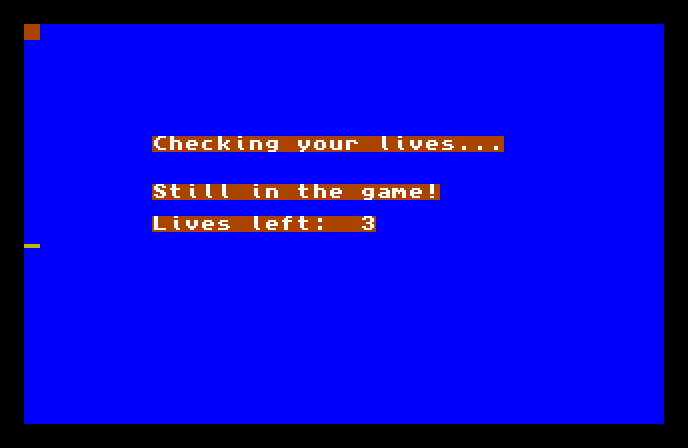
The program holds 3 lives, checks whether that’s more than zero, and — because it is — prints Still in the game! Had the count been zero, the same program would have printed Game over, man instead. One program, two possible outcomes, chosen as it runs.
The whole program
Hide
Cls 6
LIVES=3
Locate 8,7
Print "Checking your lives..."
If LIVES>0
   Locate 8,10
   Print "Still in the game!"
Else
   Locate 8,10
   Print "Game over, man."
End If
Locate 8,12
Print "Lives left: ";LIVES
Wait Key
The new part is the four-line block in the middle:
If LIVES>0
   Print "Still in the game!"
Else
   Print "Game over, man."
End If
Read it as plain English, because that’s almost what it is:
If LIVES>0asks a yes-or-no question: isLIVESgreater than zero?- The lines after it run only if the answer is yes.
Elsemarks the other path — the lines afterElserun only if the answer is no.End Ifcloses the block, so AMOS knows where the decision ends and the program carries on.
Exactly one of the two paths runs, never both. AMOS checks the question once, picks the matching branch, and skips the other entirely.
Asking the question
The > in LIVES>0 is a comparison — it’s how you ask AMOS to weigh two values against each other. There’s a small set of them, and they read the way they look:
| You write | It asks |
|---|---|
LIVES>0 |
is LIVES greater than 0? |
LIVES<0 |
is LIVES less than 0? |
LIVES=0 |
is LIVES equal to 0? |
LIVES>=3 |
is LIVES 3 or more? |
LIVES<=1 |
is LIVES 1 or less? |
LIVES<>0 |
is LIVES not equal to 0? |
Each one is a question with a yes-or-no answer, and that answer is what If branches on. (The = here means “is it equal to?”, which is a different job from the = that stores a value, like LIVES=3. AMOS tells them apart by where they sit — after If, it’s a question.)
Indenting the block
Notice the lines inside the If are pushed in a few spaces. AMOS doesn’t need that — it would run the same without it — but the indent shows at a glance which lines belong to the decision and which don’t. Get into the habit now; once programs grow, that shape is what lets you read them.
You don’t always need Else
Sometimes you only want to act when something’s true, and do nothing otherwise. You can leave Else out entirely:
If SCORE>HISCORE
   Print "New high score!"
End If
No Else, so when the score isn’t higher, the block does nothing and the program moves on. If and End If are the essential pair; Else is there for when you need the second path.
Type it and run it
Type the program in and press F1. You’ll see the Still in the game! branch, because LIVES is 3. Press a key to return to the editor.
Try this: take the other path
Change LIVES=3 to LIVES=0 and run it again. Now the question LIVES>0 is false, so the Else branch runs and you get Game over, man — and Lives left: 0 below it. Same program, the other outcome, decided entirely by the value you stored.
Try this: a different question
Change the test to If LIVES>=5 and set LIVES=3. Now the answer is no, so the Else branch runs even though there are lives left — because the question changed. The branch you see depends on both the value and what you asked about it.
If it doesn’t work
- AMOS complains about
End If, or runs the wrong lines. EveryIfneeds a matchingEnd Ifto close it. Leave it off and AMOS doesn’t know where the decision stops. - Both messages appear, or neither. Check the
Elseis on its own line, between the two branches — not attached to aPrint. - It complains about the comparison. You’re comparing a number variable here; make sure both sides are numbers. Comparing text needs its quotes, the same as printing it.
What you’ve learnt
Decisions are what let a program react. If asks a yes-or-no question, the lines after it run when the answer is yes, Else gives the path for when it’s no, and End If closes the block. The question is built from a comparison — >, <, =, >=, <=, <> — and exactly one branch runs each time. Drop Else when you only need to act on “yes.”
What’s next
You can make a decision once. Next — Loops — you’ll make the program repeat: do something a set number of times, or keep going until a condition changes. Repetition plus decisions is most of what any game is made of.